 MetaTrader 5
 Experts
 지표
지표
 스크립트
스크립트
 라이브러리
라이브러리
 보관함
보관함
거래 로봇을 무료로 다운로드 하는 법을 시청해보세요
당사를 Twitter에서 찾아주십시오!
당사 팬 페이지에 가입하십시오
당사 팬 페이지에 가입하십시오
스크립트가 마음에 드시나요? MetaTrader 5 터미널에서 시도해보십시오

Session Candle Counter: candles numbered from the cash open, DST aware - MetaTrader 5용 지표
Timon-pascal Krueger

Systematic index trader and MT5 developer from Germany.
I trade my own capital and funded accounts, including a live FTMO account, with time anchored breakout strategies on DAX, FTSE, Dow and Nasdaq.
I trade my own capital and funded accounts, including a live FTMO account, with time anchored breakout strategies on DAX, FTSE, Dow and Nasdaq.
- 조회수:
- 12
- 평가:
- 게시됨:
-
 이 코드를 기반으로 한 로봇이나 지표가 필요하신가요? 프리랜스로 주문하세요
프리랜스로 이동
이 코드를 기반으로 한 로봇이나 지표가 필요하신가요? 프리랜스로 주문하세요
프리랜스로 이동


일중 분석에는 “시황 개장 후 세 번째 캔들”이나 “7번째 바에서 반전했다”와 같은 표현이 자주 등장합니다. 5분 차트에서 이를 수작업으로 세려면 집중력이 필요하며, 거래소와 브로커 서버가 서로 다른 날짜에 일광 절약 시간제를 전환할 때면 일 년에 두 번씩 오류가 발생합니다. 이 지표는 이러한 계산을 대신해 줍니다. 이 지표는 사용자가 선택한 세션의 현물 개장 시간을 파악하고, 해당 분 또는 그 이후의 첫 번째 캔들을 찾아낸 뒤, 그날의 모든 후속 캔들 아래에 순차적인 번호를 표시합니다.
시간 변환은 거래소 현지 시간에서 UTC를 거쳐 브로커 서버 시간으로 이루어집니다. 프랑크푸르트와 런던은 3월과 10월의 마지막 일요일에, 뉴욕은 3월 둘째 주 일요일과 11월 첫째 주 일요일에 전환하며, 도쿄는 전환하지 않습니다. 브로커 오프셋은 터미널에서 읽어와 30분 단위로 반올림되며, 이는 사용 중인 모든 서버 시간대를 포괄합니다. 차트는 지표가 생성하고 제거될 때 다시 삭제하는 텍스트 객체를 제외하고는 절대 수정되지 않습니다.
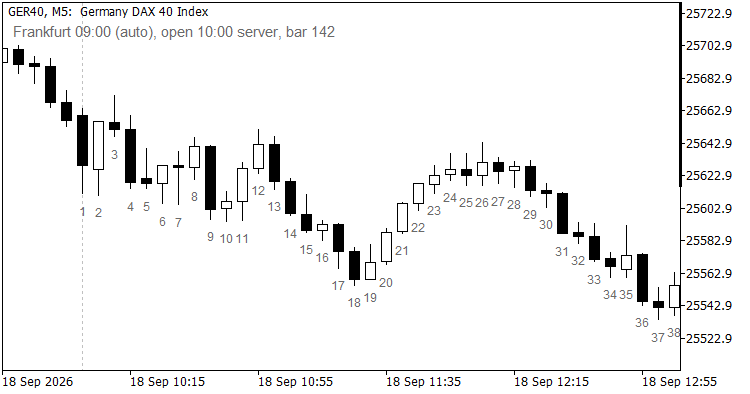
GER40 M5: 번호 매기기는 프랑크푸르트 현물 시장 개장 시점에 시작되며, 점선은 기준점을 표시합니다
차트에서 볼 수 있는 내용
- 현물 개장 이후 모든 캔들 아래에 번호가 표시되며, 세션의 첫 번째 캔들부터 1로 시작합니다. 개장 전 캔들에는 번호가 표시되지 않으므로, 야간 및 개장 전 경매는 카운트 범위 밖에서 명확히 구분됩니다.
- 가시 범위 내 각 세션 개장 시점에 수직 점선이 표시되며, 이 기능은 켜고 끌 수 있으므로 앵커를 단순히 신뢰하는 대신 가격 움직임과 대조하여 확인할 수 있습니다.
- 차트 모서리에 있는 정보 라벨에는 현재 사용 중인 세션, 서버 시간 기준 시가, 그리고 가장 최근 캔들의 번호가 표시됩니다. 세션이 종목명에서 추측된 경우 라벨에는 "auto"라고 표시되며, 추측 결과는 설정 항목으로 표시되지 않습니다.
- 라벨은 표시 범위 내에서만 생성되며 개수가 제한되므로, 긴 시계열 데이터에서도 스크롤 속도가 빠릅니다. 캔들이 밀집된 시간대에서는 모든 캔들에 라벨을 표시하는 대신 N번째 캔들마다 라벨을 표시할 수 있습니다.
세션 선택은 기본적으로 자동으로 이루어집니다. 심볼 이름에 따라 결정되며, 영국 지수는 런던, 유럽 대륙 지수는 프랑크푸르트, 미국 지수는 뉴욕, 일본 지수는 도쿄를 사용합니다. 이 그룹에 속하지 않는 심볼은 프랑크푸르트로 설정되며, 정보 라벨에 추측값으로 표시됩니다. 모든 자동 선택은 수동으로 변경할 수 있으며, 이름 인식 기능이 파악하지 못하는 항목의 경우 수동 모드에서는 15:30과 같은 단순한 서버 시간을 입력하면 됩니다.
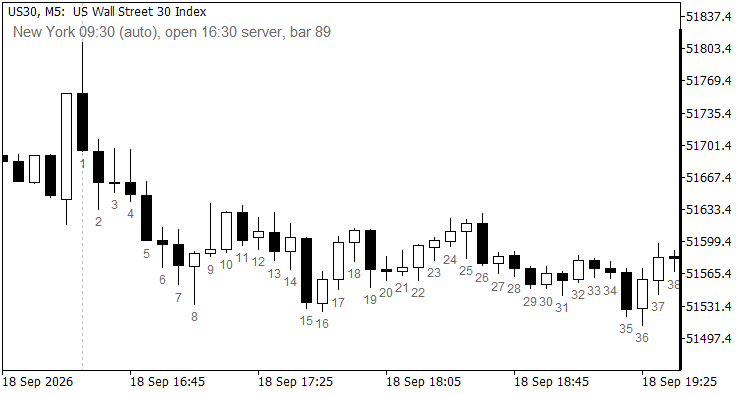
뉴욕 앵커와 정보 라벨이 적용된 US30 M5: 서버 시간 기준 시가 및 최신 캔들 번호
입력 매개변수
| 매개변수 | 기본값 | 의미 |
| InpSession | 자동 | 세션 기준: 자동, 프랑크푸르트 09:00, 런던 08:00, 뉴욕 09:30, 도쿄 09:00 또는 수동 |
| InpManualOpen | 09:00 | 서버 시간 기준 개장 시간(HH:MM 형식), 수동 세션에서 사용됨 |
| InpLabelEvery | 1 | N번째 캔들마다 라벨을 지정합니다. 1을 설정하면 모두에 라벨이 지정되며, 첫 번째 캔들에는 항상 라벨이 지정됩니다. |
| InpMaxLabels | 500 | 차트에 표시할 라벨의 상한값 |
| InpDaysBack | 10 | 최근 N일 동안만 레이블을 표시하며, 0을 입력하면 제한이 해제됩니다 |
| InpLabelColor | DimGray | 숫자와 정보 라벨의 색상 |
| InpFontSize | 7 | 숫자의 글꼴 크기. 정보 라벨은 이보다 2포인트 더 큽니다 |
| InpLabelOffsetPct | 1.5 | 가시 가격 범위의 백분율로 표시된, 숫자가 최저가 아래에 위치하는 거리 |
| InpShowOpenLine | true | 각 세션 시점에 점선을 그립니다. |
| InpOpenLineColor | 은색 | 해당 선의 색상 |
| InpShowInfo | true | 정보 레이블 표시 |
| InpInfoCorner | 왼쪽 상단 | 정보 레이블이 표시될 모서리 |
| InpInfoX | 10 | 정보 레이블의 X 방향 오프셋(픽셀 단위) |
| InpInfoY | 20 | 정보 레이블의 Y 방향 오프셋(픽셀 단위) |
종목 및 시간대
이 지표는 현물 포지션이 있는 지수 CFD 및 주식 심볼(GER40, UK100, US30, NAS100, US500, JP225)을 위해 제작되었습니다. M1부터 H1까지의 시간대가 적합하며, 일중 거래에는 일반적으로 M5와 M15가 선택됩니다. M1에서는 InpLabelEvery를 5 또는 10으로 설정하십시오. 그렇지 않으면 숫자가 서로 겹쳐 보일 수 있습니다. 외환(Forex) 시장에는 현금 개시(cash open)가 없으므로, 본인에게 의미 있는 시간을 설정하여 수동 모드를 사용하십시오.
제한 사항
- 카운트는 달력일을 기준으로 합니다. 개장 시간이 서버 자정(도쿄를 기준으로 한 극동 서버 오프셋에서 발생) 이전에 시작되는 세션의 경우, 날짜를 넘기지 않고 같은 달력일의 개장 시간부터 번호가 매겨집니다.
- 이 지표는 거래소 휴일 정보를 인식하지 못합니다. 거래소가 휴장했지만 CFD 거래가 이루어지는 날에도 카운트는 평소와 같은 분부터 시작됩니다.
- 전략 테스터에서 터미널은 시뮬레이션된 서버 시간을 GMT로 표시하므로, 브로커 오프셋은 0으로 나타나고 기준점은 UTC로 처리됩니다. 번호 매기기는 일관되게 유지되며, 그 기반이 되는 시각만 이동합니다.
- 세션 감지 기능은 종목명을 읽습니다. 비표준 명명 규칙을 사용하는 브로커는 프랑크푸르트 대체 세션으로 분류되며, 정보 라벨에는 "auto"로 표시됩니다.
- 이 지표는 표시 전용입니다. 버퍼가 없으며, 파일을 작성하지 않고 주문도 전송하지 않습니다.
빠른 시작
- M5 차트의 지수 차트에 이 지표를 적용하고 모든 입력값을 기본값으로 둡니다. 숫자는 현재 세션의 캔들 아래에 표시됩니다.
- 점선과 예상 시가를 비교해 보세요. 심볼이 이름 감지 기능에서 인식되지 않는 경우, InpSession에서 세션을 직접 선택하세요.
- M1에서는 InpLabelEvery를 5로 올리고, 거래 내역이 긴 경우 InpDaysBack을 낮추십시오.
이 코드는 마켓(Market)에 있는 제 프로프(prop) 회사 유틸리티(PropGuardian, PropMirror, PropSizer)의 무료 부가 도구입니다. 이 도구는 단독으로 실행되며 다른 것이 필요하지 않습니다.
MetaQuotes Ltd에서 영어로 번역함.
원본 코드: https://www.mql5.com/en/code/77559
 Spread Monitor
Spread Monitor is an MQL5 Expert Advisor that draws a colour-coded panel on the chart. The panel shows the current spread of the attached symbol in points, along with the average, minimum, and maximum over a rolling history. It also counts how many stored samples exceeded a warning level, and turns the status row red when the current spread is above that level. The utility does not place orders. Inputs control the warning level, the history size, the refresh interval, and the panel position. Panel objects are removed when the EA is detached.
RiskGuard Lite - Percent-Risk EMA/ATR EA
교육용 MT5 EA: 클로즈드 바 EMA 크로스오버 진입, ATR 기반 손절매 및 익절, OrderCalcProfit을 통한 순자산의 고정 비율에 따른 로트 크기 설정, 스프레드 필터, 매직 넘버 분리 및 서버 반환 코드 확인 기능을 제공합니다. 리스크 관리가 가능한 EA를 구축하기 위한 깔끔한 템플릿입니다. 수익 보장 없음.
 CSetupLedger: a per-setup win rate ledger for Expert Advisors
EA의 모든 진입 유형에 대해 하나의 순자산 곡선에 묶어두지 않고 각각의 기록으로 점수를 매깁니다. 초기화 시 계좌의 거래 내역을 바탕으로 자체적으로 재구성되므로, 재시작하더라도 기록이 지워지지 않습니다. 원시 승률 옆에 윌슨 점수 하한값을 표시하여, 3회 연속 승리로 인한 호조세가 우위처럼 보이지 않도록 합니다.
Line Master – Fast and Slow Trend Lines with Trend Change Signals
Line Master is a trend-following indicator for MetaTrader 5 that displays fast and slow dynamic price lines to help traders identify market direction and potential trend changes. Blue represents a bullish trend, while red represents a bearish trend. Visual markers highlight changes in the indicator's trend state. The indicator includes adjustable Fast Length and Slow Length parameters, allowing traders to customize its sensitivity. It can be used on forex, gold (XAUUSD), indices, and other MT5-supported markets. For better results, combine its signals with price action, support and resistance levels, and proper risk management. Signals are not guaranteed and should be confirmed before entering a trade.