 MetaTrader 5
 Experts
 지표
지표
 스크립트
스크립트
 라이브러리
라이브러리
 보관함
보관함
거래 로봇을 무료로 다운로드 하는 법을 시청해보세요
당사를 Facebook에서 찾아주십시오!
당사 팬 페이지에 가입하십시오
당사 팬 페이지에 가입하십시오
스크립트가 마음에 드시나요? MetaTrader 5 터미널에서 시도해보십시오

Trade Adjustment Panel - MetaTrader 5용 expert

- 조회수:
- 34
- 평가:
- 게시됨:
- 업데이트됨:
-
 이 코드를 기반으로 한 로봇이나 지표가 필요하신가요? 프리랜스로 주문하세요
프리랜스로 이동
이 코드를 기반으로 한 로봇이나 지표가 필요하신가요? 프리랜스로 주문하세요
프리랜스로 이동


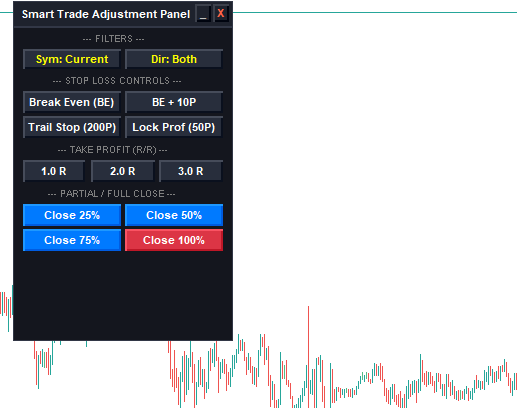
‘Trade Adjustment Panel’은 MetaTrader 5용 차트 내 포지션 관리 유틸리티로, 현재 시장 포지션을 수정하기 위해 설계되었습니다. 이 EA는 수동 거래나 다른 전문가 자문가(EA)에 의해 개설된 주문에 대한 순수한 거래 실행 후 관리 도구로만 기능합니다. 이 EA에는 진입 로직, 신호 생성 또는 주문 체결 알고리즘이 포함되어 있지 않습니다.
기능 개요:
1. 손절매 관리
- 손익분기점: 손절매를 주문 체결 가격으로 조정합니다.
- 손익분기점 오프셋: 손절매를 체결 가격에 사용자가 정의한 포인트 오프셋을 더하거나 뺀 값으로 조정합니다.
- 이익 확정: 손절매 수준을 조정하여 지정된 포인트만큼의 이익을 확보합니다.
- 트레일링 스톱: 설정된 포인트 거리를 기준으로 현재 시장 가격에 따라 손절매 수준을 동적으로 업데이트합니다.
2. 익절 계산
- 리스크:리워드 목표: 1R, 2R 또는 3R 배수를 사용하여 테이크 프로핏 거리를 자동으로 계산합니다. 계산은 진입 가격과 활성 스톱 로스 간의 초기 거리에서 직접 도출됩니다.
3. 거래량 관리 및 부분 청산
- 사전 설정된 거래량 수정: 미결제 거래량의 25%, 50%, 75% 또는 100%를 청산합니다.
- 유효성 검사 프로토콜: 주문 실행 오류를 방지하기 위해 수정 요청을 전송하기 전에 포지션 거래량을 브로커 사양(SYMBOL_VOLUME_MIN 및 SYMBOL_VOLUME_STEP)과 비교하여 확인합니다.
4. 체결 필터
- 종목 선택: 현재 차트 종목에만 조치를 적용하거나, 터미널 내 모든 활성 차트 종목에 걸쳐 조치를 적용합니다.
- 방향 선택: 주문 유형(매수 포지션만, 매도 포지션만, 또는 양방향 동시)에 따라 작업을 필터링합니다.
5. 그래픽 인터페이스 및 안전 제어 기능
- 차트 내 GUI: 네이티브 MQL5 객체 클래스를 사용하여 구축되었습니다. 창 위치 이동 기능, 패널을 제목 표시줄로 최소화하는 기능, 인터페이스 객체를 삭제하고 ExpertRemove() 호출을 실행하는 닫기 버튼이 제공됩니다.
MetaQuotes Ltd에서 영어로 번역함.
원본 코드: https://www.mql5.com/en/code/75818
GDS Renko Donchian Demo EA
A small educational Expert Advisor showing how a classic Donchian breakout can be applied directly to completed Renko bricks.
TrueCostReport
Cost is the one input to a trading system that is knowable exactly, and it is almost always estimated wrongly - always in the direction that flatters the strategy. This EA measures what one round trip really costs on YOUR broker: the live spread sampled from ticks, the swap for both sides including the triple-charge day, and the commission read from your own deals. Most spread figures come from the bar's "spread" field, because that is the easy one to reach. It is a per-bar summary, not the quote at any instant. Measured on XAUUSD: 20 points live across 60 readings against a bar-field median of 6. A factor of 3.3. So a filter set to "skip if spread > 15" never fires - it lets through exactly the moments it exists to block. Swap is the half most custom simulators do not charge at all. It is asymmetric, one side pays while the other collects, and one weekday counts three times. Read-only: it never opens, closes or modifies a position.
 Quantora Candle Strength Analyzer MT5 - Buyer Seller Pressure and Wick Analysis
MetaTrader 5용 전문 오픈소스 캔들 강도 분석기입니다. 캔들 몸통, 상단 및 하단 촛대, 매수/매도 압력, 반등, 등락폭 확대 및 캔들 강도를 실시간으로 분석합니다.
 Prop Firm Rule Checker
Checks your trade history against common prop-firm challenge rules — profit target, max daily loss, max drawdown, consistency rule, and minimum trading days — with a clear PASS/FAIL report.