Prodotti pubblicati

Telegram2MT5 Signal Copier — Automatizza la copia dei tuoi segnali Telegram direttamente in MetaTrader 5 Con Telegram2MT5 Signal Copier, ogni segnale che ricevi su Telegram viene eseguito in modo istantaneo e automatico sul tuo conto MetaTrader 5. Veloce, affidabile e completamente personalizzabile.
Scarica il file Windows Bridge APP e il tutorial Il file bridge è necessario per collegare il Pannello Web Locale all’EA MT5 Compatibile con Windows 10 & Windows 11 - 64 bit - e con Windows Server

This EA creates two buttons in a panel that you can drag to any part of the chart (simply click on the panel and drag with the mouse to the part of the chart you want) with which you can close all the open operations in the account with a simple click, or close only the trades that are currently in profit. Check out my new trade dashboard assistant : Simple and Easy MT4 Trade Panel Tell me if you like the product and how it could be improved, Thanks :)
FREE

MT5 Visual Theme Indicator – Clean Chart and Full Customization Enhance the appearance of your charts in MetaTrader 5 with this fully customizable visual indicator, designed to provide a clean, modern, and easy-to-read trading environment. This indicator does not generate signals or open trades. Its sole function is to optimize chart visualization to help you analyze the market with greater clarity. If you find this useful, please leave a 5-star rating and follow me for future tools, indicators,
FREE
This indicator uses a formula based on bollinger bands to determine if the market is in Range or not. It can be used to filter entries and not operate in a sideways market.
It has a minimum value of 0.2 from which it could be operated, although you can modify it in the options to adjust it to your trading style or the market you use.
If the histogram below is red, the market is in range, if it is green, volatility is higher.
FREE

This MT4 EA created by me to help you test Your Manual Trading strategies.
The EA Automatically place:
SL TP
Trail SL
Break-Even
M.Basket
Trail SL based on the distance of an EMA
Lot or Lot multiplier
And the multiple possible combinations.
Once configured, you only have to hit the buttons
The EA will place the Lot, the SL, TP, Basket, or Trail automatically so that you can focus on your strategy.
The EA will work in Backtest or Live Trading, Real, or Demo.

News Filter EA that send you a Push notification to your MT4 phone APP and TURN OFF MT4 Automatically Before News. This EA doesn't work in backtest From 1.7 version the EA have Close all trades before news functions added.
You only need to allow that url in MT4 options: To see the url and how to add it to MT4, visit this post:
https://www.mql5.com/en/blogs/post/754402
When Metatrader is turned off, it saves the status of all the charts, indicators and Expert Advisors that you have in them
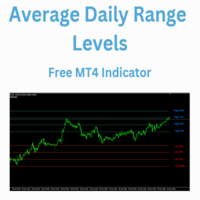
The Average Daily Range Levels indicator shows the ADR levels on the chart as if they were supports and resistances and is updated daily.
By default the indicator uses the 5-day average of the daily range. There are several strategies that suggest that these levels can be used to determine where the price can bounce and it is often said that the price can typically move 75% of the ADR.
In future versions I may add alerts at each level
Can you suggest any changes?
Greetings!
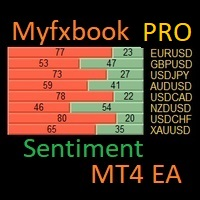
I have created this MT4 Tool EA to test if it is more profitable to trade in favor of the mass sentiment of traders or it is better to go against it. Remember to authorize Myfxbook url in WebRequest options in MT4 .
Features: Market Sentiment update every 30 minutes SL TP BreakEven Trail SL Daily Target Profit Max Daily DrawDown (Useful for prop firm) Max Spread Filter Time Filter Custom Trade Comments Protection in case a pair is not read correctly from the web (Prevents improper closing or o

Simple and Easy MT4 Trade Panel by Winidecorw I created this EA to make your life easier by making it easier and faster to open your trades. The price will increase progressively, take advantage now! Simplify Your Trading with the Simple and Easy MT4 Trade Panel Are you tired of wasting time setting up each trade in MetaTrader 4? With the simple and easy MT4 trading dashboard, taking your trading to the next level has never been so quick and easy!
This Trade Assistant dashboard is the Simple an

Trend Hunter Beast MT5 Indicator Easy to follow the overall trend by looking at a higher timeframe. Simple entry when the arrow appears. Exits are made on the opposite arrow, or you can place a stop loss below the last low or high, and a stop loss as desired.
Applies to any Forex asset, although it is recommended to use pairs with low spreads.
You can also use it on crypto assets or indices such as the SP500, etc.
Check the trend on higher timeframes such as D1 and H1, and enter in the same d

Smart Remote Trade Assistant MT5: Pannello di controllo remoto per il trading tramite Telegram per MetaTrader 5
Smart Remote Trade Assistant MT5 è un pannello avanzato per MetaTrader 5, progettato per i trader che necessitano di controllare le proprie operazioni in modo rapido, sicuro e remoto direttamente da Telegram.
Scarica il file dell'app Bridge per Windows e il tutorial Il file Bridge è necessario per connettere il pannello di trading Telegram all'EA MT5. Compatibile con Windows 10 e Wi