 Toutes les commandes
 Règles
Voir comment commander un robot de trading
Lisez les Règles avant de passer une commande ou de l'exécuter
Comment commander un robot de trading dans MQL5 et MQL4
Voir un exemple de spécification des exigences pour commander un robot
Nouvelles commandes dans la catégorie:
250 - 500 USD
30+ USD
30 - 50 USD
30 - 40 USD
30+ USD
Spécifications
EA easy to use
No indicator needed
Spread filter
FEATURES OF THE EA
Reliable EA that can work in a flat market as well as in very volatile market with any bug or shut down...
If VPS is required, so it will be done...
EA that can be launched on several charts and currency pairs at the same time with differents magics numbers;
EA that can work with other EA's without conflit;
EA that automatically detects suffixes and prefixes of the traded instruments;
EA that automatically detects 4- and 5-digit quotes;
EA that no use pending orders, only markets ones...
All EA operations should be displayed into a fully customizable Panel that can be hidden or not...
EA that will monitor all currency pairs available in the terminal.
EA with a debug mode option and which can save Log file in order to monitor EA operations for account statistics...
If both SELL and BUY SWAP are negative, EA don't trade them and display error message...
If both SELL and BUY SWAP are equal to zero EA have to trade but in this case lot for BUY and SELL should be the same... and distance, TP,SL should be the same...
EA that enters the market with 2 opposite trades (1 BUY and 1 SELL) taking into account the swap value as explained below :
Example_1 for size lot setting considering swap value for each currency pair:
SWAP BUY EURUSD = -9.38
SWAP SELL EURUSD = 4.77
LotSize = 0.01 (1)
CoefLot = 5.00 (2) (for illustration);
DeltaSwap (Always Positive Value) : ((-9.38/4.77)*-1) = 1.97(3);
So EA should open :
BUY LOT EURUSD = 0.01(1)
SELL LOT EURUSD = 0.01(1)*5.00(2)*1.97(3) = 0.0985 integer value = 0.10 and so on...in order to always have positive swap...
Then we have BUY 0.01 and SELL 0.10...
So First Market Orders should be :
1 - BUY EURUSD 0.01
2 - SELL EURUSD 0.10 as per above example...
ORDERS SETTING :
Use Money Management (TRUE/FALSE);
Risk Percent for Lotsize(1) based on free margin, not equity, nor balance...To determine only LotSize for negative swap cause the reverse trade lot size id determined by CoefLot...
Distance for Positive Swap Orders : to be specified in settings (ex:250 pips)
*Automatic Distance for Negative Swap Orders : Should be xCoeflot times less than Distance for Positive Swap Orders (ex. 250/xCeofLot;250/5=50 Pips)
Take Profit for Positive Swap Orders;to be specified in settings (ex:50 pips)
*Automatic Take Profit for Negative Swap Orders : Should be xCoeflot times greater than Take Profit for Positive Swap Orders (ex. 50*xCeofLot;50*5=250 Pips)
Stop Loss for Positive Swap Orders;To be specified in settings
Stop Loss for Negative Swap Orders : To be specified in settings
MaxNumbers of Positive Swap Orders : To be specified in settings (ex: 5 orders)
*Automatic MaxNumbers of Negative Swap Orders : Should be xCoeflot times greater than MaxNumbers of Positive Swap Orders (ex. 5*xCeofLot;5*5=25 orders)
MaxLot for Positive Swap Orders;should be specified in settings according to Money Management
*Automatic MaxLot for Negative Swap Orders;according to Money Management settings and CoefLot
(*) All those parameters should be automatically calculated by EA and displayed in the Panel for monitoring EA operations...
CLOSING ORDERS SETTINGS_1 :
TAKE PROFIT;
(Please see below illustration) :
EURUSD :
Entry Price : 1,17500
For illustration purpose spread is 0.00
BaseLotSize : 0,01
SwapBuy : -9,38
SwapSell : 4,77
DeltaSwap : 1,97
CoefLot : 5,00
MaxNumbers of Positive Swap Orders : 5
MaxNumbers of Negative Swap Orders : 25
Distance for Positive Swap Orders : 250,00
Automatic Distance for Negative Swap Orders : 50,00
Take Profit for Positive Swap Orders : 50,00
Automatic Take Profit for Negative Swap Orders : 250,00
FIRST ORDERS :
Negative Swap Order # 1 : 0,01 1,17500
Positive Swap Order # 1 : 0,10 1,17500
SUBSEQUENT ORDERS :
ENTRY PRICE TAKE PROFIT & REPLACEMENT MARKET ORDERS
Negative Swap Order # 2 : 0,01 1,17000 1,19500 Order replaced by 2 Opposite Orders with previous specified parameters and so on till MaxOrder Numbers is reached
Positive Swap Order # 2 : 0,10 1,20000 1,19500 Order replaced by 2 Opposite Orders with previous specified parameters and so on till MaxOrder Numbers is reached
Negative Swap Order # 3 : 0,01 1,16500 … …
Positive Swap Order # 3 : 0,10 1,22500 … …
Negative Swap Order # 4 : 0,01 1,16000 … …
Positive Swap Order # 4 : 0,10 1,25000 … …
Negative Swap Order # 5 : 0,01 1,15500 … …
Positive Swap Order # 5 : 0,10 1,27500 … …
Negative Swap Order # 6 : 0,01 1,15000 … …
Negative Swap Order # 7 : 0,01 1,14500 … …
Negative Swap Order # 8 : 0,01 1,14000 … …
Negative Swap Order # 9 : 0,01 1,13500 … …
Negative Swap Order # 10 : 0,01 1,13000 … …
Negative Swap Order # 11 : 0,01 1,12500 … …
Negative Swap Order # 12 : 0,01 1,12000 … …
Negative Swap Order # 13 : 0,01 1,11500 … …
Negative Swap Order # 14 : 0,01 1,11000 … …
Negative Swap Order # 15 : 0,01 1,10500 … …
Negative Swap Order # 16 : 0,01 1,10000 … …
Negative Swap Order # 17 : 0,01 1,09500 … …
Negative Swap Order # 18 : 0,01 1,09000 … …
Negative Swap Order # 19 : 0,01 1,08500 … …
Negative Swap Order # 20 : 0,01 1,08000 … …
Negative Swap Order # 21 : 0,01 1,07500 … …
Negative Swap Order # 22 : 0,01 1,07000 … …
Negative Swap Order # 23 : 0,01 1,06500 … …
Negative Swap Order # 24 : 0,01 1,06000 … …
Negative Swap Order # 25 : 0,01 1,05500 … …
Total Net Exposure : 0,16
CLOSING ORDERS SETTINGS_2 :
BREAKEVEN (ENABLE/DISABLE):
BREAKEVEN LEVEL (in account base currency) : Considering commission + spread + swap and @ reaching a certain amount in account base currency unit...
For illustration purpose :
BREAKEVEN LEVEL : 5.00 €, so TRAILING STOP should only be activated after reaching this amount + commission + spread + swap...
for the 2 opposites orders that have to be closed at the same time after being trailed...
A new cycle should begin only after those trailed orders have be closed in profit...
TRAILING START (activated only after reaching certain profit in account base currency unit as explained above)
TRAILING STEP;(in points as per minimum allowed step for each broker)
FIXED PROFIT/LOSS (%) : To close EA operations and enable another cycle of trading( in percentage regarding EA operations)
For example :
FIXED PROFIT LOSS = +500€
FLOATING PROFIT LOSS = -100€
We have +500€-100€ = +400€ with represents 80% ((+400€/+500€)*100=80%) of FIXED PROFIT/LOSS,
So if we set PARAMETER FIXED PROFIT/LOSS CLOSING to 80%,
EA should stop operations, cancel all orders and enable another cycle (only for its own orders and chart attached to)
PANEL SHOW:
Panel should display EA and only EA operations, not others EA or manual operations (even same chart or currency pair is used)...
Panel with a button to minimize or maximize displaying;
Panel shoud display in columns :
MAGIC NUMBER
CURRENCY PAIR TRADED;
COMMISSION (if applicable);
MARGIN USED by EA;
BUTTON FOR CLOSE BUY ORDERS;
BUTTON FOR CLOSE SELL ORDERS;
BUTTON FOR CLOSE ALL ORDERS;
% OF DRAWDOWN FOR EA operations;
% OF DRAWDOWN FOR ALL ACCOUNT;
FREE MARGIN for all account;
CURRENT PROFIT/LOSS for EA operations;
FIXED PROFIT/LOSS for EA operations;
SWAP VALUE (balance for BUY and SELL swap);
BUY LOT & SELL LOT;
TAKE PROFIT LEVEL;
STOP LOSS LEVEL;
BREAKEVEN LEVEL;
TOTAL MARGIN NEEDED in case all orders are triggered...
SPREAD USED AND SPREAD FILTER...
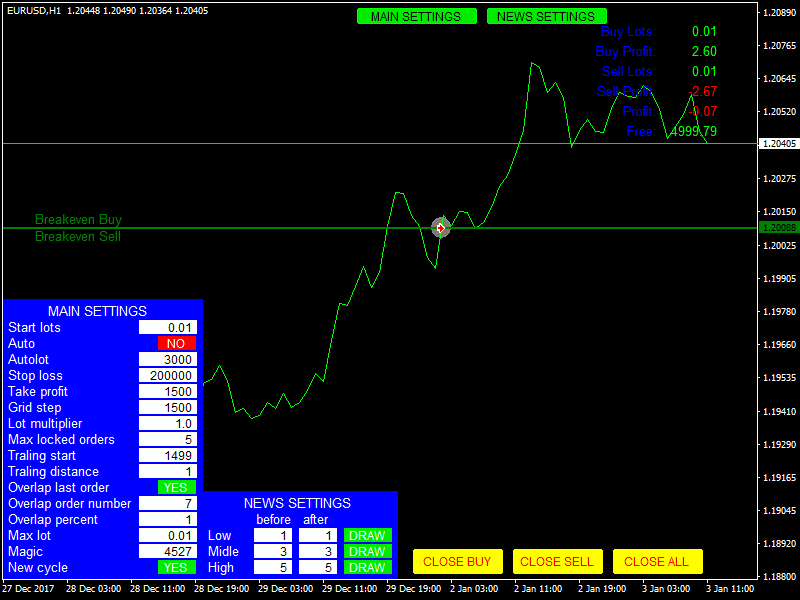
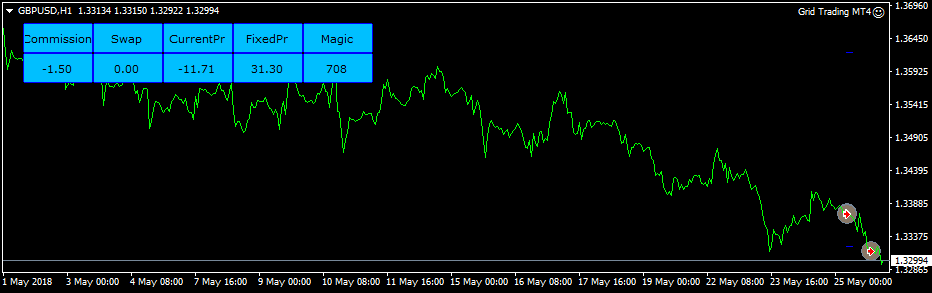
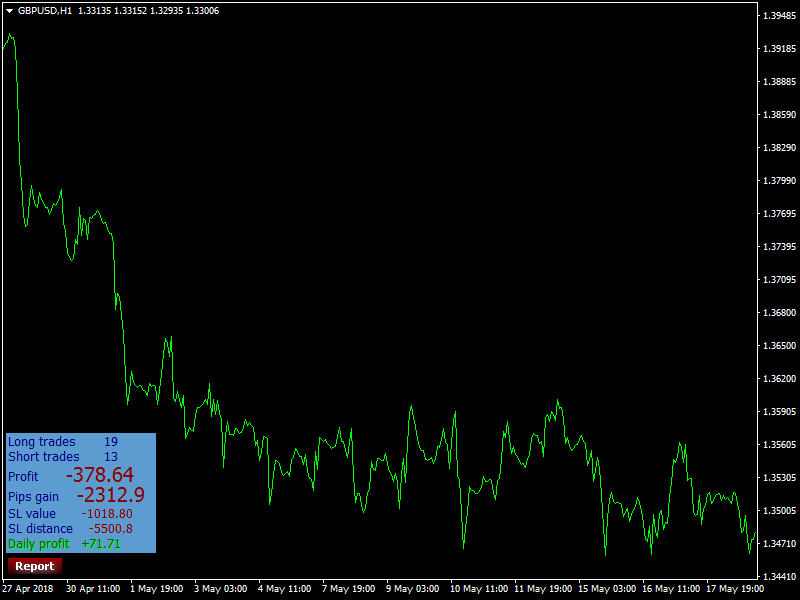
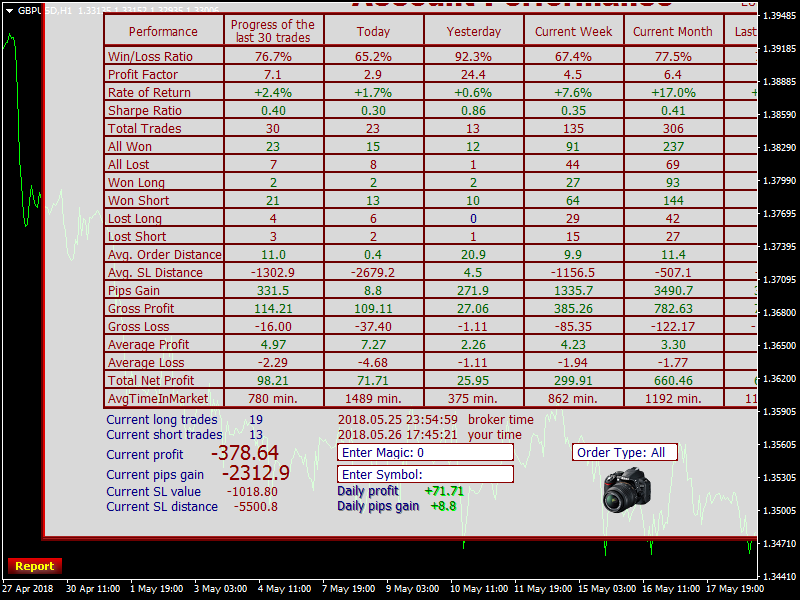
You can see attached some screenshots of panels i use with other EA's and INDICATORS to make a proper one...
No indicator needed
Spread filter
FEATURES OF THE EA
Reliable EA that can work in a flat market as well as in very volatile market with any bug or shut down...
If VPS is required, so it will be done...
EA that can be launched on several charts and currency pairs at the same time with differents magics numbers;
EA that can work with other EA's without conflit;
EA that automatically detects suffixes and prefixes of the traded instruments;
EA that automatically detects 4- and 5-digit quotes;
EA that no use pending orders, only markets ones...
All EA operations should be displayed into a fully customizable Panel that can be hidden or not...
EA that will monitor all currency pairs available in the terminal.
EA with a debug mode option and which can save Log file in order to monitor EA operations for account statistics...
If both SELL and BUY SWAP are negative, EA don't trade them and display error message...
If both SELL and BUY SWAP are equal to zero EA have to trade but in this case lot for BUY and SELL should be the same... and distance, TP,SL should be the same...
EA that enters the market with 2 opposite trades (1 BUY and 1 SELL) taking into account the swap value as explained below :
Example_1 for size lot setting considering swap value for each currency pair:
SWAP BUY EURUSD = -9.38
SWAP SELL EURUSD = 4.77
LotSize = 0.01 (1)
CoefLot = 5.00 (2) (for illustration);
DeltaSwap (Always Positive Value) : ((-9.38/4.77)*-1) = 1.97(3);
So EA should open :
BUY LOT EURUSD = 0.01(1)
SELL LOT EURUSD = 0.01(1)*5.00(2)*1.97(3) = 0.0985 integer value = 0.10 and so on...in order to always have positive swap...
Then we have BUY 0.01 and SELL 0.10...
So First Market Orders should be :
1 - BUY EURUSD 0.01
2 - SELL EURUSD 0.10 as per above example...
ORDERS SETTING :
Use Money Management (TRUE/FALSE);
Risk Percent for Lotsize(1) based on free margin, not equity, nor balance...To determine only LotSize for negative swap cause the reverse trade lot size id determined by CoefLot...
Distance for Positive Swap Orders : to be specified in settings (ex:250 pips)
*Automatic Distance for Negative Swap Orders : Should be xCoeflot times less than Distance for Positive Swap Orders (ex. 250/xCeofLot;250/5=50 Pips)
Take Profit for Positive Swap Orders;to be specified in settings (ex:50 pips)
*Automatic Take Profit for Negative Swap Orders : Should be xCoeflot times greater than Take Profit for Positive Swap Orders (ex. 50*xCeofLot;50*5=250 Pips)
Stop Loss for Positive Swap Orders;To be specified in settings
Stop Loss for Negative Swap Orders : To be specified in settings
MaxNumbers of Positive Swap Orders : To be specified in settings (ex: 5 orders)
*Automatic MaxNumbers of Negative Swap Orders : Should be xCoeflot times greater than MaxNumbers of Positive Swap Orders (ex. 5*xCeofLot;5*5=25 orders)
MaxLot for Positive Swap Orders;should be specified in settings according to Money Management
*Automatic MaxLot for Negative Swap Orders;according to Money Management settings and CoefLot
(*) All those parameters should be automatically calculated by EA and displayed in the Panel for monitoring EA operations...
CLOSING ORDERS SETTINGS_1 :
TAKE PROFIT;
(Please see below illustration) :
EURUSD :
Entry Price : 1,17500
For illustration purpose spread is 0.00
BaseLotSize : 0,01
SwapBuy : -9,38
SwapSell : 4,77
DeltaSwap : 1,97
CoefLot : 5,00
MaxNumbers of Positive Swap Orders : 5
MaxNumbers of Negative Swap Orders : 25
Distance for Positive Swap Orders : 250,00
Automatic Distance for Negative Swap Orders : 50,00
Take Profit for Positive Swap Orders : 50,00
Automatic Take Profit for Negative Swap Orders : 250,00
FIRST ORDERS :
Negative Swap Order # 1 : 0,01 1,17500
Positive Swap Order # 1 : 0,10 1,17500
SUBSEQUENT ORDERS :
ENTRY PRICE TAKE PROFIT & REPLACEMENT MARKET ORDERS
Negative Swap Order # 2 : 0,01 1,17000 1,19500 Order replaced by 2 Opposite Orders with previous specified parameters and so on till MaxOrder Numbers is reached
Positive Swap Order # 2 : 0,10 1,20000 1,19500 Order replaced by 2 Opposite Orders with previous specified parameters and so on till MaxOrder Numbers is reached
Negative Swap Order # 3 : 0,01 1,16500 … …
Positive Swap Order # 3 : 0,10 1,22500 … …
Negative Swap Order # 4 : 0,01 1,16000 … …
Positive Swap Order # 4 : 0,10 1,25000 … …
Negative Swap Order # 5 : 0,01 1,15500 … …
Positive Swap Order # 5 : 0,10 1,27500 … …
Negative Swap Order # 6 : 0,01 1,15000 … …
Negative Swap Order # 7 : 0,01 1,14500 … …
Negative Swap Order # 8 : 0,01 1,14000 … …
Negative Swap Order # 9 : 0,01 1,13500 … …
Negative Swap Order # 10 : 0,01 1,13000 … …
Negative Swap Order # 11 : 0,01 1,12500 … …
Negative Swap Order # 12 : 0,01 1,12000 … …
Negative Swap Order # 13 : 0,01 1,11500 … …
Negative Swap Order # 14 : 0,01 1,11000 … …
Negative Swap Order # 15 : 0,01 1,10500 … …
Negative Swap Order # 16 : 0,01 1,10000 … …
Negative Swap Order # 17 : 0,01 1,09500 … …
Negative Swap Order # 18 : 0,01 1,09000 … …
Negative Swap Order # 19 : 0,01 1,08500 … …
Negative Swap Order # 20 : 0,01 1,08000 … …
Negative Swap Order # 21 : 0,01 1,07500 … …
Negative Swap Order # 22 : 0,01 1,07000 … …
Negative Swap Order # 23 : 0,01 1,06500 … …
Negative Swap Order # 24 : 0,01 1,06000 … …
Negative Swap Order # 25 : 0,01 1,05500 … …
Total Net Exposure : 0,16
CLOSING ORDERS SETTINGS_2 :
BREAKEVEN (ENABLE/DISABLE):
BREAKEVEN LEVEL (in account base currency) : Considering commission + spread + swap and @ reaching a certain amount in account base currency unit...
For illustration purpose :
BREAKEVEN LEVEL : 5.00 €, so TRAILING STOP should only be activated after reaching this amount + commission + spread + swap...
for the 2 opposites orders that have to be closed at the same time after being trailed...
A new cycle should begin only after those trailed orders have be closed in profit...
TRAILING START (activated only after reaching certain profit in account base currency unit as explained above)
TRAILING STEP;(in points as per minimum allowed step for each broker)
FIXED PROFIT/LOSS (%) : To close EA operations and enable another cycle of trading( in percentage regarding EA operations)
For example :
FIXED PROFIT LOSS = +500€
FLOATING PROFIT LOSS = -100€
We have +500€-100€ = +400€ with represents 80% ((+400€/+500€)*100=80%) of FIXED PROFIT/LOSS,
So if we set PARAMETER FIXED PROFIT/LOSS CLOSING to 80%,
EA should stop operations, cancel all orders and enable another cycle (only for its own orders and chart attached to)
PANEL SHOW:
Panel should display EA and only EA operations, not others EA or manual operations (even same chart or currency pair is used)...
Panel with a button to minimize or maximize displaying;
Panel shoud display in columns :
MAGIC NUMBER
CURRENCY PAIR TRADED;
COMMISSION (if applicable);
MARGIN USED by EA;
BUTTON FOR CLOSE BUY ORDERS;
BUTTON FOR CLOSE SELL ORDERS;
BUTTON FOR CLOSE ALL ORDERS;
% OF DRAWDOWN FOR EA operations;
% OF DRAWDOWN FOR ALL ACCOUNT;
FREE MARGIN for all account;
CURRENT PROFIT/LOSS for EA operations;
FIXED PROFIT/LOSS for EA operations;
SWAP VALUE (balance for BUY and SELL swap);
BUY LOT & SELL LOT;
TAKE PROFIT LEVEL;
STOP LOSS LEVEL;
BREAKEVEN LEVEL;
TOTAL MARGIN NEEDED in case all orders are triggered...
SPREAD USED AND SPREAD FILTER...
You can see attached some screenshots of panels i use with other EA's and INDICATORS to make a proper one...
Répondu
1
Évaluation
Projets
118
17%
Arbitrage
44
23%
/
39%
En retard
20
17%
Gratuit
2
Évaluation
Projets
95
28%
Arbitrage
20
25%
/
55%
En retard
24
25%
Gratuit
3
Évaluation
Projets
144
38%
Arbitrage
67
15%
/
48%
En retard
55
38%
Gratuit
4
Évaluation
Projets
134
27%
Arbitrage
62
13%
/
53%
En retard
58
43%
Gratuit
Publié : 352 articles, 1 code
5
Évaluation
Projets
285
41%
Arbitrage
15
13%
/
47%
En retard
67
24%
Gratuit
Commandes similaires
MarketMind Breakout Pro XAUUSD H1 — Donchian Breakout EA Project type: Personal EA development and backtesting Platform: MetaTrader 5 Instrument: XAUUSD Timeframe: H1 Strategy: Donchian Channel breakout with EMA 200 Project overview This project evaluates a Donchian breakout trading strategy for XAUUSD on the H1 timeframe. The system uses channel-based breakout conditions and an EMA 200 trend filter. Historical
مستشار خبير في التحليلات الفنيه وإدارة الصفقات
80 - 400 USD
فيما يخص المتداولين من سلطان التداول وحتى المبتدى والضائع في أكبر سوق عالمي في التداول ااوكد لكم ان الاستشاره البسيطه من من يملك الاستراتيجيه المثلى في التداول والخبره الطويله في مجال التداول قد تغير مستقبلك
Ninjascript strategy tester
30+ USD
Hi, I need NinjaTrader 8 Strategy Analyzer backtests on two of my strategies, each over 1 year AND 3 years of data. Please quote the full job. Common settings: NT8 Strategy Analyzer, MCL (Micro WTI Crude Oil) continuous front-month contract (MCL ##-##), 5-minute bars, 1yr + 3yr of the most recent data, $2.50 round-turn commission per contract. Deliverables per run: full Strategy Analyzer summary (net profit, profit
To create a unique description that meets the freelance site's requirements, you can type the following: "I am looking for an experienced MQL5 developer to create a custom Forex Expert Advisor. The trading strategy should be based on a moving average crossover system, filtered by the Relative Strength Index indicator. The expert advisor needs to feature distinct strategy modules with adjustable settings for the
Scalping bort
30+ USD
GOLD SCALPING BOT STRATEGY Symbol: XAUUSD (Gold vs USD) Broker: Exness Account: Standard Starting Balance: $20 1. TIMEFRAME - Trend analysis: M15. - Entry timeframe: M5. - Trade only when the market has a clear direction. 2. INDICATORS - EMA 50 - EMA 200 - RSI 14 - Support and Resistance 3. BUY RULES The bot must open a BUY trade only when all these conditions are met: 1. EMA 50 is above EMA 200 on M15. 2. Price is
I want to create ninjtrader bot
30+ USD
Are you able to build one bot for stock and one for ninja trader and tell me the win rate on it. I need ninja trader bot that enter buy and exit according the move to do not stay long in the market in each entry . That can follow the smart money concept or other if you have a good one
I need a TradingView Pine Script (v6) indicator that gives BUY and SELL signals in real time on the live chart. MAIN REQUIREMENT – NO REPAINTING: 1. Signals must appear only when the candle closes (barstate.isconfirmed). Example: on 1-min chart, signal for the 10:35 candle must appear at 10:36 and never disappear or move. 2. Signals on historical bars must look exactly the same as they looked live. 3. No lookahead
Trading bot ea
30+ USD
yoo i want to make a trading bot i have my strategy in videos and also the rules to if anyone can work it out for me i will be glad welcome your bid and it urget let connect here on mgl5 And if you know you can not do the project without getting paid first please don't bid thanks
can you help me use a Tickblaze Algo NRBO on the NT platform? I have it somewhat set up, but I have other questions about running it & knowing how to operate it in NT. Thank you if anyone have experience in this kindly bib and let do it asap
I have an existing working MQL5 Expert Advisor and require an experienced MQL5 programmer/trading-system analyst to independently analyse its historical performance. This is NOT initially a request to rewrite the EA or simply optimize parameters. Current strategy: - MetaTrader 5 - M15 timeframe - EMA / ADX / ATR based - Approximately 1,337 historical trades - Gross Profit approximately USD 271,000 - Gross Loss
Informations sur le projet
Budget
30 - 100 USD
Délais
de 1 à 5 jour(s)