 Toutes les commandes
 Règles
Tâche terminée

Spécifications
Dear Alexander,
I have another EA which I was hoping you would be available to code for me. The calculation for the buy and sell signal is slightly different, but the money management system, the stop losses, the error reporting and so on are the same as the last EA you coded for me:
https://www.mql5.com/en/job/64535
I would be happy if you just copy those across to this new EA as well.
I have described the EA below. If there is anything that is not clear don't hesitate to ask and I will try to explain more clearly.
Best regards,
Haydn
Settings Adjusted by User
Day and Time the EA executes
(this EA should execute on this day of the week at this time every week until stopped – if for some reason this time does not exist on the chart eg if the user sets a day and time for which there was no trading then no position is opened and the EA continues to wait until the day and time occur)
Day of Week: Wednesday
Time of Day: 15:00
(At the day and time set by the user here I want the EA to check the three time periods set by the user below
On the chart they would look like this: )
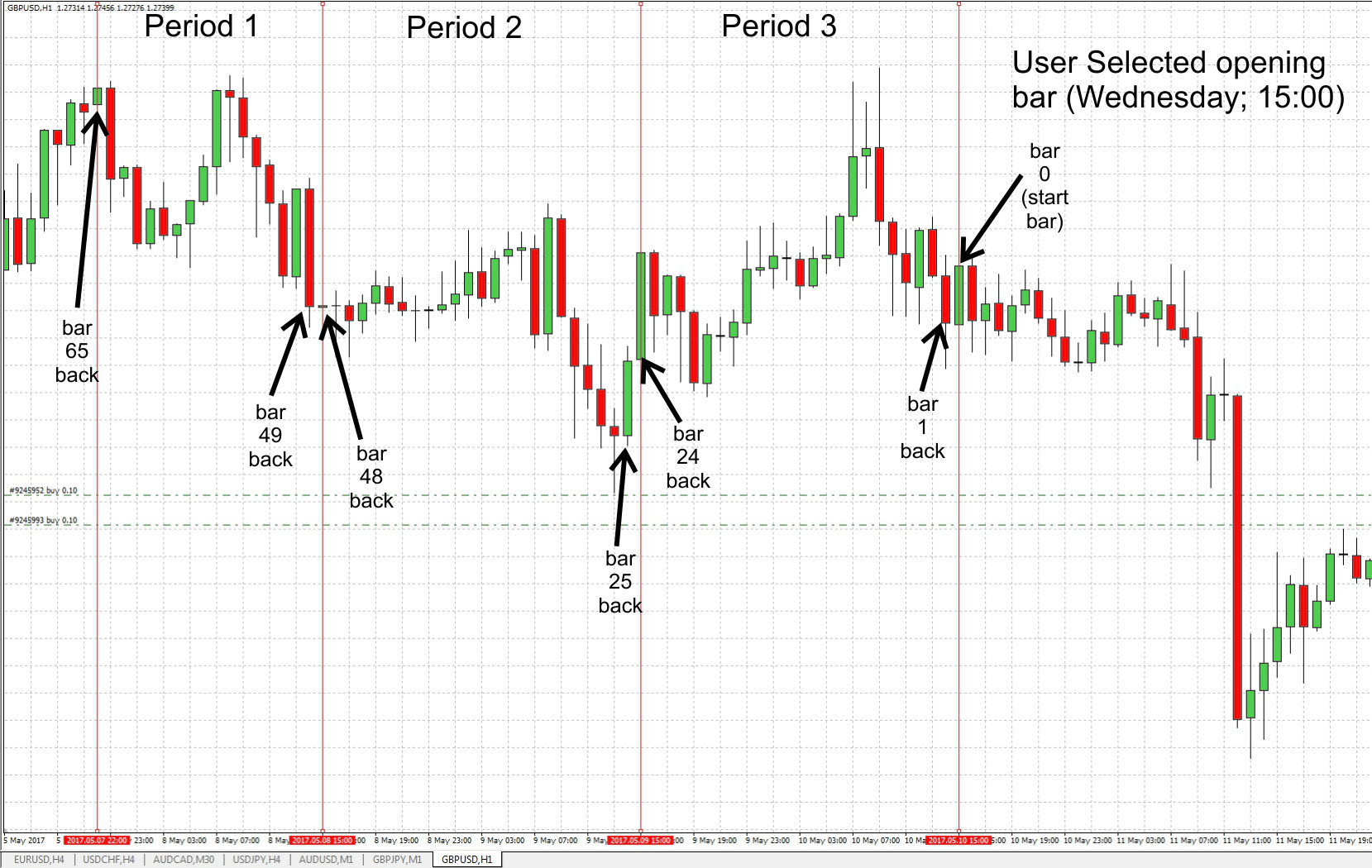
The Three Time Periods to check to create the Buy/Sell Signal
Period 1
FromStartPeriod1: 65
(user specifies the bar back from the start bar which is the start of period 1, in the example above this is 65 bars back from the start bar)
FromBarPart1: Open
(want to perform the calculation described below using the open price of this bar)
ToStartPeriod1: 49
(the user specifies the last bar of period 1)
ToBarPart1: Close
(want to perform the calculation described below using the closing price of this end bar of period 1)
Period 2
FromStartPeriod2: 48
(user specifies the bar back from the start bar which is the start of period 2)
FromBarPart2: Open
(want to perform the calculation described below using the open price of this bar)
ToStartPeriod2: 25
(the user specifies the last bar of period 2)
ToBarPart2: Close
(want to perform the calculation described below using the closing price of this end bar of period 2)
Period 3
FromStartPeriod3: 24
(user specifies the bar back from the start bar which is the start of period 3)
FromBarPart3: Open
(want to perform the calculation described below using the open price of this bar)
ToStartPeriod3: 1
(the user specifies the last bar of period 3)
ToBarPart3: Close
(want to perform the calculation described below using the closing price of this end bar of period 3)
Other user defined settings
Lot Size = 0.3
Money Management = False
(see below for description of how I would like this EA to calculate lot size when money management is turned on. If money management is turned off then EA will use the lot size specified here. This is the same as the money management you coded for me in my other EA, https://www.mql5.com/en/job/64535)
Stop Loss = 1500
Take Profit = 0
(as I understand EAs the SL and TP levels are specified in points not pips. I use a five digit broker and so I need to specify my stop loss x 10, to say 150 pips for me I will need to enter 1500. When value = 0 no SL/TP is set)
Trailing Stop Trigger Distance (in points): 250
Trailing Stop Min Trailing Step (in points): 50
Trailing Stop Trailing Distance (in points): 50
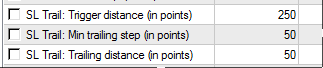
(the same system that you included in my last EA was great)
MarginPrice = 155
PercentageofEquity = 0.1
LotSizeMultiplier = 0.1
(To calculate the lot size to take when money management is turned on the user needs to specify what their broker charges for margin. That value is then used to calculate the lot size. The user also specifies what percentage of equity should be used to open positions. Lastly the user selects what order of magnitude lot size to use, ie to use micro lots the user would enter 0.01, to use mini lots the user would enter 0.1 and to use standard lots the user would enter 1 – if possible can these three options be offered as a drop down selection as it will one of those three that should be selected here. The default value can be 0.1)
Magic Number: 14444
Check for Manual Positions = False
(Under the section below “Each time the EA is triggered” the EA should check for open positions using this magic number and whether the free margin is less than Account Equity. This variable allows the user to turn off that second check)
ClosingDay = Sunday
ClosingTime = 21:45
The calculation that generates the buy/sell signal
Period 1 close – Period 1 open
If period 1 close – period 1 open < 0
Then Signal1 = -1
Else Signal1 = +1
(here we are calculating whether the price went up during period 1 or whether the price went down during period 1. If the close price is higher than the open price (ie the period is the equivalent of a green bar) then when you subtract the open price from the close price the value for period 1 should be above zero. If the value for period 1 is less than zero it means that the close price was less than the open price (the period was the equivalent of a red bar). To enable that value to be used in a calculation if the value of period 1 is less than zero (a red bar) we will assign period 1 a value of -1. If the value of period 1 is greater than zero (a green bar) we will assign period 1 a value of +1.
I hope that makes sense)
Period 2 close – Period 2 open
If period 2 close – period 2 open < 0
Then Signal2 = -1
Else Signal2 = +1
Period 3 close – Period 3 open
If period 3 close – period 3 open < 0
Then Signal3 = -1
Else Signal3 = +1
BuySellSignal = Signal1+Signal2+Signal3
If BuySellSignal > 0 then open Long position with X lot size with stop loss and take profit
(using the Stop Loss and Take Profit values set by the user, the lot size will be the value set in the money management section if Money Management is turned on, or the static user specified value if Money Management is turned off)
If BuySellSignal < 0 then open Short position with X lot size with stop loss and take profit
Money Management
(Note: This was the same money management system that I asked for in my last EA you coded for me: https://www.mql5.com/en/job/64535
Feel free to include the same thing here)
To calculate the Lot Size to open
LotSize = (Equity*PercentageofEquity/MarginPrice)* LotSizeMultiplier
(And then just use the first decimal place. E.g. if I had Equity of $10,260.24 with a margin setting of $155 and wanted to only use 10% of my equity, then I would get:
($10,260.24 * 0.1 / $155)*0.1
= 0.6619509677419355
= 0.6
(I don’t want to round up or down I just want to use the first decimal place here, ie in the number above, 0.6619509677419355, I want to use 0.6 not 0.7.
So as I understand it we can’t use NormalizeDouble(LotSize, 1) since that will normalize to the first decimal place but it will do it by rounding and I would end up with a lot size of 0.7 in this example. E.g. see discussion at: https://www.mql5.com/en/forum/113562
To only use the first digit without rounding I think we have to first of all multiply the raw LotSize number by 10 to move the first decimal place to the left hand side of the decimal point:
0.6619509677419355 x 10
= 6.619509677419355
Then convert to an integer which will remove all the decimal places:
= 6
Then convert back into a double and divide by 10
=0.6
If that is not possible then just normalize double to two decimal places, ie NormalizeDouble(LotSize, 2)
Again, I hope that makes sense)
Each time the EA is triggered
(Each time the start day and time set by the user occurs, eg each Wednesday at 15:00 in this example, the EA should check if there is already any positions open. Check for open positions in two ways:
· Check that there are no positions with this Magic number open
· Also check that Free Margin is not less than Account Equity (so that way any manually opened trades are detected)
If any of these checks are true then don’t open anymore positions and wait until next week to check again
Note: The Free Margin check can be turned off by the user setting listed above)
Error Return
(You probably have a better idea of the sorts of values that the EA needs to check and what sorts of errors need to be reported than I do. The error reporting you included in my last EA would be fine here)
Closing the Position
(The position should be closed at the day and time specified by the user)
Notifications
(The opening and closing of the positions should be indicated on the chart. I am happy with the way you implemented that on the last EA you coded for me so feel free to copy that accross
(In the Journal the actions taken by the EA should be noted along with the Magic Number, eg EA [Magic Number]: Pending orders placed; EA [Magic Number]: Buy order triggered, pending sell order cancelled; EA [Magic Number]: No pending orders triggered, pending orders cancelled; EA [Magic Number]: Buy order Closed P/L = $XX.XX.)