Toutes les commandes
 Règles
Tâche terminée

Spécifications
Settings Adjusted by User
Day and Time the EA executes
(This EA should execute at the time set on each of the days selected)
Day 0: False //Sunday
Day 1: True //Monday
Day 2: True //Tuesday
Day 3: True //Wednesday
Day 4: True //Thursday
Day 5: False //Friday
Day 6: False //Saturday
Start Time: 7am
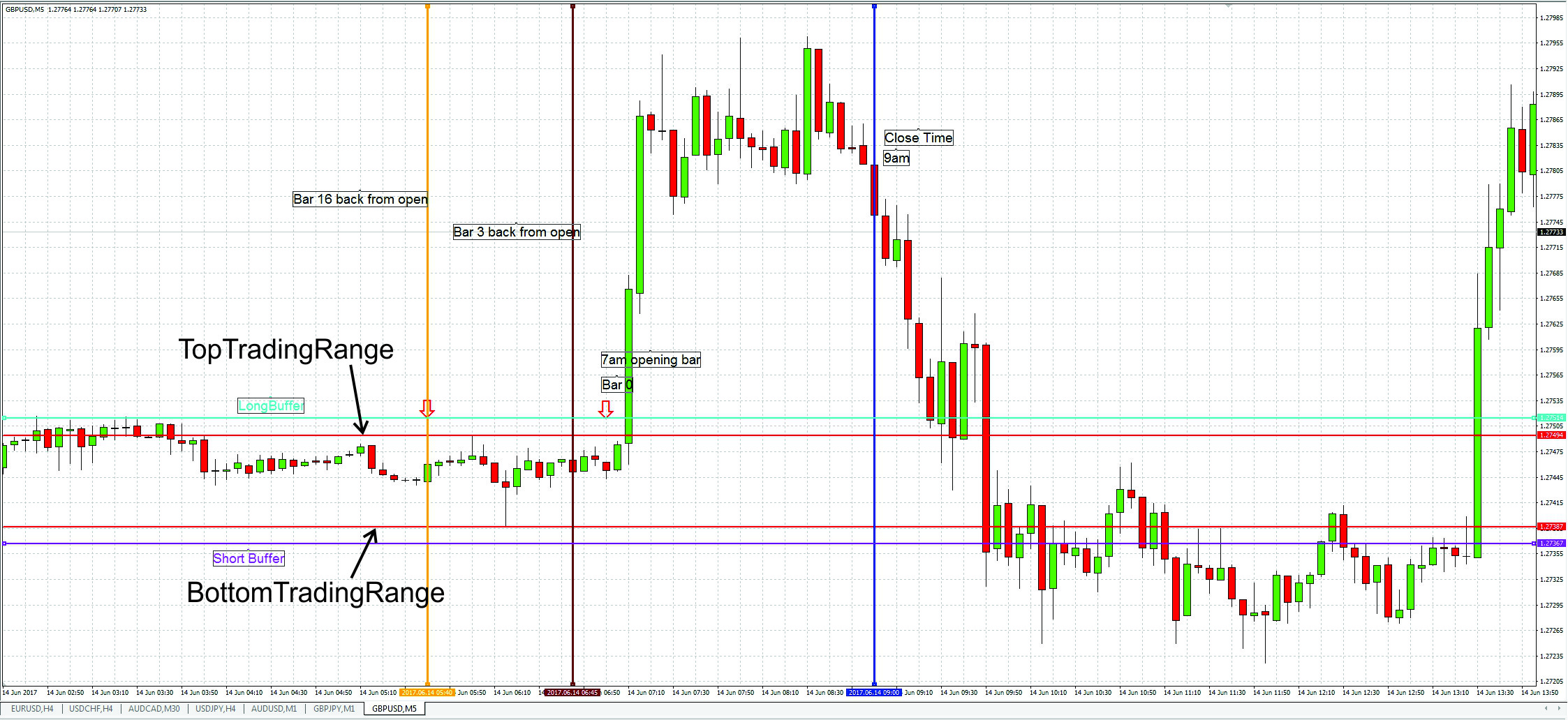
(See attached file "Bar setup.jpg" for example of what an opening time frame might look like)
(At the day and time set by the user above I want the EA to find the trading range between two points in time specified below – shown in the screen capture attached "Bar setup.jpg" as the orange and the brown vertical line. The user sets the period used to calculate the trading range by counting back the bars from the opening time bar. In the example above the user set the trading range from 16 bars back to 3 bars back.
Note: Please feel free to advise whether it is better to select the time period over which to calculate the trading range by using bars as described here, or actual times)
TradingRangeOpen: 16
TrandingRangeClose: 3
(The trading range is the maximum and the minimum value that was reached by the currency pair during the trading range time period. At the day and the time the user set above the EA will then set two pending orders with the following settings)
LongBuffer: 20
LongStop: 500
LongTP: 0
ShortBuffer: 20
ShortStop: 500
ShortTP: 0
TrailingStopActive: False
TrailingDistance: 120
(LongBuffer is the number of pips above the TopTradingRange, this should be the value that the EA opens the pending order at if the price breaks above the trading range. LongStop is the stop loss for the pending long position and LongTP is the take profit value to set with the pending order.
ShortBuffer is the number of pips below the BottomTradingRange, this should be the value that the EA opens the pending order at if the price breaks below the trading range. ShortStop is the stop loss for the pending short position and ShortTP is the take profit value to set with the pending order.
The position of the pending orders, as set by the LongBuffer and ShortBuffer settings above are shown in Purple in the attached screen capture “Bar setup.jpg”.
I would like to include the option of setting a trailing stop, but I don’t know how best to include that functionality or what settings need to be specified in order to set a trailing stop. Please advise.
I would like to be able to turn the trailing stop option on and off. If the trailing stop option is turned on then the EA will use the trailing stop settings. If the trailing stop option is turned off then the static stop losses, LongStop and ShortStop defined above will be used instead. LongStop and ShortStop will not be used if TrailingStop is set to True.
As I understand EAs the SL and TP levels are specified in points not pips. I use a five digit broker and so I need to specify my stop loss x 10, to say 50 pips for me I will need to enter 500.
When value = 0 no SL/TP is set)
Other user defined settings
Lot Size = 0.3
Money Management = False
(see below for description of how I would like this EA to calculate lot size when money management is turned on. If money management is turned off then EA will use the lot size specified here)
MarginPrice = 155
PercentageofEquity = 0.1
LotSizeMultiplier = 0.1
(To calculate the lot size to take when money management is turned on the user needs to specify what their broker charges for margin. That value is then used to calculate the lot size. The user also specifies what percentage of equity should be used to open positions. Lastly the user selects what order of magnitude lot size to use, ie to use micro lots the user would enter 0.01, to use mini lots the user would enter 0.1 and to use standard lots the user would enter 1 – if possible can these three options be offered as a drop down selection as it will one of those three that should be selected here. The default value can be 0.1)
Magic Number: 15555
Check for Manual Positions = False
(Under the section below “Each time the EA is triggered” the EA should check for open positions using this magic number and whether the free margin is less than Account Equity. The "Check for Manual Postion variable allows the user to turn off that second check)
ClosingTime = 23:55
(I need some advice on how best to close the position since I think it will be affected by how MT4 executes the instructions from EAs, but I am not sure.
I would like to be able to specify time, and the positions with this magic number are closed at that time. If I am using 1 hour charts can I specify intermediate times? For example, could I specify that I wanted to close my positions at 21:45? Or do I have to use whole bar times. So would I have to specify 21:00 and I would actually be using the closing price of the previous 20:00 bar?
Lastly can you please advise how you can specify a time beyond the current day?
The opening settings earlier let you choose which days of the week the EA is active. If the day is active then at the time set the EA will execute. If for example the EA executed on Monday, Tuesday, Wednesday and Thursday, at 9pm and you wanted to close the positions at say 4am, how would you do that since that would be 4am the next day.
Please advise.
See the section below for the checks to perform each time the EA executes to prevent more than the set number of positions being opened)
MaxTradingRange: 1000
MinTradingRange: 40
(MaxTradingRange, is the maximum size in points of the trading range. If the Trading range is larger than this value over the time period selected above, no position will be opened. MinTradingRange is the minimum size in points of the trading range. If the Trading range less than this value over the time period selected above then no position will be opened. Note: the above value is specified in points so for a five digit broker the above values will specify 100 pips and 4 pips respectively)
CancelPendingOrders: 12:00
(CancelPendingOrders is the time that any pending orders for this EA only that are still opened should be cancelled. There will only be pending orders remaining at this time if neither of the pending orders has been triggered. If one of the pending orders is triggered, the other pending order should be cancelled and so if one of the pending orders is triggered then there won’t be any pending orders to cancel)
Money Management
To calculate the Lot Size to open
(using the values for MarginPrice, PercentageofEquity and LotSizeMultiplier specified above)
LotSize = (Equity*PercentageofEquity/MarginPrice)* LotSizeMultiplier
(And then just use the first decimal place. E.g. if I had Equity of $10,260.24 with a margin setting of $155 and wanted to only use 10% of my equity, then I would get:
($10,260.24 * 0.1 / $155)*0.1
= 0.6619509677419355
= 0.6
(Note: I don’t want to round up or down I just want to use the first decimal place here, ie in the number above, 0.6619509677419355, I want to use 0.6 not 0.7.
So as I understand it we can’t use NormalizeDouble(LotSize, 1) since that will normalize to the first decimal place but it will do it by rounding and I would end up with a lot size of 0.7 in this example. E.g. see discussion at: https://www.mql5.com/en/forum/113562
To only use the first digit without rounding I think we have to first of all multiply the raw LotSize number by 10 to move the first decimal place to the left hand side of the decimal point:
0.6619509677419355 x 10
= 6.619509677419355
Then convert to an integer which will remove all the decimal places:
= 6
Then convert back into a double and divide by 10
=0.6
If that is not possible then just normalize double to two decimal places, ie NormalizeDouble(LotSize, 2). Or if you know of a better way of using the first digit without rounding then please advise
Again, I hope that makes sense)
Each time the EA is triggered
(Each time the start day and time set by the user occurs, eg 7am in this example, the EA should check if there is already any positions open. Check for open positions in two ways:
- Check that there are no positions with this Magic number open
- Also check that Free Margin is not less than Account Equity (so that way any manually opened trades, or trades by other EAs on other charts are detected)
If any of these checks are true then don’t open anymore positions and wait until next week to check again
Note: The Free Margin check can be turned off by the user setting listed above)
Cancelling the Pending Orders
(When the EA is executed at the day and time set by the user the EA then places the pending orders. If one of the pending orders are triggered, the other pending order should then be cancelled. If none of the pending orders is triggered, then both pending orders for this EA only should be cancelled at the time set above)
Error Return
(You probably have a better idea of the sorts of values that the EA needs to check and what sorts of errors need to be reported than I do but for the sake of completion some that come to mind are: )
(Check that Stop Loss and Take Profit were entered correctly.
Note: I am not sure what to put here since my broker has particular minimum values probably related to their spread which I think is different for each currency pair. I think for the GBPUSD, for example the min stop loss distance for example is 12pips, so if the user entered a value of 100points (10 pips) in this EA, no stop would be entered. I do not know how an EA running on a virtual server returns errors or how you tell if the EA is not carrying out its instructions as I intended. If the stop cannot be entered (because the broker won’t accept one that is too low) I don’t know if that prevents the entire EA from working or whether the position is still opened but just without a stop. I know when opening a position manually if the stop loss is entered incorrectly then the entire position cannot be opened so I suspect the same is true for an EA. I don’t know how to get the EA to check if an appropriate value has been entered for Stop Loss or Take Profit, so if you could suggest something here that would be great. If possible, so that the EA is not stopped by a stop loss (SL) or Take Profit (TP) entry error, if it is possible, if the value entered is below the minimum allowed by the broker, just set the SL and TP to whatever the minimum is. Again I am happy to be guided by you as to what the best way of going about this is )
Closing the Position
(All positions from this Magic Number should be closed at the time specified by the user)
Notifications
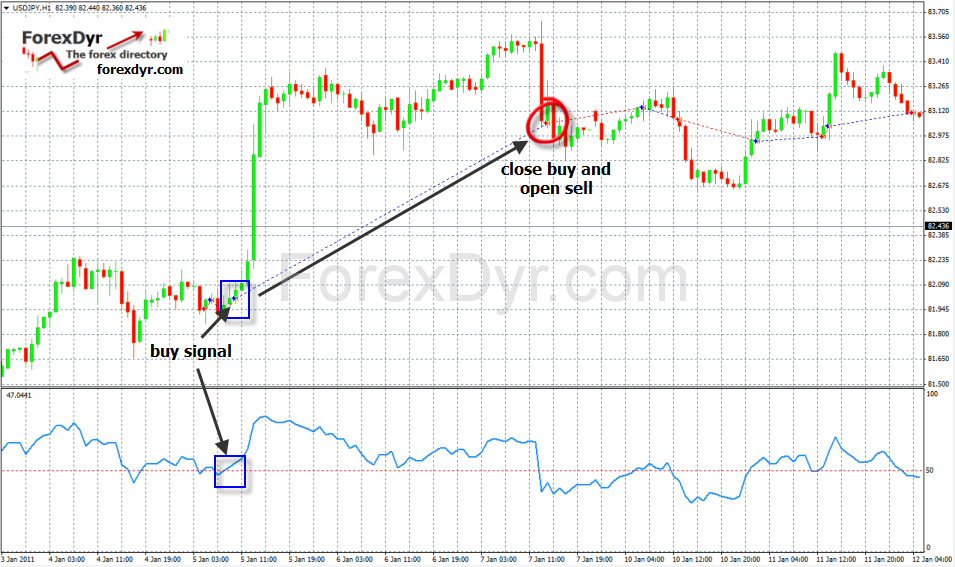
(The opening and closing of the positions should be indicated on the chart. I am happy to be advised as to the best way of doing that. I have seen screen captures of other EAs that show the open and close of executed trades with a dotted line drawn between them. If this is possible I would like to colour the dotted line blue for a buy trade and red for sell trade – see attached “Marking trades on chart.png”)
(In the Journal the actions taken by the EA should be noted along with the Magic Number, eg EA [Magic Number]: Pending orders placed; EA [Magic Number]: Buy order triggered, pending sell order cancelled; EA [Magic Number]: No pending orders triggered, pending orders cancelled; EA [Magic Number]: Buy order Closed P/L = $XX.XX.)