Toutes les commandes
 Règles
Tâche terminée

Spécifications
Range Reversal EA
29/01/26 Rev 0
Overview
This EA will bound a range of price action over a set time. At a specified time range a trade will be enabled if price action triggers a reversal at or near to the bound range, by a stated offset. Typically the EA will be permitted to only take one trade per day. The EA is not to operate on Weekends. The EA will be left running on a MT5 platform on a server.
Testing
I will not be able to test the EA on the Weekend.
I will need two working days to test the EA before final approval. Please don’t hurry me to close before then.
Specification
EA is required for MT5 platform.
Broker is 5 digit.
Speed of trade execution is important.
Time frame may be M5 or any other.
Assets may be Futures Index (Points) or FOREX (Pips)
Logic
*See Settings section at end of document for descriptions of EA ‘terms’.
The EA will be used to typically set only one trade at a user defined time window per day. In this instance it must not be triggering multiple trades per day. Typically the 5 min time frame is used.
This EA is used on Futures index where points are used. It may also be used on FOREX where pips are used.
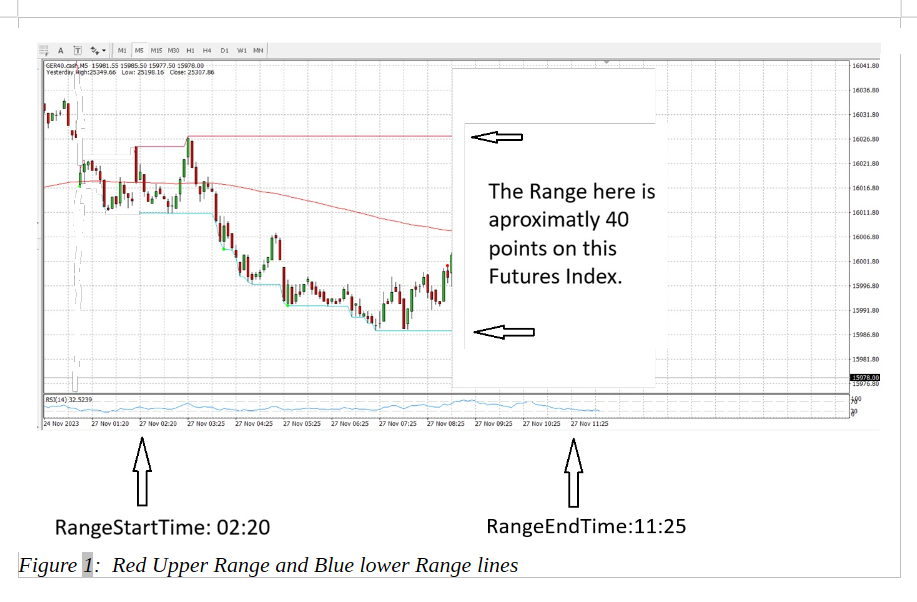
The user specified time period ‘RangeStartTime’ to ‘RangeEndTime’ is scanned to identify the candle range highest and lowest values (wicks included). Horizontal lines are drawn around this range. The colour of the lines and thickness of the lines can be changed by the user.
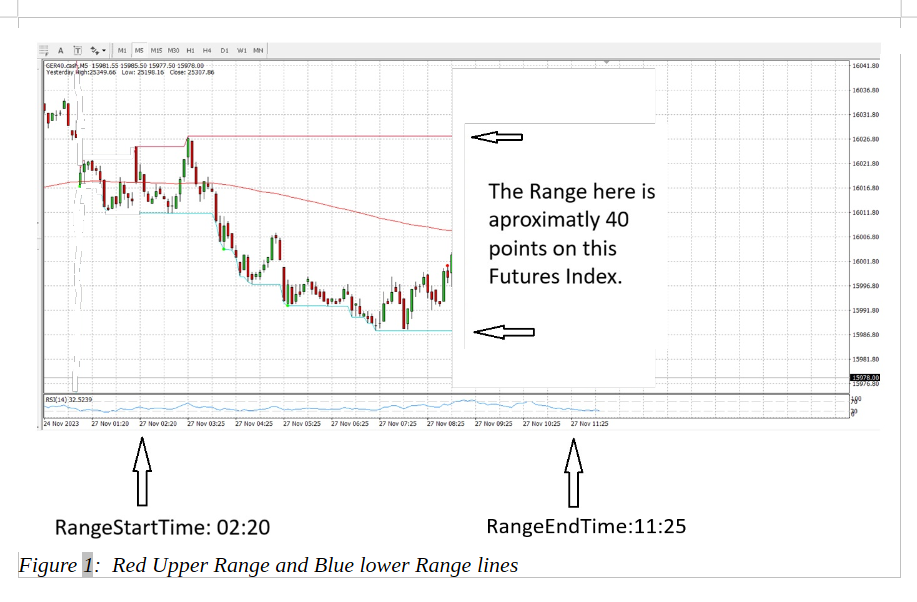
Figure 1: Red Upper Range and Blue lower Range lines
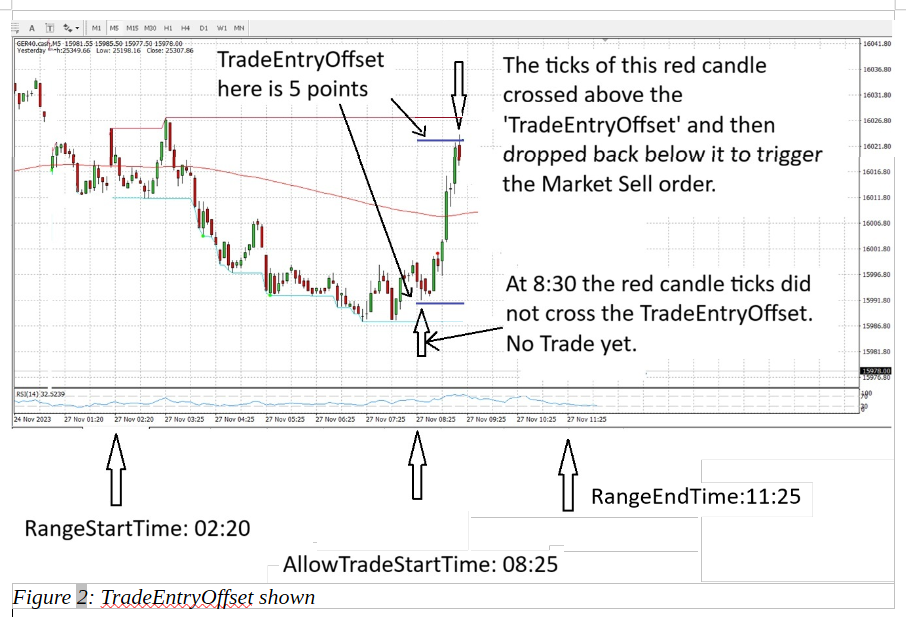
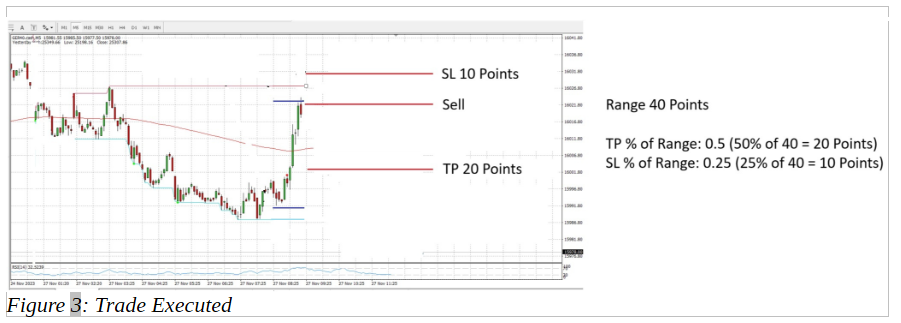
Within the Allow Trade Time (‘AllowTradeStartTime’ through to ‘AllowTradeEndTime’) a market order trade will be executed acting as a limit order should market price cross the ‘TradeEntryOffset’ located at the high and low range, and reverse back to trigger the limit order style entry. Just one trade is triggered either at the high or low range depending on price action. If a ‘TradeEntryOffset’ value greater than 0 is entered then this offset order execution line is moved within the range (not outside of the range).
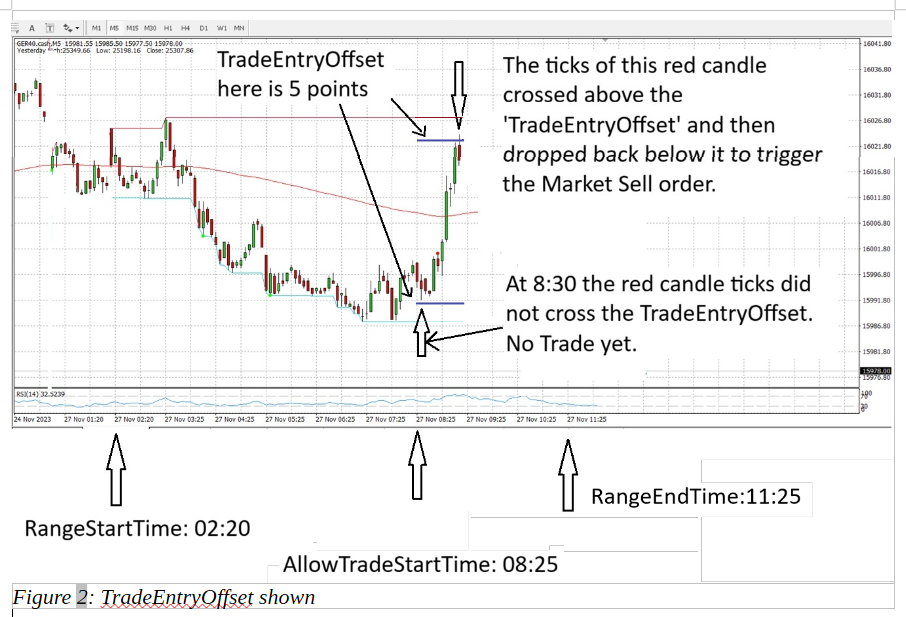
Figure 2: TradeEntryOffset shown
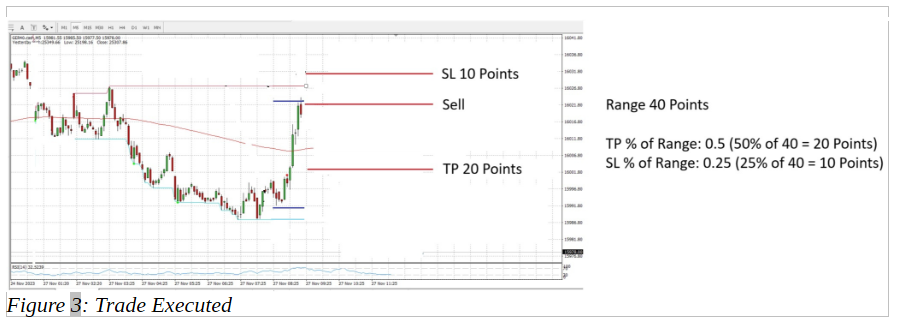
Figure 3: Trade Executed
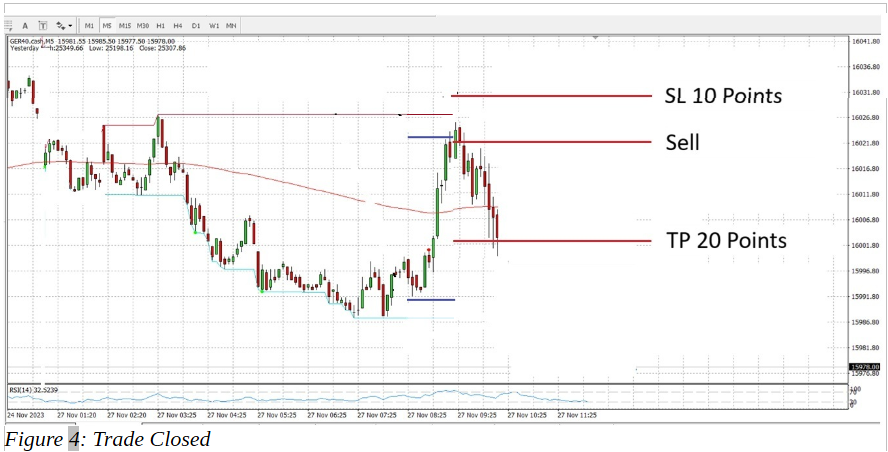
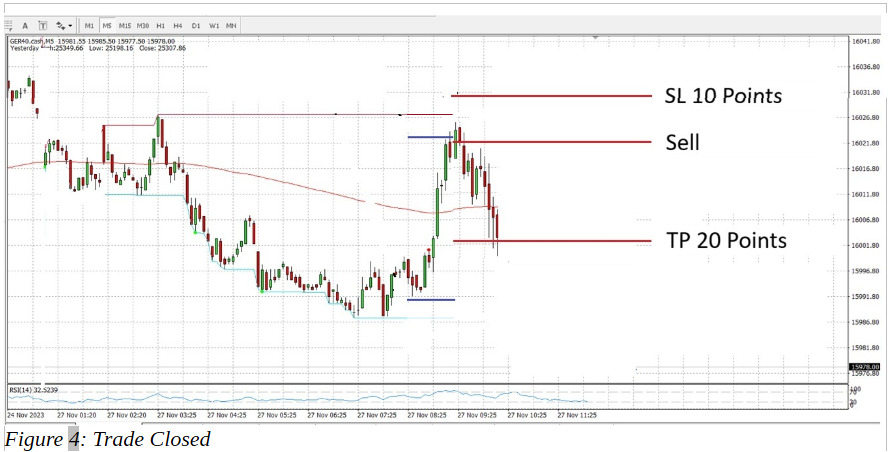
Figure 4: Trade Closed
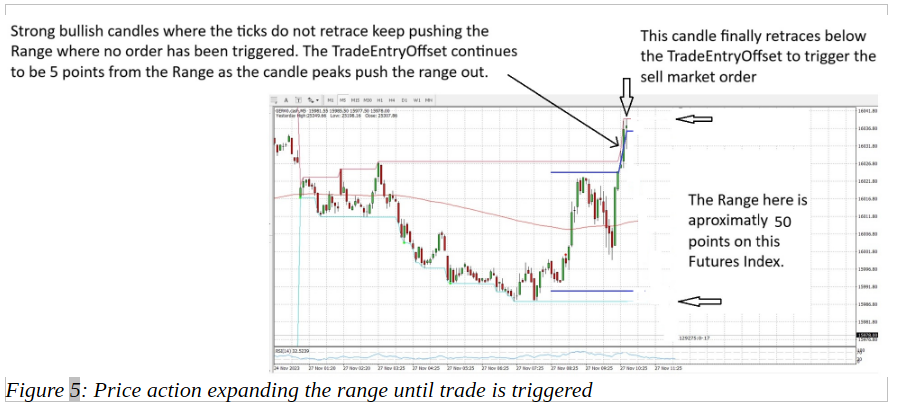
The ‘AllowTradeStartTime’ may be initiated when the ‘RangeEndTime’ has not yet concluded. This will enable the range to continue to be formed by steadily trending candles and only when one candle retraces inward of the ‘TradeEntryOffset’ will a trade then be placed. Figure 5 demonstrates this principal below. The range is monitored until moment order is placed to populate SL and TP values, and lot size if correlated to % balance or monetary value.
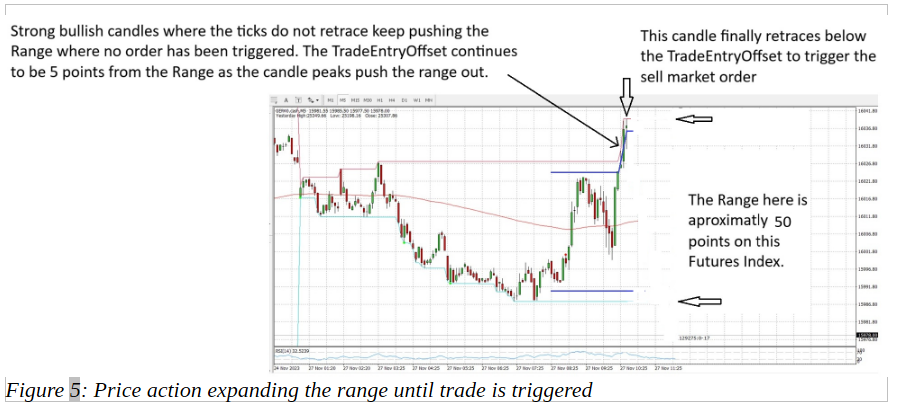
Figure 5: Price action expanding the range until trade is triggered
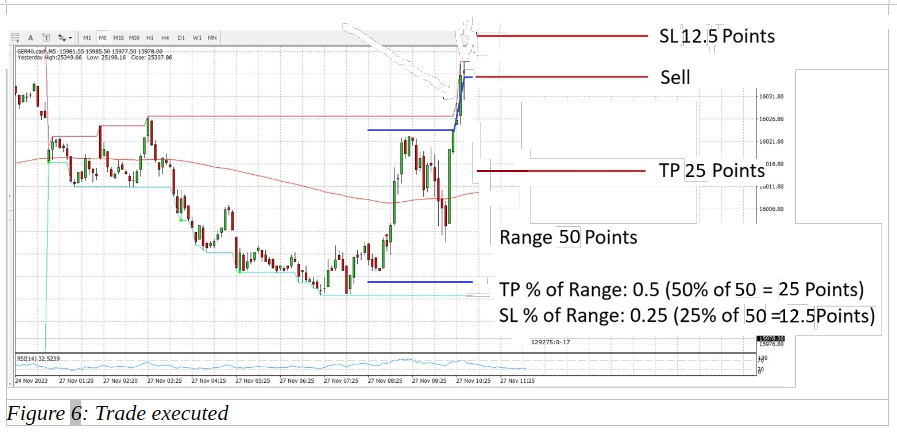
And below figure 6 the order placement.
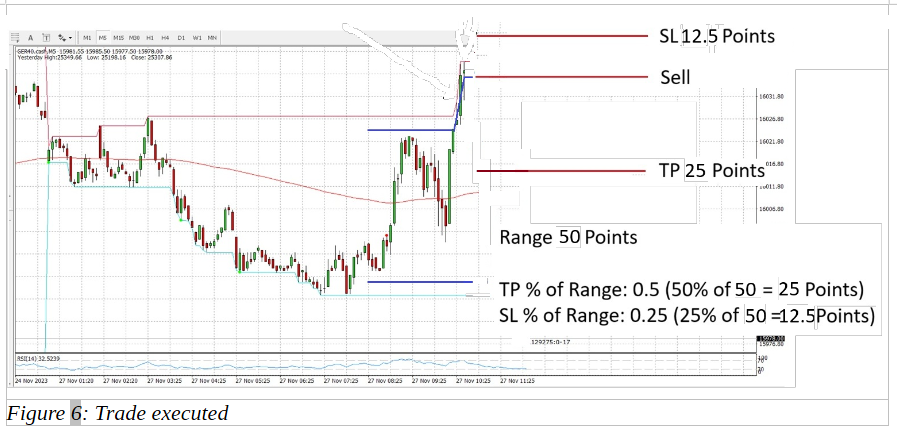
Figure 6: Trade executed
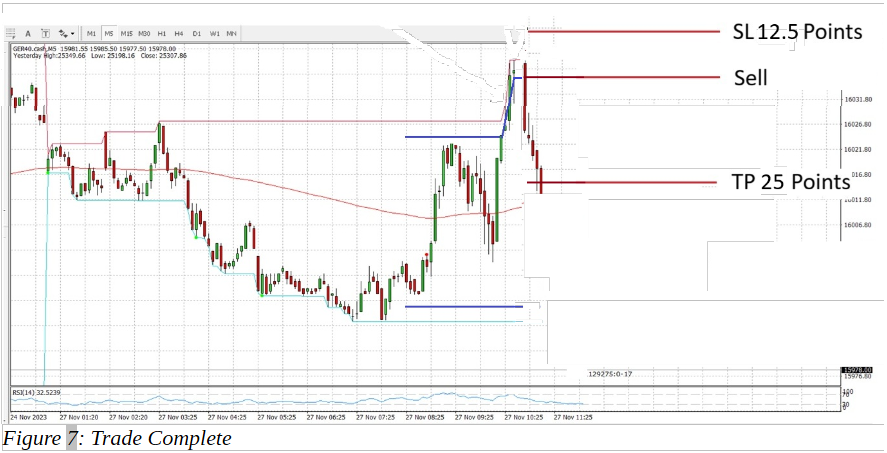
And trade completing in figure 7 below.
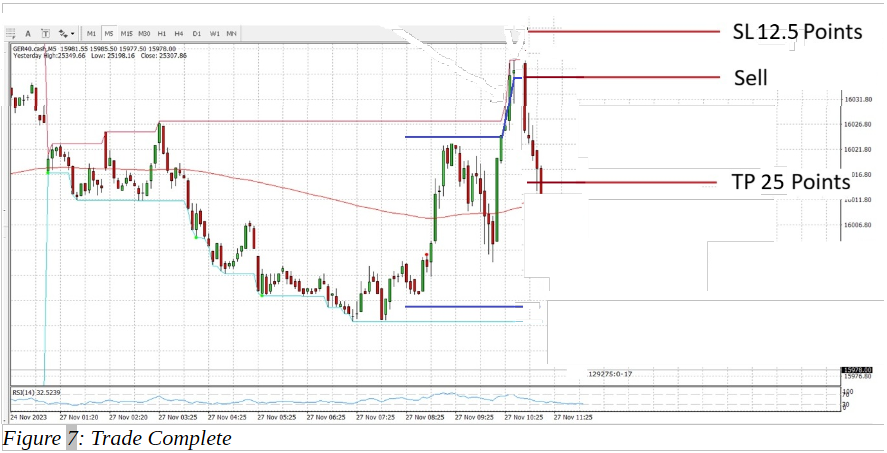
Figure 7: Trade Complete
Within the Allow Trade Time (‘AllowTradeStartTime’ through to ‘AllowTradeEndTime’) if market price activates a trade (either a buy at the lower range, or sell at the higher range), then the trade runs until SL or TP is hit or ‘CloseAllOpenTradesBy’ is met. If ‘QtyTradesAllowedPerDay’ is 1 then only 1 trade is allowed per day, resetting at Midnight. If the value is greater than 1 then still only 1 active trade is allowed at a time. Any triggers whilst an existing active trade is open will be ignored. It is the expectation that mostly this EA will be set for 1 trade per day. If no trade has been activated by ‘AllowTradeEndTime’ then simply there is no trade for that day.
Fast execution is a priority, I don’t want slippage restriction to stop order opening.
If a value greater than 0 and less than 1 is entered into ‘MoveSLToBEWhen%ToTP’ then once this % move to TP is reached in an open trade the SL will be moved to entry. Example value entered is 0 or 1 then SL will not be moved. Example value 0.5 then SL will be moved to entry when trade has reached 50% of TP. Anticipated value to be used: 0.8 = 80% of TP.
Display
The following text is to be displayed in black (Colour change available) on the top left hand side of the screen, below the MT5 chart window Symbol, Time frame i.e. USDJPY, M5:
Range Reversal EA
Range High (143.484) : Low (142.850)
Range Size (0.634)
Daily Trades Count Buy (0) : Sell (1)
Daily Trades Result Win (1) : Loss (0)
Range Start Time: 2026.01.29 01:30:00
Range End Time: 2026.01.29 10:30:00
Allow Trade Start Time: 2026.01.29 06:00:00
Allow Trade End Time: 2026.01.29 10:30:00
Close All Open Trades By: 2026.01.29 14:30:00
Server Time: 2026.01.29 11:00:00
User Settings
The below settings are to be configurable on the EA inputs settings window:
RangeStartTime_(HH:MM:SS) – 02:00:00 (beginning of daily range zone).
RangeEndTime_(HH:MM:SS) – 08:00:00 (end of daily range zone).
AllowTradeStartTime_(HH:MM:SS) – 06:00:00 (pending market order ready to be executed).
AllowTradeEndTime_(HH:MM:SS) – 08:00:00 (no new order will be placed after this time, EA will not execute new trade until next new fresh day session). TradeEntryOffset is painted on the chart starting at the ‘AllowTradeStartTime’.
CloseAllOpenTradesBy_(HH:MM) – 10:00 (Any open trade not hitting TP or SL by this time will be closed).
TradeEntryOffsetUnits_(Points or Pips) – Points (Points will be used for Futures indicies, pips for FOREX).
TradeEntryOffset – 10 (10 Points bellow upper range, and 10 Points above lower range. Trade is triggered as if it were a limit order in that it travels past the offset, then back through to trigger market execution of order. If this value is set to 0 then the TradeEntryOffset is on the Range line i.e. no offset).
QtyTradesAllowedPerDay – 1 (1 trade allowed. As soon as this trade is triggered the range horizontal lines will stop painting, as will the TradeEntryOffset lines. If 2 is selected then an additional trade will only be allowed after TP or SL is hit on the first trade, range horizontal and TradeEntryOffset lines will continue painting until last trade is taken or RangeEndTime or AllowTradeEndTime is reached).
TradingDaysActive_(Mon1/Tues2/Wed3/Thu4/Fri5/Sat6/Sun7) – 1,2,3,4,5 (EA will only operate on entered days, if a public holiday is on Wednesday for the working week I would enter 1,2,4,5 so that Wednesday is not traded) Or if you can enter the days instead of numbers even better!
TP%OfRange – 0.5 (0.5 = 50%, the TP will be set to half of the Range)
SL%OfRange – 0.25 (0.25 = 25%, the SL will be set to quarter of the Range)
MoveSLToBEWhen%ToTP – 0.8 (0.8 = 80% of TP, SL will be moved to entry when trade has reached 80% of TP).
LotRiskMoney - £100 (the lot size to trade will be equated from the SL size and be of a value of £100. If set to zero this method is not used).
LotRisk% - 1.00% (The lot size to trade will be equated from the SL size and 1% of the account balance. If set to zero this method is not used). Anticipate this will be the main method of computing lot size.
LotSize – 1 (the lot size to trade will be this entered value. If set to zero this method is not used).
UpperRangeLineColour – Select colour and line thickness of the chart upper horizontal range.
LowerRangeLineColour – Select colour and line thickness of the chart lower horizontal range.
TradeEntryOffsetLineColour – Select colour and line thickness of the chart TradeEntryOffset horizontal lines.
LookBackDays – 5 (on the charts the Range and TradeEntryOffset will be painted on 5 days of charts allowing the user to look back and review performance).
Display Only
ServerTime (this is a display of the broker server time to cross check range times and trade times).
RangeSize (this is a display of the range size between the upper range and lower range prior to trade being executed. The units will be points or pips depending on what was selected for ‘TradeEntryOffsetUnits’).