Toutes les commandes
 Règles
Spécifications
Project Overview
This tool is designed to assist manual trading for a DCA/GRID/Martingale-style strategy while offering advanced features like Basket Management, Trailing Basket Take-Profit, Automatic Limit Orders, Indicator-Based Automatic Trade Entries, and Risk Management with Account Drawdown Limits. The focus remains on efficient basket management, providing visual aids, and ensuring the tool is versatile for both manual and automated trading styles.
Core Features
1. Basket Management
-
Take-Profit Adjustment:
- Automatically recalculates and adjusts the basket’s take-profit line whenever a new trade or limit order is added.
- Ensures the basket meets the trader's predefined profit target (e.g., $500 profit on a $100,000 USD account).
- Displays the basket’s total profit target (e.g., “+$500”) on the take-profit line.
-
Basket Lines on Chart:
- Average Entry Line: Shows the average entry price, current unrealized P/L (e.g., “- $265”), and total position size (e.g., “3,000 units” or “3 lots”).
- Take-Profit Line: Shows the basket’s total profit target (e.g., “+$500”) and the relevant position size.
-
Limit Orders Management:
- When a new limit order is executed, the tool automatically adjusts the basket’s take-profit to maintain the overall basket target.
- Once the basket’s take-profit is hit, the tool:
- Closes all open positions.
- Cancels any unfilled limit orders.
2. Automatic Trade Entry (Indicator-Based)
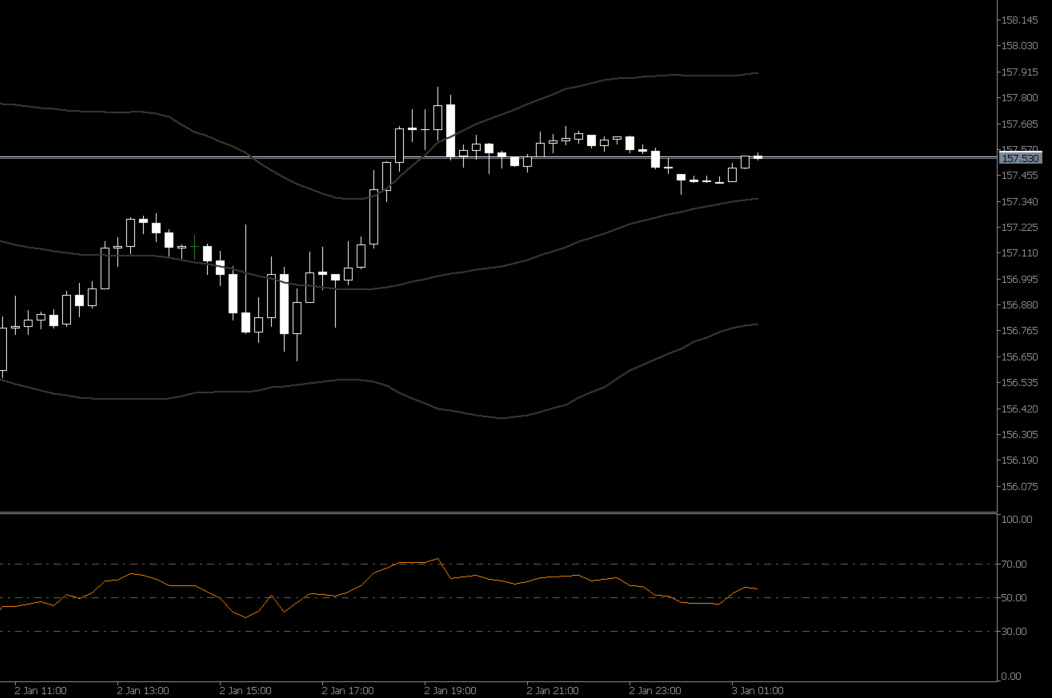
This feature allows the EA to enter trades automatically based on Bollinger Band and RSI indicators, with enhanced logic to ensure accurate re-entries only when market conditions are favorable.
Key Features:
-
Customizable Input Settings:
-
Bollinger Band:
- Period Input: The trader can define the Bollinger Band period (default: 20).
- Trigger Condition: Trades are triggered when the market price crosses the selected band:
- Buy Trade: Triggered when the price crosses above the upper Bollinger Band.
- Sell Trade: Triggered when the price crosses below the lower Bollinger Band.
-
RSI:
- Period Input: The trader can define the RSI period (default: 14).
- Upper/Lower Levels: The trader sets RSI overbought/oversold thresholds:
- Default Upper Level: 70 (for overbought conditions).
- Default Lower Level: 30 (for oversold conditions).
-
EA Entry Conditions:
- A Buy Trade is triggered when:
- The market price crosses above the upper Bollinger Band.
- RSI crosses above the upper threshold (e.g., 70).
- A Sell Trade is triggered when:
- The market price crosses below the lower Bollinger Band.
- RSI crosses below the lower threshold (e.g., 30).
-
Buy Trade Re-Entry:
- After the basket closes, the market price must first move below the upper Bollinger Band and the RSI must drop below its initial threshold (e.g., 70).
- Once these conditions are met, the EA will re-trigger a new buy trade only if:
- The price crosses back above the upper Bollinger Band.
- The RSI crosses back above the threshold (e.g., 70).
-
Sell Trade Re-Entry:
- After the basket closes, the market price must first move above the lower Bollinger Band and the RSI must rise above its initial threshold (e.g., 30).
- Once these conditions are met, the EA will re-trigger a new sell trade only if:
- The price crosses back below the lower Bollinger Band.
- The RSI crosses back below the threshold (e.g., 30).
- Continuous Mode:
- The EA will monitor and re-enter trades automatically (buy or sell) once the current basket of trades is fully closed and the conditions are met after retraction.
- One-Time Mode:
- The EA will only enter one trade per direction (buy or sell) until manually reset.
- The EA ensures only one basket of trades is open at any time.
- Bollinger Band values and RSI levels are displayed on the chart, with their respective periods and thresholds visible for real-time confirmation of trade entry and re-entry points.
2. Re-Entry Logic with Market Retraction:
Issue:
Without a proper re-entry condition, the EA might re-enter trades immediately after a basket closes, even if the trend is no longer favorable.
Solution:
After a basket closes, the EA will only re-enter when both indicators (Bollinger Band and RSI) reach their set values again, but only after the market has retracted below the initial entry conditions.
Logic:
Entry Modes:
Single Basket Management:
Indicator Visualization:
Benefits of the Re-Entry Logic:
- Avoids False Re-Entries: Prevents the EA from re-entering trades immediately after a basket closes, reducing the risk of entering against the trend.
- Enhanced Trend Detection: Ensures that new trades align with market conditions that are favorable for continuation.
- Customizable Re-Entry Logic: Traders can fine-tune Bollinger Band and RSI thresholds to match their strategy and preferred market conditions.
Example Scenario:
-
Trader Settings:
- Bollinger Band Period: 20.
- RSI Period: 14.
- RSI Upper Threshold: 70.
- RSI Lower Threshold: 30.
-
Buy Trade:
- The price crosses above the upper Bollinger Band.
- RSI crosses above 70, indicating strong upward momentum.
-
Sell Trade:
- The price crosses below the lower Bollinger Band.
- RSI crosses below 30, indicating strong downward momentum.
Benefits of Adjustable Periods and Levels:
- Flexibility: Traders can fine-tune Bollinger Band and RSI settings to adapt the EA to different market conditions and trading strategies.
- Precision: By aligning the indicator periods with the market's behavior, the EA can more accurately detect trends and avoid false signals.
3. Basket Trailing Take-Profit
-
Activation & Configuration:
- Option to enable/disable in the panel.
- Set trailing distance (e.g., X pips or a specific dollar amount).
-
Behavior:
- Activates when the market price surpasses the initial basket take-profit level.
- The basket SL line follows the price at the defined trailing distance but never moves backward if the price reverses.
- If the price reverses and hits the trailing basket SL line, all basket trades are closed in profit, and remaining limit orders are canceled.
-
Visual Representation:
- A trailing basket SL line appears on the chart, clearly indicating if the feature is active.
4. Automatic Limit Orders
-
Overview:
- When a trader places a market order (Buy or Sell), the tool automatically places a predefined number of limit orders at specified intervals.
-
Key Features:
- User-Defined Settings:
- Number of limit orders (e.g., 1–20).
- Pip gap between each order.
- Lot Size Progression:
- Lot sizes increase using the 1.5x multiplier after every 3 trades (including the original market order).
- Integration:
- Limit orders dynamically update the basket’s average entry and take-profit levels as they are executed.
- User-Defined Settings:
5. Risk Management: Account Drawdown Limit
This feature allows traders to limit the overall drawdown of their account, helping to prevent excessive losses.
Key Features:
-
Customizable Drawdown Limit:
- The trader sets a percentage-based drawdown limit (e.g., 5% of account balance).
- If the account equity drops below the specified drawdown percentage, the EA will:
- Close all open trades.
- Cancel any pending limit orders.
- Example:
- For a $100,000 account with a 5% drawdown limit, the EA will close all trades if the account equity falls to $95,000.
-
Disable Option:
- Traders can disable the feature entirely in the panel.
-
Visual Alerts:
- A warning message appears when the account approaches the drawdown limit.
- A confirmation alert is displayed before all trades are closed.
-
Integration:
- Works seamlessly with all other EA features, ensuring trades are only entered if the drawdown limit has not been breached.
-
Panel Control:
- Input field to set the drawdown limit percentage.
- Toggle to enable/disable the feature.
6. Panel Features
-
Design:
- Compact, draggable, forex-themed.
- Displays key basket details:
- Total number of trades in the basket.
- Total lot size.
- Average entry price.
- Take-profit target.
- Current profit/loss.
- Drawdown limit percentage and status.
-
Options & Controls:
- Enable/disable automatic trade entry.
- Configure Bollinger Band and RSI thresholds.
- Toggle continuous vs. one-time automatic trade entries.
- Enable/disable automatic limit orders.
- Adjust trailing take-profit settings.
- Set and manage the drawdown limit.
-
Trading Buttons:
- Manual market orders: Buy/Sell.
- Limit orders: Drag-and-drop adjustment for Buy Limit and Sell Limit orders.
- Close All: Closes the current basket and cancels remaining limit orders.
7. Recommended Pairs & Market Conditions
This tool is optimized for ranging/sideways trading pairs to improve performance in DCA/GRID/Martingale-style strategies. Suggested pairs include:
- EUR/GBP
- AUD/NZD
- EUR/USD
Key Market Conditions:
- Low to moderate volatility.
- Consistent oscillation between support and resistance levels.
Deliverables
- A fully functional EA that:
- Manages basket trades (average entry, take-profit, trailing TP, limit orders, and Martingale logic).
- Provides automatic trade entries based on Bollinger Band and RSI conditions.
- Includes a robust risk management feature with customizable drawdown limits.
- Displays real-time visual aids (average entry, take-profit, trailing TP, limit orders, and drawdown status).
- User-friendly control panel for managing all features.
- Thorough testing and debugging to ensure seamless functionality.