Options I would need,
- Enter the trade immediately after the trading signal or enter the trade after the closing candle.
- On & Off Buy/Sell Trading
- Close the position after a reversal signal or not.
- Maximum of 2 trades at the same time.
- TP & SL in points or Trailing stop
- Fixed lots or % risk based on balance
- Long Position On/Off Function: The long position strategy is applied only when the long position is "on." If it is "off," the long position strategy is not applied.
- Short Position On/Off Function: The short position strategy is applied only when the short position is "on." If it is "off," the short position strategy is not applied.
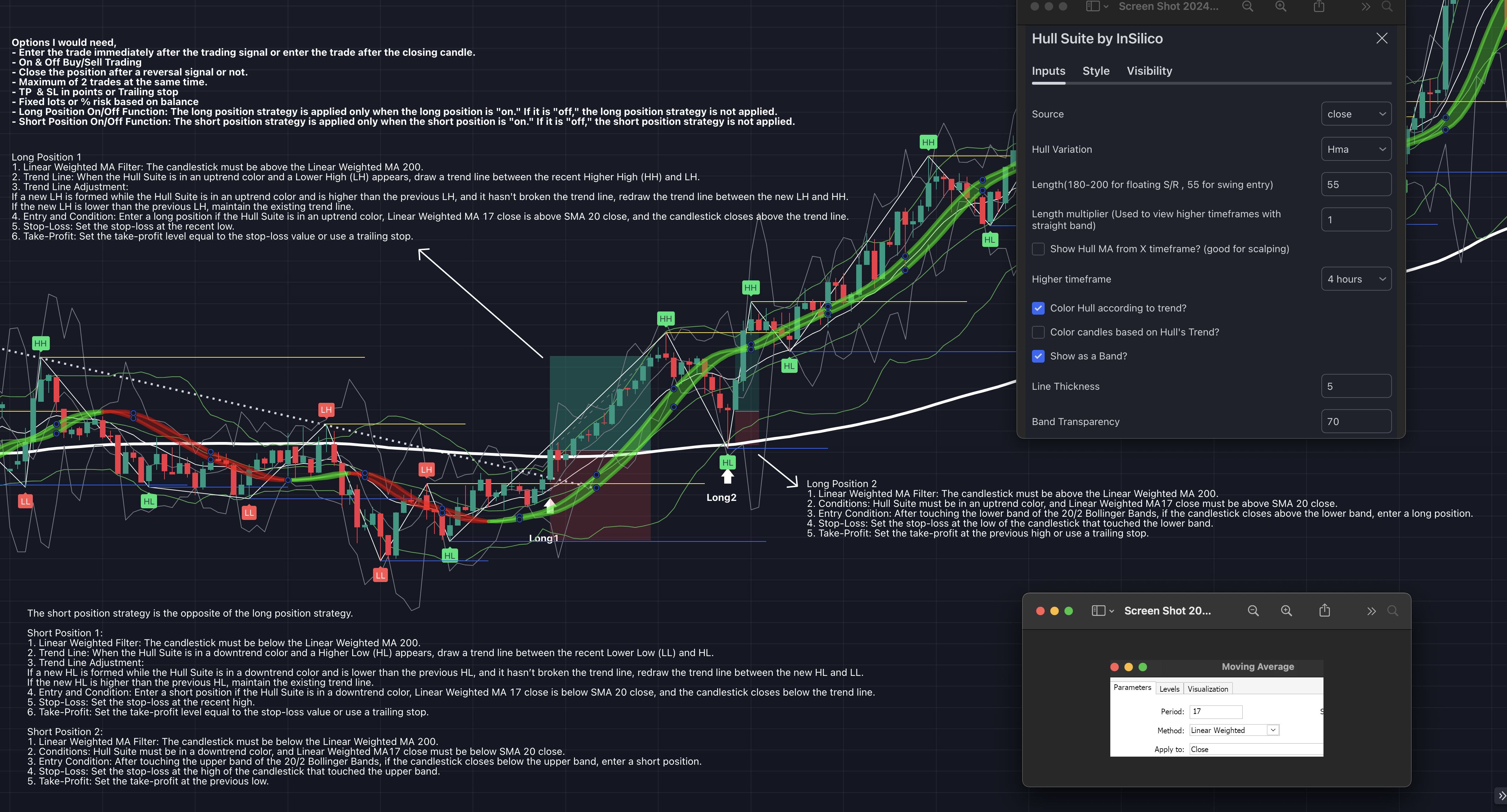
Long Position 1
1. Linear Weighted MA Filter: The candlestick must be above the Linear Weighted MA 200.
2. Trend Line: When the Hull Suite is in an uptrend color and a Lower High (LH) appears, draw a trend line between the recent Higher High (HH) and LH.
3. Trend Line Adjustment:
If a new LH is formed while the Hull Suite is in an uptrend color and is higher than the previous LH, and it hasn't broken the trend line, redraw the trend line between the new LH and HH.
If the new LH is lower than the previous LH, maintain the existing trend line.
4. Entry and Condition: Enter a long position if the Hull Suite is in an uptrend color, Linear Weighted MA 17 close is above SMA 20 close, and the candlestick closes above the trend line.
5. Stop-Loss: Set the stop-loss at the recent low.
6. Take-Profit: Set the take-profit level equal to the stop-loss value or use a trailing stop.
Long Position 2
1. Linear Weighted MA Filter: The candlestick must be above the Linear Weighted MA 200.
2. Conditions: Hull Suite must be in an uptrend color, and Linear Weighted MA17 close must be above SMA 20 close.
3. Entry Condition: After touching the lower band of the 20/2 Bollinger Bands, if the candlestick closes above the lower band, enter a long position.
4. Stop-Loss: Set the stop-loss at the low of the candlestick that touched the lower band.
5. Take-Profit: Set the take-profit at the previous high or use a trailing stop.
The short position strategy is the opposite of the long position strategy.
Short Position 1:
1. Linear Weighted Filter: The candlestick must be below the Linear Weighted MA 200.
2. Trend Line: When the Hull Suite is in a downtrend color and a Higher Low (HL) appears, draw a trend line between the recent Lower Low (LL) and HL.
3. Trend Line Adjustment:
If a new HL is formed while the Hull Suite is in a downtrend color and is lower than the previous HL, and it hasn’t broken the trend line, redraw the trend line between the new HL and LL.
If the new HL is higher than the previous HL, maintain the existing trend line.
4. Entry and Condition: Enter a short position if the Hull Suite is in a downtrend color, Linear Weighted MA 17 close is below SMA 20 close, and the candlestick closes below the trend line.
5. Stop-Loss: Set the stop-loss at the recent high.
6. Take-Profit: Set the take-profit level equal to the stop-loss value or use a trailing stop.
Short Position 2:
1. Linear Weighted MA Filter: The candlestick must be below the Linear Weighted MA 200.
2. Conditions: Hull Suite must be in a downtrend color, and Linear Weighted MA17 close must be below SMA 20 close.
3. Entry Condition: After touching the upper band of the 20/2 Bollinger Bands, if the candlestick closes below the upper band, enter a short position.
4. Stop-Loss: Set the stop-loss at the high of the candlestick that touched the upper band.
5. Take-Profit: Set the take-profit at the previous low.
Commandes similaires
Freelance Task — EA Recovery Layer Hello. I have a ready-made MQL5 EA. The signals, SL/TP and lot calculation should essentially not be touched. I need a recovery system added. I am not a programmer — below is how the robot should behave. What stays Entry only from an EA signal. Stop-loss is not a new signal. Trailing is already built into my EA — recovery does not implement its own trailing. If trailing is disabled
Should be as it but no alarms, also we need to add a deep search so he can see all the preves candles and a memory function so its not slowing down the indicator. for higher time frames daily 4h 1h around 365 days and for lower time frames we do up to 20k bars but both flexible so i can change it later. the memory is important so the indicator is not always recalculating everything when a new candle shows especially
Creating a bot using the Parabolic indicator with a simple interface.. I want a bot that uses the Parabolic SAR indicator only, with these orders attached to it. Boot name : HEMIN .FX Magic number : 000000 …………………………………………………. Trade behavior : regular OR inverse OR only long "buy" OR only short "sell" Timeframe : ………… Period: ……… ………………………………………………….. Lot size : ……………… Break even in points : …
Project: Fix & Schedule My Dual Fibo Standard Fibonacci Bot I have an existing MQ4 expert advisor called "Dual Fibo Standard Fibonacci". It needs to process 1,000 clients. Right now it runs blindly with no schedule and takes way too long. I need you to optimize it so it runs like a professional business with a 50-100 batch printed stamp copy progress log. Please reply with your numbers for this simple layout: * Phase
Hi, I need an experienced NinjaTrader 8/NinjaScript developer to finish or rebuild an automated futures strategy, ideally by the end of this week. I already have the complete TradingView Pine Script reference strategy, an existing ~2,000-line NinjaScript implementation, Playback logs, and known historical benchmark trades. MOST IMPORTANT REQUIREMENT: TRADINGVIEW ↔ NINJATRADER PARITY. The Pine Script is the reference
I need a custom MQL5 indicator for MetaTrader 5. The indicator must automatically print entry, stop loss, and take profit zones on the chart using dots. A critical requirement is that these dots must be non-lagging and absolutely non-repainting. Additionally, the indicator needs to identify and display current supply and demand zones. Please provide the mq5 source code and the ex5 file upon completion
PHANTOM PROTOCOL V1 – MT5 EXPERT ADVISOR SPECIFICATION Develop a professional MetaTrader 5 (MT5) Expert Advisor named “PHANTOM PROTOCOL V1”. PRIMARY MARKET: - XAUUSD (Gold) - Designed primarily for M15 and H1 timeframes. - The EA must work with both 3-digit and 2-digit gold pricing where applicable. TRADING LOGIC: Use pure price-action and market-structure analysis rather than relying on a single indicator. The EA
Wanna Create A Trading Robot That Uses Liquidity Sweep And Smart Money Concept EA That Works On PC. I want A Developer Who Can Program Exactly My Strategy That Will Be Shared on A Video Upon The Selection. it Should Follow My Rules .It has To be able To Read Price Action, followed By Liquidity Sweep Areas And Combine with Smart Money Concept Knowledge. We Will Talk about Parameters later on . The robot should be able
I need an experienced trading-data specialist who can help me obtain 3–4 years of historical market data compatible with NinjaTrader 8 . The data will be used for trading strategy development, backtesting, and analysis
Need aggressive M1 gold scalper rewrite of Dev3 + 8 strategies. INPUTS: RiskPercent=3, TP=400, SL=300, MaxTrades=6, Mode=BOTH, DailyProfit 15%, DailyLoss -10% LOT = Balance * RiskPercent / 1000 - works for Cent R350 and $1000. 8 STRATEGIES any true = open instantly, check 1 sec: 1 EMA8/21 cross 2 RSI14 30/70 + engulf 3 Engulfing candle 4 BB 20,2 breakout 5 FVG grab M1 6 M5 trend + M1 entry 7 Wick rejection >2 8
 Toutes les commandes
 Règles