 MetaTrader 5
 Experts
 Indicateurs
 Scripts
 Bibliothèque
 Stockage
Rejoignez notre page de fans

Session Reality Auditor - expert pour MetaTrader 5

- Vues:
- 91
- Note:
- Publié:
-
 Vous manquez des opportunités de trading :
- Applications de trading gratuites
- Plus de 8 000 signaux à copier
- Actualités économiques pour explorer les marchés financiers
Inscription Se connecterVous acceptez la politique du site Web et les conditions d'utilisation
Si vous n'avez pas de compte, veuillez vous inscrire -
 Besoin d'un robot ou d'un indicateur basé sur ce code ? Commandez-le sur Freelance
Aller sur Freelance
Besoin d'un robot ou d'un indicateur basé sur ce code ? Commandez-le sur Freelance
Aller sur Freelance
Every time filter in an Expert Advisor, every "close before the rollover" rule and every session box on a chart trusts one thing: the symbol's session table, the hours the broker declares through SymbolInfoSessionQuote and SymbolInfoSessionTrade. This tool checks that table against the history. Over the last N whole days it counts, for every minute of the week, on how many of those days the symbol has an M1 bar, and sets the result next to what the table declares: declared minutes that are usually empty, bars in minutes the table calls closed, minutes where the trade and quote tables disagree, and one-off outages in declared minutes that are not usually empty.
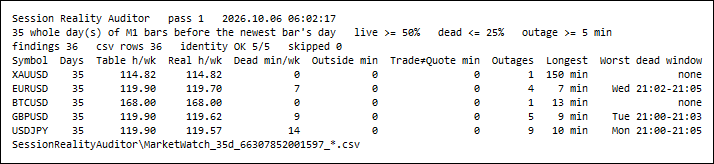
Five Market Watch symbols, 35 whole days each (2026.09.01 to 2026.10.06, server time), one pass in 62 ms. Table h/wk and Real h/wk are the hours per week the session table declares and the hours in which bars exist on at least half of the dates of that weekday. Dead min/wk counts declared minutes with bars on at most a quarter of their dates; Outages counts holes of five minutes or more in declared minutes that are not dead. Shot at panel font size 4 to fit the page; the default is 8.
The problem
A session table is a declaration, not a measurement. The terminal shows it in the symbol specification and an EA can read it, but nothing checks it against the prices that actually arrive. On the demo server measured below, EURUSD, GBPUSD and USDJPY are declared as quoting from 00:00 to 24:00 on Monday to Thursday. The M1 history says that right after 21:00 server time there is often no price at all. Gold on the same server declares a break from 20:58 to 22:00, and its bars agree with the table to the minute — except on Monday 7 September 2026, a US holiday, when the last bar before the break is at 18:27 and two and a half hours of a declared session are empty.
None of this is visible from the table, and all of it matters to automated trading. A time filter written from the table will try to trade into minutes that often have no price. The Strategy Tester has no ticks there either, so a rule that fires "at 21:01" may simply never fire on most days. And a "trading hours" input that someone once copied from the specification is only as right as the specification.
What it measures
The window is [D0, D1): D1 is 00:00 server time of the day of the symbol's newest M1 bar, so today's unfinished day is left out, and D0 lies InpDays whole days earlier (moved forward to the first whole day if the M1 history starts later). For every minute of the week the tool counts the dates of that weekday in the window — on the calendar, so a holiday without a single bar counts as a date with every minute missing — and the hits, the dates that have an M1 bar at that minute. A minute is declared when its start lies inside a quote session of its weekday, with the same session test the Tick Integrity Auditor uses.
- Effective table. A minute is real when bars exist on at least InpLivePct per cent of its dates (default 50). Consecutive real minutes of a weekday form the effective sessions printed next to the declared ones.
- Dead declared minutes (C1). A declared minute with bars on at most InpDeadPct per cent of its dates (default 25). Each run of consecutive dead minutes in one weekday is a finding.
- Bars outside the table (C2). A minute the table calls closed that has a bar on at least one date. Each run is a finding, with the number of bars in it.
- Trade table against quote table (C3). Minutes in a trade session but in no quote session (orders accepted, no price expected), and minutes in a quote session but in no trade session (prices shown, orders refused). Each run is a finding. InpCheckTrade=false switches the check off.
- One-off outages (C4). On the real timeline, minute by minute: a declared minute that is not dead and has no bar. Runs of such minutes, which may cross midnight, of at least InpOutageMinutes minutes (default 5) are outages, each a finding with its date. Dead minutes are excluded on purpose: a minute that is empty most of the time is a pattern and belongs to C1, an empty minute that is normally filled is an event and belongs here.
The journal prints the arithmetic as an identity per symbol: findings_rows == dead_windows + outside_windows + trade_no_quote_windows + quote_no_trade_windows + outages. A check that was not measured is left empty in the CSV and shown as - on the panel, never as 0.
Measured example
Exness demo server, server time = UTC, five Market Watch symbols, InpDays=35, every other input at its default.
| symbol | table h/wk | real h/wk | dead min / windows | outside min | trade≠quote min | outages | longest outage |
|---|---|---|---|---|---|---|---|
| XAUUSD | 114.82 | 114.82 | 0 / 0 | 0 | 0 | 1 | 150 min, Mon 2026.09.07 18:28 |
| EURUSD | 119.90 | 119.70 | 7 / 5 | 0 | 0 | 4 | 7 min, Wed 2026.09.02 11:39 |
| BTCUSD | 168.00 | 168.00 | 0 / 0 | 0 | 0 | 1 | 13 min, Sun 2026.09.13 07:16 |
| GBPUSD | 119.90 | 119.62 | 9 / 6 | 0 | 0 | 5 | 9 min, Thu 2026.10.01 21:03 |
| USDJPY | 119.90 | 119.57 | 14 / 5 | 0 | 0 | 9 | 10 min, Sun 2026.10.04 21:05 |
The rollover is a hole the table does not declare. On all 20 Monday-to-Thursday evenings of the window the last bar before the rollover is at 20:59. After that, at least one minute between 21:00 and 21:19 has no bar on 16 evenings for EURUSD, 19 for GBPUSD and 20 for USDJPY, and four or more of those minutes are missing on 10, 10 and 14 of them. The length changes from evening to evening, so it shows up in two ways: as dead minutes where most evenings agree (USDJPY on Monday and Tuesday, 21:00 to 21:05, bars on at most one date of five) and as outages where only some do (GBPUSD on three evenings, counted from 21:03 where its dead minutes end, seven to nine minutes each). Twenty-eight of the 36 findings start between 21:00 and 21:15; two of them are USDJPY's Sunday open, where the first bar came 6 and 10 minutes after the declared 21:05.
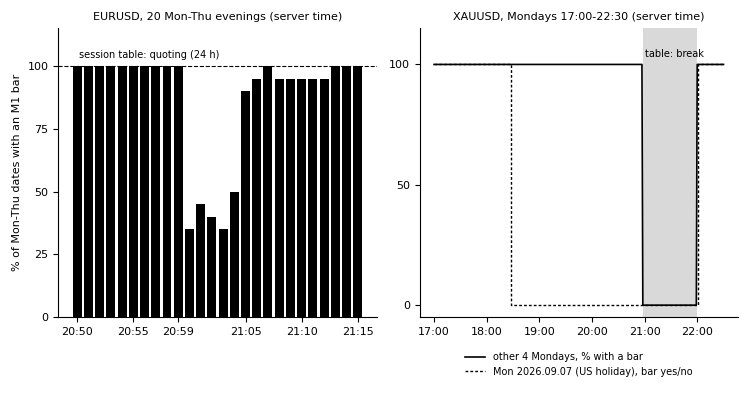
Left: share of the 20 Monday-to-Thursday evenings of the window on which EURUSD has an M1 bar, minute by minute from 20:50 to 21:15; the session table declares every one of these minutes open. Right: XAUUSD on Monday 2026.09.07 against the other four Mondays of the window; the shaded band is the break the table declares. Drawn from M1 bars read through the terminal's MCP interface, not from the tool's own output.
Gold's table is right except on the holiday. Effective and declared sessions of XAUUSD agree on every weekday, to the minute: 00:00 to 20:58 and 22:00 to 24:00 from Monday to Thursday, 22:01 to 24:00 on Sunday, 00:00 to 20:58 on Friday. Its one finding is 2026.09.07, US Labor Day, with no bar from 18:28 to the break at 20:58, 150 minutes. The table has no way to say "early close today"; the history does.
Two daytime outages hit all three currency pairs at once. Wed 2026.09.02 from 11:39 and Wed 2026.09.09 from 10:37: seven minutes each, the same minutes on EURUSD, GBPUSD and USDJPY, while XAUUSD and BTCUSD have a bar in every one of those minutes. Whatever the cause, it hit the three currency pairs together and left gold and bitcoin alone, and it is the kind of event a backtest of those days replays without a word.
What is clean. No symbol has a single bar in a minute its table calls closed, and the trade table equals the quote table on all five, so C2 and C3 found nothing here. BTCUSD, declared 24/7, is real 24/7; its one outage is 13 minutes on Sunday 2026.09.13 from 07:16.
Verifying the report independently
The report can be recounted outside MetaTrader. The script used for this page reads only what Python cannot get by itself — the window, the three thresholds, whether the trade check was on, and the session tables from the summary and sessions files — pulls the M1 bar times through the terminal's MCP interface, and recomputes the 22 result columns of the summary, all 10 080 cells of each symbol's map, the effective sessions and the findings rows from the definitions above. On the run shown here it agrees with the tool on every value of all five symbols. Two errors planted by hand in a copy of the files (one counter, one map cell) were both reported. Its own definitions were checked first on two synthetic weeks worked out by hand.
How to use it
Attach the Expert Advisor to any chart. With InpSymbols empty it audits the chart symbol; * audits the whole Market Watch; a comma-separated list audits those symbols. The audit runs once (or every InpRefreshMinutes), prints the per-weekday comparison and the outages to the Experts journal, draws the table on the chart and writes the CSV files. It reads history and session tables only: there is no trade function in the code, no DLL and no network access. With * it touches only symbols already in the Market Watch; a symbol named in the list that is not there yet is selected by the terminal when its history is read, as with any history request.
Read the journal lines first. A line such as
USDJPY Mon table 00:00-24:00 | real 00:00-21:00 21:05-24:00 | dead 21:00-21:05 (1/5) | outside none
says that on Mondays the table declares the whole day, bars exist from 00:00 to 21:00 and from 21:05 on, and each minute from 21:00 to 21:05 had a bar on at most one Monday of five. Use the real sessions, not the declared ones, for time filters; widen InpDays to see more weeks, and lower InpOutageMinutes to see shorter holes.
Inputs
| input | default | meaning |
|---|---|---|
| InpSymbols | "" | Symbols: empty = chart symbol, * = Market Watch, else CSV list |
| InpDays | 28 | Whole server days of M1 history to audit (ending before today) |
| InpLivePct | 50 | A minute is real when bars exist on at least this % of its weekdays |
| InpDeadPct | 25 | A declared minute is dead when bars exist on at most this % of them |
| InpOutageMinutes | 5 | Report one-off gaps in normally live declared minutes from this length |
| InpCheckTrade | true | Compare the trade session table with the quote session table |
| InpMaxExamples | 5 | Journal: outages printed per symbol |
| InpWriteCsv | true | Write summary, sessions, map, effective and findings CSV files |
| InpShowPanel | true | Draw the result table on the chart |
| InpPanelCorner | CORNER_LEFT_UPPER | Panel corner |
| InpPanelFontSize | 8 | Panel font size |
| InpPanelX | 10 | Panel X offset, px |
| InpPanelY | 18 | Panel Y offset, px |
| InpRefreshMinutes | 0 | Re-audit every N minutes (0 = audit once) |
Out-of-range values of the audit inputs are clamped with one journal line each (the panel inputs silently); the Expert Advisor never refuses to start.
Output files
All files go to MQL5\Files\SessionRealityAuditor\, semicolon-separated with a header row, named <symbols>_<days>d_<chart id>_… so that two charts never overwrite each other.
- …_<symbol>_summary.csv — one row: the window, the thresholds and every counter above.
- …_<symbol>_sessions.csv — every quote and trade session record of the table.
- …_<symbol>_map.csv — 10 080 rows, one per minute of the week: declared quote, declared trade, hits, dates.
- …_<symbol>_effective.csv — the effective sessions, one row per window.
- …_findings.csv — one row per finding of every symbol, with weekday, start, end, length and value.
Limits, stated plainly
- Presence is read from M1 bars: a minute with a bar counts as quoted. A bar exists when the minute has at least one tick, so a 30-second silence inside a minute is invisible here; for silences in seconds use a tick tool.
- The tool reads the session table as it is now. If the broker changed its hours inside the window, the older days are judged against the new table.
- Dates are counted on the calendar, so a holiday lowers the share of every minute of its weekday by one date. That is intended: it is exactly what the table did not say.
- Server time throughout. A daylight-saving change inside the window moves the rollover by an hour for part of the dates, and the shares of those minutes drop accordingly.
- The depth of the audit is bounded by the M1 history the terminal holds for the symbol (the maximum bars per chart setting); a shorter history shortens the window, with one journal line.
- The figures above are one demo server over five weeks. They describe that feed, not the broker's real accounts and not any other server.
Advanced Prop-firm Trade Panel based on S-R
A manual trading panel with a built-in prop-firm risk guard and a hidden Support/Resistance finder for MetaTrader 5.
Newtonian Mechanics
A MetaTrader 5 utility that treats the bid and ask quote streams as two independent physical trajectories and fits a local quadratic to each, producing position, velocity, and acceleration with honest error bars and an out-of-sample forecast scoreboard.
 ATS Trade Management Library - break-even, trailing stop and partial closes for any EA
Look after open positions in an Expert Advisor: break-even, trailing stop, two partial closes, and a stop and target for positions that have none. It never opens a trade.
 MACD Signals
Indicator edition for new platform.