Trading Buddy
Demo downloaded:
1
Published:
16 November 2022
Current version:
1.1
Didn't find a suitable robot?
Order your own one
on Freelance
Go to Freelance
Order your own one
on Freelance
How to buy а trading robot or an indicator
Run your EA on
virtual hosting
virtual hosting
Test аn indicator/trading robot before buying
Want to earn in the Market?
How to present a product for a sell-through
Version 1.1
2025.06.30
What's New in TradingBuddy Pro?
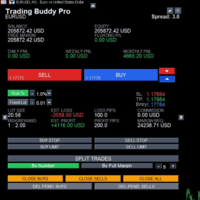
TradingBuddy Pro is a major evolution from the original TradingBuddy, rebuilt from the ground up to offer a professional-grade trading experience. We've moved beyond a simple button interface to a comprehensive, on-chart control panel packed with advanced features for serious traders.
Here is a detailed breakdown of all the new enhancements:
1. Complete User Interface (UI) Overhaul
The old, basic button layout has been replaced with a sleek, modern, and information-rich dashboard that stays on your chart.
Professional On-Chart Panel: A clean, card-based design that organizes all functions logically.
Real-Time Account Stats: Instantly view your Account Balance, Equity, Free Margin, and current Floating P/L for the symbol.
Detailed Trade Calculations: The panel displays critical pre-trade information that updates in real-time as you move your SL/TP lines, including:
Calculated Lot Size
Risk-to-Reward Ratio
Estimated Profit (in currency)
Estimated Loss (in currency and pips)
Required Margin
Interactive Panel Controls: Easily move the entire panel anywhere on your chart using built-in Up, Down, Left, and Right controls.
2. Advanced Trade Execution: Trade Splitting
This is a powerful new feature for advanced risk management. You can now automatically split a single large trade into multiple smaller positions.
Split by Number: Define exactly how many smaller trades you want to split your order into.
Split by Margin: Automatically calculate the maximum number of trades possible based on your available margin and the instrument's minimum lot size.
3. New Charting Tool: The Visual Position Tool
Plan your trades visually before execution.
Click the "Long" or "Short" position tool buttons to place a visual planner on your chart.
Drag and Drop: Easily drag the Entry, Stop Loss, and Take Profit levels to find the perfect setup.
Live R:R Calculation: The tool displays the Risk-to-Reward ratio, which updates instantly as you adjust the levels.
4. On-Chart Settings and Enhanced Usability
You no longer need to open the EA's input window (F7) to change settings.
Dedicated Settings Panel: A single click opens a clean settings menu directly on your chart to adjust:
Magic Number
Commission Per Lot
Pending Order Expiry (in bars)
Fixed Starting Balance for calculations
Auto-Commission Detection: A new button in the settings panel can automatically detect your broker's commission per lot based on your trade history.
Interactive Risk Controls: Toggle between Risk % and Fixed Lot sizing directly on the main panel. Use + and - buttons to fine-tune your risk or lot size without opening any menus.
5. Improved Order Management
We've added more granular control for managing your open and pending orders.
Close Buys/Sells Separately: Dedicated buttons to close only winning/losing buy or sell trades.
Delete Pending Orders: New functions allow you to delete all pending buy orders or all pending sell orders without affecting your open positions.
TradingBuddy Pro is a major evolution from the original TradingBuddy, rebuilt from the ground up to offer a professional-grade trading experience. We've moved beyond a simple button interface to a comprehensive, on-chart control panel packed with advanced features for serious traders.
Here is a detailed breakdown of all the new enhancements:
1. Complete User Interface (UI) Overhaul
The old, basic button layout has been replaced with a sleek, modern, and information-rich dashboard that stays on your chart.
Professional On-Chart Panel: A clean, card-based design that organizes all functions logically.
Real-Time Account Stats: Instantly view your Account Balance, Equity, Free Margin, and current Floating P/L for the symbol.
Detailed Trade Calculations: The panel displays critical pre-trade information that updates in real-time as you move your SL/TP lines, including:
Calculated Lot Size
Risk-to-Reward Ratio
Estimated Profit (in currency)
Estimated Loss (in currency and pips)
Required Margin
Interactive Panel Controls: Easily move the entire panel anywhere on your chart using built-in Up, Down, Left, and Right controls.
2. Advanced Trade Execution: Trade Splitting
This is a powerful new feature for advanced risk management. You can now automatically split a single large trade into multiple smaller positions.
Split by Number: Define exactly how many smaller trades you want to split your order into.
Split by Margin: Automatically calculate the maximum number of trades possible based on your available margin and the instrument's minimum lot size.
3. New Charting Tool: The Visual Position Tool
Plan your trades visually before execution.
Click the "Long" or "Short" position tool buttons to place a visual planner on your chart.
Drag and Drop: Easily drag the Entry, Stop Loss, and Take Profit levels to find the perfect setup.
Live R:R Calculation: The tool displays the Risk-to-Reward ratio, which updates instantly as you adjust the levels.
4. On-Chart Settings and Enhanced Usability
You no longer need to open the EA's input window (F7) to change settings.
Dedicated Settings Panel: A single click opens a clean settings menu directly on your chart to adjust:
Magic Number
Commission Per Lot
Pending Order Expiry (in bars)
Fixed Starting Balance for calculations
Auto-Commission Detection: A new button in the settings panel can automatically detect your broker's commission per lot based on your trade history.
Interactive Risk Controls: Toggle between Risk % and Fixed Lot sizing directly on the main panel. Use + and - buttons to fine-tune your risk or lot size without opening any menus.
5. Improved Order Management
We've added more granular control for managing your open and pending orders.
Close Buys/Sells Separately: Dedicated buttons to close only winning/losing buy or sell trades.
Delete Pending Orders: New functions allow you to delete all pending buy orders or all pending sell orders without affecting your open positions.

You are missing trading opportunities:
- Free trading apps
- Over 8,000 signals for copying
- Economic news for exploring financial markets
Registration
Log in
You agree to website policy and terms of use
If you do not have an account, please register