Advanced Trade Simulator MT5
40 USD
Demo downloaded:
306
Published:
31 August 2022
Current version:
1.61
Didn't find a suitable robot?
Order your own one
on Freelance
Go to Freelance
Order your own one
on Freelance
How to buy а trading robot or an indicator
Run your EA on
virtual hosting
virtual hosting
Test аn indicator/trading robot before buying
Want to earn in the Market?
How to present a product for a sell-through
Version 1.61
2023.06.05
Version 1.61
- pressing 'A' key shows a quick menu that sllow to enter a trade fast.
Version 1.60
-orders can be closed by clicking their number (numbers are displayed next to the big black rectangle on right side).
Then a close button appears which if it is pressed , it closes the order.
Version 1.59
-ShowBreakeven option.... it shows breakeven with a blue line by default (or two breakeven lines because it takes limits and stops into account, it examines two scenarios depending how limits or stops are filled which depends on how the price can move).
the colour of breakeven line can be changed.
Version 1.58
-pressing "Set Time" allows setting time using a calendar....
Version 1.57
-Color, line style and width of the alerts can be set.
Version 1.56
- alerts introduced, even faster, more convient simulations
- time alert... alert is activated when the simulation reaches a certain time. (running stops)
- price alert .. alert is activated when the price passes through the given price. (running stops)
- line (segment) alert... when the price crosses the line segment... (running stops)
- delete an alert by selecting it and deleting as an object.
Version 1.55
-potentially fixed rare bug which caused deletion of trades
Version 1.54
- speed can be adjusted with a button when running the simulation
- configurable speeds... and press shift + speed button to reduce speed, or just speed button to increase speed
- when zooming the chart... the future is hidden using a sized black rectangle (approximately as much as possible)
- the size of black rectangle can be specified in pixels now (MinFuturePixels)
Version 1.53
-Run button.... it will run the simulator until it is stopped or an event happens that stops it
-new input parameters StopWhenTpReached,StopWhenSlReached ,StopWhenRemoteNewOrder, StopWhenRemoteCloseOrder , StopWhenStopActivated ,StopWhenLimitActivated
, StopWhenAutoCloseOrder
-if multiple steps are taken by the simulator the above parameter stop the simulation should those events happen..e.g. tp is reached.
-if you click on a symbol (e.g. EURUSD) its chart will appear in the middle of the current chart. Its time needs to be synchronized with the current simulation time. That is why there is ChartBarOffset parameter, It could work by default for you but if you find the the chart that appears , its end does not match the simulation time , then the value of this variable needs to be changed until they are in sync.
Version 1.52
-client list is fixed if they are faulty when the simulator is remote controlled and time out is detected.
Version 1.51
- added a graph that displays total profit per date.. Press "G" button to see/hide it.
Version 1.50
-fixed problem causing crash if 100 trades were made or more.
Version 1.49
-it is possible to remove control the simulator, that is to send it buy,sell market orders and close order from another indicator or ea.
Version 1.48
- better feedback when a file is loaded and statistics is updated immediately.
- pressing 'A' key shows a quick menu that sllow to enter a trade fast.
Version 1.60
-orders can be closed by clicking their number (numbers are displayed next to the big black rectangle on right side).
Then a close button appears which if it is pressed , it closes the order.
Version 1.59
-ShowBreakeven option.... it shows breakeven with a blue line by default (or two breakeven lines because it takes limits and stops into account, it examines two scenarios depending how limits or stops are filled which depends on how the price can move).
the colour of breakeven line can be changed.
Version 1.58
-pressing "Set Time" allows setting time using a calendar....
Version 1.57
-Color, line style and width of the alerts can be set.
Version 1.56
- alerts introduced, even faster, more convient simulations
- time alert... alert is activated when the simulation reaches a certain time. (running stops)
- price alert .. alert is activated when the price passes through the given price. (running stops)
- line (segment) alert... when the price crosses the line segment... (running stops)
- delete an alert by selecting it and deleting as an object.
Version 1.55
-potentially fixed rare bug which caused deletion of trades
Version 1.54
- speed can be adjusted with a button when running the simulation
- configurable speeds... and press shift + speed button to reduce speed, or just speed button to increase speed
- when zooming the chart... the future is hidden using a sized black rectangle (approximately as much as possible)
- the size of black rectangle can be specified in pixels now (MinFuturePixels)
Version 1.53
-Run button.... it will run the simulator until it is stopped or an event happens that stops it
-new input parameters StopWhenTpReached,StopWhenSlReached ,StopWhenRemoteNewOrder, StopWhenRemoteCloseOrder , StopWhenStopActivated ,StopWhenLimitActivated
, StopWhenAutoCloseOrder
-if multiple steps are taken by the simulator the above parameter stop the simulation should those events happen..e.g. tp is reached.
-if you click on a symbol (e.g. EURUSD) its chart will appear in the middle of the current chart. Its time needs to be synchronized with the current simulation time. That is why there is ChartBarOffset parameter, It could work by default for you but if you find the the chart that appears , its end does not match the simulation time , then the value of this variable needs to be changed until they are in sync.
Version 1.52
-client list is fixed if they are faulty when the simulator is remote controlled and time out is detected.
Version 1.51
- added a graph that displays total profit per date.. Press "G" button to see/hide it.
Version 1.50
-fixed problem causing crash if 100 trades were made or more.
Version 1.49
-it is possible to remove control the simulator, that is to send it buy,sell market orders and close order from another indicator or ea.
Version 1.48
- better feedback when a file is loaded and statistics is updated immediately.
Version 1.47
2023.01.16
-more statistics is displayed, kept track of
-max drawdown, max relative drawdown, max win/max loss in currency
-max consecutive win/loss.. both the total amount.. and number of consecutive wins/losses
-max drawdown, max relative drawdown, max win/max loss in currency
-max consecutive win/loss.. both the total amount.. and number of consecutive wins/losses
Version 1.46
2022.09.12
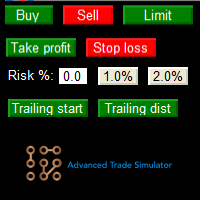
- you can set a takeprofit to close at for all positions, basket profit close.
- you can set a stoploss to close at for all positions, basket stoploss.
- T button shows or hides closed trades in a table layout.
-added trailing stoploss
- it is possible to open trades based on risked balance, in %
(set risk% to non zero value, set stoploss after adding an order)
- minor display fixes
-added current R, and planned R calculation
- key '.' goes to the current simulation time
-better printing of OCO groups.
- you can set a stoploss to close at for all positions, basket stoploss.
- T button shows or hides closed trades in a table layout.
-added trailing stoploss
- it is possible to open trades based on risked balance, in %
(set risk% to non zero value, set stoploss after adding an order)
- minor display fixes
-added current R, and planned R calculation
- key '.' goes to the current simulation time
-better printing of OCO groups.

You are missing trading opportunities:
- Free trading apps
- Over 8,000 signals for copying
- Economic news for exploring financial markets
Registration
Log in
You agree to website policy and terms of use
If you do not have an account, please register