RFX EasyTrade
49 USD
Demo downloaded:
300
Published:
16 February 2015
Current version:
2.40
Didn't find a suitable robot?
Order your own one
on Freelance
Go to Freelance
Order your own one
on Freelance
How to buy а trading robot or an indicator
Run your EA on
virtual hosting
virtual hosting
Test аn indicator/trading robot before buying
Want to earn in the Market?
How to present a product for a sell-through
Version 2.40
2022.08.25
- Better performance
Version 2.34
2019.04.14
- Bug fixes
Version 2.33
2018.10.02
- Fixed the issue of initializing the panel when the user drags a different symbol to the chart.
Version 2.31
2017.06.12
- Fixed a bug that caused the panel prevent the other charts from being focused.
Version 2.30
2017.06.01
- The panel saves and restores the settings for each symbol separately making it easy to return back to the previous session after restarting MT4 terminal.
Version 2.27
2017.05.29
- Now user can select the location of the panel to be on the right side of the chart.
Version 2.21
2016.01.12
- Now the chart objects (e.g., a horizontal line) that user adds to a chart will be automatically drawn in background.
Version 2.20
2015.12.22
- A bug in OCO function fixed.
- A bug in Martingale function fixed.
- A bug in Martingale function fixed.
Version 2.10
2015.06.04
- A bug that prevented Info tab from updating is now fixed.
Version 2.0
2015.04.28
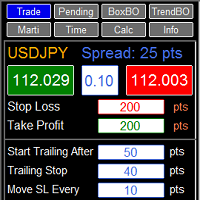
- Now the panel has 8 tabs for different trading styles:
1. Trade: Best for scalping purposes!
2. Pending: Put Pending orders as easy as possible!
3. BoxBO: Box break out, simply draw a box and the RFX EasyTrade Panel manages the trade automatically!
4. TrendBO: Trend line break out, simply draw a trend line and the RFX EasyTrade Panel manages the trade automatically!
5. Marti: Perform Martingale as easy as possible!
6. Time: Trade based on time, set the timer and the RFX EasyTrade Panel manages the trade automatically!
7. Calc: Perform Money Management calculation as easy as possible!
8. Info: Get information about your account and the currency pair as fast and easy as possible!
1. Trade: Best for scalping purposes!
2. Pending: Put Pending orders as easy as possible!
3. BoxBO: Box break out, simply draw a box and the RFX EasyTrade Panel manages the trade automatically!
4. TrendBO: Trend line break out, simply draw a trend line and the RFX EasyTrade Panel manages the trade automatically!
5. Marti: Perform Martingale as easy as possible!
6. Time: Trade based on time, set the timer and the RFX EasyTrade Panel manages the trade automatically!
7. Calc: Perform Money Management calculation as easy as possible!
8. Info: Get information about your account and the currency pair as fast and easy as possible!

You are missing trading opportunities:
- Free trading apps
- Over 8,000 signals for copying
- Economic news for exploring financial markets
Registration
Log in
You agree to website policy and terms of use
If you do not have an account, please register