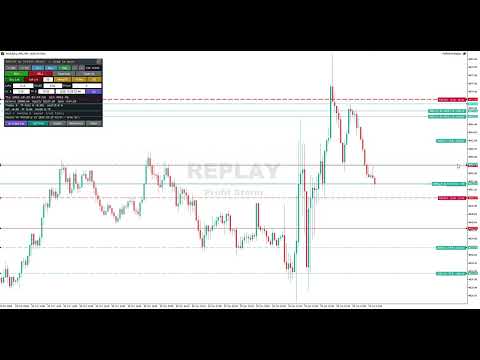
Replay Mode Full Trading Simulator
- Utilities
- Version: 1.20
- Activations: 5

Profit Storm Replay
Profit Storm Replay is a chart replay and trading practice utility for MetaTrader 5. It rewinds any symbol of your broker to a past date and shows the price history again one candle at a time, or plays it at the speed you choose. You practise entries, exits and trade management on the replay chart with virtual orders and see your results as you go. All trades are simulated; nothing is sent to your broker.
How it works
1. Attach Profit Storm Replay to a regular chart of the symbol you want to practise on.
2. A replay chart named SYMBOL_RPL opens, the panel starts on it, and the chart stops at the start date. Candles after that date stay hidden until you reveal them.
3. Step one minute or one full candle at a time, or press Play. Switch timeframes and use the standard MetaTrader 5 drawing tools on the replay chart as usual.
Features
- Bar replay from one-minute history, or tick replay with your broker's real ticks where available
- Step forward or back, play and pause, adjustable speed
- Click a candle on the chart to restart the replay from it, or jump to any date
- Virtual market orders, buy and sell limits, partial closes, break-even, and draggable stop-loss, take-profit and partial-close lines
- Fixed lot size or risk percentage sizing from the stop-loss distance
- Statistics: balance, equity, net result, profit factor, maximum drawdown, number of trades and take-profit hits
- Export of closed trades to a CSV journal
- The session is saved and restored after a timeframe change or a terminal restart
- Panel in English, Spanish, Portuguese, French, German, Russian, Turkish or Indonesian, sized automatically for any screen resolution, high-DPI displays and MetaTrader 5 for Mac
- Keyboard shortcuts: N next minute, M next candle, P play or pause, B buy, S sell, H partial close, X close all, C select a candle, T tick mode, Esc cancel
Input parameters
- Source symbol: symbol to replay (empty = the chart's symbol)
- Replay start: days before today: default 7
- Or a fixed start date: yyyy.mm.dd hh:mi (empty = days before today)
- Days of history shown before the start: default 30
- Tick mode at start: replay with real ticks where available
- Start balance: virtual account balance
- Default lots
- Risk % per trade: above 0, lots are calculated from the stop-loss distance
- Default SL distance, Default TP distance: in price units, 0 = none
- Spread for M1-bar mode: tick mode uses the real bid and ask
- Commission per lot, round turn
- SL and TP in the same M1 bar: SL first
- Pause play/step when a trade closes
- Panel X, Panel Y: starting position of the panel
- Trade tags: pixels from the price scale
- Panel language: English by default, or Auto to follow the terminal language
- Panel size %: 0 = automatic from the screen DPI
Notes
- Replay needs one-minute history around the selected dates. If a date is older than your broker's history, the replay starts at the oldest available date.
- Tick replay depends on the tick history your broker provides.
- Simulated fills can differ from live execution.
- The utility creates a custom replay symbol and opens its chart, which is only possible on a live chart. In the Strategy Tester it loads but stays idle. Watch the video on this page, or rent it for one month to try it on your own charts.