Trend Compass Alert
- Indicators
- Version: 1.10
- Activations: 5

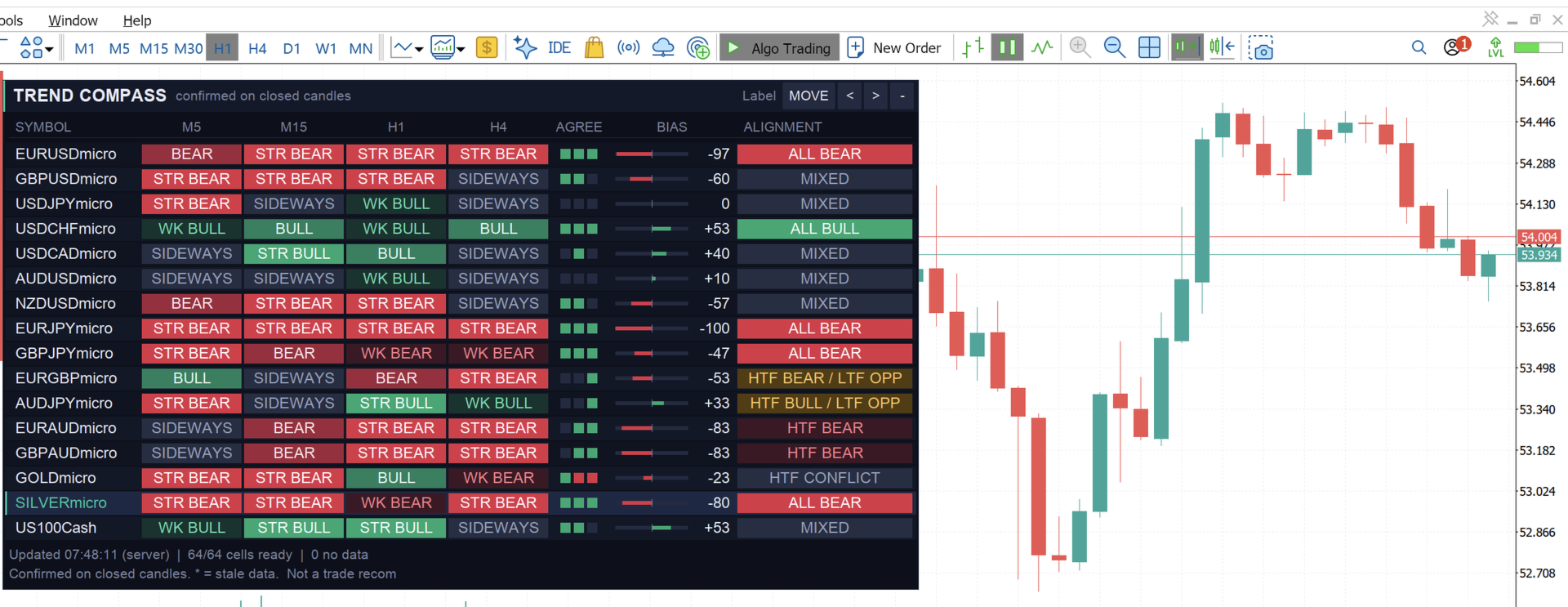
Trend Compass is a multi-symbol, multi-timeframe trend dashboard for MetaTrader 5. Attach it to any one chart and it shows the trend of up to 60 instruments across M5, M15, H1 and H4 in one clean panel. You can scan your whole watchlist without opening a single extra chart.
It reads and classifies trends. It does not place trades and does not give buy or sell signals.
What you see
- One row per symbol, with four colored badges for M5, M15, H1 and H4.
- Seven clear trend states: Strong Bull, Bull, Weak Bull, Sideways, Weak Bear, Bear and Strong Bear.
- Agreement squares showing whether M5/M15, M15/H1 and H1/H4 agree (green), oppose each other (red) or are neutral (grey).
- A bias gauge from -100 to +100 that gives more weight to H4 and H1.
- A plain-language alignment label, such as ALL BULL, HTF BULL / LTF OPP (higher timeframes bullish while the lower ones disagree), HTF CONFLICT, RANGING or MIXED.
- Your chart symbol highlighted, so you always know which row is the one you trade.
Why traders use it
- Monitor everything from one chart. Forex majors and crosses, gold, silver, indices and any other symbol your broker offers.
- Know the bigger picture at a glance. See at once if a pullback on M5 is going against, or with, the H1 and H4 trend.
- A trend label needs more than one indicator. A fast EMA above a slow EMA alone can only reach "Weak". Strong states also require trend strength (ADX), directional agreement (+DI/-DI), momentum (RSI) and price structure.
- Stable readings. The main columns use the last closed candle, so they don't flip while a candle is forming. An optional provisional column shows the forming candle separately and is clearly marked.
- Honest data handling. If a symbol is missing or has too little history, the cell says NO DATA. It is never quietly shown as sideways.
- Works with your broker's symbol names. It handles suffixes such as micro , m or .a , and finds names like GOLD or XAUUSD. If a name is ambiguous, it tells you instead of guessing.
- Light on your terminal. Cells are recalculated only when a new candle forms, and the panel refreshes on a timer, so symbols update even when your chart's own symbol has no ticks.
- Looks professional. Dark "Midnight" and light "Clean" themes, collapsible panel, drag-to-move, paging for long lists, and tooltips on every cell.
How it classifies a trend
Each timeframe is scored on five checks: fast vs slow EMA, price vs the slow EMA, +DI vs -DI, RSI momentum and recent highs/lows (structure). ADX decides how strong the trend is, and ATR keeps the EMA-gap test fair across different instruments. Weak, normal and strong states need progressively more confirmation. Three sensitivity modes (Responsive, Balanced, Strict) let you trade speed for reliability.
Getting started
- Attach Trend Compass to any chart.
- Check the Experts tab: it lists every symbol it found at your broker.
- If a symbol shows NOT FOUND or AMBIGUOUS, type the exact name from Market Watch into the symbol inputs.
- Use MOVE to place the panel, and - / + to collapse or expand it.
Input parameters
Watchlist
- Forex majors: comma-separated list. Put a - in front of a name to switch it off.
- Additional forex pairs: extra currency pairs.
- Metals: gold and silver names.
- Indices: index names, such as US100.
- Extra symbols: any other instrument.
- Broker suffix: text added to each name, for example micro , m or .a . Leave empty if your broker uses none.
- Auto-discover symbols: try to find the broker's version of a missing name.
- Add symbols to Market Watch automatically: needed to load data for symbols you haven't opened.
- Show unresolved symbols: keep rows for symbols that couldn't be found, so you can see and fix them.
Trend methodology
- Classification sensitivity: Responsive, Balanced (default) or Strict.
- Fast / Slow EMA period: 20 and 50 by default.
- ADX period: 14 by default.
- ADX floor / trend / strong: 15, 20 and 25 by default; below the floor is Sideways.
- Minimum DI spread: 5 by default; required for Strong.
- RSI period, bullish level, bearish level: 14, 55 and 45 by default.
- ATR period: 14 by default.
- Minimum EMA gap (ATR): 0.15 by default.
- Structure window: 10 candles by default.
- Candles loaded per symbol: 400 by default.
Confirmed vs provisional
- Show provisional columns: adds a separate reading from the forming candle, off by default.
- Provisional refresh (seconds): 10 by default.
- Stale after N candles: marks a cell with * if no new candle arrived, for example when the market is closed.
Alignment
- Show alignment text, agreement squares and bias gauge: each can be switched on or off.
- Weight M5 / M15 / H1 / H4: 1, 2, 3 and 4 by default, which sets how much each timeframe counts in the bias score.
Dashboard
- Panel title: the text in the title bar.
- Theme: Midnight (dark) or Clean (light).
- X / Y position, font size, font name, width scale: use the width scale to widen the columns if text overlaps on your system.
- Rows per page: longer lists get paging buttons.
- Show ADX in cells: adds the ADX value to each badge.
- Start collapsed: open as a small strip.
- Max cells recalculated per second: keeps the first load smooth.
Colors
- Override any trend color, or leave them on None to use the theme palette. An accent color sets the title bar and chart-symbol highlight.
Important notes
- Works on MetaTrader 5 only, as a chart indicator. No DLL, no web requests, no trading.
- Needs price history for each symbol and timeframe. The first load can take a few seconds while your terminal downloads data.
- A trend label describes what price has done. It is not a prediction, a trade recommendation or a promise of profit. Trends can end at any time, especially around news. Trading carries risk, so test on a demo account first.