DoubleDragon Gold
- Experts
- Version: 3.78
- Activations: 5

Short description (for the "brief description" field)
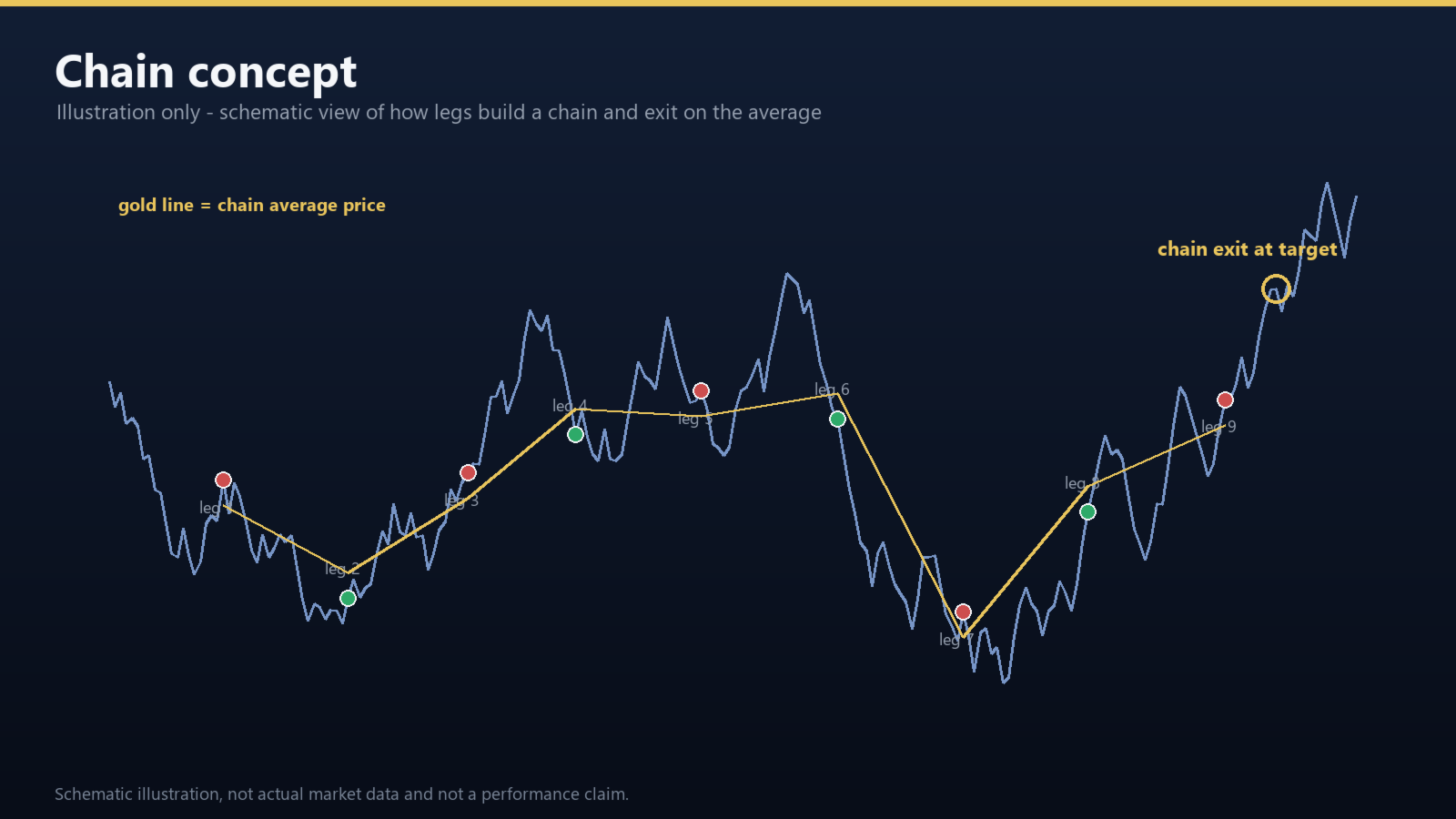
DoubleDragon Gold is an automated trade manager for gold (XAUUSD) on M1. It builds
hedged chains, tracks the weighted average price of each chain and closes the whole
chain once a small configurable target is reached. Five selectable modes and four
starting lot sizes define the spacing, target and lot curve. A layered fuse system
is available for floating loss, deep dwell, rebound give-back, daily loss and weekend
close (all optional and switched off in the default configuration).
Full description
Overview
DoubleDragon Gold is a fully automated Expert Advisor designed for gold (XAUUSD) on the
M1 timeframe. The EA does not rely on a single entry signal. It manages a two-sided
(hedged) chain of positions, keeps the average price of the chain close to the latest
filled leg, and exits the whole chain when the weighted-average profit reaches the
configured target. Spacing between legs, the target distance and the lot curve are
determined by the selected mode and starting lot size.
A hedging account is required. The EA opens long and short positions independently and
manages each side as its own chain.
How it works
- Chain construction. Positions are added at fixed or adaptive spacing. Each new
leg moves the chain average price closer to the current market price.
- Chain exit. The whole chain is closed when the weighted-average profit of that
side reaches the target. Take-profit levels are managed server-side, and a
tick-based refill runs after a fill so that the target stays consistent.
- Two-sided management. Long and short chains are tracked separately, so the EA
can reduce exposure on one side while the other side keeps working.
- Adaptive spacing and target. Both can follow the selected mode, or be turned off
or overridden manually.
Selectable modes and starting lots
Five modes are available. They differ in how the distance between legs is calculated,
how the chain exit target is calculated, and how long the EA waits before re-entering
the same side after a chain is closed:
| Mode | Distance between legs | Chain exit target | Re-entry delay |
|---|---|---|---|
| Conservative | Adapts to market volatility (ATR based) | Fixed | 75 s |
| Classic | Fixed distance, no volatility adaptation | Fixed | 75 s |
| Smart (default) | Standard fixed distance | Adapts to market volatility | 30 s |
| Aggressive | Dense distance (legs closer together) | Wider volatility-based target | 30 s |
| D recipe | Same engine as Conservative, supplied with fixed preset values | Fixed | 75 s |
How to read the table
- Distance between legs - how far price must move before the next position is added.
"Adapts to volatility" means the EA measures recent market range (ATR, average true
range) and widens or narrows the step automatically.
- Chain exit target - the weighted-average profit at which the whole chain closes.
A volatility-based target follows the market; a fixed target does not.
- Re-entry delay - how long the EA waits before opening a new chain on the same side
after the previous one is closed.
- D recipe is the low-risk option: it runs the Conservative engine with fixed
preset values (nothing to tune). It is intended for users who want the simplest setup.
Four starting lot sizes (0.01, 0.02, 0.03, 0.04) can be selected independently of the
mode. The EA never scales lots by account balance or contract size on its own.
Protection: what is active, and what you switch on yourself
The mode engine above (distance, target, cooldown) is always active. The additional
protection layers are switched off in the default configuration - you enable the
ones you want in the inputs:
| Protection | Default | What it does when enabled |
|---|---|---|
| Daily loss guard ( DailyLossGuard ) | Off | at 15% daily loss, pause new entries and refills; open positions keep being managed and nothing is force-closed |
| Persistent floating-loss fuse | Off | close a chain after floating loss stays above your level for your chosen number of minutes |
| Deep dwell fuse | Off | close a chain that has stayed deep for too long while floating loss is above your level |
| Too-far-from-target fuse | Off | close when price is too far from the target and floating loss exceeds your level |
| Rebound give-back fuse | Off | after a rebound, close if a set part of the recovered loss is given back |
| Weekend finish | Off | try to close within an allowed loss before the weekend |
| Session and news avoidance | Off | pause new entries at market opens and around calendar events |
| Check and repair | Off | verify and restore local state if the EA stalls |
Every one of these is optional; with all of them off the EA still manages chains,
targets and exits as described above.
How to enable a protection, and suggested starting values
Three steps:
1. Attach the EA to an XAUUSD M1 chart and press F7 (or double-click the EA in the
Navigator and open Inputs).
2. Find the matching group in the list: groups 03-06 for the fuses, group 07 for sessions
and loss avoidance, group 10 for check and repair.
3. Enter the values and press OK. The EA applies them on the next tick, and chains that
are already open are re-evaluated with the new thresholds.
Two rules that apply to every amount:
- Amounts are entered as a USD baseline. On a cent account the EA converts them
automatically (100x factor), so you always type the same USD numbers regardless of the
account currency.
- Thresholds scale with the chain's birth lot multiplier: a chain started with a
larger lot size gets proportionally larger thresholds. You do not need separate
settings for each starting lot size.
A value of 0 (or false ) switches that protection off - and off is the default for
all of them.
| Protection | Inputs to set | Suggested starting values |
|---|---|---|
| Persistent floating-loss fuse | InFloatEscUsd / InFloatEscMin / InFloatEscResetUsd / InFloatEscDeepUsd | 300 / 30 / 150 / 800 |
| Deep dwell fuse | InDeepDwellLayer / InDeepDwellMin / InDeepDwellUsd | 20 / 60 / 500 |
| Too-far-from-target fuse | InRetrEscUsd / InRetrEscFloatUsd | 30 / 400 |
| Rebound give-back fuse | InRebEsc / InRebEscLayer / InRebEscArmUsd / InRebEscMinRebUsd / InRebEscRecPct / InRebEscGiveUsd / InRebEscGivePct | true / 25 / 250 / 60 / 0.5 / 150 / 0.5 |
| Daily loss guard | DailyLossGuard | true (level is fixed at 15%) |
| Weekend finish | WeekendFinish / InWeekendLossLimit | true / 0 (automatic) |
| Session and news avoidance | UseSessionOpenGate / NewsAutoManage | true / true |
| Check and repair | InAutoHeal | true |
The numbers above are a starting point to adjust to your own account size and risk
appetite, not a statement about account size or a risk budget. Test them on a demo
account with your broker's conditions before going live. Every fuse only ends a chain
earlier: it never opens new positions and never increases lot size.
Manual control panel
A chart panel provides pause levels (stop new entries, then also stop refills), a
a one-click close that affects only the EA's own positions on the current symbol,
and live status readouts for chains, targets and fuse state. Buttons never touch
positions opened by other EAs or manually.
Inputs
Inputs are grouped by function: general settings, automatic management, five fuse
groups, session and loss avoidance, pause management, display and execution, check
and repair, and maintenance groups for legacy configurations. Every input has an
English description in the terminal.
Recommended setup
- Symbol: XAUUSD (or the broker's gold symbol), timeframe M1
- Account: hedging account; cent accounts are supported (USD and cent units are
detected automatically)
- Start with the default mode and the smallest starting lot, and verify the settings
on a demo account first
Important notes
- The EA is a trade management tool. It does not guarantee any trading result, and
floating loss, spread, slippage and swap can all affect the outcome.
- Keep the terminal running and auto-trading enabled while the EA is active.
- If you run more than one instance on the same symbol, give each instance its own
unique order identifier (magic number) so that they do not manage each other.
- Before the first live run, test the EA on a demo account with your broker's
conditions.
Support
Questions and bug reports are handled through the MQL5 Market product page and the
built-in MQL5 chat.
Input parameters
Input parameters
01 - General Settings
| Parameter | Type | Default | Description |
|---|---|---|---|
| Preset | ENUM_STRATEGY_MODE | MODE_SMART | Strategy mode: Conservative / Classic / Smart / Aggressive / D recipe |
| InStartLotSpec | ENUM_START_LOT_SPEC | START_LOT_001 | Initial lot size (lots) |
| EnableLong | bool | true | Allow long entries; open long positions keep being managed when off |
| EnableShort | bool | true | Allow short entries; open short positions keep being managed when off |
| Magic | long | 300003 | Order ID (magic): must be unique per symbol and instance |
02 - Automatic Management
| Parameter | Type | Default | Description |
|---|---|---|---|
| InUseAtrStep | ENUM_OPTION_SWITCH | OPTION_DEFAULT | Auto spacing: follow preset / off / on |
| InUseAtpTarget | ENUM_OPTION_SWITCH | OPTION_DEFAULT | Auto take-profit distance: follow preset / off / on |
| InRescue | bool | false | Rescue refill: open an extra position to pull the average price closer when conditions are met |
| InDirMemo | bool | false | Cooldown on same-direction entries after a loss |
| InEscDayStop | bool | true | After an emergency fuse exit, stop new same-direction entries for the rest of the day |
03 - Fuse: Persistent Floating Loss Exit
| Parameter | Type | Default | Description |
|---|---|---|---|
| InFloatEscUsd | double | 0 | Floating loss (USD) at which monitoring starts (0 = off) |
| InFloatEscMin | int | 5 | Minutes of sustained floating loss before exit |
| InFloatEscResetUsd | double | 250 | Floating loss (USD) retreat that cancels the timer |
| InFloatEscDeepUsd | double | 700 | Floating loss (USD) that triggers an immediate exit (0 = off) |
04 - Fuse: Deep Dwell Exit
| Parameter | Type | Default | Description |
|---|---|---|---|
| InDeepDwellLayer | int | 0 | Layer from which deep dwell monitoring starts (0 = off) |
| InDeepDwellMin | int | 45 | Minutes of deep dwell before the exit check |
| InDeepDwellUsd | double | 350 | Minimum floating loss (USD) at check time to exit |
05 - Fuse: Too Far From Take Profit
| Parameter | Type | Default | Description |
|---|---|---|---|
| InRetrEscUsd | double | 0 | Distance from take profit (quote spread) that triggers exit (0 = off) |
| InRetrEscFloatUsd | double | 0 | Additional minimum floating loss (USD; 0 = no extra condition) |
06 - Fuse: Give-Back After Rebound
| Parameter | Type | Default | Description |
|---|---|---|---|
| InRebEsc | bool | false | Enable give-back exit after a rebound |
| InRebEscLayer | int | 25 | Minimum layer to start monitoring |
| InRebEscArmUsd | double | 200 | Minimum floating loss (USD) to start monitoring |
| InRebEscMinRebUsd | double | 50 | Minimum rebound (USD) to count as valid |
| InRebEscRecPct | double | 0.5 | Minimum share of the loss recovered to count as valid (0-1; 0 = no limit) |
| InRebEscGiveUsd | double | 150 | Give-back (USD) after a valid rebound that triggers exit |
| InRebEscGivePct | double | 0.5 | Give-back as a share of the rebound (0-1; first threshold wins; 0 = USD only) |
07 - Sessions and Loss Avoidance
| Parameter | Type | Default | Description |
|---|---|---|---|
| NewsAutoManage | bool | false | News avoidance: pause new entries and refills around events, keep managing open positions |
| WeekendFinish | bool | false | Weekend finish: try to exit within the allowed loss before market close |
| InWeekendLossLimit | double | 0 | Allowed weekend loss: 0 = automatic; positive values in account display units (USD account = USD, cent account = cents) |
| UseSessionOpenGate | bool | false | Session open gate: pause new entries and tighten targets at major market opens |
| DailyLossGuard | bool | false | Daily loss guard: after triggering, pause new entries and refills, keep managing open positions |
08 - Pause Management
| Parameter | Type | Default | Description |
|---|---|---|---|
| InPauseTightenMinutes | int | 30 | Minutes after pausing during which take profit is tightened |
09 - Display and Execution
| Parameter | Type | Default | Description |
|---|---|---|---|
| ShowPanel | bool | true | Show trading panel |
| PanelCompact | bool | false | Panel collapsed by default |
| PanelX | int | 8 | Panel horizontal position (pixels) |
| PanelY | int | 24 | Panel vertical position (pixels) |
| ShowChartArt | bool | true | Show dark chart background |
| SlippageUsd | double | 0.30 | Allowed slippage (gold price distance, USD per ounce) |
10 - Check and Repair
| Parameter | Type | Default | Description |
|---|---|---|---|
| InAutoHeal | bool | false | Auto check and repair: verify and restore local state when the EA stalls |