Maxxi
- Indicators
-
Guilherme Vendrami Afonso
 Financial Market Analyst & MQL5 Indicator Developer
Location: Brazil
Developer Profile:
Technical indicator developer for MetaTrader 5, specializing in multi-timeframe analysis, market structure, trend identification, and rule-based trading tools. - Version: 1.29
- Activations: 10
Financial markets involving variable-income assets carry substantial financial risk. The MAXXI indicator is a quantitative and mathematical tool designed to assist with visual analysis and decision-making; it does not guarantee profits and does not automatically set Stop Loss or Take Profit orders. Capital management, position sizing, and trading discipline are the sole responsibility of the trader. Never risk capital you cannot afford to lose.
What Is MAXXI and How Does It Work?
MAXXI combines a refined trend-tracking structure synchronized with a Multi-Timeframe (MTF) Confluence Dashboard running in the background. Regardless of the chart timeframe you are trading on, the algorithm simultaneously tracks 5 market horizons, generating a directional confluence score.
2. Timeframes and Accuracy
-
Algorithmic Rule: The indicator follows a sequential, programmed logic. If you are viewing the M5 chart, it will generate arrows, sound alerts, and pop-up windows normally, according to the dynamics of that micro-timeframe.
-
Noise Filter: Like any trend-following system, the indicator is significantly more accurate on higher timeframes.
-
Practical Recommendation: After extensive operational testing, the best entries with higher win rates were consolidated starting from the M30 chart (M30, H1, and H4).
3. The Golden Key: The Confluence Dashboard
MAXXI's major differentiator is its SIMPLE Dashboard, which provides an institutional-style X-ray view of the market quickly and conveniently:
-
Confluence above 75% (Lower Risk / Higher Probability):
-
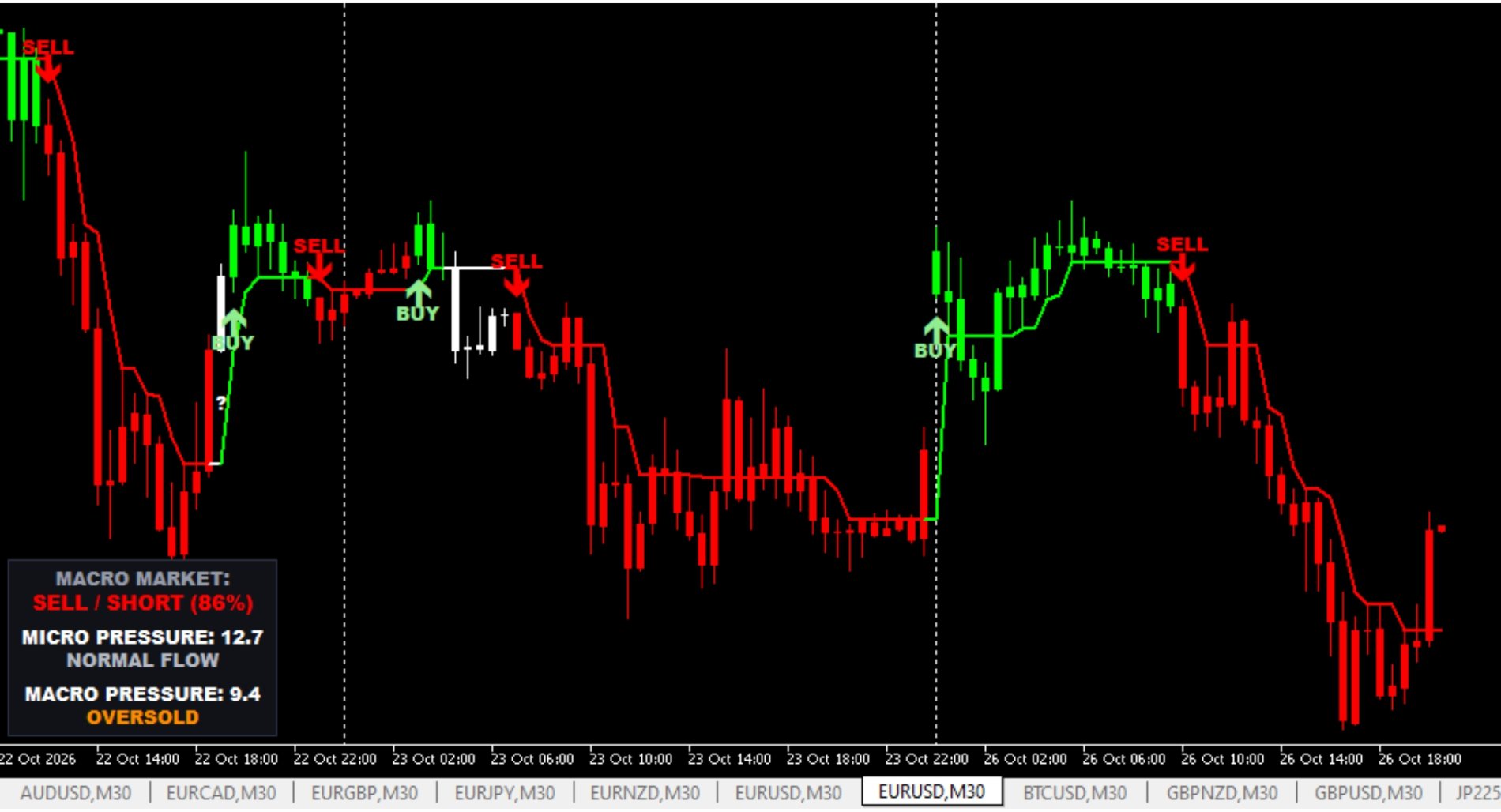
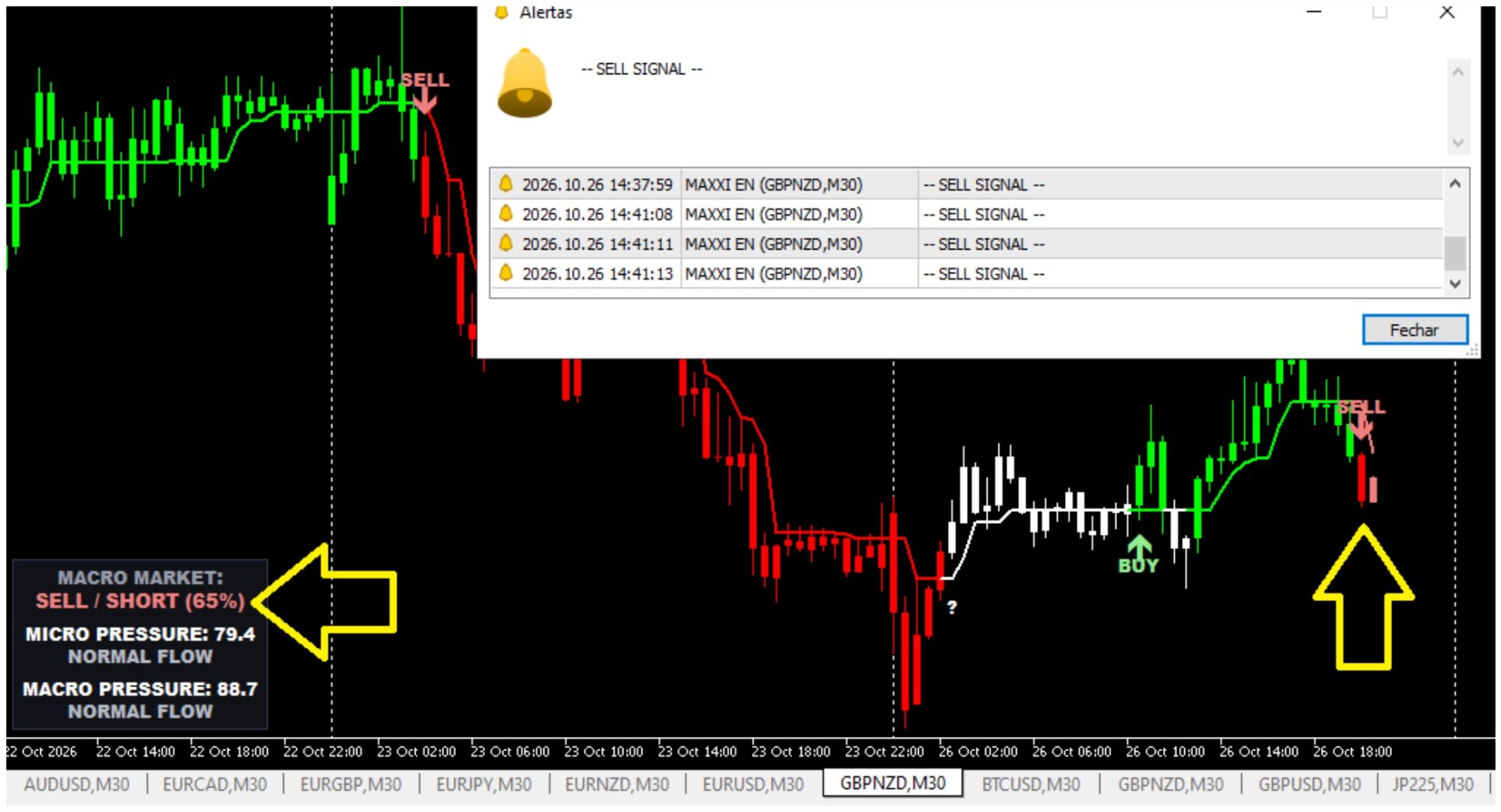
Visual: The arrow, text (BUY/SELL), trend lines, candles, and Dashboard light up in Strong Green (Lime) or Strong Red (Red), displaying BUY / LONG or SELL / SHORT.
-
Scenario: The vast majority of institutional timeframes are aligned in the same direction. This is the setup with the best risk/reward ratio.
-
-
Confluence between 57% and 75% (Moderate Risk):
-
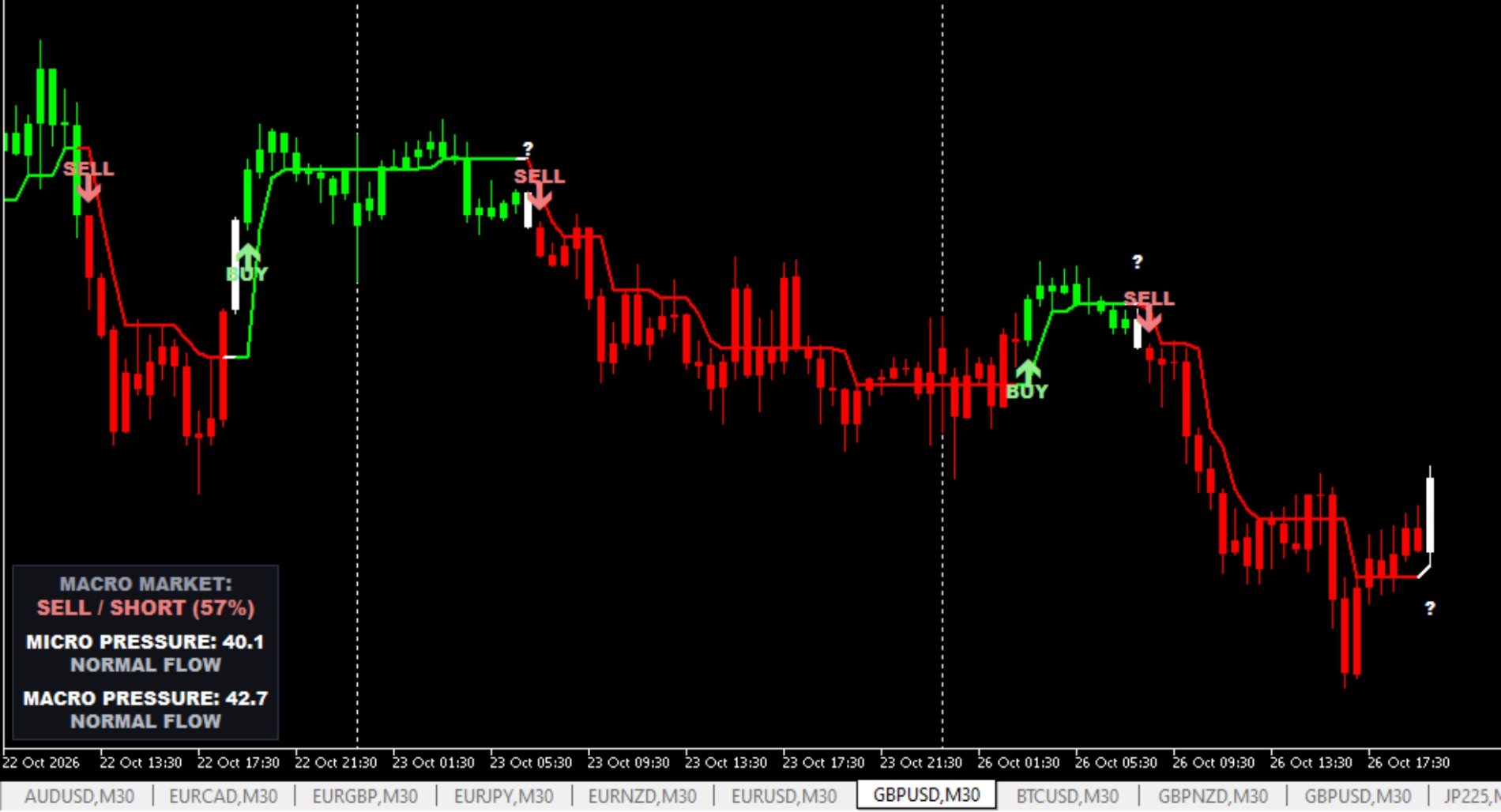
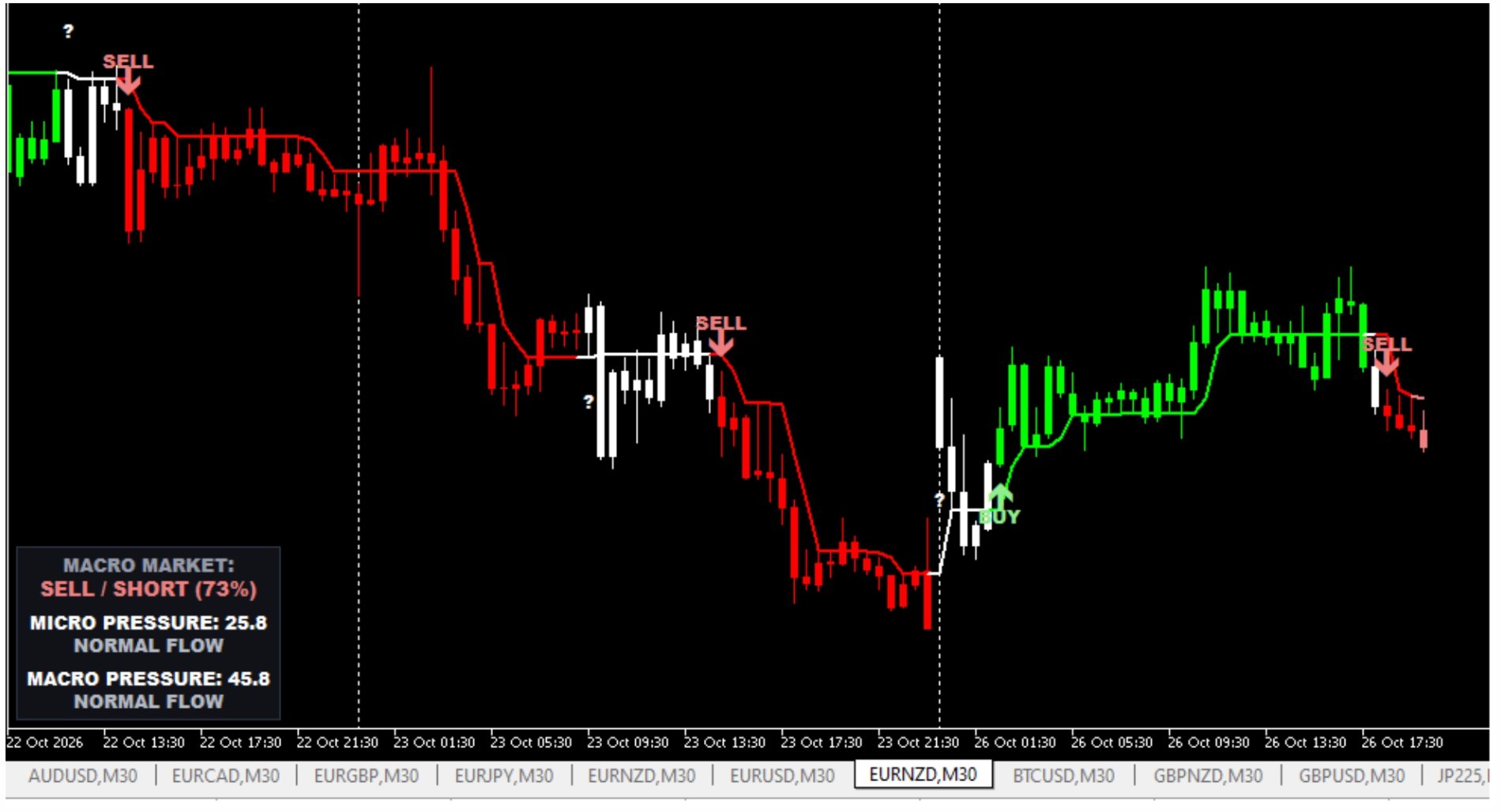
Visual: The arrow, text, line, candles, and Dashboard appear in Light Green or Light Red, displaying BUY / LONG or SELL / SHORT.
-
Scenario: The market shows meaningful alignment, but divergences remain across lower or intermediate timeframes.
-
-
Confluence below 57% (High Risk / Do Not Trade):
-
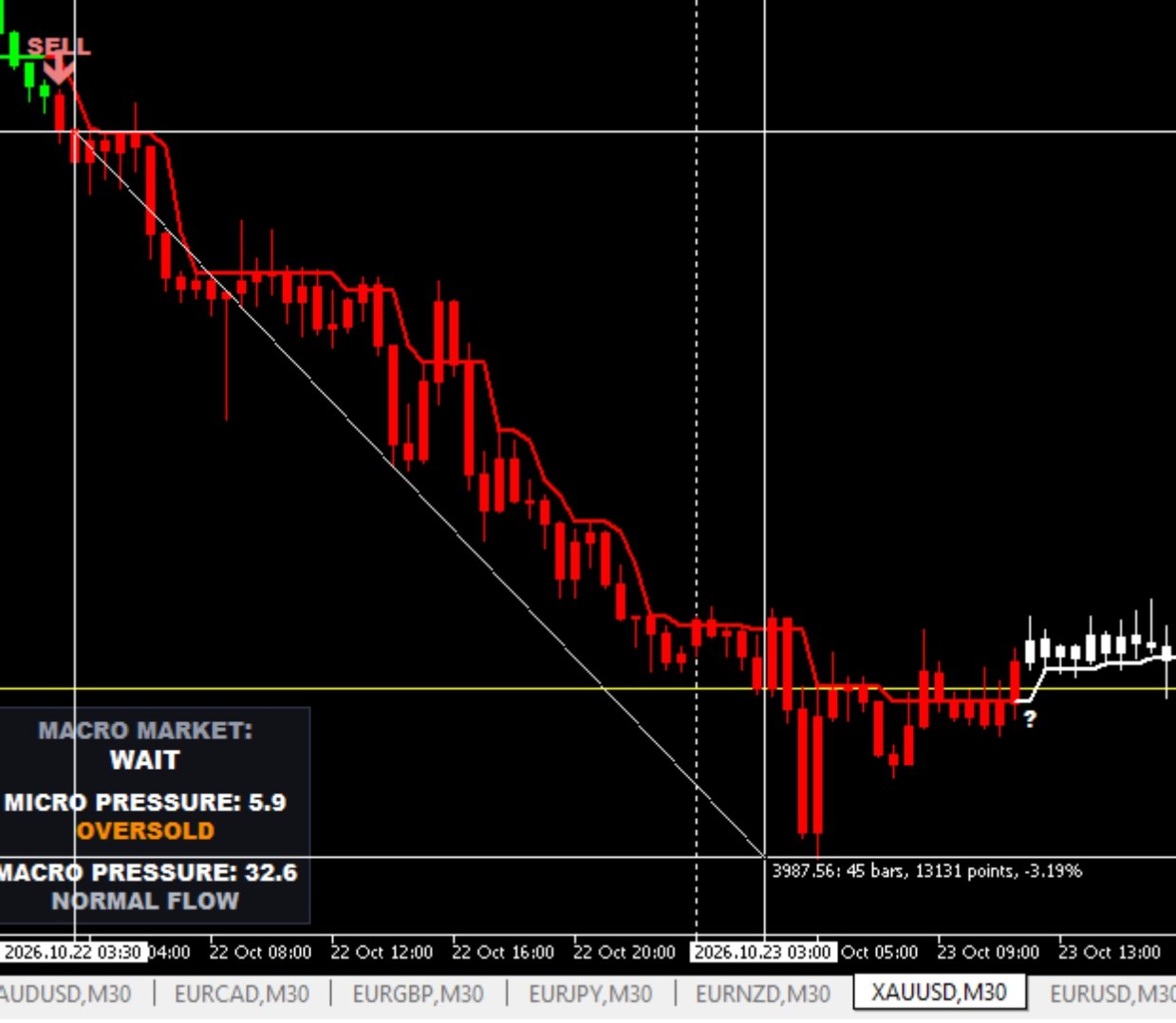
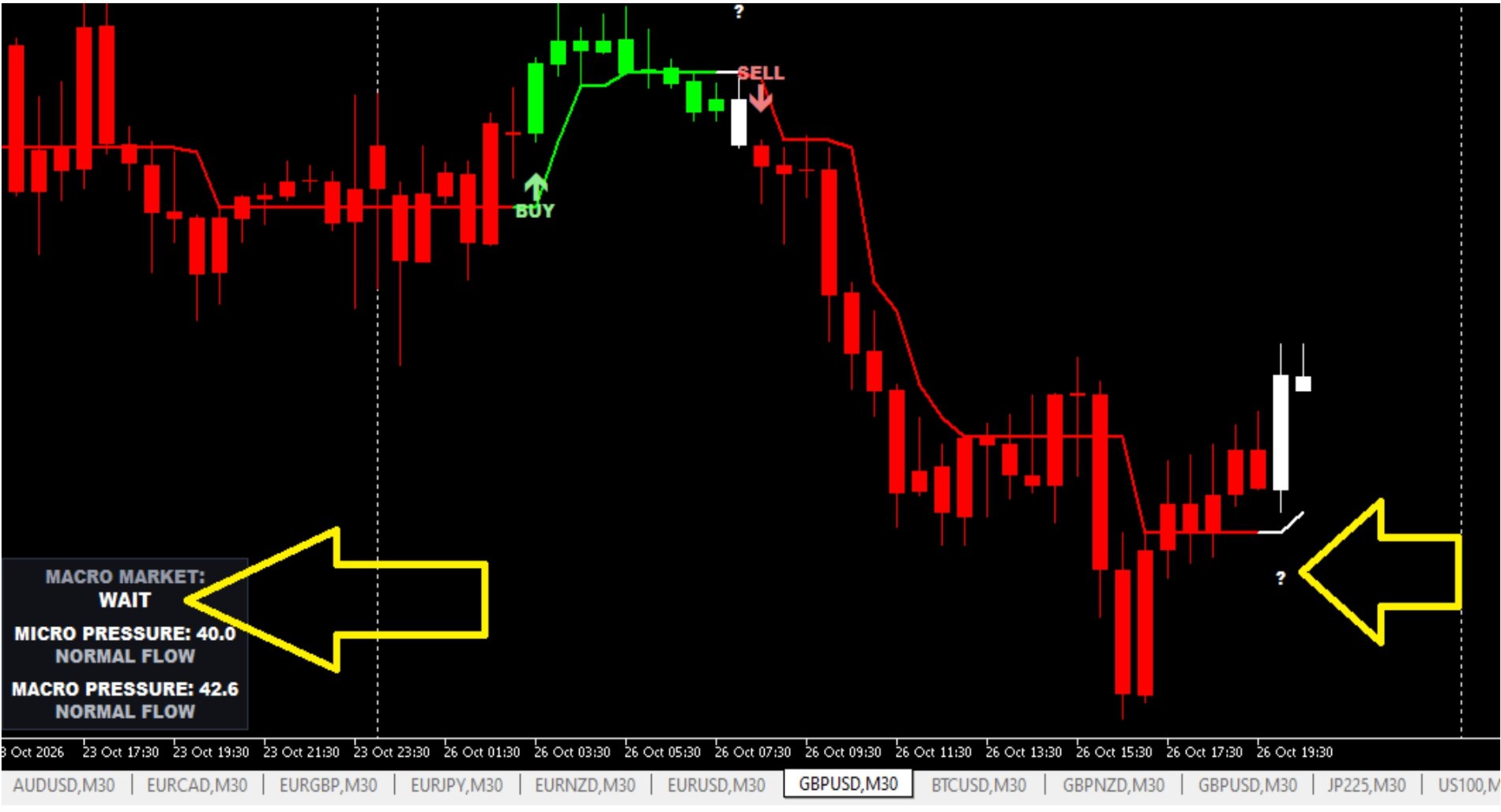
Visual: The Dashboard displays WAIT (White), while the line and candles turn White, with a question mark (?) indicating uncertainty.
-
Scenario: A ranging market, a lack of institutional consensus, or a potentially dangerous transition phase.
-
Practical Filtering Example: If you are on the M30 chart and the price generates a BUY signal (with a sound alert and a pop-up on the screen displaying -- BUY SIGNAL --), but the Dashboard indicates SELL / SHORT from a macro perspective (MACRO MARKET:) or displays WAIT, you have information indicating that the buy trade goes against the broader market flow. The risk of being stopped out is significantly higher in this situation. The final decision to enter a trade or wait for confluence alignment remains up to your trading plan.
4. Exhaustion Parameters (MICRO PRESSURE and MACRO PRESSURE)
The Dashboard monitors long-cycle oscillators with fixed settings to identify the actual strength and remaining momentum of major market participants:
-
MICRO PRESSURE: Measures the immediate intensity of the intraday cycle.
-
MACRO PRESSURE: Measures the structure and strength of the trend over one or more days.
Pressure Levels and Numerical Readings
· NORMAL FLOW (Light Gray): Price has sufficient momentum and room to continue moving in the direction of the prevailing trend.
· OVERBOUGHT (Orange): Extreme extension alert. Entering a buy trade in this zone carries an elevated risk of a sharp correction. If you are already in a buy position, pay extra attention to signs of institutional profit-taking.
· OVERSOLD (Orange): Selling exhaustion alert. Selling in this zone increases the likelihood of absorption and countertrend rebounds against your position.
· STRENGTH DYNAMICS AT THE EXTREMES (Critical Point to Watch): Being in an OVERBOUGHT or OVERSOLD zone does not constitute automatic confirmation of a reversal, pause, or immediate correction. In highly directional trends with strong conviction (strong institutional momentum), buying pressure may continue to increase even in extreme overbought conditions, or selling pressure may persist even in deeply oversold conditions, keeping prices under pressure in these zones for extended periods. These markings must be treated strictly as warning zones. The trader must assess the asset's real-time behavior, candle structure, and evolving market flow to decide whether to adjust the trailing stop, take partial profits, or close the position according to their trading plan.
· QUANTITATIVE NUMERICAL SCALE (MICRO PRESSURE and MACRO PRESSURE): The decimal value displayed immediately after each pressure reading measures the saturation level on a scale strictly ranging from 0.0 to 100.0. The closer the value is to 0, the deeper and more intense the oversold condition; the closer it is to 100, the greater the exhaustion and intensity of the overbought condition.
5. Stop Management and Take-Profit Execution
-
Technical Stop Loss: MAXXI does not plot fixed stop-loss lines because each trader operates with a different risk tolerance. The ideal technical method is to place protection behind the previous market structure — below significant swing lows for buy trades and above significant swing highs for sell trades — or to use the line plotted on the chart as a moving stop/trailing stop.
-
Trade Management and Take Profit:
-
Scalpers / Day Traders: Can manage the trade while MICRO PRESSURE remains in NORMAL FLOW. When it reaches OVERBOUGHT or OVERSOLD, consider closing the trade or protecting the position at breakeven.
-
Swing Traders: Can pursue longer targets by monitoring MACRO PRESSURE, while remaining aware that the market experiences pullbacks, pauses, and temporary corrections on lower timeframes before reaching its main objective.
-
Quick Checklist Before Clicking:
-
Has a signal and arrow appeared on the chart?
-
Is the Dashboard percentage above 57% (ideally above 75%)?
-
Are the chart and Dashboard colors aligned (Green with Green / Red with Red)?
-
Most importantly, does the technical Stop Loss fit your financial risk management plan? If all points are positive, the trade has a higher probability of success in your favor.
Visual Customization and Alert Settings
· Plot Color Customization: All candle, trend-line, and arrow colors can be adjusted directly under the Colors tab in the indicator properties. Traders have complete freedom to choose the color palette that best suits their visual preferences.
· Recommended Contrast and Background: The default confluence palette (shades of lime green, light green, strong red, light red, orange, and white) was specifically designed and calibrated to provide superior contrast and clarity on black chart backgrounds (Dark Mode). The indicator also works fully on light backgrounds; however, a dark background reduces visual fatigue and makes changes in candle and Dashboard states easier to identify.
· Sound Alerts and Visual Notifications: Under the Inputs tab, you can independently enable or disable the following settings:
o alertsMessage (True/False): Controls whether the on-screen pop-up window (-- BUY SIGNAL -- / -- SELL SIGNAL --) appears at the exact moment a validated signal is confirmed.
o alertsSound (True/False): Turns the sound alert associated with the signal on or off.