Magic Analytics
- Experts
-
Sandip R Pawar
 Professional software developer since 2007 turned full-time algorithmic trader. Specializing in custom automated infrastructure, data-driven market strategies, and precision execution across derivatives, XAUUSD, and crypto.
 - Version: 1.0
Author: Sandip R. Pawar
Version: 1.00
Platform: MetaTrader 5 (MQL5)
Category: Utilities / Trade Analytics / Portfolio Management
License: 100% Free Utility
📌 Executive Summary & Overview
When running multiple automated Expert Advisors (EAs) or executing discretionary strategies simultaneously, the biggest challenge traders face is tracking which specific Magic Number is driving profits and which one is accumulating drawdowns. Default MetaTrader 5 terminal toolboxes blend all open and closed trades together, making it nearly impossible to evaluate individual strategy performance during a live trading session.
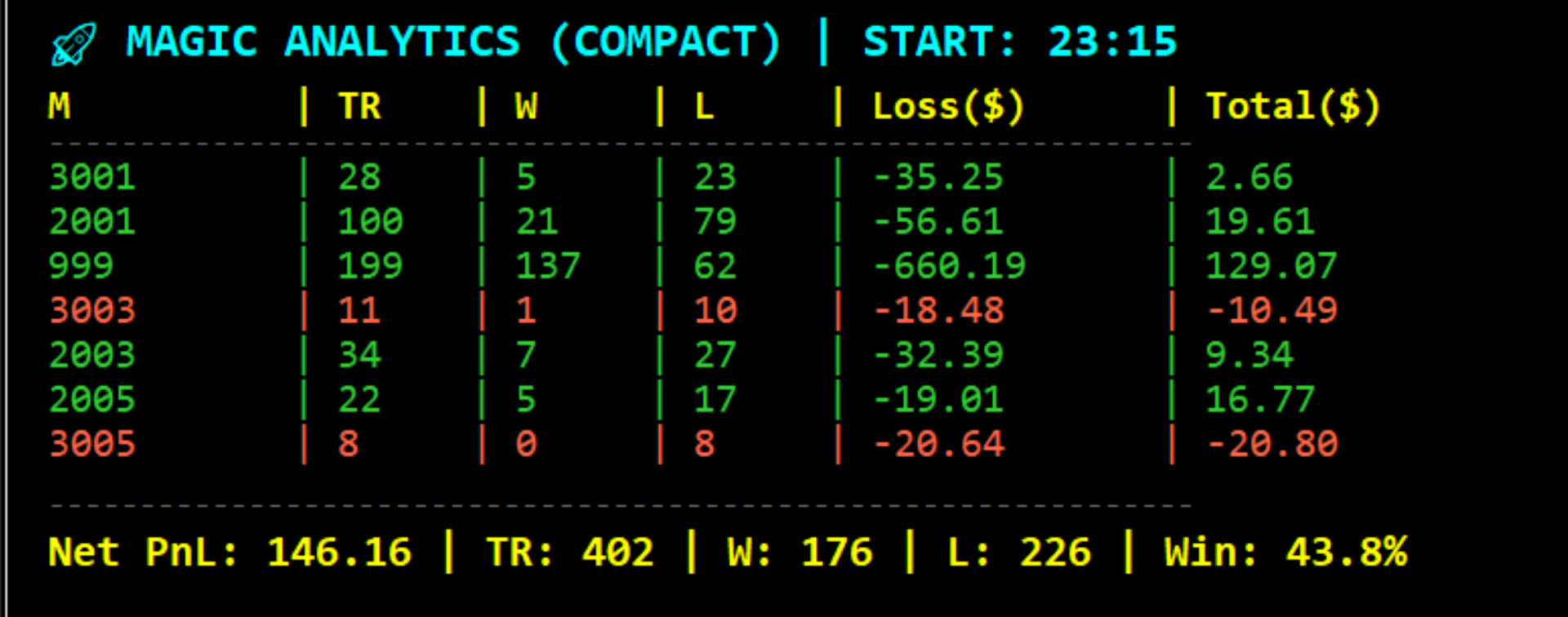
MAGIC ANALYTICS PRO EA (v1.0) is an ultra-lightweight, Object-Oriented Programming (OOP) analytics engine designed to monitor every active Magic Number (along with manual trades tagged under Magic: 0 ) in real time. Its Compact 7-Column Edition is specifically optimized for smaller screens, VPS environments, and multi-chart layouts, maintaining a completely clutter-free chart while displaying essential institutional metrics.
100% Free & Safe Utility: This tool is completely free for the trading community. On live and demo accounts, it functions strictly as a 100% Read-Only Analytics Dashboard, ensuring it never interferes with your running trades or execution logic.
✨ Key Highlights & Core Features
-
⚡ Real-Time Event-Driven Tracking ( OnTradeTransaction ): Unlike resource-heavy indicators that scan the entire account history on every tick, this EA leverages MT5's native TRADE_TRANSACTION_DEAL_ADD event. Performance metrics update within microseconds the moment a deal is executed or closed.
-
🎯 Strict Session-Anchored Analytics: Attaching or resetting the EA on the chart establishes a fresh Session Anchor ( START time). This filters out historical clutter, giving you a crystal-clear view of your current trading session's live performance.
-
🖥️ Compact 7-Column UI (Optimized for VPS & Laptops): By omitting redundant columns, it presents a clean, monospace-aligned 7-column layout (M | TR | W | L | Loss($) | Total($) | Win % ), while continuously calculating live floating PnL in the background for accurate Total($) figures.
-
💸 Dedicated Realized Loss Tracking ( Loss($) Column): Essential for effective risk management! The dedicated loss column highlights the total realized monetary loss incurred by each Magic Number during the session, allowing you to instantly identify underperforming strategies.
-
🏦 True Net PnL Accuracy (Swap + Commission + Entry Deals): Many brokers charge commissions upon opening (DEAL_ENTRY_IN ). The built-in CPerformanceEngine accurately accounts for entry/exit commissions and swaps, while strictly evaluating Win/Loss counts on closing (DEAL_ENTRY_OUT and DEAL_ENTRY_INOUT ) deals.
-
🧱 Pure Object-Oriented Architecture (OOP): Built using clean, decoupled class structures (CPerformanceEngine and CVisualRenderer ) to ensure zero memory leaks and minimal CPU usage.
📊 Dashboard Columns Breakdown (7-Column Compact Layout)
The dashboard renders a dedicated row for each active Magic Number, topped with a header and concluded with a grand summary footer:
| Column Header | Metric Name | Detailed Description |
| M | Magic ID | The unique Magic Number identifier of the Expert Advisor (Manual trades are marked as 0 ). |
| TR | Total Trades | Total closed trades ( OUT / INOUT ) processed by the Magic Number during the session. |
| W | Wins | Number of trades closed with a net profit ( >= 0 ). |
| L | Losses | Number of trades closed with a net loss ( < 0 ). |
| Loss($) | Realized Loss | The total cumulative realized loss amount (in account currency) for losing trades under that Magic ID. |
| Total($) | True Net PnL | Realized closed PnL plus live floating PnL (factoring in commissions and swaps). |
| Win % | Win Rate | Realized accuracy percentage calculated as (Wins / Total Trades) * 100 . |
Grand Summary Footer ( SUM_TOTAL ):
Located at the bottom of the panel, this footer aggregates the entire session's performance into a single line: Net PnL | TR | W | L | Win % . It automatically highlights in Yellow for net profits and Tomato Red for net losses.
🧠 Under the Hood: Advanced OOP Architecture
Engineered to professional MQL5 development standards, the source code is divided into three modular components:
-
SMagicData Data Model: A lightweight struct storing closed PnL, hidden floating PnL, wins, losses, total trades, win rate, and cumulative losses per Magic ID.
-
CPerformanceEngine (Calculation & Deal Processor):
-
FindOrCreateMagic(long magic) : Automatically detects and registers new Magic Numbers on the fly using dynamic array resizing.
-
CaptureDeal() : Filters incoming deal streams after the session anchor, factoring in commissions, swaps, and net profits.
-
RefreshFloating() : Scans active open positions to keep floating exposures updated in the background.
-
-
CVisualRenderer (Clean Chart UI Engine):
-
Utilizes Consolas monospace alignment and dynamic row height calculation (145 + (total_magics * 22) ) to scale smoothly whether tracking 1 or 20 active strategies.
-
Ensures secure cleanup of chart graphical objects and dynamic pointers (delete CoreEngine , delete VisualEngine ) upon deinitialization.
-
⚙️ Input Parameters Guide
Customize the appearance and behavior of your dashboard directly from the MT5 input dialog:
| Parameter Group | Input Variable | Default Value | Function / Description |
| Visual Configuration | InpTableX | 20 | Horizontal distance (X-Offset) from the top-left chart corner. |
| Visual Configuration | InpTableY | 40 | Vertical distance (Y-Offset) from the top-left chart corner. |
| Visual Configuration | InpPanelBG | clrBlack | Background color of the main dashboard panel. |
| Visual Configuration | InpBorderColor | clrSlateGray | Border color surrounding the panel frame. |
| Visual Configuration | InpOpacity | 225 | Panel transparency level (0–255). |
| Typography & Theme | InpColorHeader | clrCyan | Text color for the main title ( MAGIC ANALYTICS ) and session start time. |
| Typography & Theme | InpColorSub | clrYellow | Text color for column headers ( M, TR, W, L... ). |
| Typography & Theme | InpColorProfit | clrLimeGreen | Color theme for profitable rows ( Total >= 0 ). |
| Typography & Theme | InpColorLoss | clrTomato | Color theme for losing rows ( Total < 0 ). |
| Typography & Theme | InpFontSize | 10 | Font size for data rows and headers. |
| Typography & Theme | InpFontName | "Consolas" | Monospace font ensuring perfect column alignment. |
| Analytics Settings | InpRefreshRate | 1 | Timer interval (in seconds) for UI and floating PnL updates. |
| Analytics Settings | InpIncludeSwap | true | Set to true to factor overnight swap charges into the net PnL. |
| Analytics Settings | InpIncludeComm | true | Set to true to factor broker commissions into the net PnL. |
🛠️ How to Install & Use (Step-by-Step)
-
Open a clean chart window (any symbol or timeframe) in your MetaTrader 5 terminal.
-
In the Navigator window (Ctrl+N ), locate Expert Advisors, and drag-and-drop Magic Analytics Pro EA onto the chart.
-
In the EA properties window, go to the Common tab and check "Allow Algo Trading" to enable timers and event handlers, then click OK.
-
Zero Configuration Needed: You do not need to manually input EA Magic Numbers. As soon as your strategies open or close trades, the dashboard automatically detects and registers each Magic ID in real time.
💡 Strategy Tester Note: When running this EA in the MT5 Visual Strategy Tester, it automatically simulates sample test trades ( Magic 1001 & Magic 1002 ) to demonstrate real-time tracking even when live markets are closed. On standard Live and Demo charts, it operates strictly as a read-only analytics tool and never places orders.
👨💻 Author & Support
Crafted with precision by Sandip R. Pawar.
If you find this free utility valuable for your algorithmic trading setup, please consider leaving a 5-star review / rating and sharing it with fellow traders! Drop your feedback or questions in the comments below.