HedgingEA v7
- Experts
- Zuhdan Mohammad Ubay
- Version: 2.10
- Activations: 5
HedgingEA v2 — Zero-Loss Hedging Robot for XAUUSD & Forex
Trade smarter. Lose less. Let the hedge do the work.
━━━━━━━━━━━━━━━━━━━━━━━━━━━━━━━━━━━━━━
WHAT IS HEDGINGEA V2?
━━━━━━━━━━━━━━━━━━━━━━━━━━━━━━━━━━━━━━
HedgingEA v2 is a fully automated Expert Advisor built on a simple but powerful concept: every trade cycle ends in either a profit or breakeven — never a random loss.
The robot opens one trade in the direction of the current trend. From that point, only two outcomes are possible:
• Price reaches the Take Profit → you WIN
• Price moves against you → a hedge trade opens automatically, locking the position so the net result is approximately zero pips
No martingale. No grid. No averaging down. Just clean, controlled two-trade cycles.
━━━━━━━━━━━━━━━━━━━━━━━━━━━━━━━━━━━━━━
HOW IT WORKS
━━━━━━━━━━━━━━━━━━━━━━━━━━━━━━━━━━━━━━
Step 1 — Entry
The EA reads the EMA trend filter on H1 and only opens trades in the direction of the current trend. If the market is choppy or sideways, the EA waits. No trade is better than a bad trade.
Step 2 — Take Profit scenario
If price moves in your favour by the configured TP distance, the trade closes for a full profit. Cycle complete.
Step 3 — Hedge scenario
If price moves against Trade 1 by the hedge distance, a second trade opens in the opposite direction. The Stop Loss on Trade 1 is simultaneously updated so that when both trades close, the combined result is near zero — only spread and commission are consumed.
Step 4 — Cycle reset
Once both trades are closed, the EA resets and waits for the next valid trend signal.
━━━━━━━━━━━━━━━━━━━━━━━━━━━━━━━━━━━━━━
KEY FEATURES
━━━━━━━━━━━━━━━━━━━━━━━━━━━━━━━━━━━━━━
✔ Zero-loss hedging logic
Worst case outcome is breakeven minus commission — not a large drawdown.
✔ EMA trend filter
Trades only in the direction of the H1 trend using EMA 20/50. Skips choppy sideways markets automatically.
✔ Spread guard
Skips entry if the current spread is too wide (news events, market open).
✔ Daily cycle limit
Configurable maximum trades per day prevents overtrading and commission bleed.
✔ Cycle cooldown
Mandatory rest period between cycles avoids re-entering immediately after a hedge.
✔ Break Even
Moves Stop Loss to entry once trade reaches a configurable profit level.
✔ Session filter
Restricts trading to the London–New York window (08:00–20:00) for best liquidity and tightest spreads.
✔ Works on all symbols
Optimised for XAUUSD but compatible with any forex pair.
✔ Works on all timeframes
Recommended M30 or H1.
✔ Auto-resume on restart
If the EA or terminal is restarted mid-cycle, it detects existing positions and continues managing them automatically.
✔ Full parameter control
Every setting is adjustable from the input panel — nothing is hardcoded.
━━━━━━━━━━━━━━━━━━━━━━━━━━━━━━━━━━━━━━
RECOMMENDED SETTINGS — XAUUSD M30
━━━━━━━━━━━━━━━━━━━━━━━━━━━━━━━━━━━━━━
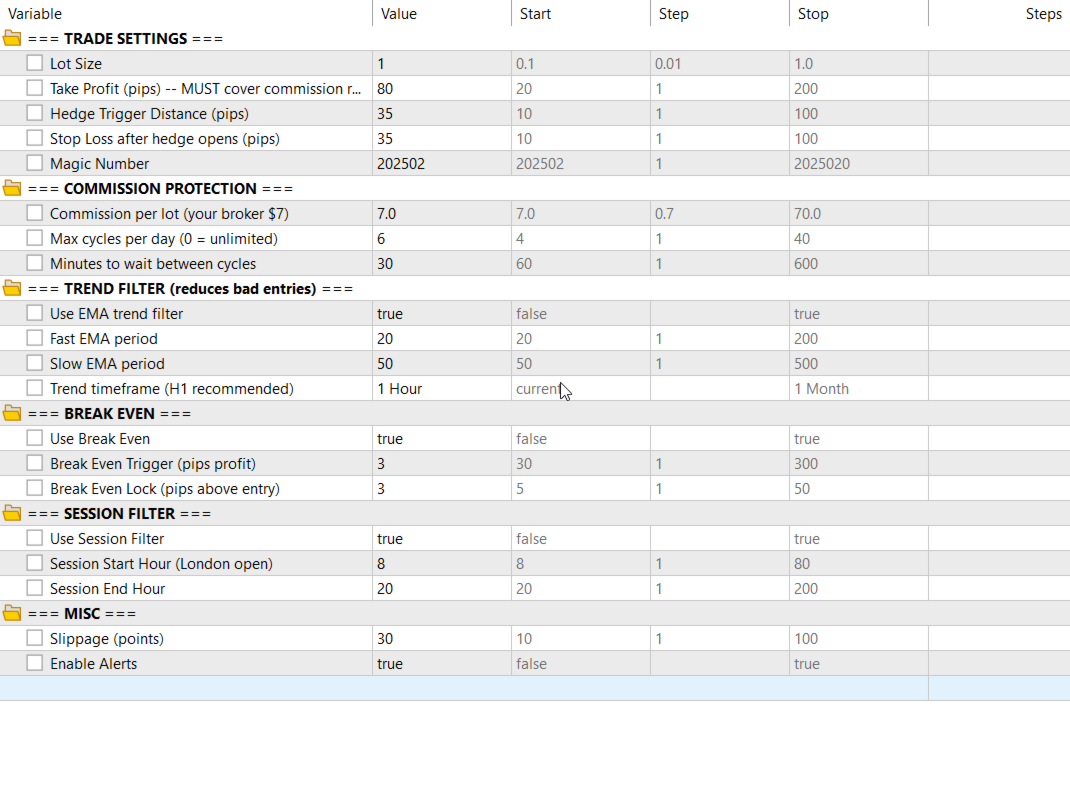
Lot Size : 0.01 (start small on demo)
Take Profit : 80 pips
Hedge Distance : 35 pips
Stop Loss : 35 pips
Max Cycles/Day : 6
Cooldown : 30 min
Session : 08:00 – 20:00 server time
━━━━━━━━━━━━━━━━━━━━━━━━━━━━━━━━━━━━━━
INPUT PARAMETERS
━━━━━━━━━━━━━━━━━━━━━━━━━━━━━━━━━━━━━━
── TRADE SETTINGS ──
InpLotSize
Lot size for both Trade 1 and the hedge trade.
Default: 0.01
InpTP_Pips
Take Profit distance in pips.
Default: 80
InpHedgeDist_Pips
Distance price must move against Trade 1 before the hedge opens.
Default: 35
InpSL_Pips
Stop Loss distance applied to both trades once the hedge is open.
Default: 35
InpMagicNumber
Unique identifier for this EA's trades. Change if running multiple EAs.
Default: 202502
── COMMISSION PROTECTION ──
InpCommissionPerLot
Your broker's commission per lot (used for profitability check in logs).
Default: 7.0
InpMaxCyclesPerDay
Maximum number of trade cycles per day. Set to 0 for unlimited.
Default: 6
InpCycleCooldownMins
Minutes to wait after a cycle closes before opening the next one.
Default: 30
── TREND FILTER ──
InpUseTrendFilter
Enable or disable the EMA trend filter.
Default: true (recommended)
InpEMA_Fast
Fast EMA period.
Default: 20
InpEMA_Slow
Slow EMA period.
Default: 50
InpTrendTF
Timeframe used for trend detection.
Default: H1 (recommended)
── BREAK EVEN ──
InpUseBreakEven
Enable or disable the Break Even function.
Default: true
InpBE_TriggerPips
Profit in pips required before Break Even activates.
Default: 30
InpBE_LockPips
Pips above entry where the SL is locked once Break Even triggers.
Default: 5
── SESSION FILTER ──
InpUseSessionFilter
Enable or disable the session time filter.
Default: true
InpSessionStartHour
Hour (server time) to start trading.
Default: 8
InpSessionEndHour
Hour (server time) to stop opening new trades.
Default: 20
── MISC ──
InpSlippage
Maximum allowed slippage in points.
Default: 30
InpEnableAlerts
Enable or disable popup alerts for trade events.
Default: true
━━━━━━━━━━━━━━━━━━━━━━━━━━━━━━━━━━━━━━
IMPORTANT NOTES
━━━━━━━━━━━━━━━━━━━━━━━━━━━━━━━━━━━━━━
• This EA requires a broker that allows hedging (two simultaneous opposite positions on the same symbol). Enable "Allow hedging" in your MT5 account settings.
• Always test on a demo account first for at least one week before going live.
• Avoid running during high-impact news events (NFP, CPI, Fed announcements). Use the session filter or pause the EA manually.
• The DEMO version of this EA is locked to demo accounts only and will refuse to load on live accounts.
━━━━━━━━━━━━━━━━━━━━━━━━━━━━━━━━━━━━━━
HedgingEA v2 — Protect your capital. Ride the trend. Keep the commission low.