Graphical Orders Manager
60 USD
Demo downloaded:
360
Published:
5 January 2016
Current version:
3.9
Didn't find a suitable robot?
Order your own one
on Freelance
Go to Freelance
Order your own one
on Freelance
How to buy а trading robot or an indicator
Run your EA on
virtual hosting
virtual hosting
Test аn indicator/trading robot before buying
Want to earn in the Market?
How to present a product for a sell-through
Version 3.9
2024.12.25
Added the "Count pending orders" button to the main panel for quick switching.
Version 3.8
2021.11.17
Compilator upgrade.
Version 3.7
2018.09.16
Some bug fixes.
Version 3.6
2017.01.09
Added the trailing function for target lines. The function is activated by the button on the panel. Two buttons, one for each line.
Once the corresponding option is activated, the target line becomes inaccessible for manual movement, and it will follow the price at the distance set at the time the function had been activated.
When this function is disabled, the target levels become movable again.
The trailing is deactivated 10 minutes after the application closes.
Once the corresponding option is activated, the target line becomes inaccessible for manual movement, and it will follow the price at the distance set at the time the function had been activated.
When this function is disabled, the target levels become movable again.
The trailing is deactivated 10 minutes after the application closes.
Version 3.5
2016.10.18
+ Revised the function for displaying orders. When calling the utility, it is always inactive. When activated, it iterates over history (the number of orders is set in the parameters) and draws the closed orders on the chart. Then it displays and redraws the current open orders in real time. When the function of the utility is disabled, the displayed orders are cleared from the chart.
+ Corrected the operation of order calculation per 1000 deposit. The check for the minimum and maximum lot size is disabled for entering a multiplier. But the check remains in the button for opening orders.
+ Corrected the operation of order calculation per 1000 deposit. The check for the minimum and maximum lot size is disabled for entering a multiplier. But the check remains in the button for opening orders.
Version 3.4
2016.09.20
Added the function for transferring the TP and SL of all orders to the target lines. The transferring is performed for all orders of the instrument (if the Magic Number is not set) with separate buttons for TP and SL. The correctness is checked when transferring levels.
If the new level does not meet the requirements for the transfer, then it will be placed at the distance of double spread from the price.
If the new level does not meet the requirements for the transfer, then it will be placed at the distance of double spread from the price.
Version 3.3
2016.06.08
+ Added the option of setting the TakeProfit and StopLoss levels by target lines. When the function is active, the stops will be placed at the current location of the target levels (but not closer than double spread). In order to move the lines but not the stop levels, it is necessary to "grab" the line with a small offset. Otherwise it will move the stop level itself.
+ Added the function of placing a hedging pending order. When the function is active and the offset for a hedging order is set, then if a new trade is opened, an opposite pending stop order will be placed automatically. The offset can not be set less than double spread. The pending order will be placed without the TakeProfit and StopLoss levels.
If there are any errors in the program operation or any suggestions on improvement, then please contact me via the private messages or the comments section.
+ Added the function of placing a hedging pending order. When the function is active and the offset for a hedging order is set, then if a new trade is opened, an opposite pending stop order will be placed automatically. The offset can not be set less than double spread. The pending order will be placed without the TakeProfit and StopLoss levels.
If there are any errors in the program operation or any suggestions on improvement, then please contact me via the private messages or the comments section.
Version 3.2
2016.02.12
- Fixed the zero division error during the lot calculation by the risk and zero value of the StopLoss.
- Fixed the calculation of the current profit. Now even with the pending orders accounting enabled the actual current profit is calculated by the actually opened orders.
- Started the formation of the info panel. Currently only the minimum deposit per 1 lot is displayed. The suggestions on the content of the panel are welcome.
- Fixed the calculation of the current profit. Now even with the pending orders accounting enabled the actual current profit is calculated by the actually opened orders.
- Started the formation of the info panel. Currently only the minimum deposit per 1 lot is displayed. The suggestions on the content of the panel are welcome.
Version 3.1
2016.02.11
- Added accounting of pending orders. The option can be enabled and disabled from the Manager settings. As the MetaTrader opens pending orders with Magic=0, the option only works with the zero value of the Magic in the program.
- Added button to delete all pending orders of the instrument. The situation with Magic is identical - only works with the value set to Magic=0.
- Fixed a typo.
- Fixed lot calculation per 1000 of the deposit.
- StopLoss/TakeProfit can not be placed closer than the double spread. If a lower value is set in the settings, the level will be extended automatically to avoid errors.
- Almost all the settings have been transferred to the manager. Comments will be left in the external settings, since global variables do not store string values.
- Removed the preset indent for the initial placement of the lines, as it happens only once. Later the levels are taken from the stored values.
- Added button to delete all pending orders of the instrument. The situation with Magic is identical - only works with the value set to Magic=0.
- Fixed a typo.
- Fixed lot calculation per 1000 of the deposit.
- StopLoss/TakeProfit can not be placed closer than the double spread. If a lower value is set in the settings, the level will be extended automatically to avoid errors.
- Almost all the settings have been transferred to the manager. Comments will be left in the external settings, since global variables do not store string values.
- Removed the preset indent for the initial placement of the lines, as it happens only once. Later the levels are taken from the stored values.
Version 3.0
2016.02.03
- The trading panel is almost complete. Most of the planned functions work. All panels can be moved. Position of the panels is saved.
- Settings are saved separately for each symbol. It allows to restart the terminal and switch timeframes without loss of control. If the manager does not operate for 10 minutes, then the automatic trade closure is disabled. This is done for the safety of orders, the price of which went beyond the line while the terminal was not working.
- If there are no trades, then the target lines can not be placed closer than the double spread to the price. This is done for the safety of opening orders.
- The orders are not closed while the left mouse button is pressed. This is for safe moving of the target lines.
- Introduced the operation using the MagicNumber. If the value greater than 0 is specified in the settings, the manager will work only with its own orders: calculate and close. At the value 0 - every order of the symbol is considered.
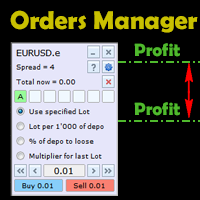
- Implemented a fully functional trading panel with lot calculation. Four calculation modes: lot specified in the settings, lot per 1000 units of the deposit, lot based on risk using the Stop Loss (the target lines are used), increase of the maximum open lot by the specified multiplier. The trades will be opened with the Magic, StopLoss/TakeProfit and the comment specified in the settings.
- Added the function to quickly clear the chart of all graphical objects.
- Part of the setting have been moved to the manager, and they can now be configured without restarting the system. The list of flexible parameters will expand.
Features planned to be added:
- Deletion of the pending orders
- Ability to perform calculations with consideration of pending orders
- Additional pending order placement mode
- Setting SL/TP by target levels
- Additional information panel
- Settings are saved separately for each symbol. It allows to restart the terminal and switch timeframes without loss of control. If the manager does not operate for 10 minutes, then the automatic trade closure is disabled. This is done for the safety of orders, the price of which went beyond the line while the terminal was not working.
- If there are no trades, then the target lines can not be placed closer than the double spread to the price. This is done for the safety of opening orders.
- The orders are not closed while the left mouse button is pressed. This is for safe moving of the target lines.
- Introduced the operation using the MagicNumber. If the value greater than 0 is specified in the settings, the manager will work only with its own orders: calculate and close. At the value 0 - every order of the symbol is considered.
- Implemented a fully functional trading panel with lot calculation. Four calculation modes: lot specified in the settings, lot per 1000 units of the deposit, lot based on risk using the Stop Loss (the target lines are used), increase of the maximum open lot by the specified multiplier. The trades will be opened with the Magic, StopLoss/TakeProfit and the comment specified in the settings.
- Added the function to quickly clear the chart of all graphical objects.
- Part of the setting have been moved to the manager, and they can now be configured without restarting the system. The list of flexible parameters will expand.
Features planned to be added:
- Deletion of the pending orders
- Ability to perform calculations with consideration of pending orders
- Additional pending order placement mode
- Setting SL/TP by target levels
- Additional information panel
Version 2.0
2016.02.02
- The code completely reworked. Set a regular timer instead of an infinite loop.
- The levels are always displayed. If there are no trades - the amount of points from the current price is displayed. (In future it will be used in lot calculation by the specified risk).
- Added a movable control panel. Currently it only shows the symbol name and the current spread. The panel can be collapsed into a compact form. You can remove the manager using the close button on the panel.
In the future, the functionality of the panel will be significantly expanded. The functionality suggestions and bug reports are welcome.
- The levels are always displayed. If there are no trades - the amount of points from the current price is displayed. (In future it will be used in lot calculation by the specified risk).
- Added a movable control panel. Currently it only shows the symbol name and the current spread. The panel can be collapsed into a compact form. You can remove the manager using the close button on the panel.
In the future, the functionality of the panel will be significantly expanded. The functionality suggestions and bug reports are welcome.
Version 1.4
2016.01.27
- Reduced the number of settings.
- Added a configurable pause for the spread recalculation. This was done to avoid frequent changes of the total results for the Sell orders. The pause is specified as the number of cycles of the program iteration. If needed, the value can be set to 1, and the spread will be constantly recalculated.
- The entire program is now in an infinite loop. Before, the cycle only started when orders opened and finished once there were no orders. Now the cycle is infinite and it starts once the first tick arrives, but when there are no orders present, the pause is doubled. The infinite loop is necessary for the implementation of the upcoming features.
- Performed general optimization of the code.
- Added a configurable pause for the spread recalculation. This was done to avoid frequent changes of the total results for the Sell orders. The pause is specified as the number of cycles of the program iteration. If needed, the value can be set to 1, and the spread will be constantly recalculated.
- The entire program is now in an infinite loop. Before, the cycle only started when orders opened and finished once there were no orders. Now the cycle is infinite and it starts once the first tick arrives, but when there are no orders present, the pause is doubled. The infinite loop is necessary for the implementation of the upcoming features.
- Performed general optimization of the code.
Version 1.3
2016.01.12
Added accounting for commissions and swaps in the calculation of total income.
Added options for the calculation of profit for CFD and Futures (calculation method is determined automatically).
Please report about bugs in the program.
Added options for the calculation of profit for CFD and Futures (calculation method is determined automatically).
Please report about bugs in the program.
Version 1.2
2016.01.06
Version 1.2 now has an option to display trades on the chart, which were closed using the manager.
A new settings item:
Show closed orders - show closed trades on the chart
- true - enabled
- false - disabled
A new settings item:
Show closed orders - show closed trades on the chart
- true - enabled
- false - disabled

You are missing trading opportunities:
- Free trading apps
- Over 8,000 signals for copying
- Economic news for exploring financial markets
Registration
Log in
You agree to website policy and terms of use
If you do not have an account, please register