TheMegathronbuttons
60 USD
Demo downloaded:
3
Published:
11 April 2025
Current version:
2.3
Didn't find a suitable robot?
Order your own one
on Freelance
Go to Freelance
Order your own one
on Freelance
How to buy а trading robot or an indicator
Run your EA on
virtual hosting
virtual hosting
Test аn indicator/trading robot before buying
Want to earn in the Market?
How to present a product for a sell-through
Version 2.3
2026.03.30
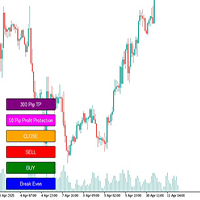
TheMegathron Trader Pro is a manual trading utility panel for MetaTrader 5. It provides one-click execution of common trading actions directly from the chart, designed to minimize reaction time and eliminate input errors during live trading sessions.
This is a significant upgrade from the original Megathron Buttons EA. In addition to the core Buy, Sell, Close, and Break Even functionality, version 2 introduces a complete suite of position management tools.
New in Version 2:
Dollar-based stop loss system. Instead of setting stop loss in pips, you now define your maximum risk in dollars. The EA calculates the correct stop loss distance based on your lot size and the instrument's tick value. Quick buttons for $3, $5, and $10 risk levels are available.
Auto stop loss on entry. When AutoSetStopLoss is enabled, every new position is automatically assigned a stop loss at the moment of opening — no manual adjustment needed.
Partial close buttons. Close 50% or 75% of an open position with a single click, allowing you to lock in partial profits while keeping the trade running.
Reverse button. Closes all current positions and immediately opens the opposite direction with the same lot size.
SL and TP fine adjustment. Increase or decrease the stop loss by $1 increments, or adjust the take profit by 10-pip increments, without reopening the settings panel.
Exit at Entry button. For losing positions, sets the take profit to the entry price — allowing the position to recover to breakeven before closing automatically.
Risk-based lot calculation. Switch between fixed lot size and percentage-based risk calculation at any time from the inputs.
Multiple positions. Open multiple positions simultaneously with a single click by setting the NumberOfPositions parameter.
Keyboard shortcuts. B = Buy, S = Sell, C = Close All, E = Break Even, ESC = Emergency Close.
Recommended Use:
Attach to any chart. Works on all symbols and timeframes.
Set MagicNumber to identify this panel's positions.
Configure button position with XCoord and YCoord.
Test on a demo account before live use.
Risk Disclosure: This is a trade execution utility only. It does not provide signals or analysis. All trading decisions remain the responsibility of the user.
This is a significant upgrade from the original Megathron Buttons EA. In addition to the core Buy, Sell, Close, and Break Even functionality, version 2 introduces a complete suite of position management tools.
New in Version 2:
Dollar-based stop loss system. Instead of setting stop loss in pips, you now define your maximum risk in dollars. The EA calculates the correct stop loss distance based on your lot size and the instrument's tick value. Quick buttons for $3, $5, and $10 risk levels are available.
Auto stop loss on entry. When AutoSetStopLoss is enabled, every new position is automatically assigned a stop loss at the moment of opening — no manual adjustment needed.
Partial close buttons. Close 50% or 75% of an open position with a single click, allowing you to lock in partial profits while keeping the trade running.
Reverse button. Closes all current positions and immediately opens the opposite direction with the same lot size.
SL and TP fine adjustment. Increase or decrease the stop loss by $1 increments, or adjust the take profit by 10-pip increments, without reopening the settings panel.
Exit at Entry button. For losing positions, sets the take profit to the entry price — allowing the position to recover to breakeven before closing automatically.
Risk-based lot calculation. Switch between fixed lot size and percentage-based risk calculation at any time from the inputs.
Multiple positions. Open multiple positions simultaneously with a single click by setting the NumberOfPositions parameter.
Keyboard shortcuts. B = Buy, S = Sell, C = Close All, E = Break Even, ESC = Emergency Close.
Recommended Use:
Attach to any chart. Works on all symbols and timeframes.
Set MagicNumber to identify this panel's positions.
Configure button position with XCoord and YCoord.
Test on a demo account before live use.
Risk Disclosure: This is a trade execution utility only. It does not provide signals or analysis. All trading decisions remain the responsibility of the user.

You are missing trading opportunities:
- Free trading apps
- Over 8,000 signals for copying
- Economic news for exploring financial markets
Registration
Log in
You agree to website policy and terms of use
If you do not have an account, please register