Dragan Joksimovic / 个人资料
- 信息
|
不
经验
|
17
产品
|
3
演示版
|
|
0
工作
|
0
信号
|
0
订阅者
|
I develop and test Expert Advisors, indicators and trading utilities for MetaTrader 4 and MetaTrader 5 based on clearly defined trading rules.
My work includes:
• Expert Advisors for MT4 and MT5
• Custom indicators
• Multi-timeframe strategies
• Entry and exit logic
• Stop Loss, Take Profit, Break Even and Trailing Stop
• EMA, RSI and price-action systems
• Trading session and spread filters
• EA modification, debugging and testing
I focus on clear trading logic, configurable parameters and careful testing before delivery.
H4 CONTAINER MTF BOXES (MetaTrader 5) | //| | //| One H4 container box holds every H1, M30, M15, M5 and M1 box | //| that falls inside it
- Platform / type: MetaTrader 5 / Expert Advisor
- Category: Trend (secondary tags if offered: Multi-timeframe, Channels)
- Price: 49 USD, no rent
- Activations: 5 (Market minimum; raise to 10 if you want to be generous — it cannot be lowered later)
MTF Trend Channel EA trades pullbacks to the middle line of a higher-timeframe trend channel. The channel is built on a higher timeframe of your choice (H1 by default): the middle line is a moving average, the upper and lower lines are the moving average plus and minus the Average True Range. The slope of the moving average on the last closed bars gives the trend direction. The Expert Advisor calculates the channel itself, so no additional indicator is needed, and it draws the channel on the
And a shorter one-line version:
Indicator displaying a higher-timeframe MA on the current chart, with an ATR channel and line color indicating trend direction – fully adjustable timeframe, MA period and channel width, with optional alerts.
If you need an even shorter one or a different wording, just say the word.
Draws the H1 MA (± ATR) channel directly on your chart. Line color shows the H1 trend direction (blue up / red down). Optional alert, email and push on trend change. Read-only, free compani See the higher-timeframe trend directly on your current chart. MTF Trend Channel draws the Moving Average of CLOSE prices from the higher timeframe (default H1) together with a volatility-based channel (MA ± ATR × multiplier) right on your chart. • Line color shows the trend direction on the higher timeframe
- Trigger: the middle of the box candle itself or of the lower-timeframe candle; optional band in points beyond the channel lines.
- Exit: the opposite crossing (close and reverse), the middle back inside the channel, or the lower-timeframe middle crossing the middle of the current candle; optional close at the end of the candle.
- One entry per direction per candle; optional stop loss (points or beyond the opposite line), take profit (points or channel width multiple) and trailing stop; fixed lot or risk percent sizing.
- Every order checked against the free margin, the broker's stop level and the trade sessions of the symbol before it is sent.
- Netting and hedging accounts; positions and the entries of the current candle recognized after a restart.
- Steps (exact values) or smoothed lines between the candles.
- Middle (High+Low)/2 of the current candle of that timeframe as a moving line; middles of the last N closed candles kept as shortened segments.
- Price labels; hidden buffers for Expert Advisors (both lines, exact values of the candle, running middle, state above / inside / below).
- Trigger: the middle of the box candle itself or of the lower-timeframe candle; optional band in points around the average.
- Exit: the opposite crossing (close and reverse) or the lower-timeframe middle crossing the middle of the current candle; optional close at the end of the candle.
- One entry per direction per candle; optional stop loss, take profit and trailing stop; fixed lot or risk percent sizing.
- Every order checked against the free margin, the broker's stop level and the trade sessions of the symbol before it is sent.
- Netting and hedging accounts; positions and the entries of the current candle recognized after a restart.
- Steps (exact values) or smoothed line between the candles.
- Middle (High+Low)/2 of the current candle of that timeframe as a moving line; middles of the last N closed candles kept as shortened segments.
- Price labels; hidden buffers for Expert Advisors (average, exact average of the candle, running middle, state).
**MA Channel MTF Middle EA** trades the breakout of the candle middle out of a higher-timeframe moving-average channel. The channel is calculated inside the EA — the moving average of the candle highs as the upper line, the moving average of the candle lows as the lower line, with the inputs you know from the built-in Moving Average (period, shift, method) — on the box timeframe of your choice, exactly as the MA Channel MTF Middle indicator draws it. The EA watches the middle of the candle in
**MA Channel MTF Middle** draws a moving-average channel of a higher timeframe on the chart you trade from: the upper line is the moving average of the candle highs, the lower line the moving average of the candle lows. The inputs are the ones you know from the built-in Moving Average — period, shift and method — plus the timeframe. A third line marks the middle of the current candle of that timeframe, the price halfway between its high and its low. **How it works** - Both averages are
**MA MTF Middle EA** trades the crossing of the candle middle over a higher-timeframe moving average. The average is calculated inside the EA with the inputs you know from the built-in Moving Average — period, shift, method, apply to — on the box timeframe of your choice, exactly as the MA MTF Middle indicator draws it. Instead of waiting for a close, the EA watches the middle of the candle in progress: the price halfway between the high and the low the candle has made so far. No grid, no
**MA MTF Middle** puts the standard Moving Average of a higher timeframe on the chart you trade from — for example the H1 moving average on an M5 chart — with exactly the inputs you know from the built-in Moving Average: period, shift, method (simple, exponential, smoothed, linear weighted) and the price it is applied to, plus the timeframe. Next to it the indicator draws a second line: the middle of the current candle of that timeframe, the price halfway between its high and its low. **How it
- Trades the ATR levels fixed at the open of every candle of the box timeframe (same rules as the ATR Levels MTF indicator, no repainting).
- Base entry when the middle of the candle crosses the first ATR level, optional add-on position on the second; one base entry and one add-on per direction per candle.
- Exit when the lower-timeframe middle crosses the middle of the current candle (or its open / first level); optional close on the opposite signal and at the end of the candle.
- Optional stop loss, take profit and trailing stop; fixed lot or risk percent sizing.
- Every order checked against the free margin and the broker's stop level before it is sent.
- Netting and hedging accounts; positions and the entries of the current candle recognized after a restart.
**ATR Levels MTF EA** trades the volatility levels of a higher-timeframe candle. At the open of every candle of the selected box timeframe the EA fixes the candle open and four ATR levels around it — two above and two below, at adjustable multiples of the ATR — exactly as the ATR Levels MTF indicator draws them. The levels are known the moment the candle opens and do not change until it closes, so every entry and exit can be checked on the chart afterwards. No grid, no martingale, no averaging
**ATR Levels MTF Dragan** draws the volatility levels of a higher-timeframe candle on the chart you trade from. The moment a candle of the selected timeframe opens, the indicator fixes its open price as a base line and places two ATR levels above it and two below it. The lines stay exactly where they are until the candle closes, so what you see during the candle is what you would have seen at its open — nothing is recalculated afterwards and nothing repaints. A sixth, dotted line follows the
- Sixth line: the middle (High+Low)/2 of the candle, moving while the candle forms.
- Lines of the last N closed candles kept on the chart as shortened segments (history).
- Separate colors, width and style for the base line, the four ATR levels and the middle line; price labels at the current bar.
- Hidden buffers for Expert Advisors: the five levels, the ATR and the running middle of the candle for every chart bar.
- Trades the return of price into Fair Value Gaps detected on any timeframe (same rules as the FVG MTF indicator, no repainting).
- Two entry modes: market order at the entry level inside the gap, or pending limit order placed when the gap is confirmed.
- Entry level adjustable from the near edge to the far edge of the gap (default 50 %).
- Stop loss beyond the gap or fixed; take profit by risk multiple or fixed; optional points trailing stop.
- Gap size filter (points or ATR fraction), overlap skipping, gap invalidation rule and expiry, optional EMA trend filter, spread filter.
- One trade per gap, limits on open positions and pending orders, fixed lot or risk % sizing.
- Every order is checked against the broker's stop level and the free margin before it is sent.
- Netting and hedging accounts supported; pending orders and positions recovered after a restart.
**FVG MTF EA** trades one of the cleanest price-action setups: the return of price into a Fair Value Gap. The gaps are detected inside the EA on the timeframe of your choice, with the same rules as the FVG MTF indicator, so what you see on the chart is exactly what the EA trades. No grid, no martingale, no averaging — one position per gap with a fixed stop loss and take profit. **How it trades** A Fair Value Gap is a three-candle pattern in which the middle candle moves so fast that the first
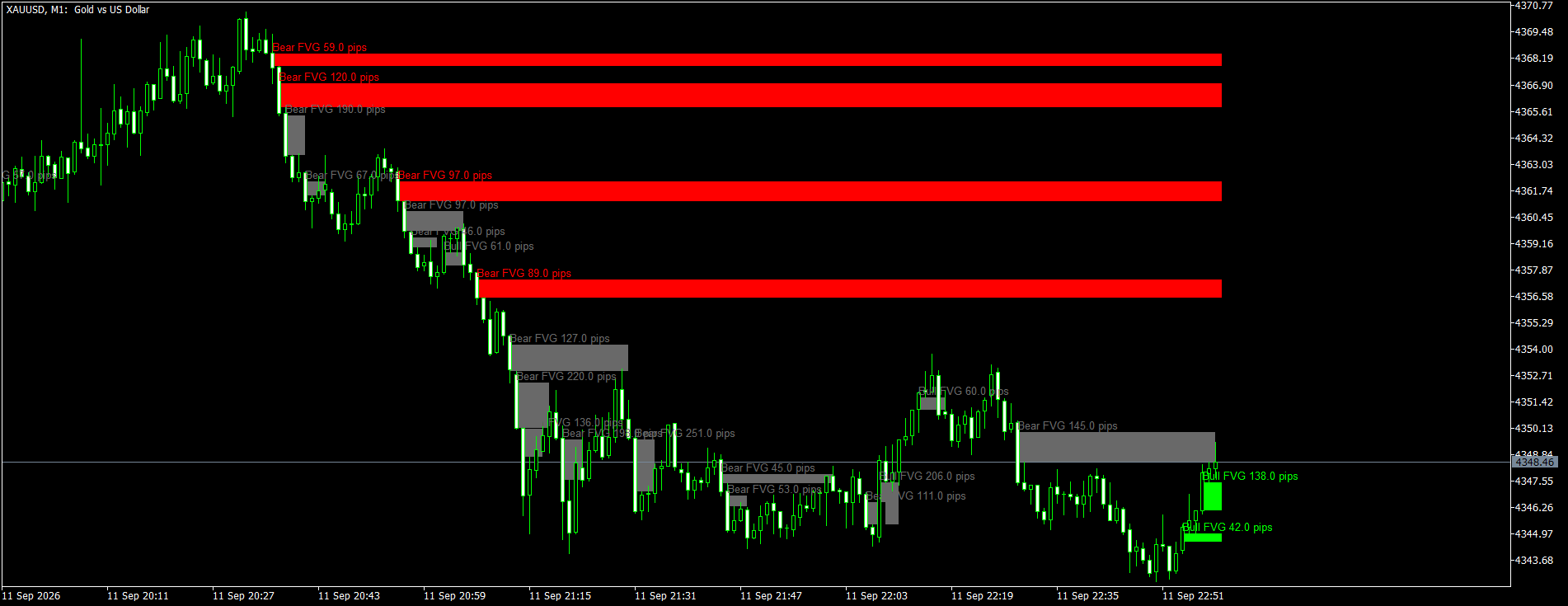
- Multi-timeframe Fair Value Gap detection: gaps of any timeframe from M1 to MN1 drawn as boxes on the chart you trade from; a gap is confirmed on the close of the third candle, no repainting.
- Minimum gap size filter in points or as a fraction of ATR (same setting works on forex, metals, indices and crypto).
- Four mitigation rules: touch, 50 % of the gap, full fill, close beyond the far edge.
- Boxes extended live until mitigated or for a fixed number of candles; mitigated boxes grayed out or deleted; optional skipping of gaps that overlap an active gap; adjustable limit of boxes kept on the chart.
- Labels with gap type and size in pips.
- Alerts on new confirmed gaps and on mitigation: pop-up, push notification, e-mail (history never triggers alerts).
- Six hidden buffers for Expert Advisors: nearest active bullish and bearish gap (top / bottom), confirmation signal (+1 / -1) and number of active gaps.