 MetaTrader 5
 Experts
 지표
지표
 스크립트
스크립트
 라이브러리
라이브러리
 보관함
보관함
당사 팬 페이지에 가입하십시오
- 게시자:
-
Wennide Mogore
 I'm Wennide Mogore, Lead Quantitative Developer at IronHawk Capital. I work directly with clients on MQL5, MT5 and Python trading-system projects, from the first specification to testing, delivery and post-delivery support.
 - 조회수:
- 16
- 평가:
- 게시됨:
-
 이 코드를 기반으로 한 로봇이나 지표가 필요하신가요? 프리랜스로 주문하세요
프리랜스로 이동
이 코드를 기반으로 한 로봇이나 지표가 필요하신가요? 프리랜스로 주문하세요
프리랜스로 이동

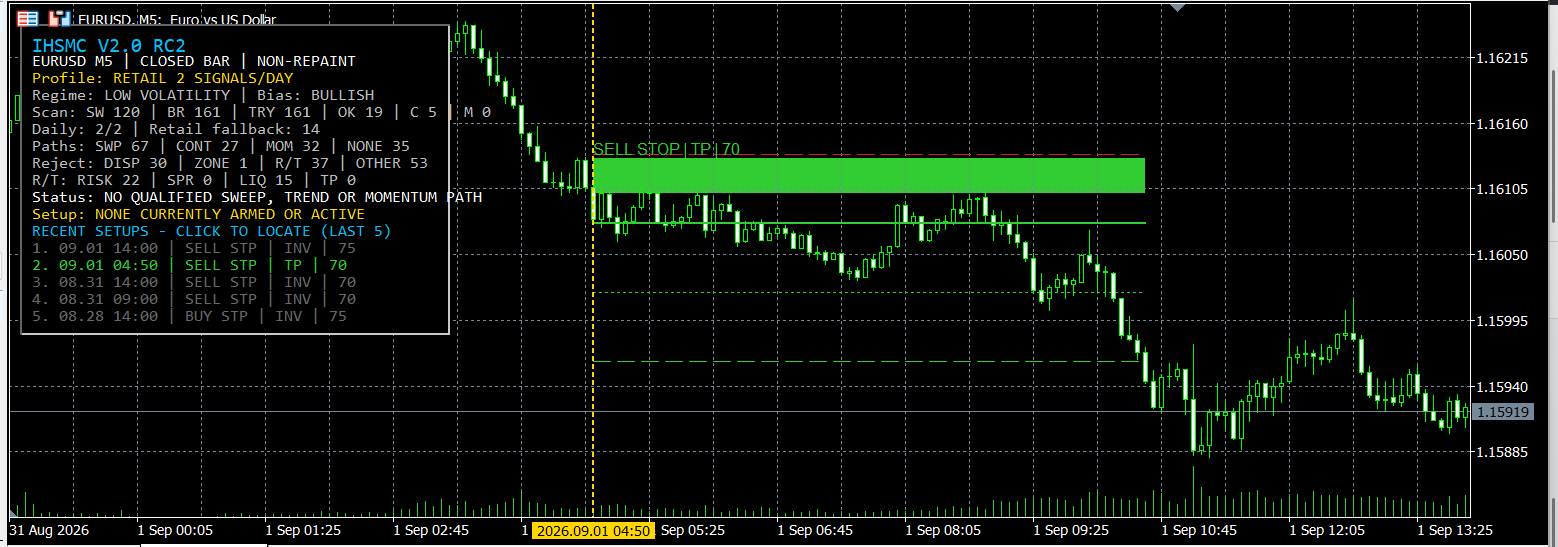
IronHawk SMC Trade Zones M5는 마감된 M5 캔들에서 구조화된 거래 기회를 식별하도록 설계된 차트 지표입니다.
이 지표는 확인된 스윙 포인트, 유동성 스윕, BOS 및 CHoCH 이벤트, 변위, 공정가치 갭, 오더 블록, RSI, MACD 및 ATR 기반 위험 측정치를 결합합니다.
이 지표는 매매를 개시, 수정 또는 청산하지 않습니다. 진입점, 손절매(Stop Loss), TP1 및 TP2는 분석 및 수동 의사 결정을 위한 제안 수준으로 표시됩니다.
주요 기능:
• 마감된 봉을 기반으로 한 리페인팅 없는 계산
• 강세 및 약세 시장 구조 감지
• 유동성 스윕, 추세 지속 및 모멘텀 반전 경로
• STOP 및 LIMIT 진입 제안 간 자동 선택
• ATR 기반 손절매 및 목표가 계산
• TP1 및 TP2 시각화
• 시장 체제 및 구조적 편향 표시
• 설정 상태: ARMED, ACTIVE, TP, SL, EXPIRED, INVALIDATED 및 AMBIGUOUS
• 결과 색상으로 표시된 최근 완료된 5개의 설정
• 원본 신호 캔들로 바로 이동할 수 있는 클릭 가능한 설정 내역
• 선택 가능한 터미널, 푸시 및 이메일 알림
• 선택 가능한 CSV 감사 일지
소매 거래 빈도 모드:
자연 발생 SMC 세팅이 항상 우선순위를 가집니다. 브로커 거래일 동안 나타난 기회가 2개 미만인 경우, 지표는 서버 시간 기준 09:00 및 14:00 이후에 예정된 소매 신호를 추가할 수 있습니다.
이러한 추가 신호는 EMA 20/50, MACD 및 RSI의 종가 기준 다수결 방식을 사용합니다. 이들은 소매용 대체 진입 기회로 명확히 표시되며, 사용자 정의 가능한 ATR 기반 위험 수준을 적용합니다.
일일 카운트는 표시된 기회를 나타냅니다. 이는 진입이 반드시 발생하거나 해당 설정이 수익을 낼 것임을 보장하지 않습니다.
중요한 설정:
• HistoryBars는 스캔할 M5 과거 데이터의 양을 제어합니다.
• MinimumDailySignals는 일일 소매 투자자 대상 신호 발생 횟수 목표를 제어합니다.
• RetailFirstSignalHour 및 RetailSecondSignalHour는 브로커 서버 시간을 사용합니다.
• RetailStopATR는 대체 스톱로스 거리를 제어합니다.
• RetailTargetR은 제안된 TP2 위험 배수를 제어합니다
• MaximumDisplayedSetups는 차트에 표시되는 구역 수를 제어합니다
• RecentSetupCount는 나열되는 완료된 셋업 수를 제어합니다
• 알림 및 CSV 옵션은 비활성화되어 있거나 지표 입력값에서 구성할 수 있습니다
이 지표는 M5 차트에 적용되어야 합니다. 실제 거래에서 신호를 활용하기 전에 데모 계좌에서 테스트해 보시기 바랍니다.
커뮤니티의 피드백을 환영하며, 특히 향후 버전에서 MQL5 기본 경제 캘린더 경고 및 뉴스 필터 추가 가능성에 대한 의견을 기다립니다.
MetaQuotes Ltd에서 영어로 번역함.
원본 코드: https://www.mql5.com/en/code/76830
 History Integrity Auditor
Audits the bar history your terminal actually holds, which is the history every backtest and every indicator reads. Six checks per symbol: impossible OHLC values, broken bar times, bars missing while the broker's own session table says it was quoting, empty and flat bars, bars that disagree with the broker's own M1 series, and spread sanity. The headline figure is session coverage, not a grid percentage that mostly measures how many weekends you audited. Every finding goes to CSV with its bar time, and the audited bars plus the session table can be dumped so the whole report can be recounted by something other than this tool.
WaveMaster Pro EA
Signal-Driven Automation for WaveMaster Oscilloscope. Automated execution engine for WaveMaster Oscilloscope. Reads signal buffers in real time. Full risk management, trailing, and break-even built in.
 Fair Value Gap Scanner MT5
강세 및 약세 불균형을 표시하고 각 구역이 메워지는 시점을 추적하는 MT5 공정가치 갭 스캐너입니다.
Session Liquidity Map MT5
MT5용 브로커 타임 세션 차트로, 아시아, 런던, 뉴욕 시장의 거래 범위와 확인된 고점 및 저점을 표시합니다.