Sahrul Sidik / Profilo
- Informazioni
|
2 anni
esperienza
|
4
prodotti
|
4
versioni demo
|
|
0
lavori
|
0
segnali
|
0
iscritti
|
====== MQL5 Algo Trading community ======
All MQL5 Algo Trading
https://www.mql5.com/en/users/sahrulsidik96/seller
Close Manager Dashboard
https://www.mql5.com/en/market/product/181930
Pending Order Dashboard
https://www.mql5.com/en/market/product/182165
Open Position SL TP Dashboard
https://www.mql5.com/en/market/product/182434
====== Profile ======
MQL5 Profile: https://www.mql5.com/en/users/sahrulsidik96
Portfolio: https://sahrulsidik.github.io
Momentum Re-Entry Scalper TIMING IS EVERYTHING Momentum Re-Entry Scalper is a semi-automatic Expert Advisor designed to help traders execute pending orders with speed, precision, and discipline based on the BBMA OA Momentum trading concept. Unlike fully automated trading robots, this EA does not analyze the market or generate trading signals . Every trading decision remains entirely under the trader's control. Once a valid momentum setup has been identified, the EA assists by placing and
https://www.mql5.com/en/market/product/182434
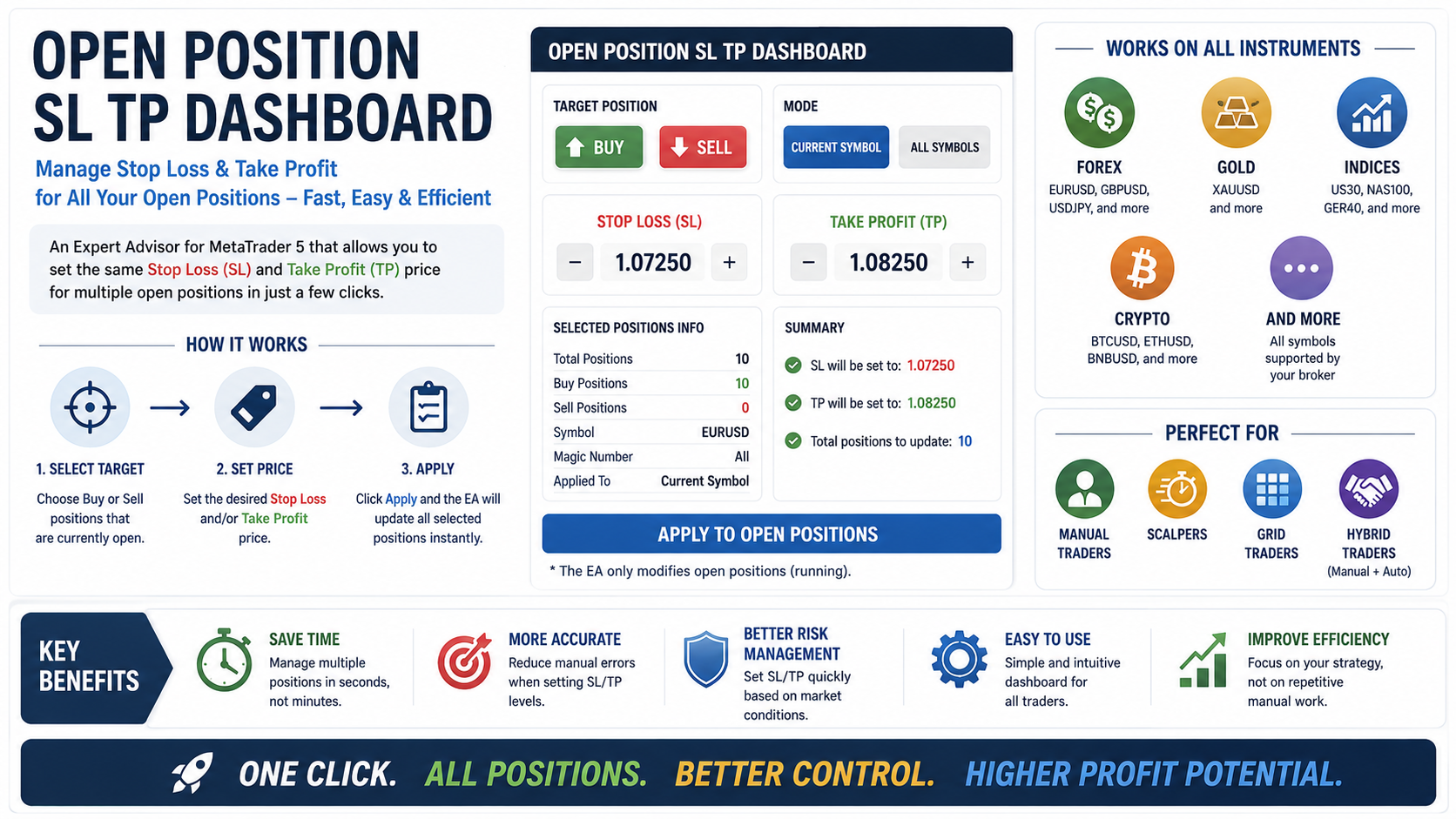
OPEN POSITION SL TP DASHBOARD
Manage Stop Loss & Take Profit for Multiple Open Positions in Seconds
Open Position SL TP Dashboard is a professional trade management tool for MetaTrader 5 that allows you to apply the same Stop Loss and Take Profit price to multiple open positions with just a few clicks.
Whether you trade Forex, Gold, Indices, or Cryptocurrency, this EA helps you manage your running positions faster, more accurately, and more efficiently.
WHAT PROBLEM DOES IT SOLVE?
Managing multiple positions manually can be time-consuming and prone to errors.
Imagine you have:
10 Buy positions on EURUSD
15 Buy positions on Gold
Multiple BTCUSD entries
If you want all positions to share the same Stop Loss or Take Profit level, you normally need to modify each trade one by one.
With Open Position SL TP Dashboard, everything can be done instantly from a single dashboard.
HOW IT WORKS
STEP 1 — Select Target Position
Choose which open positions you want to manage:
✅ Buy Positions Only
or
✅ Sell Positions Only
The EA will only modify positions that match your selected target.
STEP 2 — Enter Stop Loss & Take Profit Price
Simply enter:
Desired Stop Loss Price
Desired Take Profit Price
Example:
Stop Loss = 1.07250
Take Profit = 1.08250
The same price will be applied to all selected positions.
STEP 3 — Apply
Click the Apply button.
The EA instantly updates all matching open positions.
No manual editing.
No repetitive work.
No unnecessary complexity.
WORKS ON ALL INSTRUMENTS
Forex
EURUSD
GBPUSD
USDJPY
AUDUSD
And more
Gold & Metals
XAUUSD
XAGUSD
Indices
US30
NAS100
GER40
And more
Cryptocurrency
BTCUSD
ETHUSD
BNBUSD
And more
Compatible with all broker-supported symbols.
PERFECT FOR
Manual Traders
Quickly manage multiple positions without opening the Trade window repeatedly.
Scalpers
React faster to market conditions and secure profits with a few clicks.
Grid Traders
Manage multiple layered entries using one unified Stop Loss or Take Profit level.
Hybrid Traders
Perfect for traders combining manual execution with automated strategies.
KEY BENEFITS
Save Time
Manage dozens of positions in seconds instead of minutes.
Reduce Human Error
Avoid mistakes caused by manually editing multiple orders.
Better Risk Management
Apply consistent Stop Loss levels across all positions.
Easy to Use
Simple dashboard interface directly on the chart.
Improve Efficiency
Spend less time managing trades and more time focusing on strategy.
IMPORTANT NOTE
Open Position SL TP Dashboard only modifies positions that are already open and running.
The EA does not open new trades and does not place pending orders.
Its purpose is to simplify Stop Loss and Take Profit management for existing positions.
ONE CLICK. MULTIPLE POSITIONS.
Faster Management.
Better Risk Control.
More Consistent Trading.
Open Position SL TP Dashboard
Open Position SL TP Dashboard is an Expert Advisor (EA) that allows traders to quickly set the same Stop Loss (SL) and Take Profit (TP) price for multiple open positions with a single click. Designed for efficient trade management, the EA can apply SL and TP levels to positions on the current symbol or across all symbols. The intuitive on-chart dashboard makes it easy to modify and synchronize risk management settings without manually editing each position. Features Set the same SL price for
Close Manager Dashboard Take Full Control of Your Trades with One Click Close Manager Dashboard is a simple and powerful MetaTrader 5 tool designed to help traders manage and close positions quickly. The clean dashboard interface gives you instant access to essential trade management functions without opening multiple windows. Key Features • Close all open positions instantly. • Close only profitable trades. • Close only losing trades. • Close all pending orders with one click. • Easy and
Close Manager Dashboard is a powerful, simple, and highly functional utility tool designed for MetaTrader 5 to optimize your trade management. It features an intuitive, all-in-one dashboard panel that allows you to manage and close your trades instantly , ensuring you never miss critical market moments. With this Expert Advisor, you can execute complex closing commands with a single click based on your specific needs. Key Features : - Close All Orders: Instantly wipe out all open positions and