• Informazioni
1 anno
esperienza
8
prodotti
0
versioni demo
0
lavori
0
segnali
0
iscritti
I'm Dan, a UK trader, a disabled veteran, and the builder behind PrecisionFX.

My mission is simple: help people get started in trading without paying a penny.

When I started, I did what most people do. I spent two years and a lot of money on courses that taught what YouTube teaches for free. I bought "premium" tools that were just free indicators with a new name. I looked at $1,500 EAs that turned out to be martingale hiding under the bonnet. Most of what's sold to new traders is built to be sold, not to work.

So I started building my own, and I give all of it away.

EVERYTHING HERE IS FREE
Not a trial. Not a "lite" version with the good bits behind a paywall. Every tool is free for good, with the full manual and every setting explained.

PFX Trade Copier: copy trades between MT5 terminals on the same PC
PFX Equity Shield: an account-wide guard for prop-firm drawdown rules
PFX Trade Manager: break even, trailing stops, partials and an equity guard from one panel
PFX Structure and Liquidity Model (SLM): an indicator and EA built on market structure and fair value gaps
On the way: PFX RGM, PFX Triple and PFX TrendGrid

HOW I BUILD
Every trade has a defined stop. No grid, no martingale, no recovery tricks dressed up as a strategy. I test properly, and I'll tell you honestly what something does and doesn't do. I'd rather one person who couldn't afford to start ends up with something that actually works than sell a hundred copies of something that doesn't.

BEFORE YOU BUY ANYTHING
Before you pay for a course, a signal group or an EA, check whether it's already out there for free. Most of the time it is. If you can't find it, message me and I might just build it.

FREE CUSTOM BUILDS
Got a strategy you want automated, or an indicator you wish existed? Send me a message describing exactly what it should do. If I take it on, I'll build it properly, the same way I build everything here, and it costs you nothing.

The honest small print:

One job at a time, when I have room. There may be a queue, and sometimes I'll have to say no.
I won't clone or decompile anyone's paid product.
I won't promise a strategy will be profitable. Nobody honestly can. I build what you spec and I build it well. Whether the idea earns is up to the market.

SUPPORT
If something of mine earns its keep and you fancy buying me a coffee, there's a link on precisionfx.io. It's entirely optional, and nothing is ever locked behind it. If you can't, use the tools anyway. That's rather the point.

Questions, bugs or build requests: message me here on MQL5.
Daniel Freeman
Daniel Freeman
PFX Reversion is nearly here. Free, like everything else I build.

This one wasn’t planned. I was mixing a few ideas together on a gold chart — a Keltner channel, a touch rule, a small capped grid — mostly to see what would happen. What happened was an EA that quietly did its job all day while I was busy breaking everything else. I kept watching it. It kept working. So I stopped calling it an experiment.

What it is

It waits for price to touch a channel line — the bottom band, the top band, or the middle line from either side — and opens a basket in the direction of the bounce. If price keeps going the wrong way it adds a few more orders, spaced out and capped hard, then closes the whole basket as one trade at a single take-profit from the average entry. One basket at a time. One new order per candle. That’s it.

What it’s been through

Day one, it was called PFX LB and got ten builds before midnight. Day two, I ripped the entry out and rebuilt it as a directional three-line touch — a separate V2, because I didn’t trust it yet. Then an audit went through every line: the recovery code that refuses to guess, the lock that stops two copies trading the same account, the limits that cap lots per order, per symbol and per side. Then the panel got rebuilt three times until it told me what the EA was about to do, not just what it had done. Then the chart markup got redrawn four times in one day until a busy session was readable at a glance.

Seventeen builds in four days. 92 native checks. 244 package checks. The same two-day run on two different builds producing deal-for-deal identical trades, because display changes must never touch the trading. It’s been on five terminals this week — demo, live broker, and a funded challenge — watching real spreads, real slippage and real news.

Read this before you get excited

It is a grid EA. If price goes one way and keeps going, it adds orders and each can be bigger than the last. I’ve put hard limits on everything — max orders a side, max lots per order, max lots on the symbol, an equity stop that locks the account until you reset it — but limits only work if you set them. Hedging accounts only. Demo first. Always.

Coming next

Screenshots, the Market upload, and a tested settings guide. The manual already covers all 62 settings in plain English.

Built by a trader. Shared freely. More soon.
Daniel Freeman Prodotto pubblicato

Your TradingView alerts, executed in MetaTrader 5. Free - no DLL, no subscription. HOW SIGNALS REACH IT This EA does not generate signals. It takes alerts TradingView has already sent and turns them into orders. Point your TradingView alert at the PrecisionFX relay and this EA collects from it. Nothing to install beyond the EA itself, nothing to keep running on your PC, and the webhook address never changes. About five minutes to set up. If the relay is briefly unavailable your signals are not

Daniel Freeman Segnale MetaTrader 5 pubblicato
"PrecisionFX" non è disponibile
Daniel Freeman Prodotto pubblicato

There are plenty of updates coming, so bear with me as I continue building and refining it. I’ve got big plans for this one! Your whole trading setup on ONE screen. Every terminal. Every broker. Every prop account. Every chart. See it all, name it all, and run it all from one dashboard. Free - no DLL, no internet, no subscription. If you are like me and trade across multiple terminals, multiple brokers and prop firms, with multiple charts on every terminal - this one is for you. You know the

Daniel Freeman Prodotto pubblicato

NOTE : The walkthrough GIFs on this page were recorded on an earlier build, so they show the old plain-text status instead of the new PFX status panel. Updated GIFs showing the new panel are on my list for the next update. Everything else works exactly as shown. STOP COPYING TRADES INTO SPREADSHEETS. FOREVER. Every serious trader knows a journal is what separates guessing from improving. And almost nobody keeps one - because typing trades into a spreadsheet after a long session is the last thing

Daniel Freeman
Daniel Freeman
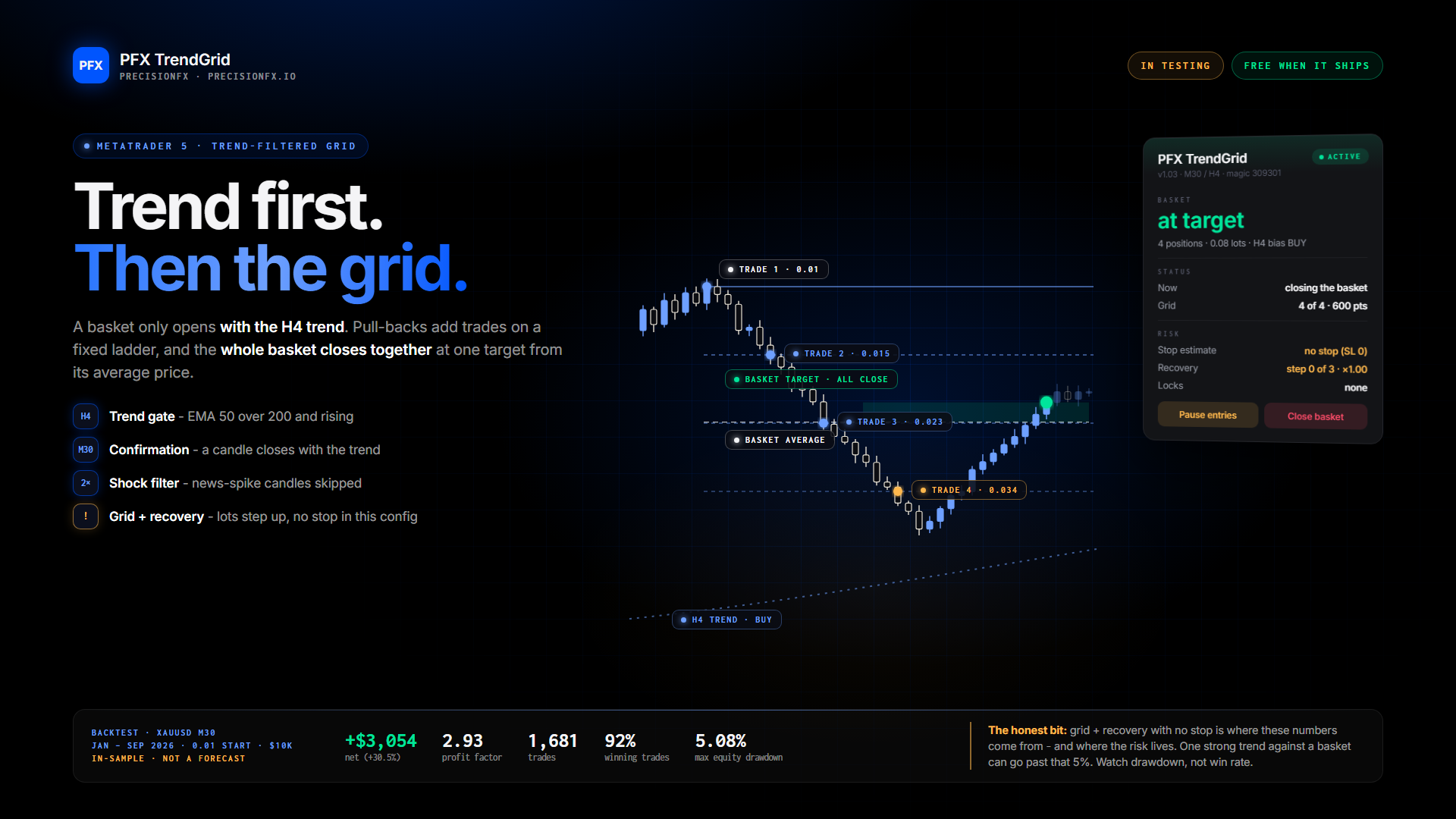
🔥 In the lab right now: PFX TrendGrid 🔥

Right, I'll be straight with you, because that's how I do things. This one IS a grid EA. It adds trades as price moves against the basket, and it can size up after a loss. You know how those usually go: great for months, then one bad week takes the lot. So I built it differently, and I'm testing it harder than anything I've released.

What makes it different
🧭 It only trades with the trend. The H4 bias has to agree before a single trade opens. No blind grid in both directions.
🕯️ It waits for confirmation. An M30 candle has to close in the trend's direction and beyond its entry EMA.
🛑 It skips the chaos. Oversized news-spike candles are ignored.
🧯 It has cash protection built in. Daily and account loss limits in money, a news pause, trading hours, and it respects PFX Equity Shield.

The backtest that made me sit up (XAUUSD M30, Jan – Sep 2026, 0.01 lots, $10,000 account):

📈 +$3,054 net (+30.5%)
⚖️ Profit factor 2.93
🎯 1,681 trades, 92% winners
📉 Max equity drawdown 5.08%

And the honest bit

These settings were tuned on the same months they were tested on, so this is the best case, not a forecast.
It's a 1-minute OHLC backtest, not real ticks.
This config runs with no stop loss and raises the lot after a losing basket. That's where the returns come from, and it's also exactly where the danger lives. One strong trend against the basket and that 5% drawdown isn't the ceiling.

So here's what's happening before you ever see it:
🔬 An optimisation right now to test whether smarter entry filters can cut the drawdown further
🌍 The same tests on six different brokers, because settings that only work on one feed aren't real
📅 Out-of-sample checks on dates it has never seen
🧪 Live demo time

If it survives all that, it's coming, free as always. No paid version, no upsell. If it doesn't survive, you'll hear that from me too.

👀 Follow the profile to watch it get put through the wringer.
Daniel Freeman Prodotto pubblicato

Trade manually, manage automatically. Break even, trailing stops, partial closes and an equity guard - all from one clean panel. Free - no DLL, no internet, no subscription. A ton of work has gone into this to make it the best I can make it, and it is free - not a trial, not a lite version - and it always will be. I am still developing it, so expect regular updates. Spotted a bug, or want something added? Reach out in the Comments and I will get it done. You place the trade. PFX Trade Manager

Daniel Freeman
Daniel Freeman
🔥 Coming soon: PFX Trade Manager, FREE

Next up from me: a proper trade manager for MT5. And like everything I put out on MT5, it's completely free. No trial, no locked features, no subscription.

You place the trade. It manages the rest.

⚡ Place trades fast. Buy or sell with your lot sized by cash or % risk, shown live in % and money. Or drag an entry, stop and target straight onto the chart.
🛡️ Protect them. Break even with four levels, plus seven trailing stop styles: basic, levels, swing high/low, moving average, PSAR, ATR, or follow your partials up.
💰 Bank profit in stages. Four partial take-profits and four partial loss cuts, in lots or %, measured in pips, %, R or price.
🚨 Equity guard. A profit target and loss limit across all your trades that closes everything and stays locked until you re-arm it.
🎯 Per-trade control. Click any trade on the chart to give it its own settings, move its stop, close, reverse or part-close it.

A panel that's actually nice to use
Four clean tabs, the same design as the rest of the PFX range. Drag it anywhere on the chart and it remembers where you left it. Plus live P&L, alerts to your phone, templates, and hotkeys if you want them.

Works on any symbol, any timeframe. No DLL, no internet, nothing to install beyond the EA.

It pairs nicely with PFX Equity Shield if you're trading a prop challenge: the Trade Manager manages each trade, and the Shield guards the whole account.

👀 Follow my profile so you don't miss the drop.
PFX Trade Manager: coming soon. 🚀
Daniel Freeman Prodotto pubblicato

This EA has a matching indicator - PFX SLM . Same engine, same rules, same trades. Two ways to use them together: backtest the EA to find the best settings, then trade them by hand with the indicator - or let the EA loose and have it trade them for you. Either way, put the indicator on the chart and you see every decision. FREE - AND IT ALWAYS WILL BE A ton of work has gone into these tools to make them the best I can make them, and they are free. Not a trial, not a lite version - free, and it

Daniel Freeman Prodotto pubblicato

This indicator has a matching Expert Advisor - PFX SLM EA . Same engine, same rules, same trades. Two ways to use them together: backtest the EA to find the best settings for your symbol, then trade those settings by hand with the indicator - or let the EA loose and have it trade them for you. FREE - AND IT ALWAYS WILL BE A ton of work has gone into these tools to make them the best I can make them, and they are free. Not a trial, not a lite version - free, and it always will be. I am still

Daniel Freeman Prodotto pubblicato

A hard stop your discipline can't argue with. Free - no DLL, no internet, no subscription. A ton of work has gone into this to make it the best I can make it, and it is free - not a trial, not a lite version - and it always will be. I am still developing it, so expect regular updates. Spotted a bug, or want something added? Reach out in the Comments and I will get it done. PFX Equity Shield watches your whole account - every symbol, every EA, every manual trade - against the limits you set. The

Daniel Freeman
Daniel Freeman
The PFX SLM MT5 version is absolutely flying! 🚀 It’s going to be released very soon for everyone, completely free. Right now, I'm using my published copier to replicate these results across three other accounts. Best of all, this EA works on any currency pair with fixed SL and TP levels—no martingale, no grid, just clean and proper trading. I’ll be updating the website this weekend with some absolutely rocking backtest results. Aiming for a full release next week, so stay tuned!
Daniel Freeman
Daniel Freeman
The TradingView indicator is cooking!
Daniel Freeman Prodotto pubblicato
Recensioni: 1
FREE

Copy trades between MetaTrader 5 terminals on the same computer. Free, and no DLL, no internet connection, no subscription. One EA does both jobs. Attach it as a TRANSMITTER on the account you trade, and as a RECEIVER on every account that should follow. SETUP - four steps Attach to any one chart on the account you copy FROM. Set Mode = Transmitter. Attach to any one chart on each account that should follow. Set Mode = Receiver. Give every terminal the SAME Channel ID. That is the only thing

Daniel Freeman
Daniel Freeman
PFX SLM Indicator on NAS100
Daniel Freeman
Daniel Freeman
I built a couple of tools for my own trading and I'd like to know if they're worth sharing

Bit of background first. I'm a disabled veteran. I started building these partly to make my own
trading a bit easier, and honestly partly just to keep myself busy and give my head something to
work on. It turned into a much bigger project than I expected.

They're now at the point where they do everything I need on my own charts, so before I go any
further I wanted to ask people who actually trade this stuff: is this useful to anyone besides me,
and is there anything obvious I've missed?

There are two pieces, and they share the same detection engine — so what the indicator draws is
exactly what the EA acts on. No second implementation to drift out of sync.

THE INDICATOR

Market structure with fair value gaps, and inverted FVGs when a gap fails
Supply and demand zones - optionally only displacement-backed ones, and broken zones flip to
breakers rather than just vanishing
Liquidity sweeps with a rejection-wick filter and equal-level clustering (SSL x3 and so on)
Entry, stop and three targets drawn on every signal. When the trade resolves the lines clear
and leave one tag behind - "TP2 +1.15R" or "SL -1.00R"
A dashboard with win rate, net R, average R per trade, how often TP1/TP2/TP3 actually got
reached, and a long versus short split
Trade history written to file, so "all time" really is all time and survives reattaching

THE EA

Trades the same setups the indicator draws
Real stop loss and take profit sent to the broker with the order, not managed in the terminal
Three targets, scaling out at TP1 and TP2 with the rest running to TP3
Stop to breakeven after TP1, up to TP1 after TP2, optional ATR trail after that
Risk percent of equity or fixed lots, plus a daily loss limit, spread filter and session window
No martingale, no grid, no averaging down, one position at a time

WHAT I'M ASKING

Would you use either of these? And more importantly - what's missing? I've built this around how I
trade, which means there are almost certainly blind spots I can't see from the inside. If there's a
filter, a stat on the dashboard or a risk control you'd expect and I haven't got, I'd genuinely
like to hear it.

I'm not selling anything today. If there's enough interest I'd be happy to release the pair as a
bundle for a small fee. I'd rather keep developing these two properly than put out twenty different
products - I use them myself every day, so they're going to keep getting worked on either way.

Thanks for reading, and thanks in advance to anyone who takes the time to reply.
12