 Tutti gli ordini
 Regolamenti
Guarda come ordinare un robot di trading
Leggi le Regole prima di pubblicare un ordine o di eseguirlo.
Come Ordinare un Robot di Trading in MQL5 e MQL4
Visualizza un esempio di Specifiche dei requisiti necessarie per ordinare un robot
Nuovi ordini nella categoria:
50 - 110 USD
1000 - 5000 USD
Lavoro terminato
Tempo di esecuzione 9 giorni

Feedback del cliente
Victor did a great job with the EA. He has good communication skills and is a skilled programmer. Would buy again from him!
Specifiche
**Objective**: Develop a trend-following Expert Advisor (EA) that opens trades based on a trend detected across multiple timeframes using the *AllAverages_v4.9_MT5* indicator. The EA should use a Martingale strategy, only adding trades in the same direction when the price moves against the initial position, and include several risk management settings.
### Strategy Overview
1. **Trend Detection**:
- The EA should detect a trend by analyzing the *AllAverages_v4.9_MT5* indicator across multiple timeframes.
- Execution timeframe will be set to M1, but the trend should be confirmed on multiple selected timeframes.
- **Condition for Entry**: The EA will open a trade only when all selected timeframes show a trend in the same direction, as indicated by the *AllAverages_v4.9_MT5* indicator.
- **Trend Identification**: The EA should use the uptrend/downtrend buffers of the indicator to determine the trend direction.
2. **Martingale Strategy**:
- If the price moves in the opposite direction of the open trade, the EA should open an additional trade in the same direction as the initial trade but with a larger lot size.
- The lot size for each subsequent trade should increase based on a configurable Martingale multiplier.
- The step size (in pips) for opening the next position when the price moves against the trade direction should also be configurable.
- There should be a configurable maximum number of trades in the Martingale sequence to prevent excessive risk.
- The EA should keep opening new trade sequences whenever the last sequence hits TP and the trend is still confirmend on all selected timeframes.
### Configurable Settings
1. **Trend Confirmation**:
- The EA should allow setting the number of timeframes that must show the same trend direction before opening a trade.
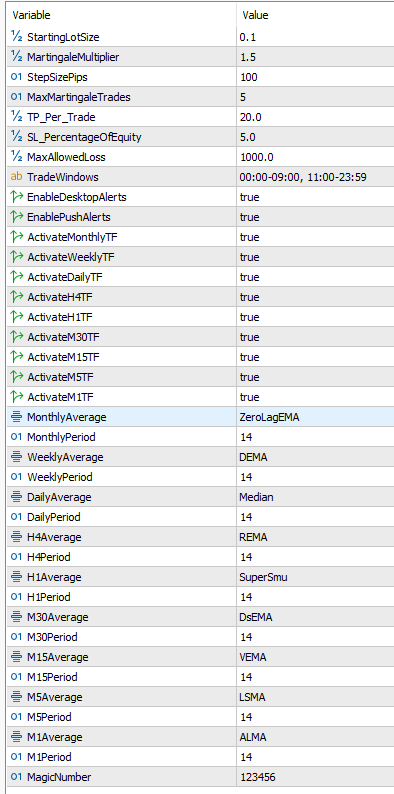
- Users should be able to select a specific type of moving average (e.g., HMA, EMA, DEMA, etc.) for each timeframe individually (e.g., H4 could use EMA while M1 uses DEMA).
2. **Trade Settings**:
- **Starting Lot Size**: Configurable starting lot size for the initial trade.
- **Martingale Multiplier**: Factor by which the lot size should increase with each subsequent trade in the Martingale sequence.
- **Step Size**: Number of pips the price must move against the last opened trade of the sequence before the EA opens the next trade in the Martingale sequence.
3. **Take Profit (TP) Settings**:
- TP should be configurable in terms of profit per trade (e.g., $20).
- When a new trade is added to a sequence, the TP should be adjusted to the same for all open trades so that if the TP is hit, the total profit is equal to the target profit specified for the first trade (e.g., if the first trade's target was $20, the cumulative profit for all trades in the sequence should still be $20 when the TP is hit).
- The TP should increase, if necessary, but should never result in a lower total profit than initially targeted.
- The TP should be updated only when a new trade is added to the sequence.
- Spread should be factored in the TP level.
- The TP should be updated only when a new trade is added to the sequence.
- Spread should be factored in the TP level.
4. **Stop Loss (SL) Settings**:
- Configurable SL as a percentage of total account equity.
- This SL should apply to the entire trade sequence, not individual trades. For example, if the SL is set to 5% of equity and there are 4 trades in the Martingale sequence, the SL should adjust to the same for all open trades such that the combined loss would equal 5% of equity if hit.
- The SL should be updated only when a new trade is added to the sequence.
5. **Time Filter**:
- The EA should have a configurable time filter to limit when new Martingale sequences can begin.
- Users should be able to set specific time windows for trading (e.g., 00:00-08:00 and 14:00-23:59).
- If a sequence is still open outside of the trading window, the EA should continue to manage the sequence (e.g., adding trades if necessary and changing TP/SL) until it closes via TP or SL.
- The time filter should use server time.
6. **Capital Loss Limit**:
- An option to set a maximum allowable loss in dollar terms. If this loss limit is reached (including floating losses), the EA should:
- Close all open trades immediately.
- Disable itself to prevent further trading.
- This feature ensures compliance with prop firm drawdown limits. The EA should continuously monitor floating losses on each tick to prevent violating drawdown rules.
7. **Magic Number**:
- The EA should have a configurable magic number to help distinguish trades it opens from other trades on the account.
### Additional Features
1. **Logging**:
- The EA should log all key actions, such as when a new trade sequence starts, trades are added to a sequence, TP or SL levels are modified, and sequences are closed.
2. **Alerts**:
- The EA should send an alert whenever a new sequence is opened and when a sequence closes.
- These alerts should be configurable for desktop notifications and push notifications to a mobile device.
### File Requirements
- The EA should be able to access the *AllAverages_v4.9_MT5* indicator directly to read trend up/downtrend buffers.
### Summary
This EA will serve as a trend-following system using multiple timeframes to confirm a trend direction, with a Martingale approach to manage trades when price moves against the position. Configurable settings will allow for precise control of trade entries, lot sizing, risk management, and time filters. Key logging and alerts will enhance monitoring, and robust risk management features ensure compliance with prop firm trading rules.
Con risposta
1
Valutazioni
Progetti
25
52%
Arbitraggio
3
0%
/
100%
In ritardo
2
8%
Gratuito
2
Valutazioni
Progetti
184
25%
Arbitraggio
25
16%
/
76%
In ritardo
16
9%
Gratuito
3
Valutazioni
Progetti
10
10%
Arbitraggio
9
0%
/
89%
In ritardo
1
10%
Gratuito
4
Valutazioni
Progetti
8
13%
Arbitraggio
3
0%
/
33%
In ritardo
2
25%
Gratuito
Pubblicati: 1 codice
5
Valutazioni
Progetti
19
16%
Arbitraggio
3
67%
/
0%
In ritardo
0
Gratuito
6
Valutazioni
Progetti
33
27%
Arbitraggio
20
10%
/
50%
In ritardo
11
33%
Gratuito
7
Valutazioni
Progetti
91
52%
Arbitraggio
2
0%
/
50%
In ritardo
1
1%
Gratuito
8
Valutazioni
Progetti
0
0%
Arbitraggio
0
In ritardo
0
Gratuito
Pubblicati: 1 codice
Ordini simili
Looking for a Complete Forex & Gold Signal System — Telegram Automation + Performance Tracking I’m looking for a complete automated trading signal solution for Forex pairs, including EUR/USD, GBP/USD and others, as well as gold (XAU/USD). Requirements: • An average of 2–3 quality signals per day across the selected instruments. Quality matters more than generating signals just to meet a quota. • A high win rate
FOR MT5. BROKERS - XM,TICKMILL. looking for an EA which can generate reasonable profits like 100% monthly, SEND ME SOUCE CODE AND UPON TESTING I SHALL PAY AND WE CAN MAKE NECESSARY MODIFICATIONS
Needed Gold (XAUUSD) Trading Bot with SL & TP
30 - 35 USD
I need a robot that will grow small accounts to bigger amounts, I will test it on demo first then if it does what i want, i will take it. Please it must be simply to use. It must set targets, for example, once it reaches $200 profit for the day, it must close
I need a robot that will grow small accounts to bigger amounts like this one in this link, https://youtu.be/d38pMbJihew?si=3NeIOVyrlwDr4X_o. Please click the link and watch how this EA grow small accounts. Then create a robot like that. I will test it on demo first then if it does what i want, i will take it. Please it must be simply to use. It must set targets, for example, once it reaches $500 profit, it must
STRADDLE EA- EFFECTIVE
30 - 50 USD
Your XAUUSD Buy Stop / Sell Stop Grid EA Strategy 1. Initial order placement Buy Stop orders — 5 orders Place 5 Buy Stop pending orders above the current market price. Each order is spaced 1.00 XAUUSD price unit apart. Initial lot sizes range from 0.01 to 0.05 lots . Sell Stop orders — 5 orders Place 5 Sell Stop pending orders below the current market price. Each order is spaced 1.00 XAUUSD price unit apart. Initial
I am looking for an experienced and highly competent MQL5 developer to create a bespoke, fully automated Forex Expert Advisor for Meta Trader 5 for my Apple iMac. The EA will incorporate a proprietary trading strategy involving multiple position management, dynamic trade execution, advanced profit management and sophisticated risk controls. Key technical requirements: Automated trade execution and management
Hello developers and quantitative traders, I am looking to purchase a license for an EXISTING, professionally developed MT5 quantitative portfolio Expert Advisor with a long-term, independently verifiable trading history. Purchase budget: $5,000–$15,000 USD Additional annual maintenance fee: $1,000 USD I am willing to establish a long-term commercial relationship with the developer. IMPORTANT: I am NOT looking for
SIERRA CHART
40+ USD
Hello. I have some custom chartbooks/studies that run on ACSIL C++ in Sierra Charts trading platform. I need them put into pinescript to be able to be used in trading view and look similar to the charts we are giving you. also need it to be able to work on ninja trader NinjaScript (C#)/java, and MQL4 and MQL5 for metatrader 4 and 5. You would have to assist with testing. Let me know if you can help with this task
Trading
35+ USD
Project: XAUUSD Gold Trading Robot for MetaTrader 5 I want to develop a fully automated Expert Advisor (EA) for MetaTrader 5, designed exclusively for Gold (XAUUSD) and compatible with the Exness broker. Trading Strategy: Liquidity + CHOCH + Retest Identify important buy-side and sell-side liquidity zones using previous highs and lows, equal highs/lows, and confirmed swing points. Wait for a clear liquidity sweep
I am looking to acquire an EXISTING and PROVEN MetaTrader 5 Expert Advisor. I am NOT looking for someone to develop a random new strategy from scratch. The objective is to find a robust EA with an existing track record, verify its performance and robustness, and purchase the MQL5 source code together with clearly defined commercial rights. MAIN REQUIREMENTS The EA should meet most or all of the following
Informazioni sul progetto
Budget
50+ USD