 MetaTrader 5
 Sistemi Esperti
 Indicatori
 Script
 Librerie
 Archiviazione
Unisciti alla nostra fan page

Broker Spec Inspector - script per MetaTrader 5

I put my money where my mouth is, be sure to check the performance of my EAs through my signals.
- Visualizzazioni:
- 14
- Valutazioni:
- Pubblicato:
- Aggiornato:
-
 Ti stai perdendo delle opportunità di trading:
- App di trading gratuite
- Oltre 8.000 segnali per il copy trading
- Notizie economiche per esplorare i mercati finanziari
Registrazione AccediAccetti la politica del sito e le condizioni d’uso
Se non hai un account, registrati -
 Hai bisogno di un robot o indicatore basato su questo codice? Ordinalo su Freelance
Vai a Freelance
Hai bisogno di un robot o indicatore basato su questo codice? Ordinalo su Freelance
Vai a Freelance
COSA STAMPA
Per ogni strumento: cifre, punto, dimensione del tick e valore, dimensione del contratto, lotto minimo / incrementale / massimo, spread e se è variabile, modalità di esecuzione, swap long e short, e il margine richiesto per un lotto minimo rapportato al margine libero attuale. Poi la parte che risponde alla domanda vera e propria:
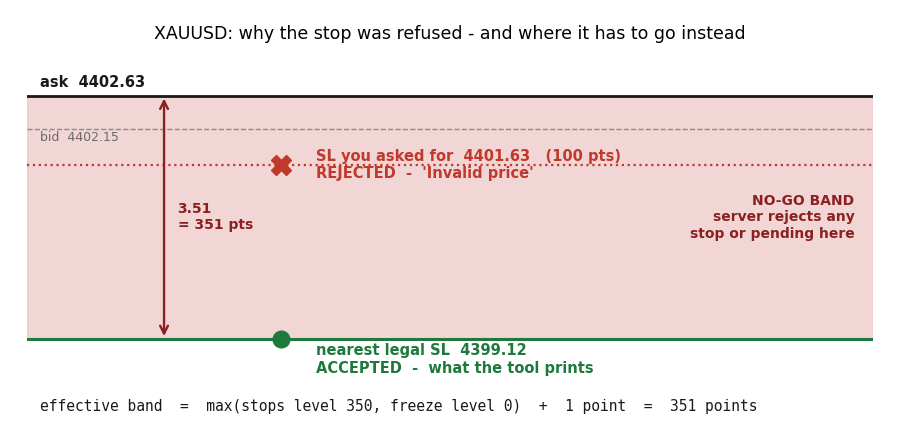
--- XAUUSD (bid 4402.15 / ask 4402.63) ---------------------
stops level 350 pts | freeze level 0 pts | EFFECTIVE band 351 pts
VERDICT: a stop/pending placed 100 pts from price would be REJECTED as 'Invalid price' (band is 351 pts)
buy at ask 4402.63: you asked SL 4401.63 -> nearest legal SL 4399.12 (moved out)
double MinStopDistance(const string sym)
{
long stops = SymbolInfoInteger(sym, SYMBOL_TRADE_STOPS_LEVEL);
long freeze = SymbolInfoInteger(sym, SYMBOL_TRADE_FREEZE_LEVEL);
long band = (stops > freeze ? stops : freeze) + 1;
return band * SymbolInfoDouble(sym, SYMBOL_POINT);
}
double LegalStopLoss(const string sym, const bool isBuy,
const double price, const double wanted)
{
double dist = MinStopDistance(sym);
int digits = (int)SymbolInfoInteger(sym, SYMBOL_DIGITS);
double sl = wanted;
if(isBuy) { if(price - sl < dist) sl = price - dist; }
else { if(sl - price < dist) sl = price + dist; }
return NormalizeDouble(sl, digits);
}
Una fermata che è già legale viene riportata senza modifiche, quindi è sicuro far passare tutte le fermate attraverso di essa. Per includere il calcolo esistente basta una riga:
double sl = LegalStopLoss(_Symbol, true, ask, ask - atr * 1.5);
NOTE SULLA LETTURA DEI RISULTATI
I simboli devono essere presenti in Market Watch e devono aver registrato almeno un tick. Se un simbolo non riporta dati relativi ai tick, apri il relativo grafico una volta ed esegui nuovamente la procedura.
Tradotto dall’inglese da MetaQuotes Ltd.
Codice originale https://www.mql5.com/en/code/76178
 Risk Guard — risk-based lot size, daily loss lock, max positions, oversized-trade trim, forced stop-loss
Enforces your own risk rules on every position, whether opened by hand or by another EA: shows the lot size that matches your risk, locks the account for the day after a set loss, caps open positions, trims positions that risk more than allowed, and adds a stop-loss to any position opened without one.
Prop-Firm Equity Guard - daily and max drawdown protection (FTMO-style)
Strict risk management utility for prop-firm challenges. Automatically monitors your entire account to prevent daily and max drawdown failures. It acts as a safety buffer against spread spikes and revenge trading by instantly closing all positions and pending orders before your evaluation is terminated.
 Custom Simple Moving Average
Una media mobile adattiva a due stadi (media di base + livellamento secondario) che cambia colore in base alla pendenza e segna con delle frecce i punti di incrocio tra prezzo e media.
Smart Loss Exit — early exit for losing positions (ATR adverse excursion, time in trade, EMA invalidation, RSI, money cap) with a CSV journal
Closes losing positions early, before the full stop-loss, when a rule says the trade is not coming back: adverse move beyond N x ATR, too long in loss, EMA trend flipped, RSI against the position, or a money cap. Never touches a position in profit. Observe-only mode journals what would be closed without closing anything. Every exit is written to CSV with the rule, the age and the maximum adverse excursion, so the rules can be tuned from data.