
|
1 année
expérience
|
2
produits
|
19
versions de démo
|
|
0
offres d’emploi
|
0
signaux
|
0
les abonnés
|
gpttrading.info
Amis
Ajoutez des amis via leur profil ou une recherche d'utilisateur et vous pourrez voir s'ils sont en ligne

Federico Ponzini

· 8
Annasale
2025.07.20
Sembra davvero ben pensato! Il flusso di connessione tra MT4 e la Dashboard è semplice ma potente. Hai in programma anche una versione con compatibilità MT5
Federico Ponzini
2025.07.20
Prossimamente lavoreremo ad una versione per MT5 ;) Rimani aggiornato tramite il nostro gruppo Telegram!
Federico Ponzini
Produits publiés

· 8
renatozero33
2025.07.18
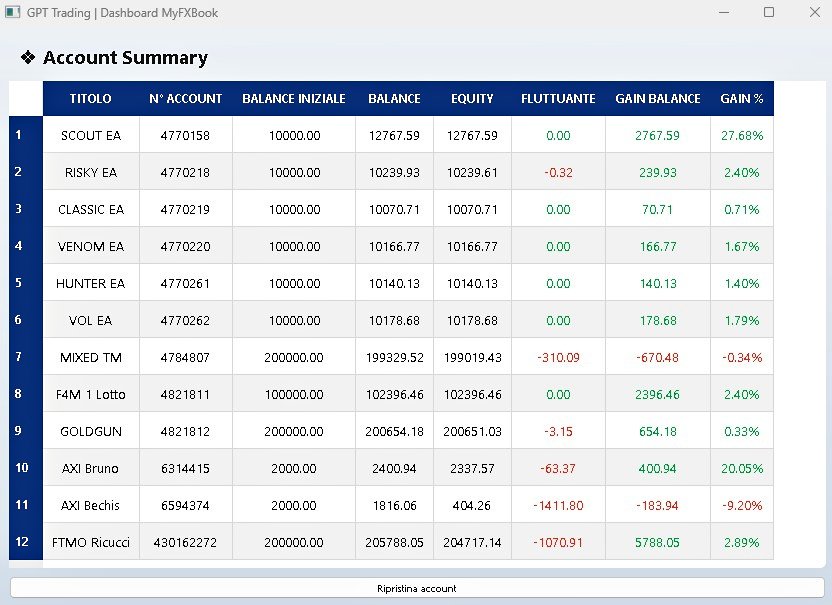
sto provando in versione demo questa Dashboard in sostituzione al sito di MyFXBook. Molto veloce, intuitiva e aggiornata in tempo reale. Sicuramente una grande alternativa a MyFXBook.
GianfrancoPolu71
2025.07.27
Finalmente un tool che centralizza tutto in modo chiaro e professionale. Monitoraggio live, interfaccia intuitiva e perfetta integrazione con MT4. Consigliatissima per chi gestisce più strategie o account.
Federico Ponzini
Produits publiés

· 8
Afficher tous les commentaires (4)
filippoilrosso
2025.07.19
Ciao Federico ho avuto modo di provare la versione demo. Mi chiedevo su una prop firm tipo FTMO funziana bene il trailing sistem o è meglio per versioni live dei conti ?
Federico Ponzini
2025.07.19
Ciao @filippoilrosso grazie per il download! FTMO ha molto spread quindi ti consiglio di allargare un pò i gradini del traling. Scrivimi in privato, ti mando i SetFile già pronti e ti do qualche suggerimento!