Lungile Mbanjwa / Profil
- Informations
|
1 année
expérience
|
10
produits
|
10
versions de démo
|
|
0
offres d’emploi
|
0
signaux
|
0
les abonnés
|
Hi, I’m Lungile Mbanjwa, a 27-year-old reliable and dedicated Expert Advisor (EA) developer.
I specialize in building smart, adaptive trading robots using Moving Average strategies — including SMA/EMA crossovers, trend detection, slope analysis, and dynamic filters.
My promise to you:
Complete honesty and excellent communication
High-quality, well-tested Expert Advisors
Personal support after purchase
Free lifetime updates
Fast fixes and ongoing help whenever you need it
I’m committed to providing smooth, trustworthy service and long-term support for every customer.
If you have any questions or you’re ready to trade smarter with custom EAs, feel free to reach out:
📧 Email: lungilegambu981205@gmail.com
Lungile Mbanjwa
AI Coder | Moving Averages Specialist | EA Developer
I specialize in building smart, adaptive trading robots using Moving Average strategies — including SMA/EMA crossovers, trend detection, slope analysis, and dynamic filters.
My promise to you:
Complete honesty and excellent communication
High-quality, well-tested Expert Advisors
Personal support after purchase
Free lifetime updates
Fast fixes and ongoing help whenever you need it
I’m committed to providing smooth, trustworthy service and long-term support for every customer.
If you have any questions or you’re ready to trade smarter with custom EAs, feel free to reach out:
📧 Email: lungilegambu981205@gmail.com
Lungile Mbanjwa
AI Coder | Moving Averages Specialist | EA Developer
Lungile Mbanjwa
📌 Market Session KillZone MT5 – Overview
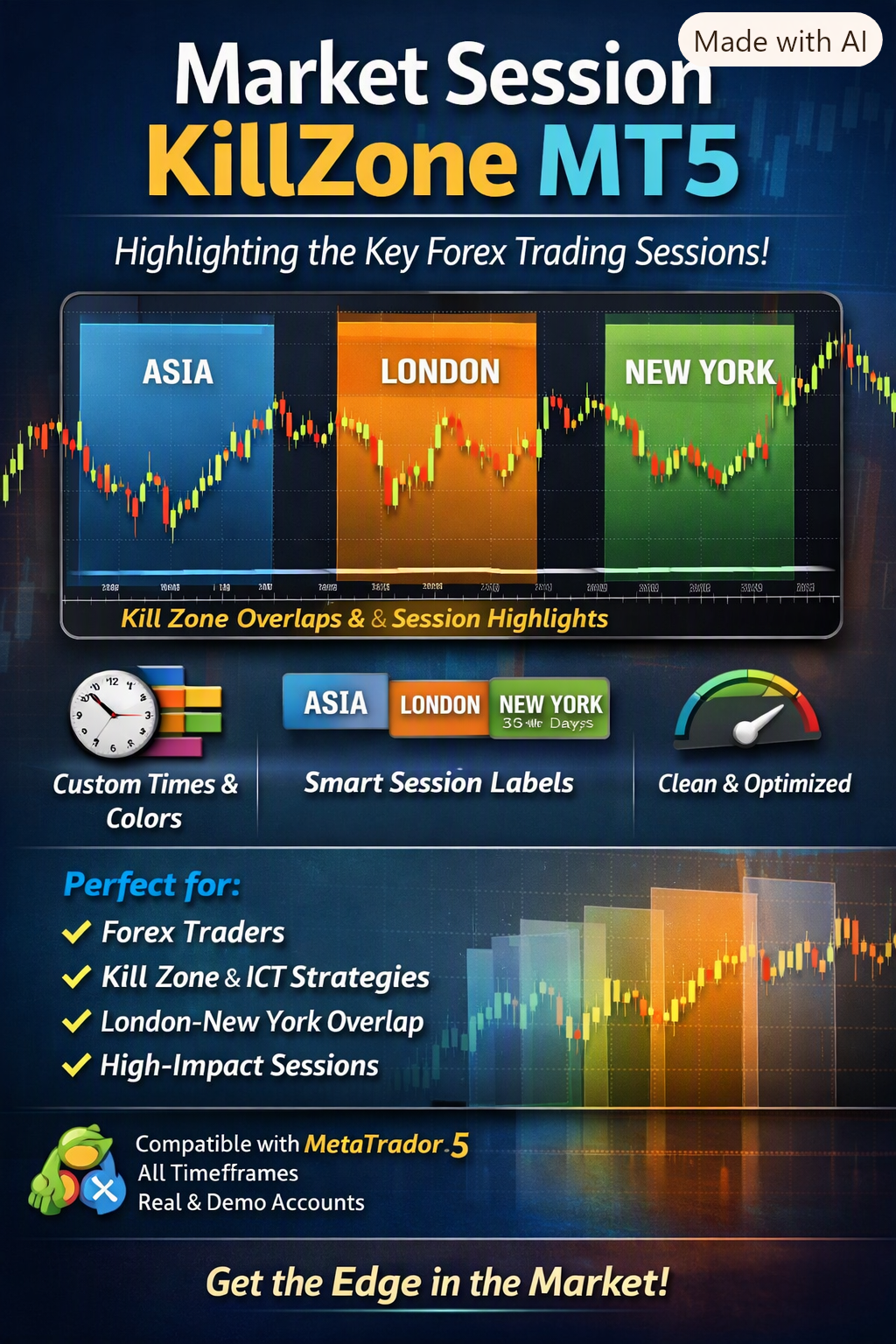
The Market Session KillZone MT5 is a clean and powerful visual indicator designed to highlight the Asia, London, and New York sessions directly on your chart. It provides traders with a clear structure of the trading day, helping identify high-probability Kill Zones and overlaps without clutter.
🔑 Key Features
Three Major Sessions: Asia, London, and New York, each fully customizable.
Customizable Times: Adjust start and end times to match broker or preferred timezone.
Smart Labels: Clear session names with adjustable font size, color, and visibility.
Multi-Day History: Display session boxes for 1–30+ days.
Clean Chart Design: Semi-transparent shaded boxes drawn behind candles for a professional look.
Performance Optimized: Refresh on new bar or every tick for efficiency.
🎯 How to Use
Attach the indicator to any chart.
Adjust session times to broker/server time.
Customize colors and transparency to fit your chart theme.
Use shaded zones to identify:
Session opens & closes
London–New York overlap (Kill Zone)
Asia range breakouts
High-volume periods
👤 Ideal For
Forex traders focusing on session-based strategies.
Kill Zone / ICT / SMC traders.
Traders who want a clear visual structure of the trading day.
Anyone seeking a professional session indicator without clutter.
⚙️ Compatibility
MetaTrader 5
All symbols & timeframes
Works on real and demo accounts
Lightweight and optimized
💡 Market Session KillZone MT5 gives you a clear visual edge by highlighting the most important trading sessions of the day — simply, cleanly, and professionally.
The Market Session KillZone MT5 is a clean and powerful visual indicator designed to highlight the Asia, London, and New York sessions directly on your chart. It provides traders with a clear structure of the trading day, helping identify high-probability Kill Zones and overlaps without clutter.
🔑 Key Features
Three Major Sessions: Asia, London, and New York, each fully customizable.
Customizable Times: Adjust start and end times to match broker or preferred timezone.
Smart Labels: Clear session names with adjustable font size, color, and visibility.
Multi-Day History: Display session boxes for 1–30+ days.
Clean Chart Design: Semi-transparent shaded boxes drawn behind candles for a professional look.
Performance Optimized: Refresh on new bar or every tick for efficiency.
🎯 How to Use
Attach the indicator to any chart.
Adjust session times to broker/server time.
Customize colors and transparency to fit your chart theme.
Use shaded zones to identify:
Session opens & closes
London–New York overlap (Kill Zone)
Asia range breakouts
High-volume periods
👤 Ideal For
Forex traders focusing on session-based strategies.
Kill Zone / ICT / SMC traders.
Traders who want a clear visual structure of the trading day.
Anyone seeking a professional session indicator without clutter.
⚙️ Compatibility
MetaTrader 5
All symbols & timeframes
Works on real and demo accounts
Lightweight and optimized
💡 Market Session KillZone MT5 gives you a clear visual edge by highlighting the most important trading sessions of the day — simply, cleanly, and professionally.
Lungile Mbanjwa
Produits publiés
Overview Market Session KillZone MT5 is a clean and powerful visual indicator designed to highlight the major forex trading sessions directly on your chart. It clearly marks the Asia , London , and New York sessions with customizable semi-transparent shaded boxes and labels, helping traders instantly identify high-probability “Kill Zones” and session overlaps. Whether you trade session opens, London-New York overlap, or specific Kill Zones, this indicator gives you a clear visual structure of
Lungile Mbanjwa
# Bullish EA MT5 v1.26 – Multi-Session Moving Average Trading EA
Bullish EA MT5 v1.26 is an automated Expert Advisor for MetaTrader 5 that uses a structured **5/10/50 Simple Moving Average strategy** to identify bullish and bearish market conditions and automate trade execution.
The EA is designed with a focus on **controlled entries, limited trading frequency, session-based trading, and flexible trade management**.
## Trading Strategy
The EA uses three Simple Moving Averages:
* **MA 5**
* **MA 10**
* **MA 50**
### Buy Signal
A buy condition is generated when:
**MA 5 > MA 10 > MA 50**
### Sell Signal
A sell condition is generated when:
**MA 5 < MA 10 < MA 50**
The moving averages are configurable, allowing traders to adjust the strategy to different market conditions.
## Multi-Session Trading
The EA supports two independent trading sessions.
Default settings:
* **Session 1:** 06:00 – 13:00
* **Session 2:** 17:00 – 20:00
Trading sessions can be customized according to the trader's preferred market hours. The second session also includes additional controls to determine when new trades are permitted.
## Trade Control
To help prevent excessive trading, the EA includes:
* Fixed lot sizing
* Maximum trades per period
* Daily or weekly trade limits
* Delay between trades
* One-position control
* Directional trade protection
The default configuration uses a **0.01 lot size**, with a maximum of **2 trades per period** and a **30-minute delay** between trades.
## Stop Loss & Trailing Stop
The EA includes configurable risk-management options.
Users can enable or disable:
* Stop Loss
* Trailing Stop
* Separate trailing distances for buy and sell positions
The default market Stop Loss is **2,000 points**.
## Pending Order System
Bullish EA also includes an optional pending-order system.
The EA can operate in:
* **Market Only**
* **Pending Only**
* **Both**
Pending orders can include their own Stop Loss, Take Profit, expiration and trailing functionality.
One of the special features is the ability to place a pending order around the Stop Loss level of an existing market trade when the appropriate settings are enabled.
## Smart Session Management
The EA can automatically manage positions when trading sessions start or end.
Users can configure whether positions should be closed at:
* First session end
* Second session start
* Second session end
There is also an optional scheduled Force Close feature for closing the EA's positions and pending orders at a specified time.
## Trading Days
The EA allows traders to choose which days it is permitted to trade.
Monday to Friday are enabled by default, while Saturday and Sunday are disabled.
## Professional Trading Panel
The EA includes an integrated dashboard displaying important information directly on the MetaTrader 5 chart.
The panel can show:
* Account Balance
* Equity
* Free Margin
* Leverage
* Current Position
* Floating P/L
* Pending Orders
* Active Trading Session
* Trading Status
* Buy/Sell Signals
* Last Trading Direction
* Session Times
* Trade Statistics
* Current EA Settings
## Designed for Controlled Automated Trading
Bullish EA MT5 is built around a simple principle:
**Identify market direction → Confirm MA structure → Check trading session → Apply trade limits → Execute and manage the trade.**
The goal is to provide traders with a systematic approach that follows predefined rules rather than relying on continuous manual intervention.
The EA's parameters are configurable, allowing traders to adapt the system to different instruments, account sizes and trading preferences.
## Risk Warning
Trading financial markets involves significant risk. Past performance and backtesting results do not guarantee future results.
Users should properly test the EA using the Strategy Tester and forward/demo testing before considering live deployment.
**Trade responsibly and use risk settings appropriate for your account.**
Bullish EA MT5 v1.26 is an automated Expert Advisor for MetaTrader 5 that uses a structured **5/10/50 Simple Moving Average strategy** to identify bullish and bearish market conditions and automate trade execution.
The EA is designed with a focus on **controlled entries, limited trading frequency, session-based trading, and flexible trade management**.
## Trading Strategy
The EA uses three Simple Moving Averages:
* **MA 5**
* **MA 10**
* **MA 50**
### Buy Signal
A buy condition is generated when:
**MA 5 > MA 10 > MA 50**
### Sell Signal
A sell condition is generated when:
**MA 5 < MA 10 < MA 50**
The moving averages are configurable, allowing traders to adjust the strategy to different market conditions.
## Multi-Session Trading
The EA supports two independent trading sessions.
Default settings:
* **Session 1:** 06:00 – 13:00
* **Session 2:** 17:00 – 20:00
Trading sessions can be customized according to the trader's preferred market hours. The second session also includes additional controls to determine when new trades are permitted.
## Trade Control
To help prevent excessive trading, the EA includes:
* Fixed lot sizing
* Maximum trades per period
* Daily or weekly trade limits
* Delay between trades
* One-position control
* Directional trade protection
The default configuration uses a **0.01 lot size**, with a maximum of **2 trades per period** and a **30-minute delay** between trades.
## Stop Loss & Trailing Stop
The EA includes configurable risk-management options.
Users can enable or disable:
* Stop Loss
* Trailing Stop
* Separate trailing distances for buy and sell positions
The default market Stop Loss is **2,000 points**.
## Pending Order System
Bullish EA also includes an optional pending-order system.
The EA can operate in:
* **Market Only**
* **Pending Only**
* **Both**
Pending orders can include their own Stop Loss, Take Profit, expiration and trailing functionality.
One of the special features is the ability to place a pending order around the Stop Loss level of an existing market trade when the appropriate settings are enabled.
## Smart Session Management
The EA can automatically manage positions when trading sessions start or end.
Users can configure whether positions should be closed at:
* First session end
* Second session start
* Second session end
There is also an optional scheduled Force Close feature for closing the EA's positions and pending orders at a specified time.
## Trading Days
The EA allows traders to choose which days it is permitted to trade.
Monday to Friday are enabled by default, while Saturday and Sunday are disabled.
## Professional Trading Panel
The EA includes an integrated dashboard displaying important information directly on the MetaTrader 5 chart.
The panel can show:
* Account Balance
* Equity
* Free Margin
* Leverage
* Current Position
* Floating P/L
* Pending Orders
* Active Trading Session
* Trading Status
* Buy/Sell Signals
* Last Trading Direction
* Session Times
* Trade Statistics
* Current EA Settings
## Designed for Controlled Automated Trading
Bullish EA MT5 is built around a simple principle:
**Identify market direction → Confirm MA structure → Check trading session → Apply trade limits → Execute and manage the trade.**
The goal is to provide traders with a systematic approach that follows predefined rules rather than relying on continuous manual intervention.
The EA's parameters are configurable, allowing traders to adapt the system to different instruments, account sizes and trading preferences.
## Risk Warning
Trading financial markets involves significant risk. Past performance and backtesting results do not guarantee future results.
Users should properly test the EA using the Strategy Tester and forward/demo testing before considering live deployment.
**Trade responsibly and use risk settings appropriate for your account.**
Lungile Mbanjwa
Quick facts on this EA
Price: $130 (or cheaper rental options)
Author: Lungile Mbanjwa
Strategy: Triple SMA (5/10/50) crossover + fixed trading sessions
Main focus: Gold (XAUUSD)
Risk style: Fixed lot only (no martingale/grid)
Demo downloads: Only 34 so far
Reviews: None visible yet
Live results: No public verified signal or third-party track record
Honest community view
This is a very basic MA trend-following EA. The logic is simple and transparent, which is better than many overcomplicated “AI” or martingale bots that blow accounts. Fixed lot size is also a plus for risk control.
However:
Extremely low interest so far (only 34 demos)
No independent reviews or verified performance
Relatively new seller with limited history on MQL5
Strategy is nothing unique — many free or cheaper EAs use similar MA + session filters
Recommendation from the community angle
Download the free demo and test it yourself first (don’t buy blind).
Run it on a demo account with realistic conditions for at least 2–4 weeks.
Only consider buying if the results make sense to you after proper testing.
Never risk money you can’t afford to lose on any EA.
If anyone in the community has already tested this specific EA (version 1.20), feel free to share results — good or bad. Real feedback helps everyone.
Would you like help with:
How to properly backtest / forward-test it?
What settings people usually try first on Gold?
Or are you looking for opinions on whether $130 is fair for this type of EA?
Just say the word.
Price: $130 (or cheaper rental options)
Author: Lungile Mbanjwa
Strategy: Triple SMA (5/10/50) crossover + fixed trading sessions
Main focus: Gold (XAUUSD)
Risk style: Fixed lot only (no martingale/grid)
Demo downloads: Only 34 so far
Reviews: None visible yet
Live results: No public verified signal or third-party track record
Honest community view
This is a very basic MA trend-following EA. The logic is simple and transparent, which is better than many overcomplicated “AI” or martingale bots that blow accounts. Fixed lot size is also a plus for risk control.
However:
Extremely low interest so far (only 34 demos)
No independent reviews or verified performance
Relatively new seller with limited history on MQL5
Strategy is nothing unique — many free or cheaper EAs use similar MA + session filters
Recommendation from the community angle
Download the free demo and test it yourself first (don’t buy blind).
Run it on a demo account with realistic conditions for at least 2–4 weeks.
Only consider buying if the results make sense to you after proper testing.
Never risk money you can’t afford to lose on any EA.
If anyone in the community has already tested this specific EA (version 1.20), feel free to share results — good or bad. Real feedback helps everyone.
Would you like help with:
How to properly backtest / forward-test it?
What settings people usually try first on Gold?
Or are you looking for opinions on whether $130 is fair for this type of EA?
Just say the word.
: