Morris Mukono Waithaka / Fil d'actualité
- Informations
|
1 année
expérience
|
8
produits
|
24
versions de démo
|
|
0
offres d’emploi
|
0
signaux
|
0
les abonnés
|
MT4: https://www.mql5.com/en/market/product/203840?source=Site+Profile
MT5: https://www.mql5.com/en/market/product/203838?source=Site+Profile
ABILITY TO SHUT DOWN EVERY CHART WINDOW INSTANTLY:
MT4: https://www.mql5.com/en/market/product/153877?source=Site+Profile+Seller#description
MT5: https://www.mql5.com/en/market/product/201860?source=Site+Profile+Seller
is a native chart-management script. When run on a chart, it opens separate charts for the same symbol at the enabled timeframes, from M1 through MN1. By default, it opens M15, M30, H1, H4, and D1. You can enable or disable each supported timeframe to create a workspace suited to your analysis. Key Benefits One-Click Multi-Timeframe Access: Open all selected timeframes without manually creating each chart. Flexible Configuration: Enable or disable individual timeframes from M1 to MN1. Cleaner
Automatically cycles through every symbol in your Market Watch at a user-defined interval, letting you scan multiple pairs hands-free without manually changing charts. Benefits Hands-free multi-pair scanning with adjustable speed and optional reverse direction Reliable play/pause button that stays on-chart and can be placed in any corner with custom colors Optional large centered Symbol + Timeframe labels (stacked, with adjustable spacing) that can sit behind or in front of price Remembers its
MT4: https://www.mql5.com/en/market/product/202215?source=Site+Profile+Seller
MT5: https://www.mql5.com/en/market/product/202208?source=Site+Profile+Seller
MT5: https://www.mql5.com/en/market/product/200128?source=Site+Profile+Seller
MT4: https://www.mql5.com/en/market/product/199055?source=Site+Profile+Seller
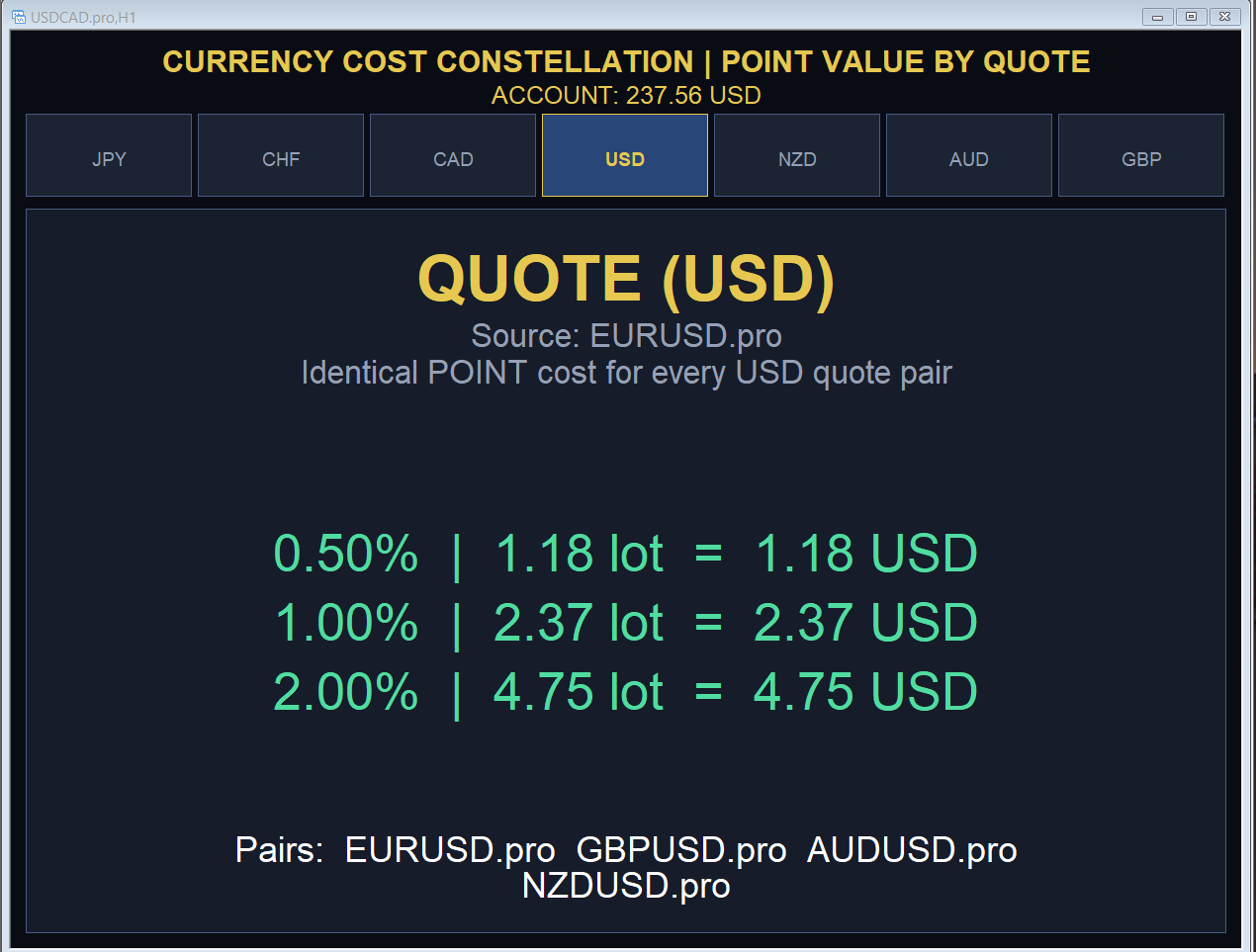
Both indicators show the shared pip or point cost for every major quote currency and instantly convert three risk percentages (or fixed lots) into the exact lot sizes that expose that amount of your account.
**Example:** On the JPY tab, 1.00% risk of a $500 account equals 0.37 lots, and a 1-point move on that position is worth $2.33.
We Traders know that the FX market moves endlessly through Time and Price, but do you know the cost of a SINGLE PIP OR POINT (and how to find its calculation)?
Safe regards, https://indicatorspot.com/
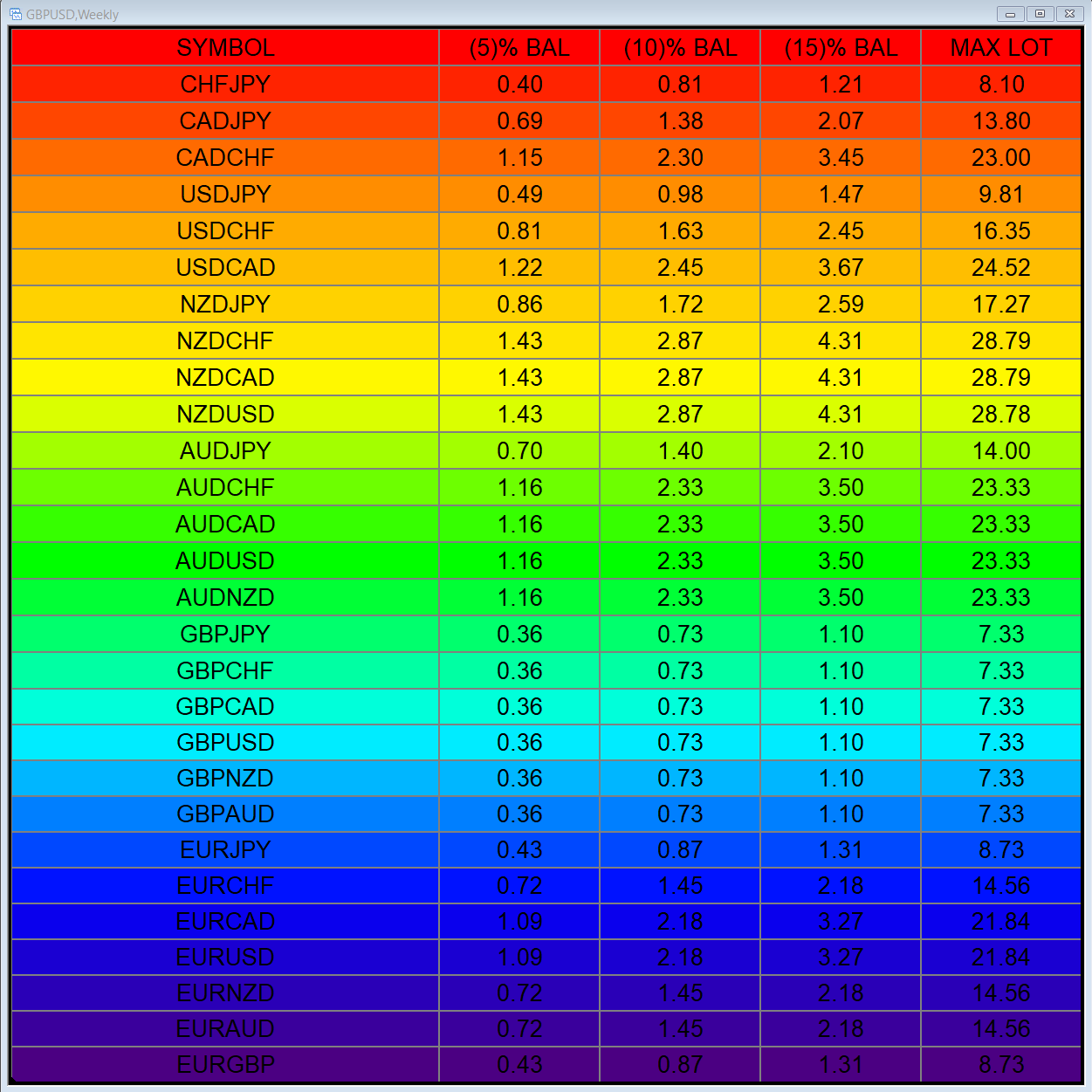
This EA gives traders a clean, full-window view of how large a position each Market Watch symbol can support at different percentages of account balance used as margin. It helps you quickly compare sizing options across symbols and risk levels without ever placing or modifying orders. The goal is simple position-size awareness so you can decide exposure before you trade. Benefits Shows lot size potential across Market Watch symbols at up to three different % of balance margin levels
gives you the power to close every open chart window at once — no matter the symbol, timeframe, number of indicators, Expert Advisors, or objects on them. When you attach it, a confirmation dialog appears. Only after you explicitly grant permission does the script shut down all charts, leaving you on the clean gray screen with Market Watch still fully available. From there you can rebuild your layout from scratch exactly the way you want it. Ideal for: Quickly clearing a cluttered multi-chart
is a multi-timeframe visual matrix that tracks the relative linear progression (log-return strength) of the eight major currencies — EUR, GBP, AUD, NZD, USD, CAD, CHF, and JPY — across selected timeframes in a single responsive panel. Motive Traders often struggle to quickly see which currencies are gaining or losing strength relative to one another across multiple timeframes. This indicator condenses that information into color-coded progression lines so you can immediately identify strong
designed to help traders monitor the long and short swap rates of available trading instruments through a clear, organized on-chart table. Its primary purpose is to make overnight financing costs and potential swap credits easier to observe across multiple symbols without repeatedly opening individual instrument specifications. By presenting swap information in a centralized display, the application helps traders incorporate holding costs into their market analysis and trade planning. Key
UPDATED BOTH MT5 AND MT4 of Eye of Providence:
Why free? I'm from a country known as the "Land of the free and the home of the brave."
https://www.mql5.com/en/market/product/200617?source=Site+Profile+Seller
https://www.mql5.com/en/market/product/153676?source=Site+Profile+Seller
This indicator builds a live correlation matrix from the symbols currently selected in Market Watch . It calculates Pearson correlation on simple returns over a user-defined lookback and displays the results in a clean, auto-sized grid. Positive correlations appear in green, negative in red, and near-zero values stay neutral. An optional automatic timeframe scanner cycles through only the timeframes you enable (M1, M5, M15, M30, H1, H4, D1, W1, MN1), updating the entire matrix at a set interval