
How to purchase a trading robot from the MetaTrader Market and to install it?
 1 475 061
 224
224

The MetaTrader Market features over 10,000 trading robots, indicators and other useful applications for the MetaTrader 4 and MetaTrader 5 trading platforms. We recommend that you watch a series of video tutorials on how to select, purchase and update Products from the Market:
| | Watch video: How to purchase a trading robot or an indicator from the Market? The Market features thousands of trading robots and indicators. You can purchase them from the website or straight from your trading platform. Watch the video and see how easy it is. |

Table of Contents
- Introduction
- Purchasing a product from the Market on the MQL5.com site
- Purchasing a product from the trading terminal
- How do I use a trading robot after purchasing?
- Technical support
Introduction
The article provides a step-by-step description of the product purchasing and activation procedure. Additional information is provided to explain how to use a product on multiple computers, terminals or MQL5 accounts.
A product from the MetaTrader Market (Expert Advisor, trading panels, libraries, etc.) can be purchased on the MQL5.com website or straight from the MetaTrader 4 and MetaTrader 5 trading platforms.
A variety of methods are available to pay for the product, including a transfer from an MQL5.com account or through popular payment systems.
Purchasing a product from the Market on the MQL5.com site
In order to purchase a product from the MetaTrader Market, you should have the required amount in your MQL5 account or in any of the supported international payment systems. Free products can be downloaded and installed without any limitations.
1. Getting started
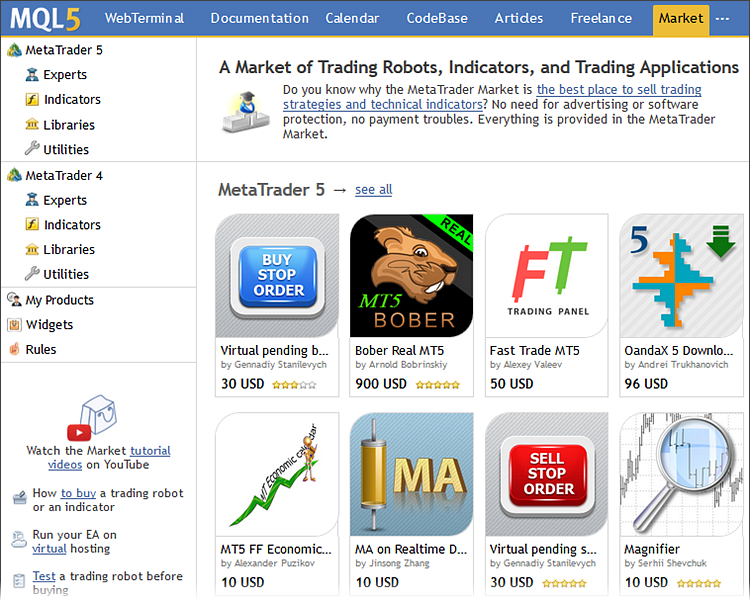
The main page of the Market features the most popular applications for MetaTrader 5 and MetaTrader 4, including trading robots, technical indicators, libraries and utilities.
2. Product categories. Configuring filters
To find a desired product, select the product category and specify additional search parameters if necessary. For example, you can select indicator type (trend, oscillator, multi-timeframe, indicator of levels or channels, etc.), price category, rent options, etc. Products that meet your search criteria will be shown on the main page of the Market.
Suppose we are looking for a scalping Expert Advisor for MetaTrader 5 and are ready to pay $100 for it. Configure the filter:
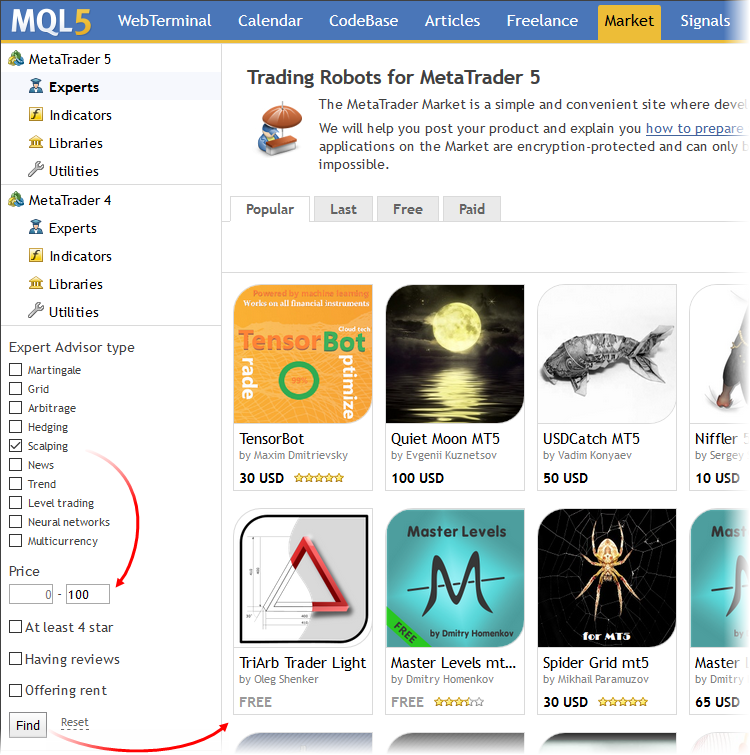
Click "Find". Only icons of Expert Advisors that meet the filter criteria will be shown on the main page.
3. Product description. Selection
To view the description of a product, click on its icon. The product operating principle, as well as the description of input parameters and screenshots are provided in the Overview. Products are often provided with a detailed video. Check out the Reviews and Comments tabs to find out the opinion of traders who have purchased this app. Releases of new product versions are published in the What's new tab.
Price details, information on product release and update dates, as well as the number of downloads and available activations are shown in the left-side field.
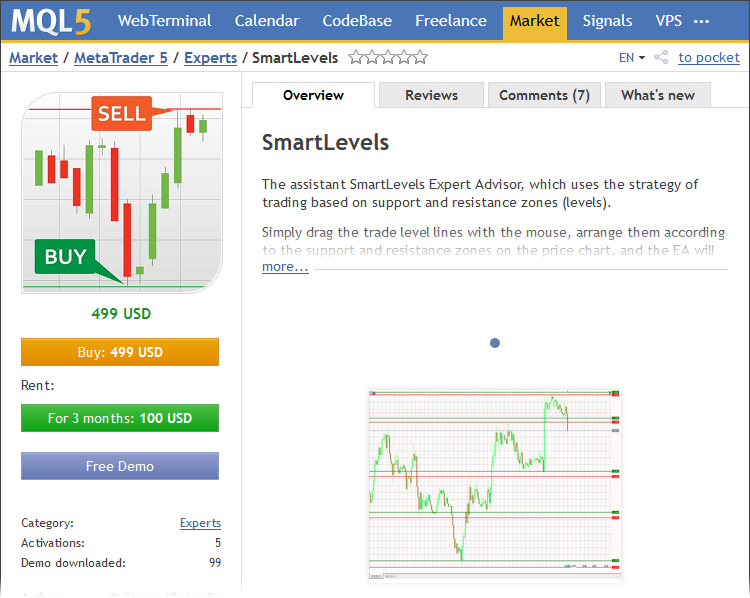
Suppose you have carefully studied product descriptions and have chosen one. All paid products are provided with demo (trial) versions which can be downloaded and tested in the strategy tester. Unlike the full product, the trial version can only run in the Strategy Tester. This possibility allows evaluating how a product works before purchasing it. Upon clicking on the "Download trial" button, you will be redirected to the trading terminal, since the demo version is downloaded directly to the platform.
4. Purchasing a product. Payment methods
Proceed to purchasing. Click "Buy". If you are logged in on the site, a window for choosing the payment method will be shown to you. You can pay for the product from your account balance on the MQL5.com website or via a suitable payment system.
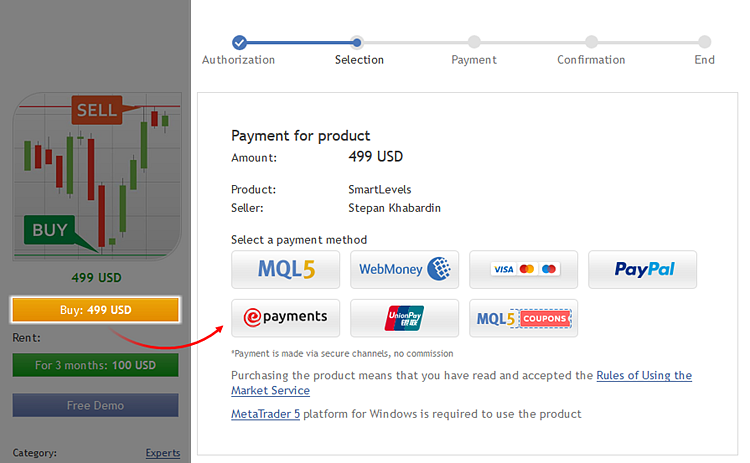
If you are not logged in, then a login window will appear after you click the "Buy" button. Enter the login and password of your MQL5.com profile. After that, you will be redirected to the payment method selection window.
There is a variety of payment options to choose from.
-
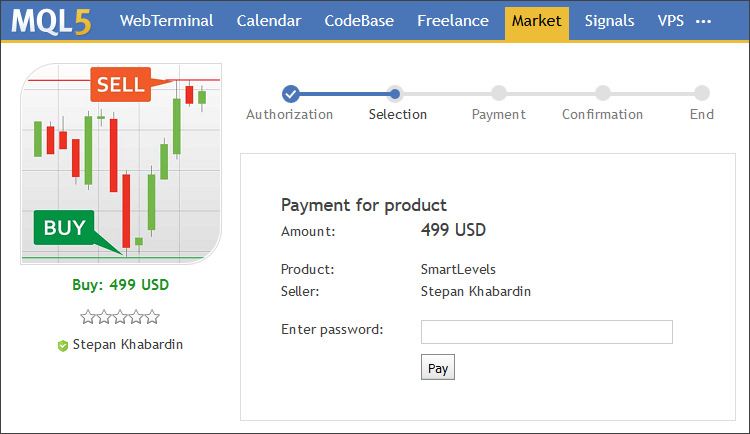
Via the MQL5.com payment system. To pay for a product, you need to enter your MQL5 account password. This is the confirmation of your intention to purchase the product.
-
Using any of supported payment systems. Payment for a product is transferred over secure channels. In order to proceed with the payment, you will need to sign in to your account in the selected payment system. Once you click on the icon of the selected payment system, you will be redirected to the login page.
Note: you should have a valid account in the selected payment system, and the required amount to pay for the product.
After a successful transfer you will receive the following notification:
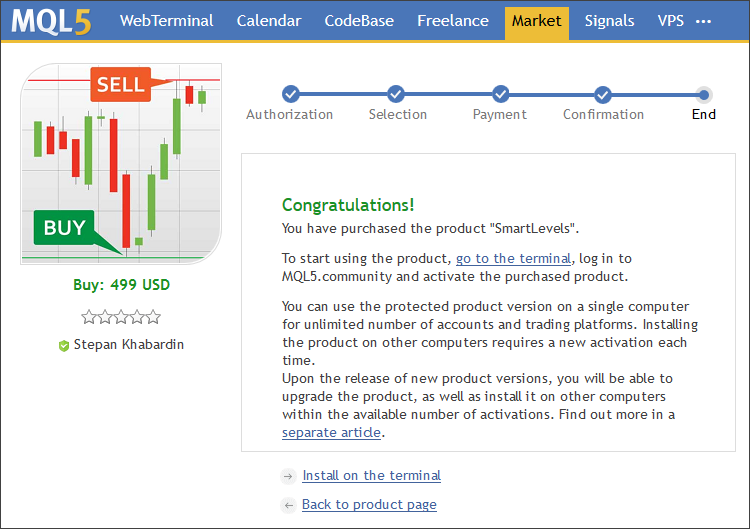
The process of purchasing on the MQL5.com website is complete.
5. Product activation
The key concept in the MetaTrader Market related to product purchasing is the Activation. By purchasing a product, you do not acquire it physically forever. You are only granted the right to use this application on a limited number of computers. At the same time, a product can be used on an unlimited number of terminals within one computer. Each paid product is provided with at least 5 activations, while the Seller can allow more activations. No activation is required for free-of-charge products.
During product activation, the terminal downloads from the Market a special protected version of the application which is linked to a specific computer. The number of available activations is then reduced by one. Activation means that you can only use the obtained product on this computer. Change of the operating system or upgrade of hardware changes the characteristics of the computer, which requires spending an additional activation. You should keep this in mind. The number of activations is always displayed in the product detailed description page.
So, let's proceed to activation.
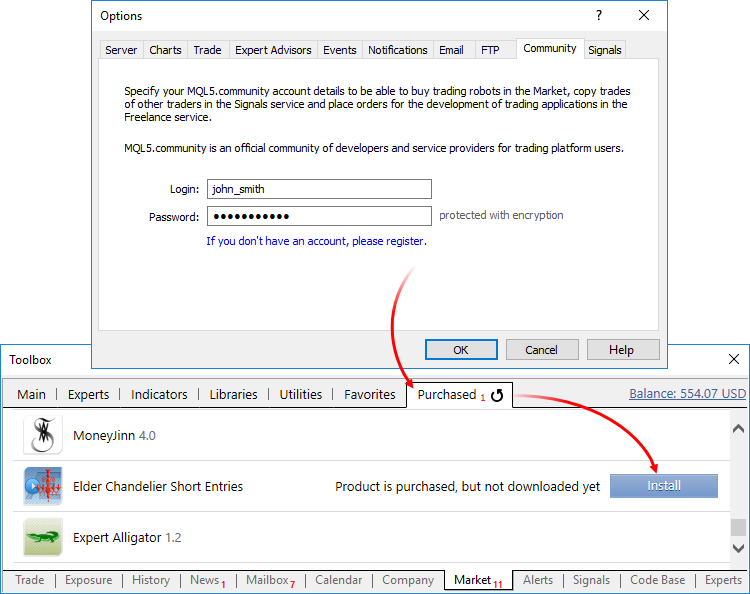
- Open the trading terminal and sign in to the MQL5.community account.
-
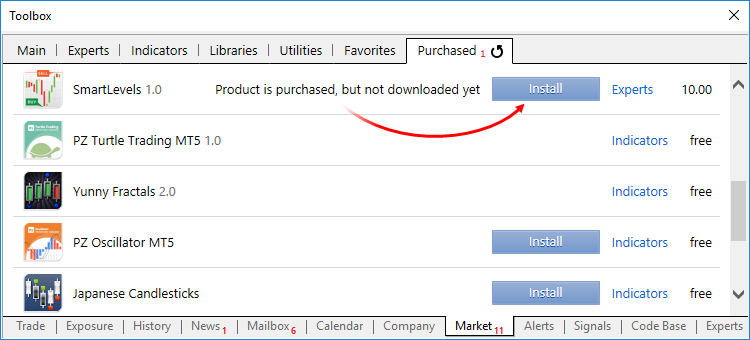
In the Toolbox window, open the Market tab and go to the Purchased section. All products purchased from your MQL5 account are displayed here. In our case, a warning is displayed notifying that the product has been purchased, but has not yet been downloaded.
-
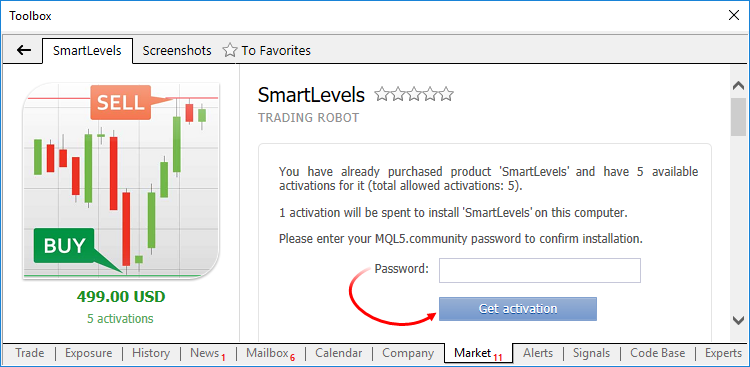
Click "Install". This opens a dialog with the number of available product activations. To confirm the installation on your computer, you will need to enter a password of your MQL5 account.
-
Enter the password and click on "Get activation". After that the product is activated and downloaded to the Market folder of the terminal, and then can be used in this terminal. An appropriate message will be sent to your email, and the following window will be shown in the terminal:
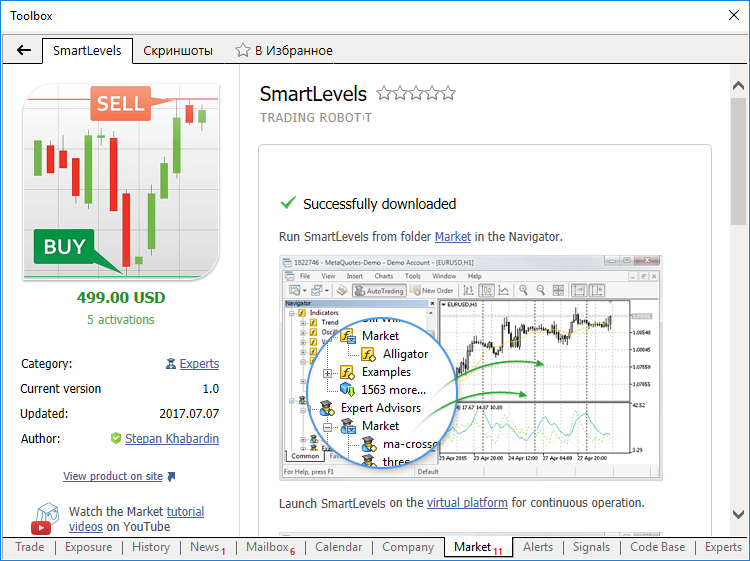
Congratulations, you have just activated the trading robot purchased from the Market!
Purchasing a product from the trading terminal
Purchasing a product via the MetaTrader 4 or MetaTrader 5 trading terminal is similar to buying directly on the website, except for a few differences.
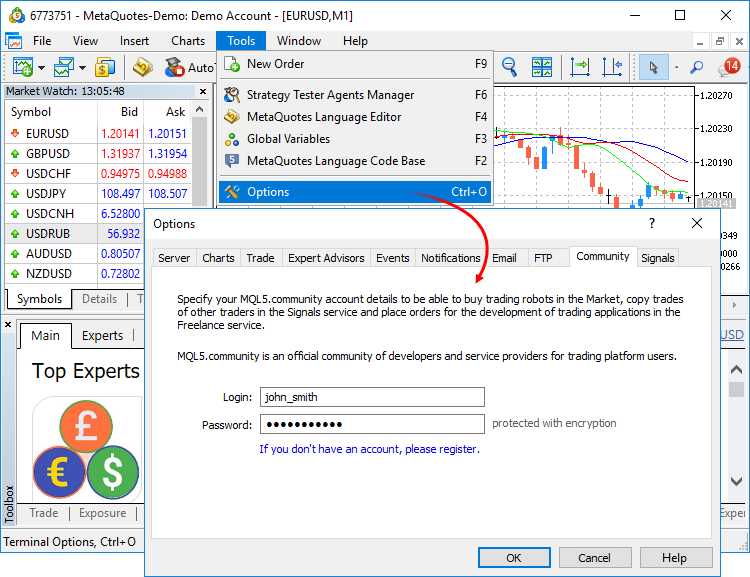
1. Login at MQL5.сom from the trading terminal
Open the terminal and log in to MQL5.com from the terminal:
2. Product categories. Configuring filters
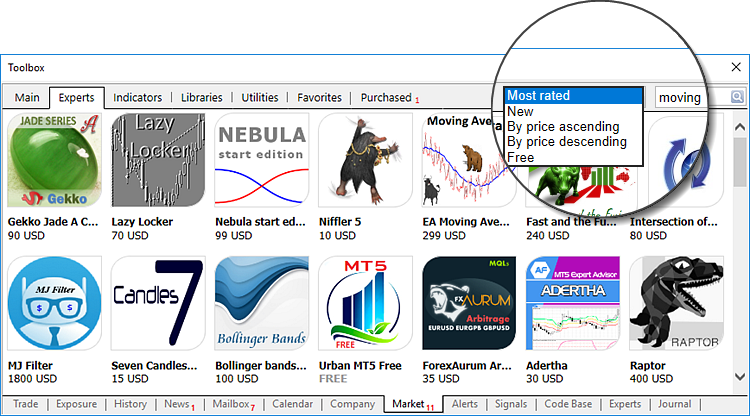
Open the Market. You will find the Market tab in the Toolbox window of MetaTrader 5 or the Terminal window of MetaTrader 4. The main Market tab contains the list of the most popular products by categories. The applications displayed there are purchased most often, and this tab is the best starting point for exploring the Market. More applications from different categories can be viewed using tabs at the top of the window.

Applications in each category are sorted by type. For example, Experts are divided into trend, hedging, scalping, grid, trading from levels and other types. Also you can filter apps by popularity, release date or price. If you are looking for a product having a desired phrase in its name or description, you can use the search bar.
3. Product description. Selection
Similar to the MQL5.com site, the product page in the terminal features the necessary details including description and screenshots, as well as the author, the number of available activations, the product price and category.
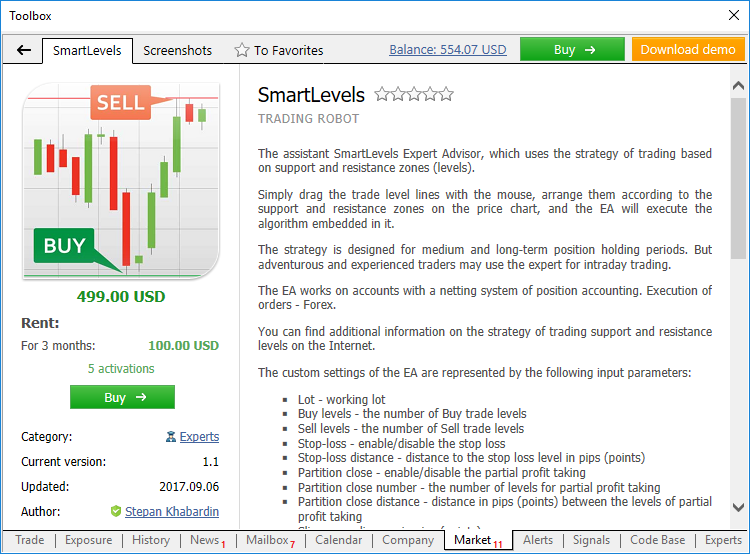
The description, available payment options and the number of activations are opened by clicking on the product icon. You can download a demo version, test it in the Strategy Tester and determine whether the product is suitable for your trading style.
4. Purchasing a product. Payment methods
Proceed to purchasing and click Buy. This button is only available if you are logged in with your MQL5.com account in the terminal (see Getting started). In the next window, you should select the payment method. Further purchasing steps are similar to those on the MQL5.com website.
You can pay for a product from your MQL5 account or from a preferred payment system.
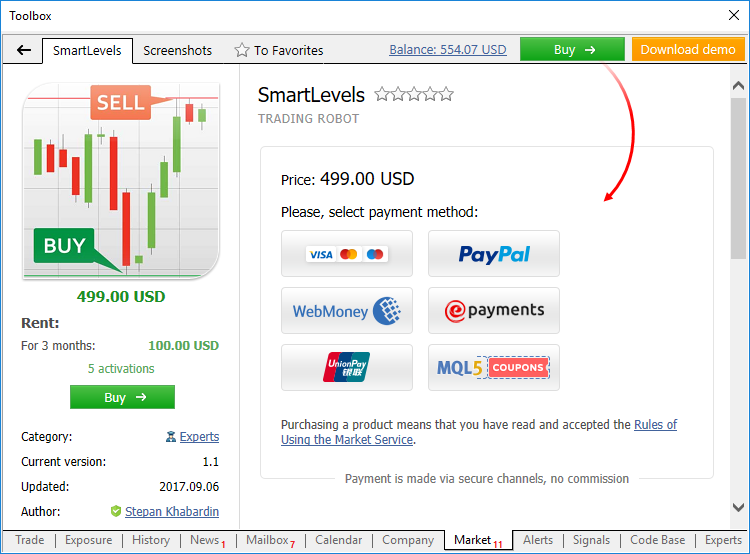
The following example demonstrates the purchase procedure using the ePayments system. After selecting this payment method, the following sign in form opens, where you should enter the login and password of your ePayments account. Click "Enter" and confirm the payment.
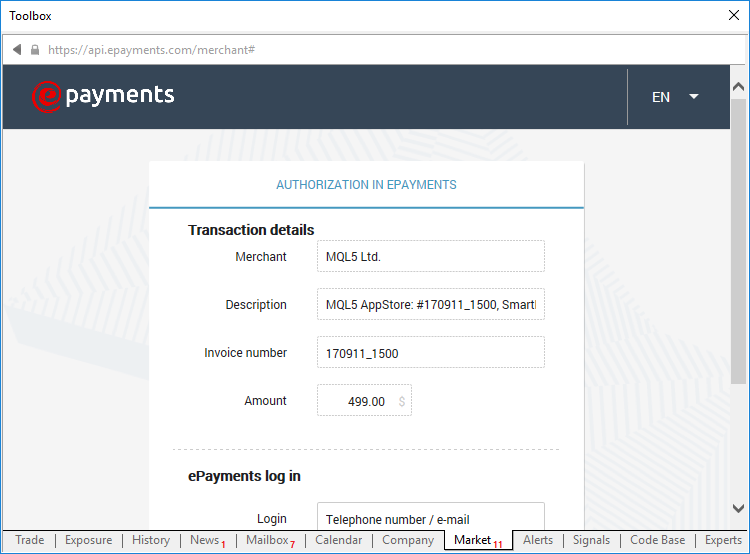
A similar authentication step is required for all other payment systems. Purchasing via any payment system is performed over secure channels and is absolutely safe. When you pay from your MQL5 account, you only need to enter your password to confirm the payment.
Payment is transferred instantly. After that, a message about the successful purchase is shown in the terminal:
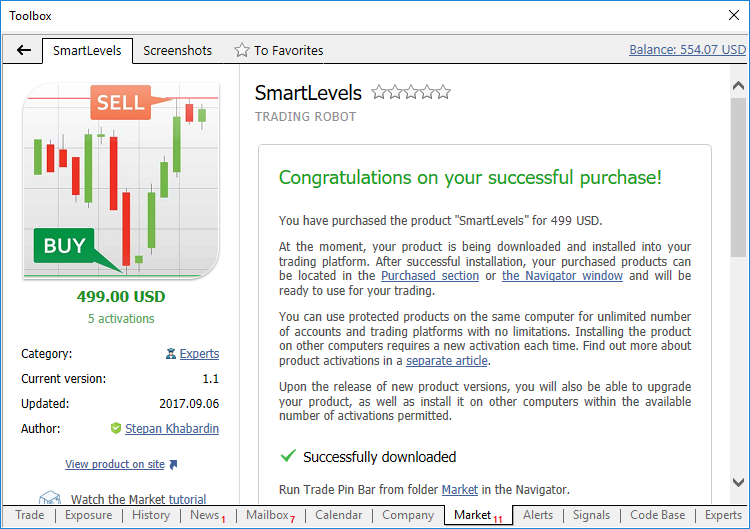
When you purchase a product from the terminal, it is automatically activated and installed to the Market folder in the Navigator of the MetaTrader terminal. A notification of successful purchase and activation is sent to your email, as well as to the MetaTrader terminal and as a private message to your MQL5 account.
How do I use a trading robot after purchasing?
Where do I see my purchases?
Open MetaTrader 5 or MetaTrader 4.
- If you have logged in to your MQL5.com account from the terminal, all products purchased and activated using the current profile will be displayed in the purchased tab.
- If you are have not logged in, all products downloaded from this platform will be displayed in this tab, which will be displayed as "Downloads".
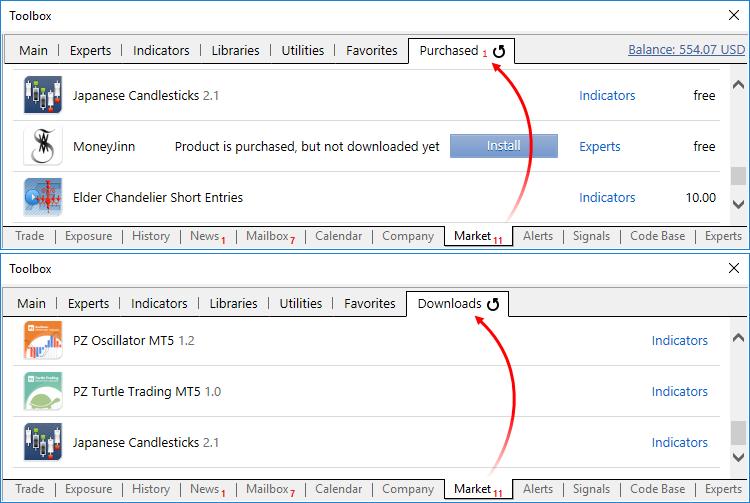
How can I move a purchased application to another computer or platform?
Migration of a trading robot to another platform depends on whether this platform is located on the same computer or on a different one.
- If multiple trading platforms are installed on your computer, you can copy the EX4/EX5 file of the application from a terminal folder and add it to the same folder of another terminal.
- If you want to move the application to another computer, you will need to re-activate it, because a product copy is linked to a computer. To do this:
- open the trading platform on a new computer;
- log in through to your MQL5.community account from this platform;
- open the Purchased tab of the Market section. The list of products purchased using the specified MQL5 account will be displayed here;
- select the desired product and click "Install". The app will be downloaded to the disk and installed in the terminal folder. Attention! A new activation is required in order to install an app on a new computer.
How do I update an app to the latest version?
Sellers update products from time to time, add new features, optimize code, etc. After purchasing a product, you will be receiving all its updates for free.
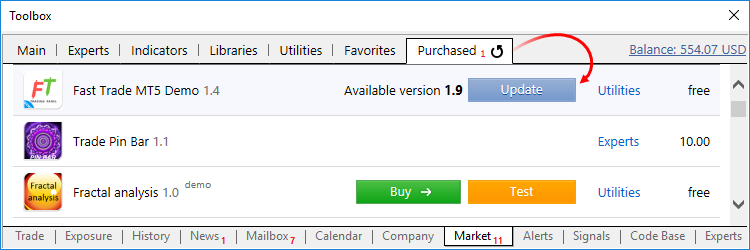
To receive such updates, check the "Purchased" tab in your terminal. A notification about a new version of the products and/or of its demo version is displayed in the product line. Click "Update"/"Update Demo", and a new application file will be downloaded instead of the old one.
For any questions contact Service Desk
After purchasing or renting a product, you will be able to use it without limitations. Also, all updates will be provided to you for free.
However, if you have any problems that cannot be solved using this article, contact Service Desk please. We will be happy to help you.
As you can see, it's simple, fast and secure. Are you ready to purchase your first product? Let's do it then!
We also recommend reading the following Market service related articles:
Warning: All rights to these materials are reserved by MetaQuotes Ltd. Copying or reprinting of these materials in whole or in part is prohibited.
 Fundamentals of Statistics
 MetaQuotes ID in MetaTrader Mobile Terminal
 Exploring Trading Strategy Classes of the Standard Library - Customizing Strategies
 Trade Operations in MQL5 - It's Easy

- Free trading apps
- Over 8,000 signals for copying
- Economic news for exploring financial markets
You agree to website policy and terms of use
Am a beginner and i would be very happy to have EA, pliz take me through how to download it on mt5 demo to see how it work before buying it
How to buy, install, test and use an Expert Advisor
https://www.mql5.com/en/forum/366152 (MT4)
No.
Market products are associated with your MQL5 Community Account here on your site, not trading accounts. You can use the product on your computer with any trading account you wish, but you must be logged on with the same MQL5 Community Account that you used to purchase the product.
If you use a different computer or a 3rd party VPS, then you will consume an extra activation up to the maximum (5-20) allowed by the product, but you will continue to need to be logged on with the same MQL5 Community Account that you used to purchase it.
If you use MetaQuotes own Virtual Hosting solution, then no extra activation will be consumed.
Please read the Market rules for all the details ... Rules of Using the Market Service