Preliminary Announcement of the MetaTrader 5 Updates
Over
the next few days, we will release the MetaTrader 5 update. After the
release of the update, we will publish additional news containing the
full list of changes and the build number. The following changes are
planned:
MetaTrader 5 Client Terminal build 578
Terminal: Included the release version of the MQL5 Market that allows to buy applications from the terminal.
Terminal: Fixed binding of file extensions in Windows Explorer.
Terminal: Fixed recalculation of panel size for a minimized window.
Terminal: Enhanced logging of email sending errors.
MQL5: Added support for parallel computing using OpenCL.
MQL5:
Changed behavior of the Bars() function - if necessary, the cache of
historical data for the appropriate period is recalculated, but without
downloading additional history from the server.
MQL5: Fixed checking for the existence of a trading symbol before requesting its history.
MQL5: Fixed passing of coordinates in mouse events - added correction for the window frame.
MQL5: Fixed passing of reference to a string for the x64 version.
MQL5: Fixed calculation of a string passed to the DLL for the x64 version.
MQL5: Fixed handling of ChartRedraw() call in graphical objects of the "Chart" type.
MQL5: Standard Library. Fixed FormatOrder(...) methods of classes CHistoryOrderInfo and COrderInfo.
MQL5: Standard Library. Fixed the CiCustom::Initialize() method.
MetaTester: Fixed restoring of balance in testing settings.
MetaTester: Optimized scanning of the list of available agents.
MetaTester: Fixed setting of a deal price in the MqlTradeResult structure for Instant Execution.
MetaTester: Expanded checking for the integrity of historical data on tester agents.
Fixed errors reported on the forum and in crash logs.
Terminal: Included the release version of the MQL5 Market. Applications can be purchased from the terminal now.
Terminal: Fixed binding of file extensions in Windows Explorer.
Terminal: Fixed recalculation of panel size for a minimized window.
Terminal: Enhanced logging of email sending errors.
MQL5: Added support for parallel computing using OpenCL.
MQL5:
Changed behavior of the Bars() function - if necessary, the cache of
historical data for the appropriate period is recalculated, but without
downloading additional history from the server.
MQL5: Fixed checking for the existence of a trading symbol before requesting its history.
MQL5: Fixed passing of coordinates in mouse events - added correction for the window frame.
MQL5: Fixed passing of reference to a string for the x64 version.
MQL5: Fixed calculation of a string passed to the DLL for the x64 version.
MQL5: Fixed handling of ChartRedraw call in graphical objects of the "Chart" type.
MQL5: Standard Library. Fixed FormatOrder(...) methods of classes CHistoryOrderInfo and COrderInfo.
MQL5: Standard Library. Fixed the CiCustom::Initialize method.
MetaTester: Fixed restoring of balance in testing settings.
MetaTester: Optimized scanning of the list of available agents.
MetaTester: Fixed setting of a deal price in the MqlTradeResult structure for Instant Execution.
MetaTester: Expanded checking for the integrity of historical data on tester agents.
Fixed errors reported on the forum and in crash logs.
Updated documentation.
The update is available through the LiveUpdate system from February 3, 2012.
Preliminary Announcement of the MetaTrader 5 Updates
Over
the next few days, we will release the MetaTrader 5 update. After the
release of the update, we will publish an additional news containing the
full list of changes and the build number. The following changes are
planned:
MetaTrader 5 Client Terminal build 584
Terminal: Fixes in the MQL5 Market.
Terminal: Added showing of trade levels for the "Chart" graphical object.
Terminal: Fixed errors connected with password change.
Terminal: Added the "Anchor Point" property (OBJPROP_ANCHOR) for the "Bitmap Label" object.
Terminal: Fixed the "Code Base" tab.
MQL5: Fixed an error in the Bars() function for the W1 and MN timeframes.
MQL5: Fixes in the OpenCL support.
MQL5: Standard Library. Published classes of controls processing mouse events.
MQL5: Standard Library. Fixed an error in the CExpertTrade::SetOrderExpiration method.
MetaTester: Fixed display of balance in the list of testing agents.
MetaTester: Fixed an error that could damage string parameters of an Expert Advisor during optimization.
MetaTester: Fixed generation of testing reports.
Fixed errors reported on the forum and in crash logs.
Preliminary Announcement of the MetaTrader 5 Updates
Over
the next few days, we will release the MetaTrader 5 update. After the
release of the update, we will publish an additional news containing the
full list of changes and the build number. The following changes are
planned:
MetaTrader 5 Client Terminal build 590
Terminal: Fixed display of swap calculation mode in symbol specification.
Terminal: Fixed resetting of current prices in Market Watch for changed symbol parameters.
Market: Added the pressed state of the "Download" button when downloading a file.
MQL5: Fixed calling of functions from DLL.
MQL5: Added a property of MQL5 programs - #property icon. It is used to specify the application icon in the MQL5 Market.
MQL5: Added error ERR_FILE_WRITEERROR.
MQL5: Standard Library. Fixed the CList::Insert method.
MQL5: Standard Library. Fixed the CExpertSignal::Direction method.
MQL5:
Standard Library. Fixed methods CSpreadBuffer::RefreshCurrent,
CTimeBuffer::RefreshCurrent, CTickVolumeBuffer::RefreshCurrent,
CRealVolumeBuffer::RefreshCurrent.
MetaTester: Fixed testing and optimization of trial versions or free Expert Advisors from the Market when using agents with different bitness.
MetaTester: Fixed errors that could appear when switching to a different account opened on the same trade server.
MetaEditor: Fixed search in the Code Base section.
MetaEditor: Added an option for downloading examples from the Code Base in search results.
MetaEditor: Added a keyboard shortcut Ctrl+W for closing a source code window.
Fixed errors reported on the forum and in crash logs.
Updated documentation.
The update will be available through the LiveUpdate system.
Terminal: Fixed display of swap calculation mode in symbol specification.
Terminal: Fixed resetting of current prices in Market Watch for changed symbol parameters.
Terminal: Fixed placing of pending orders in an empty Market Depth.
Terminal: Fixed saving of SL and TP of a position for one-click trading.
Market: Added the pressed state of the "Download" button when downloading a file.
MQL5: Option "Allow DLL" moved to the "Dependencies" page.
MQL5: Fixed calling of functions from DLL.
MQL5: Added a property of MQL5 programs - #property icon. It is used to specify the application icon in the MQL5 Market.
MQL5: Added error ERR_FILE_WRITEERROR.
MQL5: Fixed an error in the ObjectGetValueByTime() function.
MQL5: Standard Library. Fixed the CList::Insert method.
MQL5: Standard Library. Fixed the CExpertSignal::Direction method.
MQL5:
Standard Library. Fixed methods CSpreadBuffer::RefreshCurrent,
CTimeBuffer::RefreshCurrent, CTickVolumeBuffer::RefreshCurrent,
CRealVolumeBuffer::RefreshCurrent.
MQL5: Standard Library. Fixed an error in the example of the custom indicator RSI.
MetaTester: Fixed testing and optimization of Expert Advisors downloaded from the Market, using agents with different bitness.
MetaTester: Fixed errors that could appear when switching to a different account opened on the same trade server.
MetaTester: Fixed change of location of panels in a collapsed application window.
MetaEditor:
Enabled support of MQL5 Storage, a personal MQL5 source codes storage
designed for the versioned storing of files and managing projects
directly from MetaEditor 5 in a handy manner. Check the "Use MQL5
Storage" box in your MQL5.community profile to start using the storage.
MetaEditor: Added the "Journal" tab in the toolbar.
MetaEditor: Fixed search in the Code Base section.
MetaEditor: Added an option for downloading examples from the Code Base in search results.
MetaEditor: Added a keyboard shortcut Ctrl+W for closing a source code window.
Fixed errors reported on the forum and in crash logs.
Updated documentation.
The update is available through the LiveUpdate system from February 23, 2012.
Preliminary Announcement of the MetaTrader 5 Updates
Over the next few days, we will release the MetaTrader 5 update.
After the release of the update, we will publish an additional news
containing the full list of changes and the build number. The following
changes are planned:
MetaTrader 5 Client Terminal build 602
Terminal: Changed the algorithm of storing MQL5.com accounts
passwords - previously saved passwords will be reset, their re-entering
will be required.
Terminal: Fixed the average price display on the buy/sell buttons of the Depth of Market.
MQL5: Changed behavior of the graphical objects created from MQL5
programs. When creating such objects, their parameters are not saved as
default ones.
Terminal: Changed the algorithm of storing MQL5.com accounts
passwords - previously saved passwords will be reset, their re-entering
will be required.
Terminal: Fixed the average price display on the buy/sell buttons of the Depth of Market.
Terminal: Fixed drawing the lines of orders trading levels on a chart.
MQL5: Changed behavior of the graphical objects created from MQL5
programs. When creating such objects, their parameters are not saved as
default ones.
Preliminary Announcement of the MetaTrader 5 Updates
Over
the next few days, we will release the MetaTrader 5 update. After the
release of the update, we will publish additional news containing the
full list of changes and the build number. The following changes are
planned:
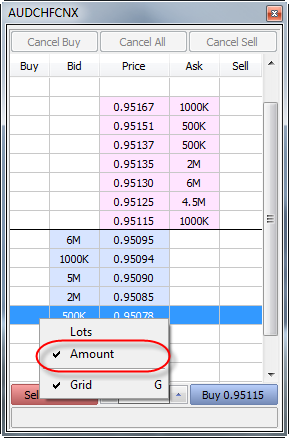
Terminal:
Added new display mode of volumes "Amount" for forex instruments in the
Depth of Market. The new mode allows you to see requests in lots and in
the quoted currency.
Terminal: In the dialogs of properties of Bitmap and Bitmap Label, added tooltips to show long paths of image files.
MQL5:
Added new methods FrameAdd, FrameFirst, FrameNext and FrameInputs,
allowing testing agents to pass their own custom data frames to the
terminal and allowing the terminal to read them. With the new methods
you can implement distributed computing to produce results in any
convenient form, and not only in the form of one or more numeric values.
By connecting to the MQL5 Cloud Network, you can solve any distributed
tasks in MQL5, not necessarily, however, related to the financial
markets.
MQL5: Added new entry points OnTesterInit,
OnTesterDeinit and OnTesterPass. During the optimization of an Expert
Advisor with these entry points, a chart to attach the EA to is created
in the terminal. When a new data frame is received from testing agents,
OnTesterPass is called, in which the received data can be read and
analyzed. A detailed description is available in the documentation.
MQL5:
Added new method ResourceCreate, which allows to create a resource of
an image in the memory based on the array of the description of pixels.
The created resource can be assigned to graphical objects Bitmap and
Bitmap Label. A detailed description is available in the documentation.
MQL5:
Added new properties TERMINAL_MEMORY_PHYSICAL, TERMINAL_MEMORY_TOTAL,
TERMINAL_MEMORY_AVAILABLE, TERMINAL_MEMORY_USED, TERMINAL_X64,
TERMINAL_OPENCL_SUPPORT, TERMINAL_DISK_SPACE, TERMINAL_CPU for
TerminalInfoInteger. New features allow MQL5 programs to analyze the
environment in which they run, and based on this make decisions about
the use of various resources. These properties will be useful in complex
Expert Advisors that require large amounts of resources. Now, during
the optimization of such an Expert Advisor in the MQL5 Cloud Network,
you can implement checks of available memory of an agent in the EA's
OnInit, and in case of a potential shortage of memory not to start the
testing process. A detailed description is available in the documentation.
MQL5: Fixed optimizer error, which could result in incorrect calculations with floating point.
MQL5:
Fixed the terminal crash error which occurred when using exceptions
inside its own DLL in Windows Server 2008 R2 and Windows Server 2008.
MQL5: Standard Library. Fixed an error of self-deletion of an indicator in the CAppDialog::CreateIndicator method.
MQL5: Standard Library. The BackGround method has been renamed to Background in control objects.
MetaTester:
Changed the operation of the testing method "on open prices". As
before, OnTick of an Expert Advisor runs only at the opening of the bar,
but instead of M1 OHLC ticks, high, low and close states the tested bar
are used. Due to this, stops and pending orders may trigger at a price
different from the stated one. This has led to a multiple acceleration
of tests.
MetaTester: Increased the total speed of optimization.
MetaTester:
The algorithm of checking restrictions on the aggregate positions
volume now exactly matches that used on the server.
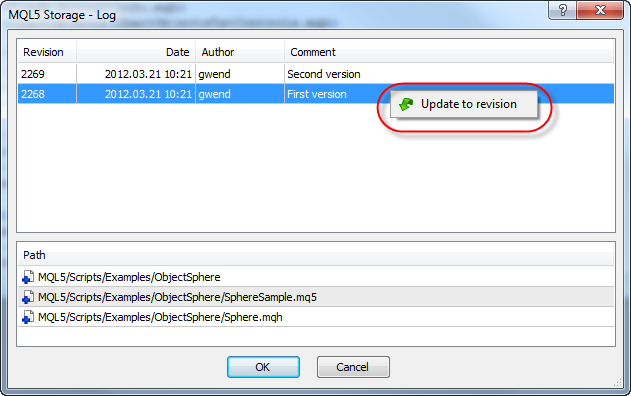
MetaEditor: In the log of changes of the MQL5 Storage you now can revert changes to a certain revision.
MetaEditor: Fixed an error in case-insensitive search in the Code Base and articles for the Russian language.
MetaEditor: In the Navigator, added the display of .h and .cpp files.
Fixed errors reported on the forum and in crash logs.
Updated documentation.
The update will be available through the LiveUpdate system.
63913
MetaTrader 5 Client Terminal build 574
The update is available through the LiveUpdate system from January 13, 2012.
The MetaTrader 5 Client Terminal can be downloaded at http://files.metaquotes.net/metaquotes.software.corp/mt5/mt5setup.exe
63913
Preliminary Announcement of the MetaTrader 5 Updates
Over the next few days, we will release the MetaTrader 5 update. After the release of the update, we will publish additional news containing the full list of changes and the build number. The following changes are planned:
MetaTrader 5 Client Terminal build 578
63913
MetaTrader 5 Client Terminal build 581
The update is available through the LiveUpdate system from February 3, 2012.
The MetaTrader 5 Client Terminal can be downloaded at http://files.metaquotes.net/metaquotes.software.corp/mt5/mt5setup.exe
63913
Preliminary Announcement of the MetaTrader 5 Updates
Over the next few days, we will release the MetaTrader 5 update. After the release of the update, we will publish an additional news containing the full list of changes and the build number. The following changes are planned:
MetaTrader 5 Client Terminal build 584
63913
The update is available through the LiveUpdate system from February 9, 2012.
The MetaTrader 5 Client Terminal can be downloaded at http://files.metaquotes.net/metaquotes.software.corp/mt5/mt5setup.exe
63913
Preliminary Announcement of the MetaTrader 5 Updates
Over the next few days, we will release the MetaTrader 5 update. After the release of the update, we will publish an additional news containing the full list of changes and the build number. The following changes are planned:
MetaTrader 5 Client Terminal build 590
The update will be available through the LiveUpdate system.
63913
The update is available through the LiveUpdate system from February 23, 2012.
The MetaTrader 5 Client Terminal can be downloaded at http://files.metaquotes.net/metaquotes.software.corp/mt5/mt5setup.exe
63913
Preliminary Announcement of the MetaTrader 5 Updates
Over the next few days, we will release the MetaTrader 5 update. After the release of the update, we will publish an additional news containing the full list of changes and the build number. The following changes are planned:
MetaTrader 5 Client Terminal build 602
63913
MetaTrader 5 Client Terminal build 607
The update is available through the LiveUpdate system from March 9, 2012.
The MetaTrader 5 Client Terminal can be downloaded at http://files.metaquotes.net/metaquotes.software.corp/mt5/mt5setup.exe
63913
Preliminary Announcement of the MetaTrader 5 Updates
Over the next few days, we will release the MetaTrader 5 update. After the release of the update, we will publish additional news containing the full list of changes and the build number. The following changes are planned:
- Terminal:
Added new display mode of volumes "Amount" for forex instruments in the
Depth of Market. The new mode allows you to see requests in lots and in
the quoted currency.

- Terminal: In the dialogs of properties of Bitmap and Bitmap Label, added tooltips to show long paths of image files.
- MQL5:
Added new methods FrameAdd, FrameFirst, FrameNext and FrameInputs,
allowing testing agents to pass their own custom data frames to the
terminal and allowing the terminal to read them.
- MQL5: Added new entry points OnTesterInit,
OnTesterDeinit and OnTesterPass. During the optimization of an Expert
Advisor with these entry points, a chart to attach the EA to is created
in the terminal. When a new data frame is received from testing agents,
OnTesterPass is called, in which the received data can be read and
analyzed.
- MQL5:
Added new method ResourceCreate, which allows to create a resource of
an image in the memory based on the array of the description of pixels.
The created resource can be assigned to graphical objects Bitmap and
Bitmap Label. A detailed description is available in the documentation.
- MQL5:
Added new properties TERMINAL_MEMORY_PHYSICAL, TERMINAL_MEMORY_TOTAL,
TERMINAL_MEMORY_AVAILABLE, TERMINAL_MEMORY_USED, TERMINAL_X64,
TERMINAL_OPENCL_SUPPORT, TERMINAL_DISK_SPACE, TERMINAL_CPU for
TerminalInfoInteger.
- MQL5: Fixed optimizer error, which could result in incorrect calculations with floating point.
- MQL5:
Fixed the terminal crash error which occurred when using exceptions
inside its own DLL in Windows Server 2008 R2 and Windows Server 2008.
- MQL5: Standard Library. Fixed an error of self-deletion of an indicator in the CAppDialog::CreateIndicator method.
- MQL5: Standard Library. The BackGround method has been renamed to Background in control objects.
- MetaTester:
Changed the operation of the testing method "on open prices". As
before, OnTick of an Expert Advisor runs only at the opening of the bar,
but instead of M1 OHLC ticks, high, low and close states the tested bar
are used. Due to this, stops and pending orders may trigger at a price
different from the stated one. This has led to a multiple acceleration
of tests.
- MetaTester: Increased the total speed of optimization.
- MetaTester:
The algorithm of checking restrictions on the aggregate positions
volume now exactly matches that used on the server.
- MetaEditor: In the log of changes of the MQL5 Storage you now can revert changes to a certain revision.

- MetaEditor: Fixed an error in case-insensitive search in the Code Base and articles for the Russian language.
- MetaEditor: In the Navigator, added the display of .h and .cpp files.
- Fixed errors reported on the forum and in crash logs.
- Updated documentation.
The update will be available through the LiveUpdate system.With the new methods you can implement distributed computing to produce results in any convenient form, and not only in the form of one or more numeric values. By connecting to the MQL5 Cloud Network, you can solve any distributed tasks in MQL5, not necessarily, however, related to the financial markets.
A detailed description is available in the documentation.
New features allow MQL5 programs to analyze the environment in which they run, and based on this make decisions about the use of various resources. These properties will be useful in complex Expert Advisors that require large amounts of resources. Now, during the optimization of such an Expert Advisor in the MQL5 Cloud Network, you can implement checks of available memory of an agent in the EA's OnInit, and in case of a potential shortage of memory not to start the testing process.
A detailed description is available in the documentation.