
Speed Up Calculations with the MQL5 Cloud Network
 34 087
 25
25

Multithreaded Testing in MetaTrader 5
You can long enumerate all the advantages of the new MetaTrader 5 trading platform and argue that it is better than other programs for technical analysis and trading in financial markets. There is one more indisputable argument in favor of the platform. And this last argument is the Strategy Tester in the MetaTrader 5 Client Terminal. In this article we describe its great features and explain why MetaQuotes Software Corp. developers are so proud of it.
The 5th generation client terminal has got not only a new powerful and fast MQL5 language for programming trading strategies, but also an absolutely new Strategy Tester that has been designed from scratch. The Tester is used not only for receiving the results of trading strategies tested on historical data, but also allows to optimize it, i.e. to find the optimal parameters.
Strategy optimization is a multiple run of a trading strategy on the same period of history with different sets of parameters on which it depends. This is a standard task of mass calculations, which can be parallelized, and as you might have guessed - the tester in MetaTrader 5 is multithreaded! What this actually means, we will now see at an example of optimization of an Expert Advisor from the standard distribution pack.
Test Conditions
For the purposes stated above we use a computer with Intel Core i7 (8 cores, 3.07 GHz) and 12 GB of memory with the Operating System Windows 7 64 bit and MetaTrader 5 build 1075.
The Expert Advisor Moving Average.mq5 from the standard delivery pack with the following settings is tested:
- Symbol: EURUSD H1
- Testing interval: from 2011.01.01 to 2011.10.01
- Price simulation mode: 1 minute OHLC (Open, High, Low and Close prices on 1-minute bars are used)
- Optimization type: slow complete algorithm, totally 14,040 passes
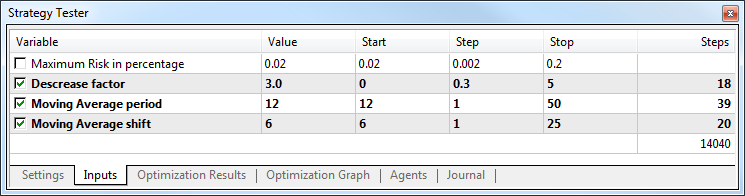
Optimization on Local Agents
First, let's run the optimization on local agents. We have eight testing agents - the optimal number by the number of cores. Disable the use of remote agents from the local network and the agents of the MQL5 Cloud Network:
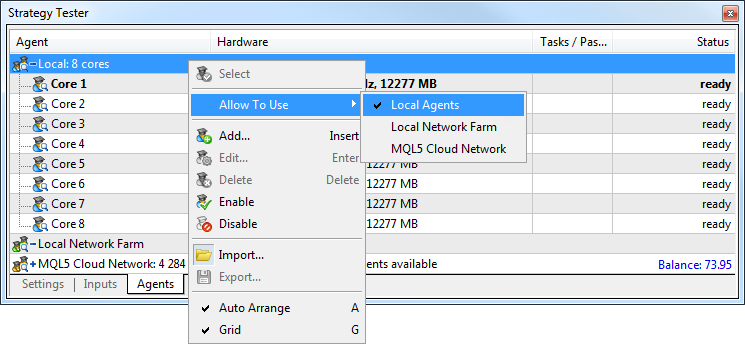
After the end of optimization, go to the Journal: 14,040 passes on 8 local agents took 1 hour, 3 minutes and 44 seconds.
2015.02.05 16:44:38	Statistics	locals 14040 tasks (100%), remote 0 tasks (0%), cloud 0 tasks (0%)
2015.02.05 16:44:38	Statistics	optimization passed in 1 hours 03 minutes 46 seconds
2015.02.05 16:44:38	Tester	optimization finished, total passes 14040
Optimization using a local farm of agents
How to perform more tasks in parallel? Of course, you can purchase a processor with a large number of cores. However, this wouldn't let you multiply the number of concurrent tasks. Strategy Tester solves this problem. You can create your own farm of processing agents in your local network.
How to create a farm of agents?
Agents should be installed on each computer of the local network. If MetaTrader 5 is installed on a computer, open testing agents manager using the corresponding command from the "Tools" menu.
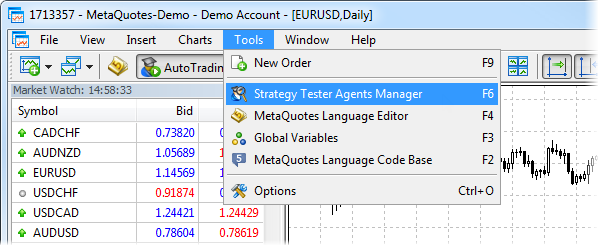
Otherwise, download a separate application for managing agents MetaTrader 5 Strategy Tester Agent and go through the simple installation process.
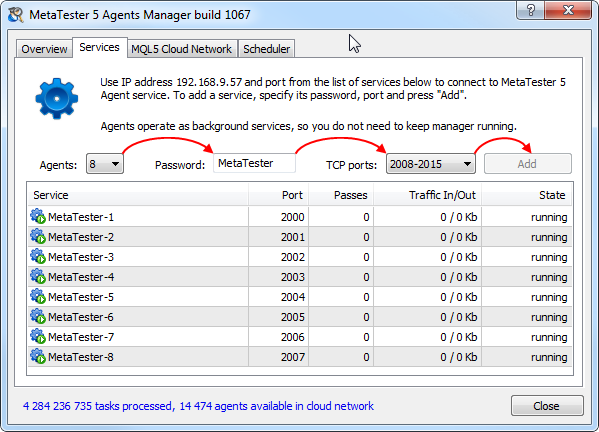
In the manager, open the Agents tab:
- Select the number of agents that must be installed. Agents are installed based on the number of logical cores.
- Enter the password that will be used for connecting the agents for use.
- Select a range of ports for connection.
- Click Add.
That's all about it. The agents are ready to use from other computers on the local network.
How to connect your agents?
Agents are connected in just a few clicks. Open the strategy tester in the terminal and go to the "Agents" tab. Select "Local Network Farm" and click "Add" in the context menu.
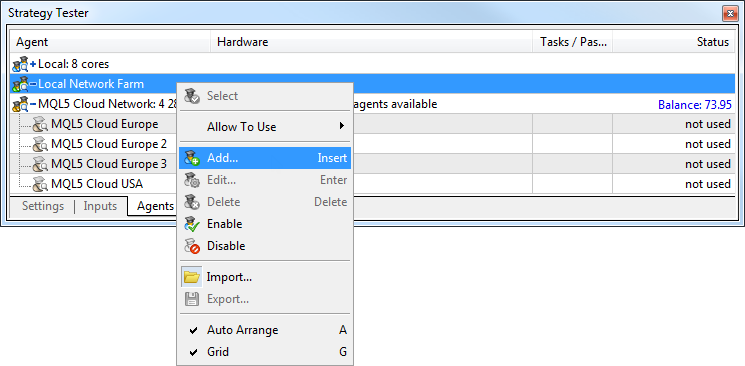
The easiest and fastest way is to automatically scan the local network for a range of IP addresses and ports. Select them, and enter the agent connection password that was specified during installation.
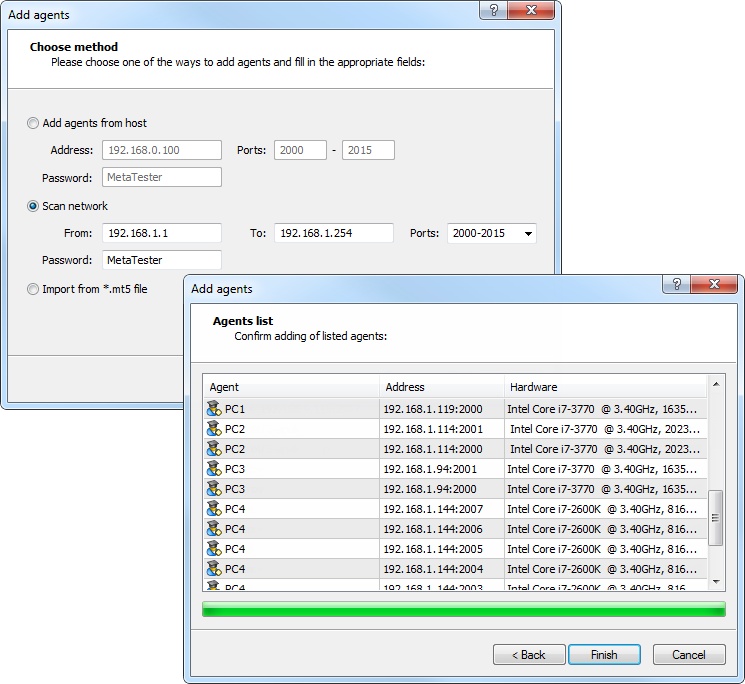
Click "Finish", and all the found agents will be available for testing.
Speed Test
We have added 20 remote agents to 8 local ones. Thus we have 28 agents in total, what is 3.5 times more than we had originally. Let's optimize our Expert Advisor and see how fast it will be performed.
2015.02.05 15:14:44 Statistics optimization passed in 15 minutes 47 seconds
2015.02.05 15:14:44 Tester optimization finished, total passes 14040
Three-quarters of tasks were performed by remote agents. Optimization time was reduced to 15 minutes 47 seconds, which is almost 4 times faster.
An impressive growth of speed, but this solution is not available to everyone. Don't worry. There is an opportunity to optimize the EA even faster - let's try to use agents from the MQL5 Cloud Network!
Optimization Using the MQL5 Cloud Network
This time we do not use local agents, instead we use only MQL5 Cloud Network agents. Click the "Start" button and watch the progress of the optimization. The video shows the process in real time.
With MQL5 Cloud Network the optimization process is 150 times faster!
During the optimization, each node of the MQL5 Cloud Network distributes tasks (single runs) to available agents. The optimization took only 26 seconds, giving the acceleration in the 147 (!) times. Traders may need to run hundreds of thousands of optimization passes in a reasonable time. With the MetaTrader 5 tester, you need only an hour for calculations in the MQL5 Cloud Network, while without the network you would spend a few days. Now with one click you can involve thousands of cores to solve a task. And it's available to everyone! But how does it work?
MQL5 Cloud Network Includes Thousands of Computers
The MQL5 Cloud Network consists of nodes - dedicated servers, to which testing agents connect to perform tasks. These nodes are managers (poolers), as they combine agents around the world into larger pools based on their geographical location. Being in the idle mode, each agent sends a message notifying that it is ready to perform a task. The interval between such messages depends on the current load of the MQL5 Cloud Network.
Each node of the network is at the same time treated by MetaTrader 5 as a point to access the MQL5 Cloud Network; a terminal connects to them using the MQL5.com account details. The list of servers of the MQL5 Cloud Network and the number of cloud agents available through them can be found in the terminal, the Tester window, tab "Agents".
An agent is free, that is in the idle mode, in case it is not busy performing its own local tasks received from a local computer or local network. While an agent is busy, it makes no attempt to take tasks from the MQL5 Cloud Network. Within several minutes after completing local calculations, the agent gets in touch with the nearest MQL5 Cloud Network node and offers its services. Thus, your testing agents are working on the network only if you do not need them. And, of course, the agents work on the network in accordance with the set schedule.
Thanks to the ease of installation and the minimum necessary settings of the MetaTrader 5 Agents Manager, thousands of testing agents are available in the network at any given time. The general statistics of MQL5 Cloud Network agents and completed tasks is available on the main page of the project at https://cloud.mql5.com.
Running Distributed Computing Using the MQL5 Cloud Network Agents
Like with conventional optimization, you need to set all the testing options and Expert Advisor's input parameters. Before that, do not forget to specify your MQL5.community login in the terminal settings and allow the use of the MQL5 Cloud Network. The four required steps are shown in the below figure.
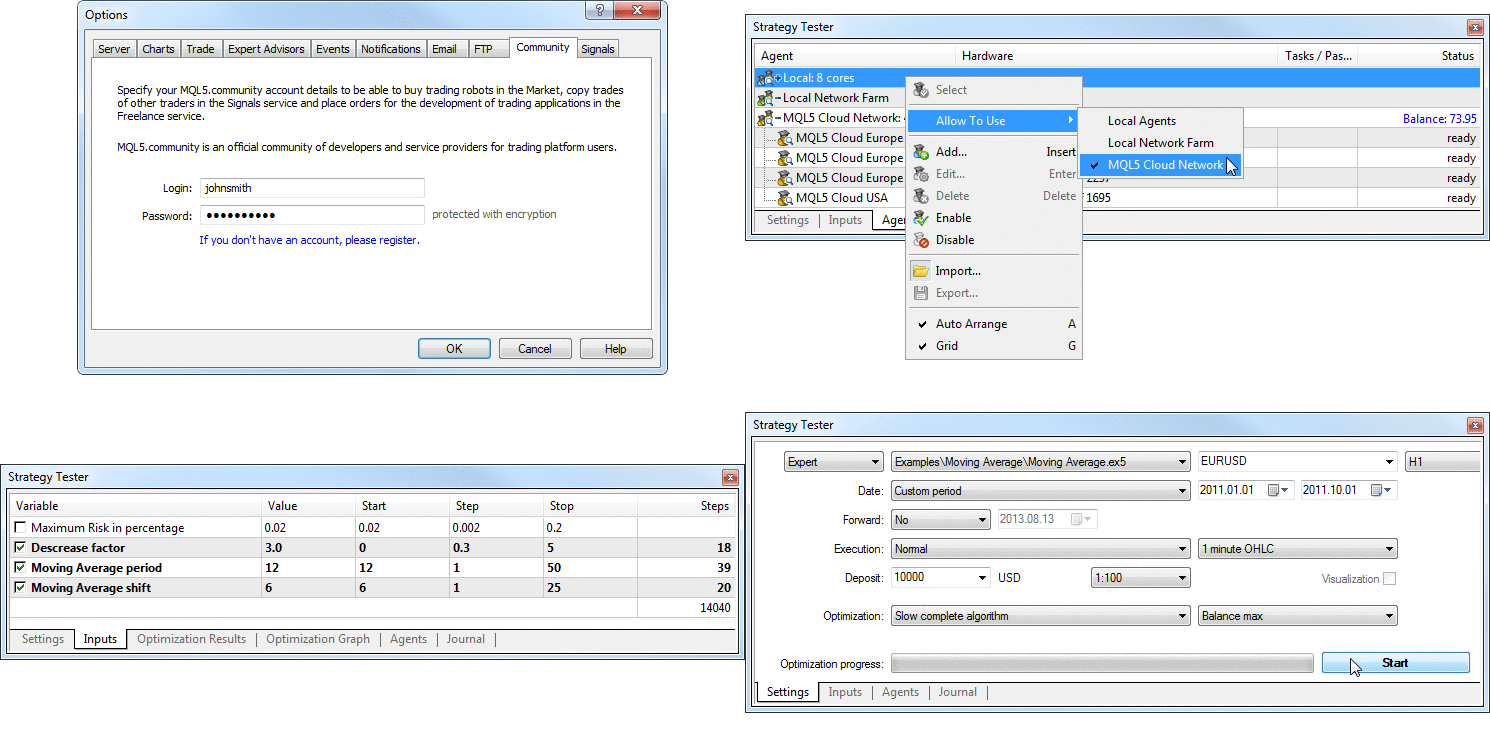
Click the "Start" button and the optimization process starts. The terminal prepares a task for the testing agents, which includes:
- a compiled Expert Advisor file with the EX5 extension
- indicators and EX5 libraries that are enabled using the directives #property tester_indicator and #property tester_library (DLL's are definitely not allowed in the cloud)
- data files needed for the test, enabled using the directive #property tester_file
- testing/optimization conditions (the name of the financial instrument, testing interval, simulation mod, etc.)
- trading environment (symbol properties, trading conditions, etc.)
- the set of Expert Advisor parameters that form the entire set of required passes, i.e. tasks
The MetaTrader 5 terminal communicates with the nodes of the MQL5 Cloud Network and gives each node a separate package of tasks to perform specific passes. Each node is actually a proxy server, since it receives a task and a package of passes, and then begins to distribute these tasks to agents connected to it. In this case the files of Expert Advisors, indicators, libraries and data files are not stored on the hard drives of the MQL5 Cloud Network servers.
Also, EX5 files are not stored on hard disks of cloud agents for reasons of confidentiality. Data files are saved on a disk, but after optimization data files are deleted.
This is the whole procedure of communication between your client terminal and the MQL5 Cloud Network - actually, it sends packets of tasks to the network and waits for the results.
Synchronization in the Cloud and Distribution of History to Agents
Each node of the MQL5 Cloud Network keeps the history of the required symbols and sends it to the agents connected to it on demand. If it has no history of symbol XYZ from broker ABC, then the node automatically downloads the necessary history data from your terminal. Therefore, your terminal should be ready to provide such a story.
We recommend you to run a preliminary single test of a strategy on your computer before you send it to the MQL5 Cloud Network. This approach automatically provides downloading and synchronization of all the required history from a trading server.
As a rule, 4 to 8 agents are installed on a modern computer, but history data are stored in a single folder in the MQL5 Strategy Tester Agent installation directory. All cloud agents installed by one MQL5 Strategy Tester Agent manager, receive the history from this folder. If 8 agents are installed, and they are all available for the MQL5 Cloud Network, the required history is downloaded only once. This allows you to save traffic and hard disk space. Also it is convenient to carry out synchronization between cloud agents and nodes of the distributed computing network.
Thus, all the agents that perform optimization of a trading strategy in a given time interval and on a given symbol are automatically provided with the same synchronized history and market environment.
Warming up
How does optimization run on a local computer optimization? If you have 8 cores, usually 8 default local agents are available to you. When you click "Start", tasks are distributed to local agents, the required is downloaded (if necessary) and the process begins. In this case optimization start almost instantaneously. But if you distribute tasks to the MQL5 Cloud Network, the procedure changes a little.
Cloud agents are not permanently connected to the network managers, it is technically unjustified and costly for all reasons. Instead, the agents periodically ask MQL5 Cloud Network servers about whether there are any new tasks for them. This happens often enough to ensure the rapid mobilization of the required number of agents, and rare enough, so as not to overload the network traffic with such messages. So when you run optimization, you can see the growth in the number of agents that connect to the fulfillment of your tasks. This is the real-time process of how cloud agents access the MQL5 Cloud Network and receive tasks for certain passes.
If there are no tasks, agents contact managers quite rarely. But if an order to calculate thousands (tens of thousands) of tasks comes, the picture changes. We can say that the activity of the MQL5 Cloud Network increases, and after completing the task the number of applications of agents for new tasks reduces. And if after completing a task, for example, from Europe, an order for other tasks comes from Asia, the network will be ready for a quick start. You can call this behavior of the network "warming up".

Thus, the MQL5 Cloud Network is ready again to accept new tasks to perform them in the shortest possible time.
Use the MQL5 Cloud Network!
The phrase "Time is money" becomes even more topical with each passing year, and we cannot afford to wait for important computations for tens of hours or even days. At the time of this writing, the MQL5 Cloud Network provides increase of calculations in a hundred times. With its further increase, the gain in time can grow to a thousand times or more. In addition, the network of distributed computing allows you to solve not only strategy optimization tasks.
You can develop a program in MQL5 that implements massive mathematical calculations and requires a lot of CPU resources. The MQL5 language, in which programs for the MetaTrader 5 terminal are written, is very close to C++ and allows you to easily translate algorithms written in other high level languages.
An important feature of the MetaTrader 5 terminal tester is that hard mathematical tasks aimed at finding solutions with large sets of input variables are easily parallelized among testing agents. And you do not need to write any special code for that - just connect to the MQL5 Cloud Network of distributed computing!
Translated from Russian by MetaQuotes Ltd.
Original article: https://www.mql5.com/ru/articles/341
 Using Discriminant Analysis to Develop Trading Systems
 Create Your Own Graphical Panels in MQL5
 The All or Nothing Forex Strategy
 Time Series Forecasting Using Exponential Smoothing

- Free trading apps
- Over 8,000 signals for copying
- Economic news for exploring financial markets
You agree to website policy and terms of use
lol, same thing happened to me a couple of weeks ago, Now I am looking for other options, like 3rd party cloud computing service, can you use that for the strategy tester? or buying my own server, is there anyone who can help get me started on that?
Wasn't sure where to see my cloud network usage information; found it under Agents > Tasks in the web portal.
Hi, seems like user statistics page has gone down.
Looks like that cloud is down.
At least no agents connected..