
How to Order a Trading Robot in MQL5 and MQL4
 197 352
 19
19

The MetaTrader platform enables round-the-clock trading by using trading robots. Even if you do not have required programming skills, you can utilize extensive algo-trading capabilities and automate trading operations, as well as perform real-time technical analysis of any complexity level. All these advanced options can be obtained by ordering a required application from the Freelance service!
- Creating an Order
- Tips on Customers' Frequently Asked Questions
- Extending Order Execution Period/Increasing Cost
- Selecting a Developer
- Freelance Order Execution
- Requirements Negotiation
- Loading Requirements Specification to an Order
- Demonstration
- Handover and Payment
- Order Feedback
MQL5.com Freelance Advantages
The main advantage of Freelance, which distinguishes it from similar services, is its high financial security: at the beginning of the development, the entire order amount is frozen on the Customer's account. Thus, the Developer will receive a guaranteed payment for the work, while the Customer can be sure that the payment will only be made after order completion.
A Freelance order is divided into steps, each of which is registered in the system. The Developer agrees to perform an order, receives required specifications, provides a prototype and demonstrates the final version: all the relevant actions are recorded in the system journal. After implementing all the specified requirements, the Developer receives the appropriate payment automatically — the system transfers the amount which has earlier been frozen on the Customer's account.
Any dispute can be resolved through arbitration. In any case, the parties can resolve a conflict without contacting the service administration, by selecting one of the three available options.
When creating an order, you can choose ready-made quick options:
- Order type: development of a trading robot or indicator, conversion or modification of an existing application, trading advice or integration with other programming languages.
- The version of the terminal for which you wish to order an application: MetaTrader 4 or MetaTrader 5.
- Application category: indicators, Expert Advisors, scripts and others.
- Required development skills: knowledge of specific programming languages, knowledge of mathematics, creation of custom graphics and so on.
The Customer may increase order development period or cost, if such a need arises in the order development process.
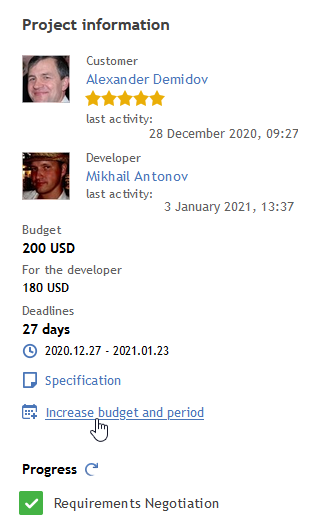
Click on the relevant link to increase the budget and/or deadline
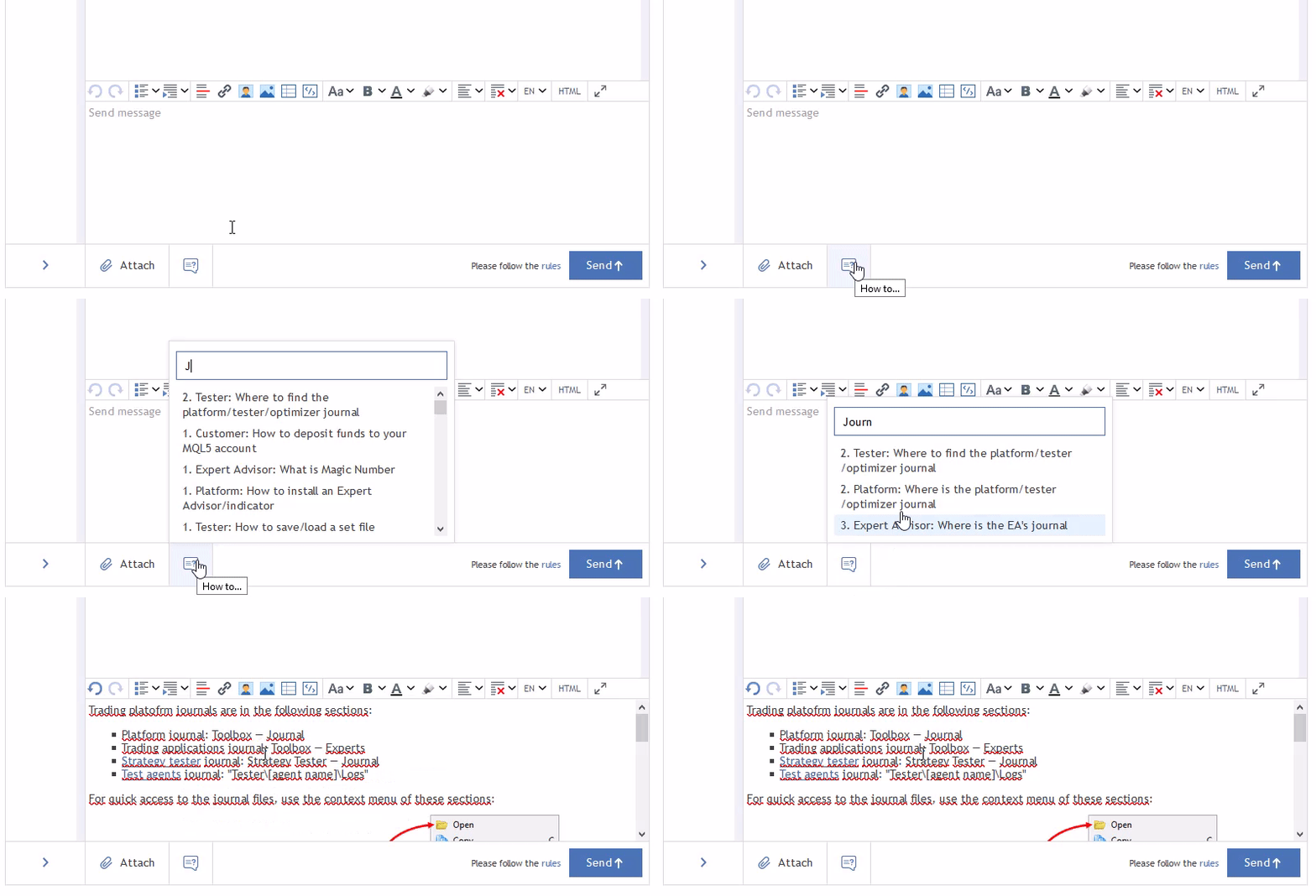
To assist Customers with their first orders, we have prepared Freelance tips which provide answers to frequently asked questions. All these tips can be used straight from the order section. Start typing a word in Questions to sort the list and select the most suitable issue. Click on the selected question to insert it into the chat.
In this article, we will show how to use the Freelance service to order applications or to develop custom orders.
1. Creating an Order
The Freelance section can be opened directly from the MetaTrader 4/5 terminal, which redirects you to the MQL5.com website. Click "Create an order"
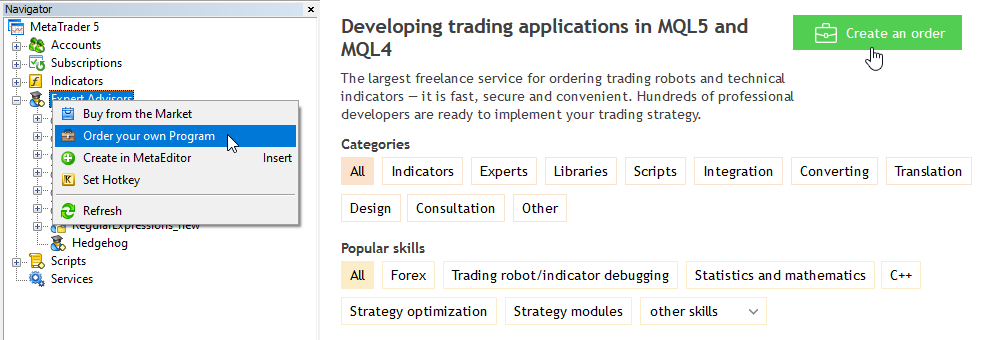
Figure 1. Creating a New Order
Select order options and specify the main parameters:
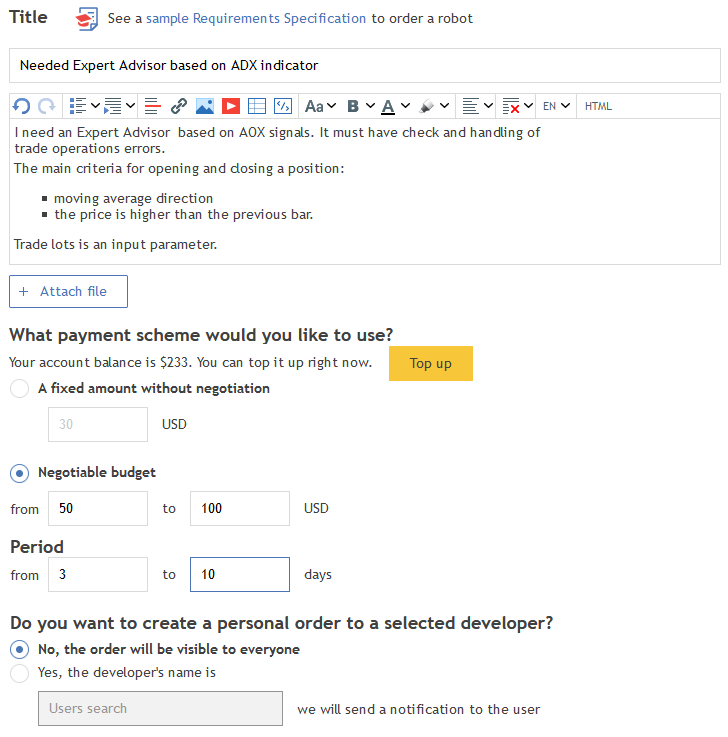
Figure 2. Basic order parameters — description, desired budget and terms
- Title — brief information about the required application.
- We recommend adding a short and clear description, enabling potential developers to assess the order complexity and cost.
- A Requirements Specification file. This file can be attached later, after discussing the order with the selected Developer.
- Desired budget.
- Order implementation deadline in days.
- A Developer's name for a personal order.
Be realistic. If you specify a very low cost, you may not be able to find Developer or the resulting application quality may not be satisfactory. If you are not sure about the order complexity and cost, you can leave this field blank. Potential developers will offer their implementation terms and cost.
The first stage is completed. Now you should wait for someone to take the order and prepare for order-related questions.
2. Selecting a Developer
Developers willing to take up your order will apply for implementation. Current applications can be seen by all users of the MQL5.community, although all applicants are anonymous at this stage. However, the number, rating, statistics on executed orders and current workload are displayed for each applicant.
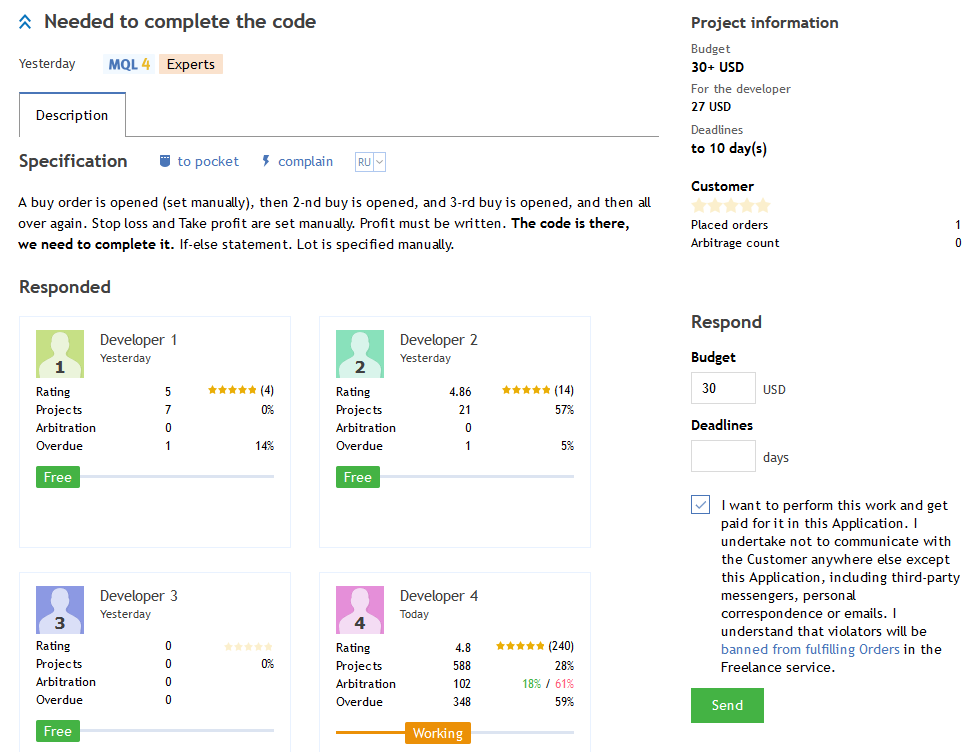
Figure 3. Applying for order development
Fulfilling Orders outside of the Freelance service
- You can use the Freelance service only for its intended purpose, that is to execute order-related works and to make relevant payments. Searching for customers and developers in the Freelance service in order to perform a work outside of the service is forbidden.
- Customers and applicants cannot exchange contact data in any form before concluding a work agreement. Violators are banned from participating in the Freelance.
- Performing works and making payments for Freelance Orders outside of the service is forbidden. Violators will be banned from all MQL5.com website services.
- The Administration can ban violators from participating in the Freelance service after an internal investigation, without any explanation.
When new messages are added to your order, a briefcase icon appears at the top of the page — this is a notification about updates in your order:

Figure 4. Updates in orders
Double click on this icon to view messages.
On the next step, the Customer should process all received applications. This includes moving applications into appropriate categories: "Selected", "Candidates", or "Rejected":
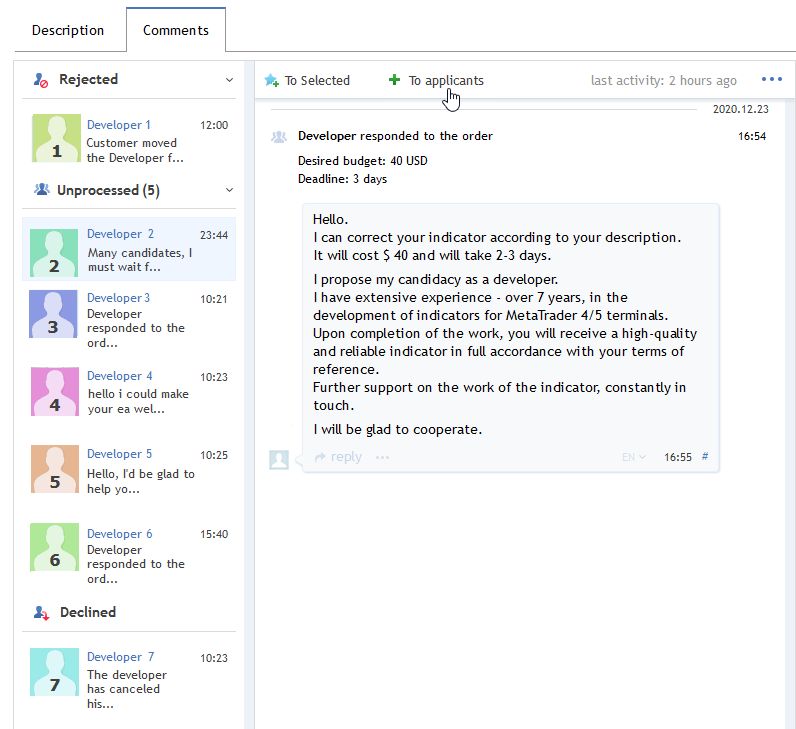
Figure 5. The list of applications from Applicants
Suitable applicants are moved into the "Candidates" group where further order details can be discussed.
When applicants are moved into the "Candidates" group, they receive a notification, and appropriate messages are added to the respective orders
The Customer select the most suitable developer and move the appropriate Applicant to the "Selected" category. This category can only contain one developer. If you try to add another Applicant to this group, the previously selected one will be removed from the Selected category.
Make sure you have clarified all the order details. We recommend carefully reading all messages, before proceeding to the next step.
3. Freelance Order Execution
The order execution process consists of three steps. Each step requires confirmation by both Customer and Developer. Whenever one of the parties completes a step, the other party receives an appropriate push notification.
To enable Push notifications, you should specify your Metaquotes ID in your MQL5.community profile. For further details about Push notifications please read the article MetaQuotes ID in MetaTrader Mobile Terminal.
As soon as the Customer confirms the last Handover and Payment step, the previously frozen amount is automatically transferred to the developer.
The following table shows a brief description of Customer and Developer actions at each step.
| Step | Name | Customer | Developer |
|---|---|---|---|
| 1 | Requirements Negotiation | Provides the Requirements Specification to the Developer Confirms the final cost and implementation time Checks the "Requirements Negotiation" box  | Confirms Requirements specification and accepts the specified final development cost and time. Checks the "Requirements Negotiation" box  |
| 2 | Demonstration | Upon receiving the materials, the Customer must either confirm that the submitted materials correspond to the Order, or refuse it, providing a list of unimplemented parts of the Requirements Specification. Checks the "Demonstration" checkbox  | When all the features specified in the Requirements Specification have been implemented, the Developer demonstrates the results and confirms the demonstration step. Checks the "Demonstration" checkbox  |
| 3 | Handover and Payment | The Customer verifies the submitted materials and accepts the work. As soon as the Customer accepts the result, the system will automatically transfer the appropriate amount to the Developer's account. Checks the "Handover and Payment" checkbox  | The Developer delivers the work to the Customer and confirms that the work has been submitted. Checks the "Handover and Payment" box  |
All these steps are performed within the Order.
To start working with a selected Developer, the Customer should move the appropriate application to the "Selected" category and confirm his choice:
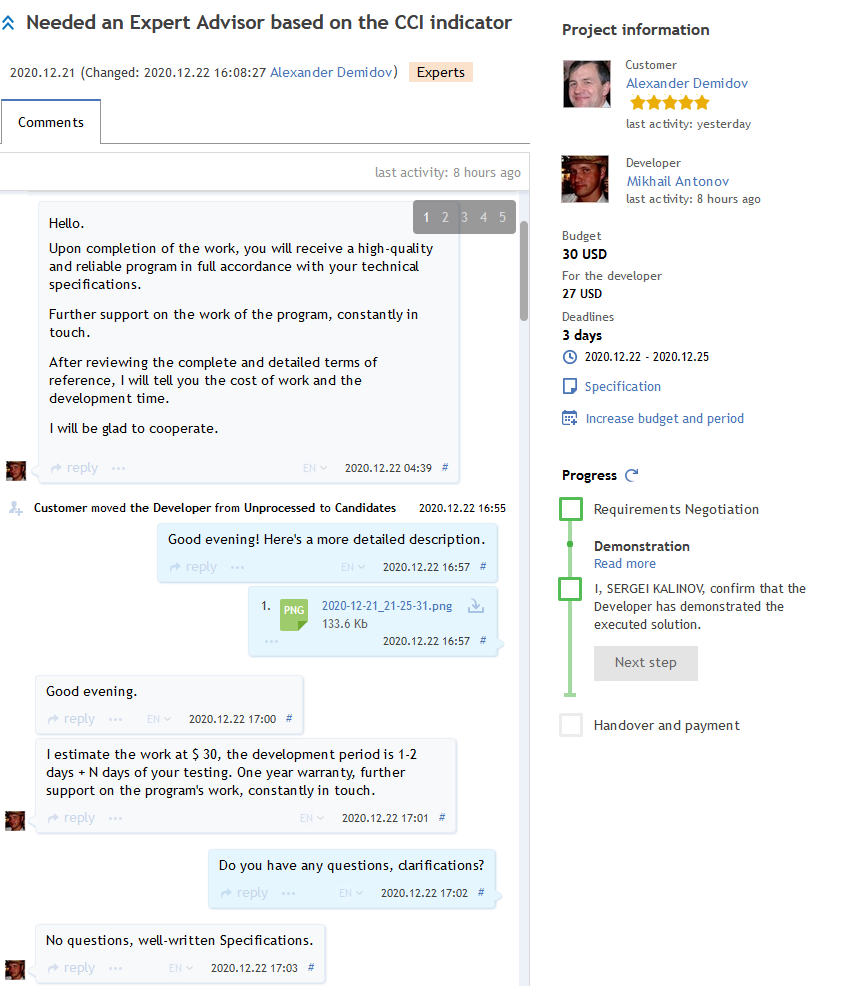
Figure 6. The Customer and the Developer discuss preliminary conditions
Once a Developer is moved to the Selected group, the parties can proceed to discussing the Requirements Specification details, the final development cost and deadline.
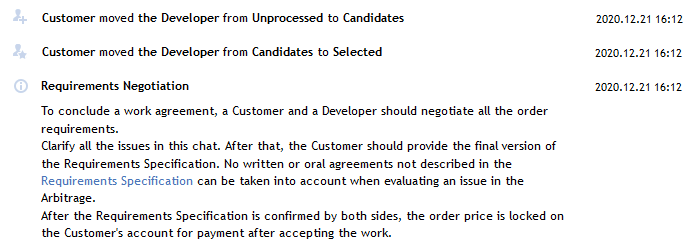
Figure 7. The Customer selects the Developer
Step 1. Requirements Negotiation
The Requirements Specification is one of the most important parts of the Freelance order. Discuss all the details of the desired solution and ask questions, even if the answers to them seem obvious. The most common problems are related to misunderstanding, when each party considers some points to be clear and not requiring discussion. Later, in the process of development, it may turn out that the Developer has implemented the required functionality in a completely different way. After a couple of such moments the parties may start accusing each other of non-compliance with the previous agreement.
 Make sure to view the example of the Requirements Specification required for ordering a trading robot or an indicator
According to the standard MQL4/MQL5 application ordering procedure (as well as applications in other programming languages), the Developer usually provides to the Customer the source code created during the development process. Nevertheless, the Customer must explicitly specify this requirement in the Requirements Specification.
We also recommend specifying in the Requirements Specification whether the Developer is allowed to use parts of this development in other commercial projects or in their own products published in the Market.
Important! The Freelance service administration does not deal with order-related legal disputes. For legal protection, the parties can enter into an additional agreement outside the Freelance service.
The final version of the Requirements Specification is provided by the Customer as a separate attachment, just before confirming the Requirements Negotiation step. All details of the order must be covered by the Requirements Specification. Use screenshots or images where applicable.
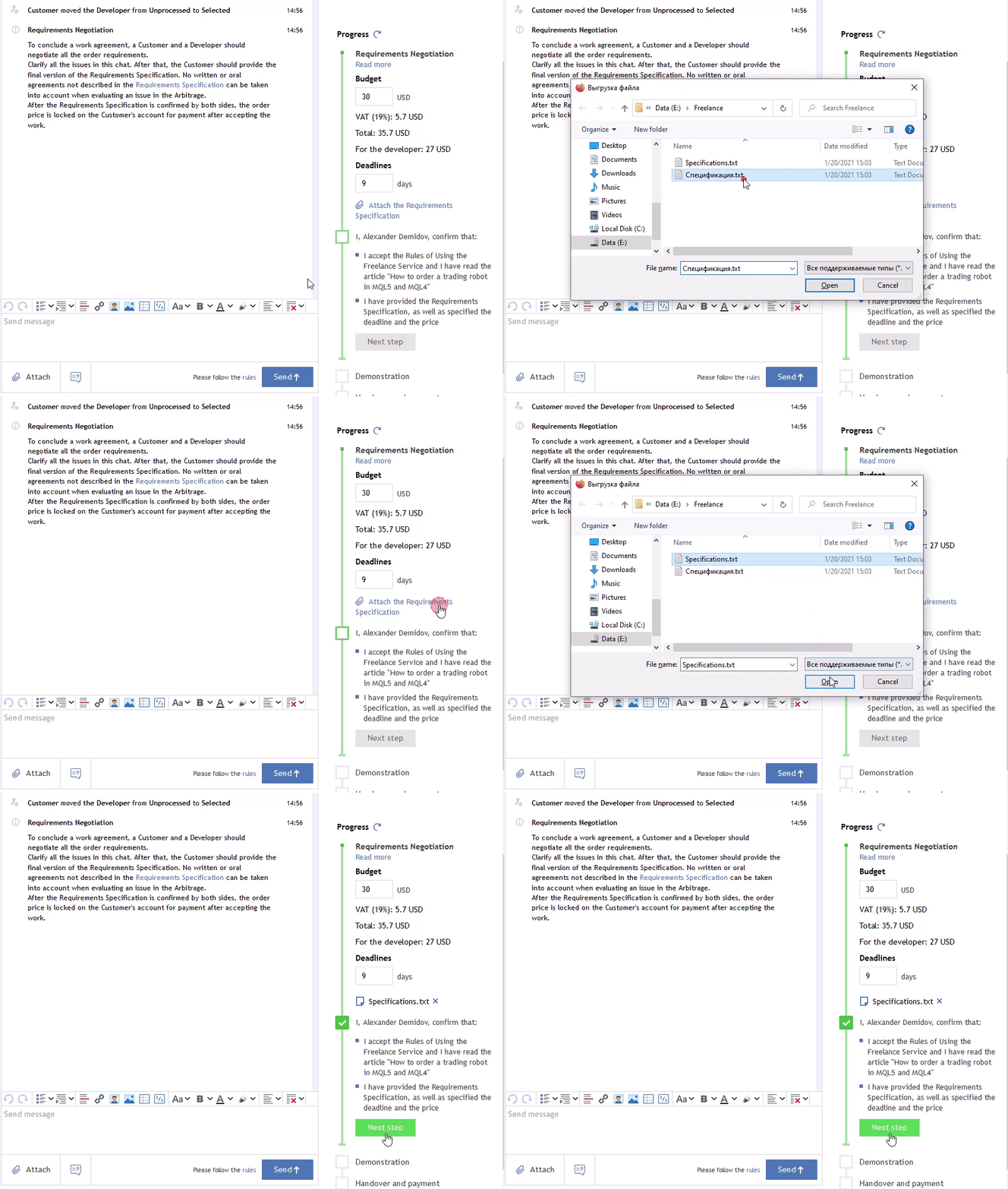
The Customer must provide the final version of the Requirements Specification along with the cost and deadline.
The Developer must agree with the Requirements Specification terms and the final cost. If any changes should be made to the order, send new messages with the details of these changes.
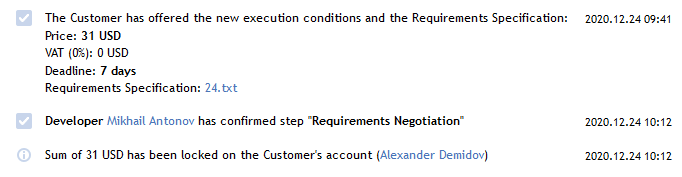
Figure 8. The Customer and the Developer have agreed on the Requirements, cost and deadline
Note that the parties should proceed to the next stage only after the final version of the Requirements Specification has been approved.
This means that the Developer should start working only after both parties have checked the "Requirements Negotiation" checkbox.

Step 2. Demonstration
On the second step, the Developer can start implementing the order. All further questions which may arise during the development process should be discussed directly in comments.
Once all of the requirements specified in the Requirements Specification have been implemented, it is time to demonstrate the finished work to the Customer. The result demonstration depends on the order. For Expert Advisors it can be as follows:
- the Developer attaches the EX4/EX5 executable file to be checked by the Customer,
- the Developer can additionally provide a testing report for a period specified in the Requirements Specification,
- sometimes the Developer can provide Expert Advisor operation logs from a demo account with a specific broker,
- screenshots and videos,
- remote access to the Developer's terminal, on which the resulting application is running.
The purpose of demonstration is to assist the Customer in evaluating the resulting application.
After the demonstration, the Customer must either confirm the compliance of the submitted solution with the Requirements, or reject it, providing a list of unfulfilled requirements or deviations. If necessary, the Developer can take additional time to correct the identified flaws and produce a new demonstration.
The confirmation of the Demonstration step is also automatically recorded by the Freelance service:

Figure 9. Confirmation of the Demonstration step
Only after successful completion of the Demonstration step, the Developer must submit the final version, unless otherwise agreed by the agreement.

If the resulting product does not meet the previously agreed Requirements, then the Customer or the Developer may request Arbitration.
Even after applying for Arbitration, the parties can complete the order in a regular way or select one of the available options:
- Cancel the Orders: 10% of the amount frozen for order is deducted from the Customer's account, while the remaining 90% is released; nothing is transferred to the Developer's account, while the service commission is 10%. The Order is classified as "New" and becomes available to new Developers; the feedback can only be added by the Customer.
- Divide the money in half less the Freelance service commission:
- 10% of the previously frozen amount is deducted as the Freelance service commission,
- the remaining 90% is divided into two halves: the first half (45% of the Order cost) is returned to the Customer's account, while the second half (45% of the Order cost) is transferred to the Developer, which is equal to 50% of the original cost,
- the Order is classified as "New" and becomes available to new Developers; the feedback can be added by both parties, the Developer and the Customer.
Step 3. Handover and Payment
The Developer sends to the Customer all the materials relating to the implemented order, in the specified volume. As a rule, the solution is submitted as source code, because the compiler version may change in the future in which case the recompilation of the solution may be required. If only the executable file is to be provided by agreement, further updates should be covered by the Requirements Specification.
Further usage of the obtained results in other developments, by the Customer or the Developer, as well as the authorization of passing the solutions to third parties on paid or free bases, should also be discussed in the Requirements Specification. Parties can additionally specify these obligations in a separate agreement, outside the Freelance service. The Freelance administration does not deal with such issues.
The Developer transfers the required materials, checks the "Handover and Payment" checkbox, and waits for the same step to be confirmed by the Customer. As soon as the Customer confirms this step, the order is considered completed, and payment for it is automatically transferred from the Customer's account to the Developer's account. No actions from the Customer are required for the payment.
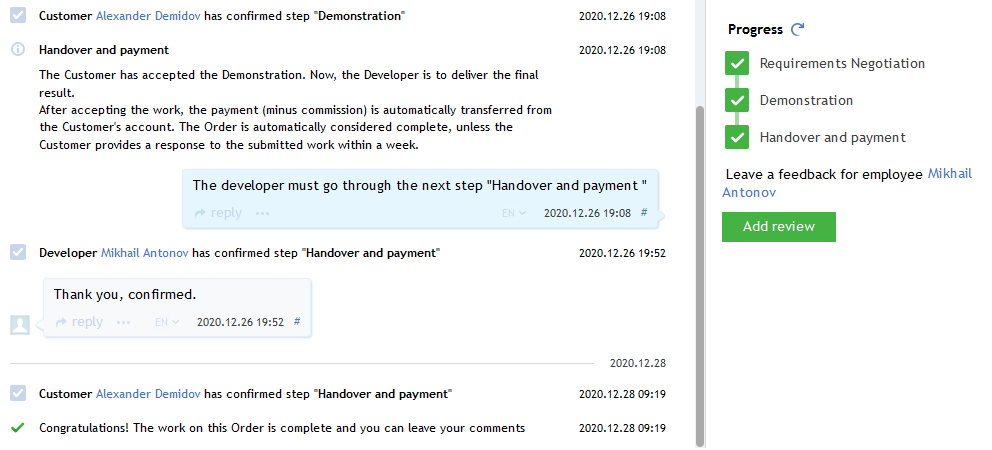
Figure 10. Handover and Payment confirmation
As soon as the Customer confirms this step, the order is considered completed, and payment for it is automatically transferred from the Customer's account to the Developer's account. By this time, the Customer should have all the results of the work, in accordance with the Requirements Specification.


Figure 11. Payment
4. Order feedback
After the completion of the order, the Customer and the Developer can add a feedback about the cooperation and rate the order.
The list of works, completed by the Customer or the Developer, is available in the "Freelance" section of the user's profile.
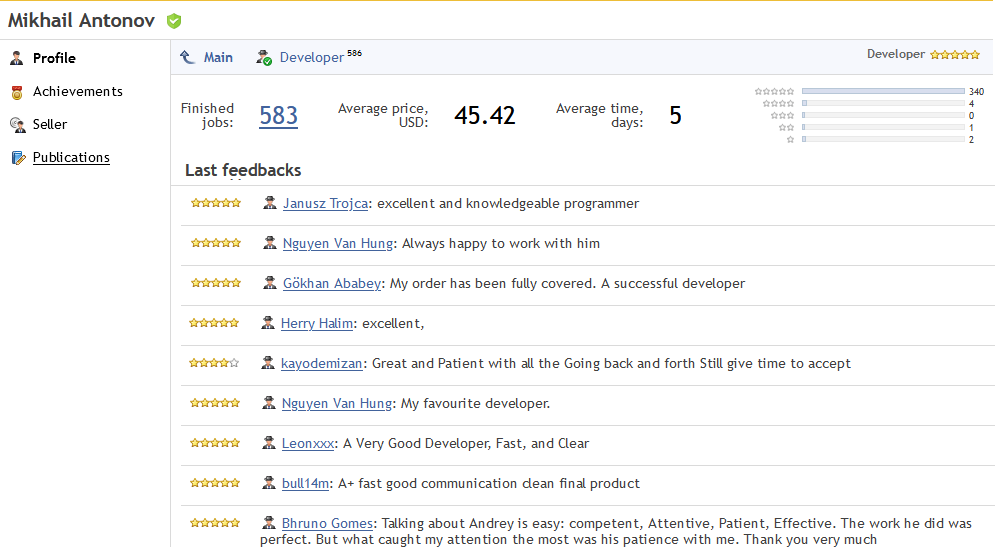
Figure 12. Freelance section with customer reviews
The Developer can also leave feedback about the Customer.
Order algo trading solutions from Freelance!
Freelance is an ideal place to order indicators, trading robots and visual technical analysis systems of any complexity level. Thousands of traders and developers meet on the world's largest freelance service for algorithmic trading on the most popular trading platform MetaTrader.
If you are a trader with a ready-made trading strategy, but you do not have MQL5/MQL4 programming skills, then Freelance is the best solution for you. With this service, you can find a developer who will create an Expert Advisor or an indicator for you.
Order a robot or an indicator from Freelance
Related articles:
Translated from Russian by MetaQuotes Ltd.
Original article: https://www.mql5.com/ru/articles/117
 The Principles of Economic Calculation of Indicators
 Writing an Expert Advisor Using the MQL5 Object-Oriented Programming Approach
 A Library for Constructing a Chart via Google Chart API
 Functions for Money Management in an Expert Advisor

- Free trading apps
- Over 8,000 signals for copying
- Economic news for exploring financial markets
You agree to website policy and terms of use
If the customer does not explicitly request the source code in the requirements, then the developer can do as they wish.
And if the developer decides not to supply the source code, then they will not be violating the requirements, and will win the arbitration if it goes that way.
Many developers feel ethically motivated to offer the source code irrespective of the customer requirements, but other developers do not.
There is no default! It should be in the requirement specifications and it can affect the price of the job.
If the customer does not explicitly request the source code in the requirements, then the developer can do as they wish.
And if the developer decides not to supply the source code, then they will not be violating the requirements, and will win the arbitration if it goes that way.
Many developers feel ethically motivated to offer the source code irrespective of the customer requirements, but other developers do not.
There is no default! It should be in the requirement specifications and it can affect the price of the job.
After reading the MQL5.com rules, I can second this that no other information/request supersedes the requirements specification.
Asking for a source code before a project might affect the price of a job, so the developer has to be aware about it in advance to bid accordingly.
If the customer does not explicitly request the source code in the requirements, then the developer can do as they wish.
And if the developer decides not to supply the source code, then they will not be violating the requirements, and will win the arbitration if it goes that way.
Many developers feel ethically motivated to offer the source code irrespective of the customer requirements, but other developers do not.
There is no default! It should be in the requirement specifications and it can affect the price of the job.
The developer does not have any exclusive rights to the software developed unless otherwise spelled out in the specifications. Like it or not, this is the current rule you agree to. MQL5/MetaQuotes must bind all of us to these rules and apply them as stated. Stating otherwise is misleading. According to the current rules, it is up to the developer to state what kind of rights to the software is retained or given out if they don't want to all exclusive rights rule to apply. Seems perfectly fair to me and as developer who knows these rules, can easily demand a clause that all rights belong to the developer if they wish. A developer understands this better than most customers (who may be ordering some work for the first time and don't know anything about this business) and the burden naturally should be placed on a developer to protect and assert any rights they desire including exclusivity to software they build. The rule broadly states the term software, not compiled program, so in case you are thinking you can get out of not providing the source code because it doesn't specifically mention source code, I don't believe you can. The term software is very broad. All rights transfer to the customer and exclusive rights at that. This is consistent across the spectrum of Freelancer websites. However, MQl5 is being generous and still granting a developer to be able use the code they developer but only in a non-exlusive capacity. The way all of this reads implies the delineating of rights between customer and freelancer and its quite clear the developer gets the non-exclusive right. Want something more, make sure its in writing. Don't expect the customer to know to do this, especially customers who have no idea of the in's and outs of the development world like you do.
The rules state, to paraphrase, without terms in the specification stating differently, the developer receives "...a free and simple (non-exclusive) license..." to use what they built. Meaning, developers, you don't have the ultimate rights to determine what you do with what you built. MQL5 through a default clause that gives all rights to the customer. This is why, it seems with the current rules in place, developers need to make sure they include in the specifications what happens to the rights of what they build.
The developer does not have any exclusive rights to the software developed unless otherwise spelled out in the specifications. Like it or not, this is the current rule you agree to. MQL5/MetaQuotes must bind all of us to these rules and apply them as stated. Stating otherwise is misleading. According to the current rules, it is up to the developer to state what kind of rights to the software is retained or given out if they don't want to all exclusive rights rule to apply. Seems perfectly fair to me and as developer who knows these rules, can easily demand a clause that all rights belong to the developer if they wish. A developer understands this better than most customers (who may be ordering some work for the first time and don't know anything about this business) and the burden naturally should be placed on a developer to protect and assert any rights they desire including exclusivity to software they build. The rule broadly states the term software, not compiled program, so in case you are thinking you can get out of not providing the source code because it doesn't specifically mention source code, I don't believe you can. The term software is very broad. All rights transfer to the customer and exclusive rights at that. This is consistent across the spectrum of Freelancer websites. However, MQl5 is being generous and still granting a developer to be able use the code they developer but only in a non-exlusive capacity. The way all of this reads implies the delineating of rights between customer and freelancer and its quite clear the developer gets the non-exclusive right. Want something more, make sure its in writing. Don't expect the customer to know to do this, especially customers who have no idea of the in's and outs of the development world like you do.
The rules state, to paraphrase, without terms in the specification stating differently, the developer receives "...a free and simple (non-exclusive) license..." to use what they built. Meaning, developers, you don't have the ultimate rights to determine what you do with what you built. MQL5 through a default clause that gives all rights to the customer. This is why, it seems with the current rules in place, developers need to make sure they include in the specifications what happens to the rights of what they build.
You seem to keep mixing up the concepts of "program"/"software" and "source code". The source code is transformed into an executable file (i.e. program).
Having Exclusive rights over the program/software does not override the Copyrights of the source code.
The two things are distinct and separate from each other.