Lib5 EAPadPRO for MT5

4.5

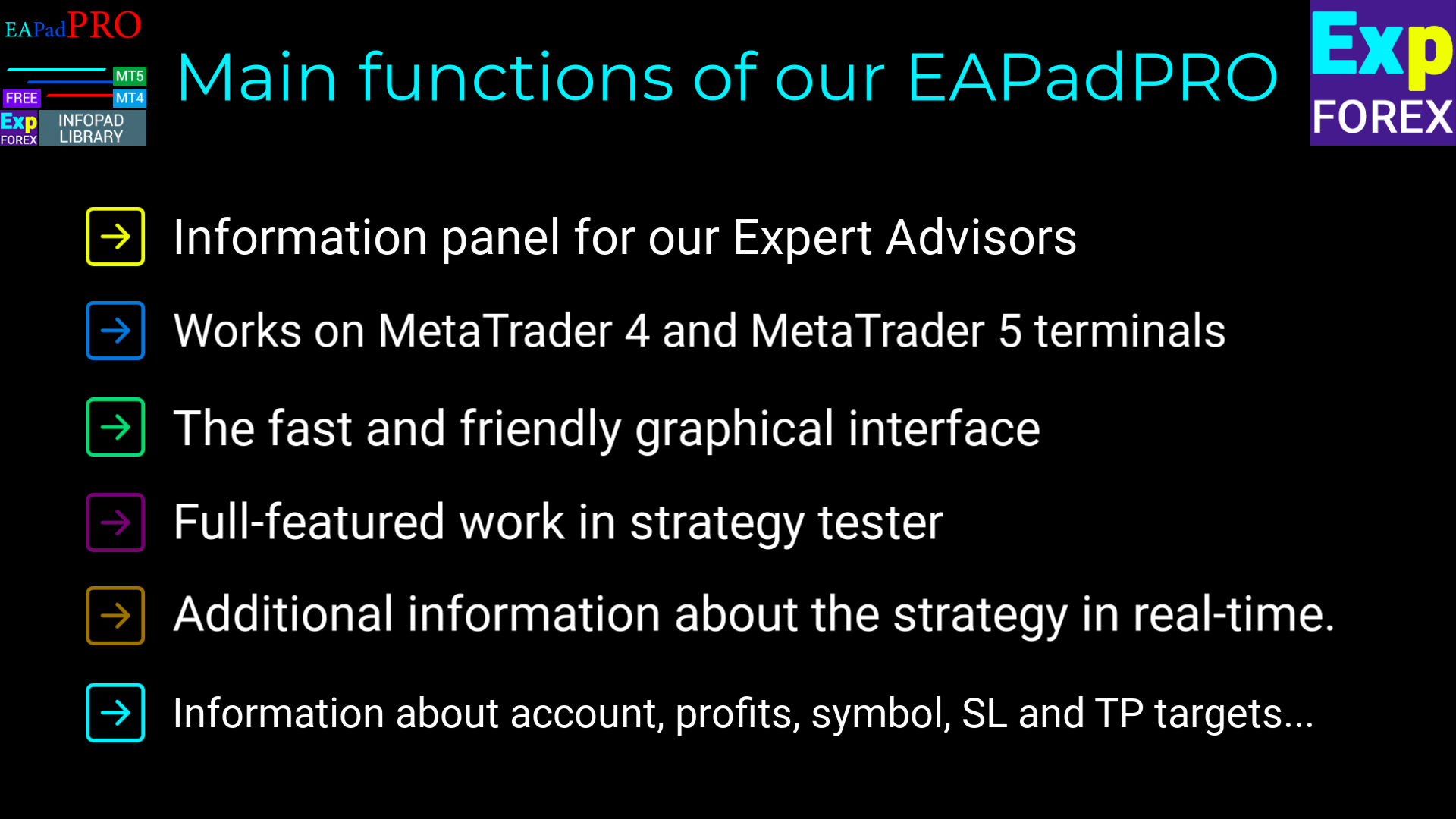
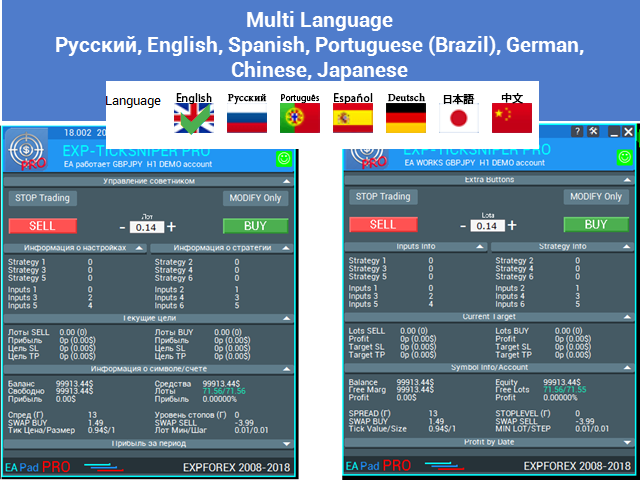
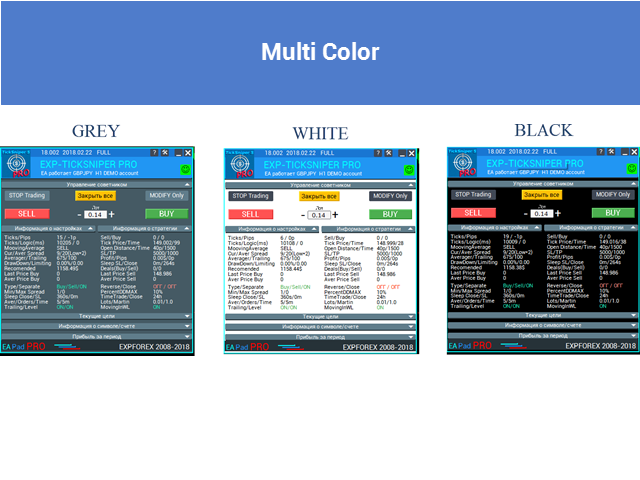
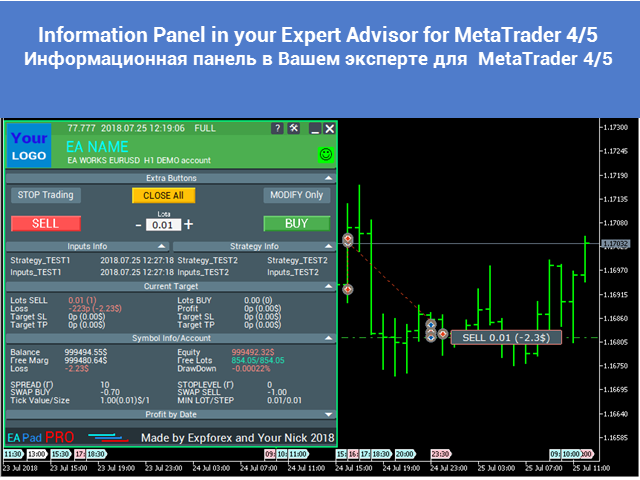
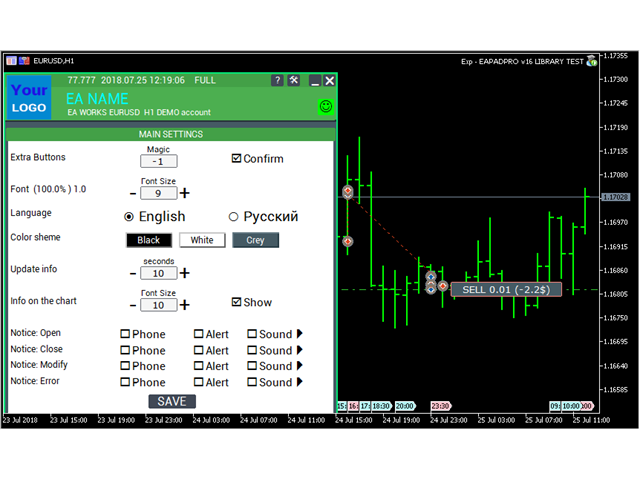
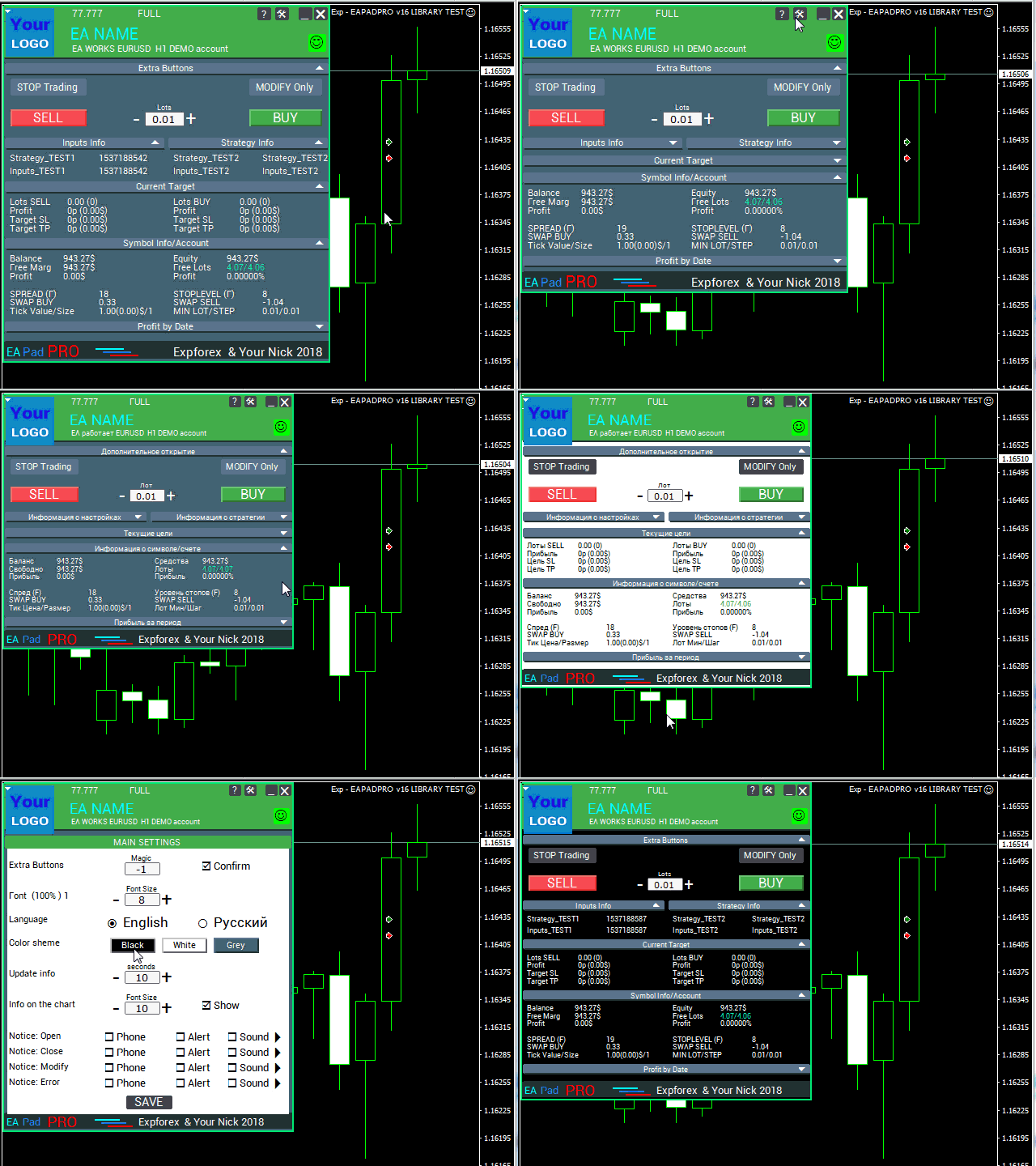
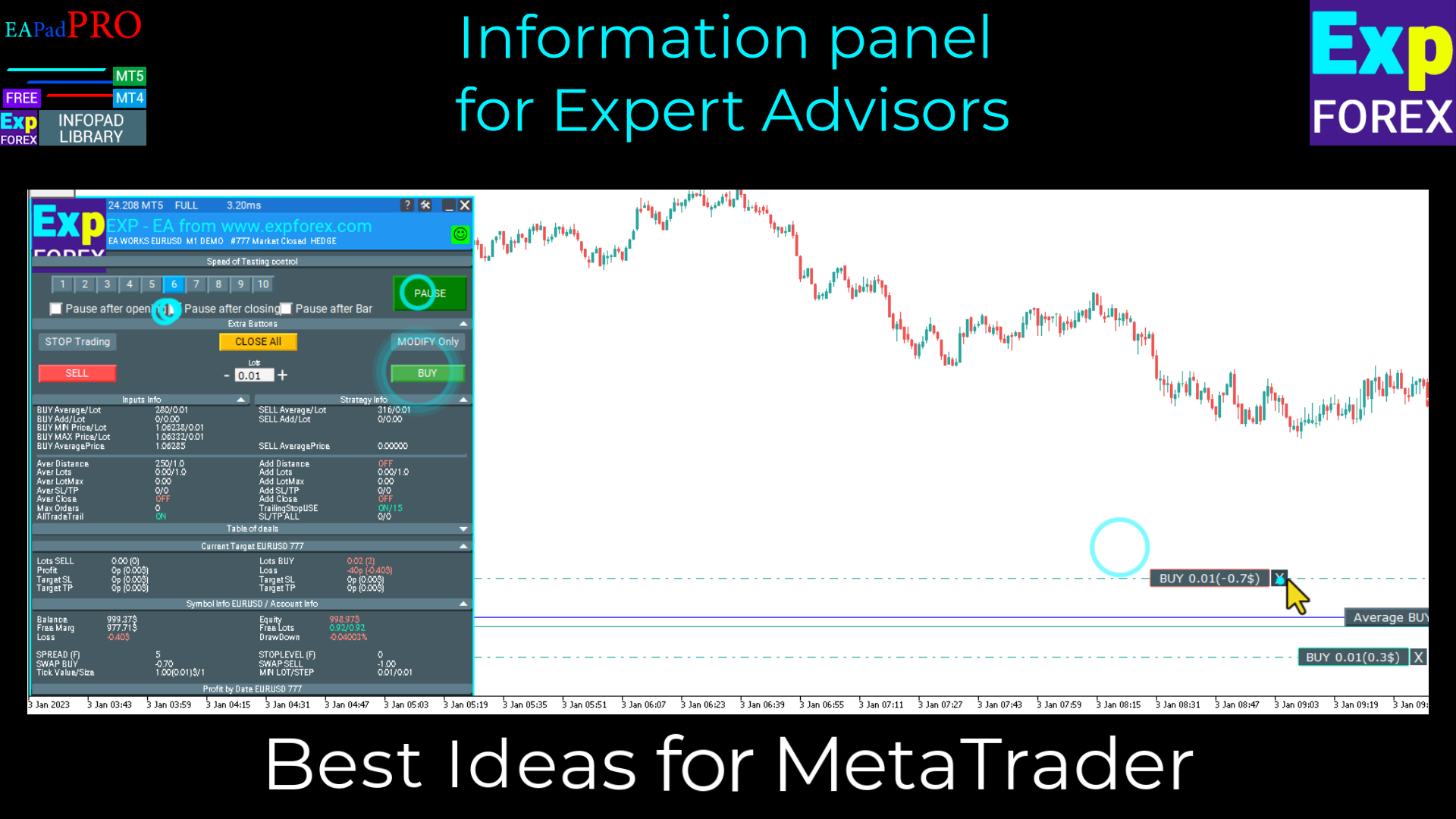
Library to add the Information Panel to your Expert Advisor for MetaTrader 5.

We can not guarantee that the information and interface of the program will give you a profit on deals, but we will definitely say that even the simplest interface of the program can strengthen the first impression.

Detailed description and instructions for adding our panel to your Expert Advisor are in our blog: LIB - EAPADPRO Step-by-step instruction

Detailed description of our panel and instructions for using EAPADPRO

MetaTrader 4 Library Version

The process of adding consists of 10 steps and they are described in detail in our article.


Installing the Library

  1. Install the library from this site;
  2. Open your Expert Advisor;
  3. Open our sample and step-by-step guide to installing our code, the file Exp - EAPADPRO LIBRARY TEST (Can be found in the blog);
  4. Do each Step as written in the recommendation or use our step-by-step instruction from the site.

EAPADPRO personalization

All that you can change in our panel is described in this paragraph:

  1. versionea - The version of your Expert Advisor that is displayed in the panel;
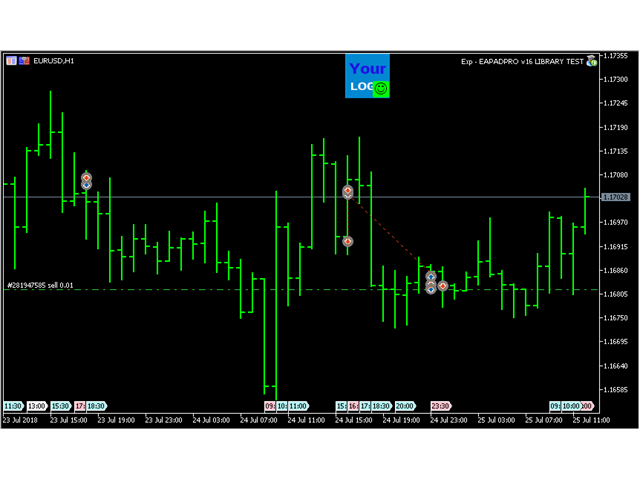
  2. BMPLOGO - the logo of your BMP 60x60 adviser that is displayed on the panel;
  3. icon - The icon of your expert, which is displayed in the properties of the expert;
  4. defEANAME - the name of your Expert Advisor that is displayed in the panel;
  5. YourName - your name or nickname that is displayed in the panel;
  6. copyright - Your copyright, which is displayed in the properties of the Expert Advisor;
  7. CreateInputs - The function of displaying your external variables on the panel. There are 10 such parameters in total. The format of the filling: "Name", "Value";
  8. CreateStrategy - The function of displaying your strategy values ​​on the panel. There are 10 such parameters in total. The format of the filling: "Name", "Value";
  9. MagicForEaPadPRO = 0 - Magic number, which will be watched by our panel (All information is filtered by magic number), at -1 = the panel will take all positions from the account by this symbol, at 0 = only manual (Hand) deals;
  10. MagicForEaPadPRO_Open = -1 - Magic number, which will be assigned to the positions opened from our panel;
  11. CommentForEaPadPRO = "" - A comment that will be assigned to positions opened from our panel;
  12. TypeFillingForEaPadPRO = 0 - Type of fill orders at opening, only for terminal MT5;
  13. ShowBuySell = true - Show the "trading panel in 1 click" (BUY SELL)

Terms of Use

Our library with the information panel EAPADPRO is distributed on the back link to our page.

If you wish to sell your expert in the market or on the Internet, you need to add the following text to the description of your product:

  1. The EAPADPRO information graphic panel.
  2. All rights to this EAPADPRO panel belong to Vladislav  Expforex
  3. The author of the EAPADPRO information panel is not responsible for the advisor or indicator that uses our panel.
  4. Our EAPADPRO panel is designed solely for the purpose of providing additional information about trading on your account.

Recensioni 11
Benjamin Afedzie
3366
Benjamin Afedzie 2025.07.02 22:08 
 

great product

Seth Tetteh
2086
Seth Tetteh 2024.04.25 12:47 
 

not bad

Nepomnjashchy
78
Nepomnjashchy 2023.12.16 02:08 
 

Пока все классно. тестируют

Prodotti consigliati
LT Mini Charts
Thiago Duarte
4.88 (8)
This is a utility indicator that creates mini charts on left side of the chart you are looking at. It is very useful to watch many timeframes simultaneously, without having to change between multiple charts. Its configuration is very simple. You can have up to 4 mini charts opened. They automatically load the template of the "parent" chart. If you have any doubt please contact me. Enjoy! This is a free indicator, but it took hours to develop. If you want to pay me a coffee, I appreciate a lot  
FREE
MultiTimeframe Info Feed (MIF) Indicator Description: MultiTimeframe Info Feed (MIF) is a smart MQL5 indicator that displays a dynamic, real-time info panel directly on your chart, offering powerful insight into current market conditions. Key features include: Real-time display of Open, High, Low, Close, and live Tick price Tick Rate (ticks per second) for assessing market activity Auto-calculated Entry Price on new candle formation Signal direction detection (BUY / SELL) Price action pattern re
FREE
EdgeZone EA Inspector - FREE Edition Monte Carlo Analysis Tool for Trading Strategies Important: This is an analysis tool, not a trading robot. It does not execute trades but analyzes strategy data through statistical simulations. The Problem Many Expert Advisors show impressive backtest results but fail in live trading. The most common reason: over-optimization - the strategy was adjusted until it looks perfect for past data, but doesn't work for the future. The Solution: EdgeZone EA Inspector
FREE
Volume Weighted Average Price or VWAP is an indicator wich shows different average prices on chart. This is very useful to find strong negotiation price areas and as trend following. Configurations: Day, Week and Month - Show different VWAPs according to the period. You can change each line style on "colors" tab. Any doubt or suggestion please contact us. Enjoy! This is a free indicator, but it took hours to develop. If you want to pay me a coffee, I appreciate a lot   <3 PayPal, Skrill, Nete
FREE
Exact Time — detailed time on the seconds chart. The utility shows the opening time of the selected candle. This is necessary when working with seconds charts. For example, it can be used on a seconds chart built using the Seconds Chart utility. Inputs Base corner — the chart corner to which an object Is attached. X distance — the horizontal distance from the chart corner. Y distance — the vertical distance from the chart corner. Text font — font name Font size — font size Color — text color
FREE
Value Chart Candlesticks
Flavio Javier Jarabeck
4.69 (13)
The idea of a Value Chart indicator was presented in the very good book I read back in 2020 , " Dynamic Trading Indicators: Winning with Value Charts and Price Action Profile ", from the authors Mark Helweg and David Stendahl. The idea is simple and the result is pure genius: Present candlestick Price analysis in a detrended way! HOW TO READ THIS INDICATOR Look for Overbought and Oversold levels. Of course, you will need to test the settings a lot to find the "correct" one for your approach. It
FREE
News Expert MT5
Maksim Neimerik
Introduction Welcome to the world of Forex trading, where every tick of the market can be influenced by news events. Introducing our expert advisor for MetaTrader, your ultimate tool for navigating the complexities of news trading. This innovative advisor is specifically designed to automate your trading strategy during key macroeconomic releases, ensuring you never miss an opportunity.  When important indicators are announced, volatility often spikes, creating potential for profit. Our expert
FREE
Levels of Pivots
Nikolay Mitrofanov
The utility draws reversal levels using the formulas for each of the selected number of candles: Pivot = (high + close + low) / 3 R1 = ( 2 * Pivot) - low S1 = ( 2 * Pivot) - high R2 = Pivot + (R1 -S1) R3 = high + ( 2 * (Pivot - low)) S2 = Pivot - (R1 - S1) S3 = low - ( 2 * (high - Pivot)) H = high L = low U = if the candle is bullish, then close. Otherwise - open D = if the candle is bullish, then open. Otherwise - close On any timeframe. After a new candle closes on the calculated timeframe
FREE
High Low Open Close
Alexandre Borela
4.98 (42)
Se ti piace questo progetto, lascia una recensione a 5 stelle. Questo indicatore disegna i prezzi aperti, alti, bassi e di chiusura per i specificati periodo e può essere regolato per un determinato fuso orario. Questi sono livelli importanti guardati da molti istituzionali e professionali commercianti e può essere utile per voi per conoscere i luoghi dove potrebbero essere più attivo. I periodi disponibili sono: Giorno precedente. Settimana precedente. Mese precedente. Precedente trimestre. A
FREE
Friend of the Trend: Your Trend Tracker Master the market with Friend of the Trend , the indicator that simplifies trend analysis and helps you identify the best moments to buy, sell, or wait. With an intuitive and visually striking design, Friend of the Trend analyzes price movements and delivers signals through a colorful histogram: Green Bars : Signal an uptrend, indicating buying opportunities. Red Bars : Alert to a downtrend, suggesting potential selling points. Orange Bars : Represent cons
FREE
This robot sends Telegram notifications based on the coloring rules of PLATINUM Candle indicator. Example message for selling assets: [SPX][M15] PLATINUM TO SELL 11:45. Example message for buying assets : [EURUSD][M15] PLATINUM TO BUY 11:45 AM. Before enable Telegram notifications  you need to create a Telegram bot, get the bot API Key and also get your personal Telegram chatId. It's not possible to send messages to groups or channels. You can only send messages to your user chatId. You should
FREE
Crystal Dashboard
Muhammad Jawad Shabir
Crystal Profit Dashboard – Real-Time MT5 Account Performance Utility Overview Crystal Profit Dashboard is a lightweight MetaTrader 5 utility that provides real-time profit and loss monitoring directly on the chart. It offers a clean, modern dashboard interface that updates account performance without clutter, allowing traders to focus on execution while keeping essential metrics visible. Designed for scalpers, intraday traders, and swing traders, this tool provides accurate floating profit/los
FREE
Gap Detector Pro
Andres Felipe Carvajal Rodriguez
GapDetector Pro identifica in tempo reale tre livelli di gap di prezzo : Punto blu (Punto azul): Allerta precoce , anticipa la possibile formazione di un gap. Punto giallo (Punto amarillo): Condizioni di basso volume e spread ampio , indica un'alta probabilità di gap. Punto bianco (Punto blanco): Conferma un gap reale già formatosi tra le candele. Regolazione dei Parametri L'utente può regolare i parametri in base alle proprie esigenze: VolumeDropRatio: Valori bassi generano maggiore sensibilità
FREE
MACD Colored ZeroLag
Farzin Sadeghi Bonjar
4.7 (10)
It is the MQL5 version of zero lag MACD that was available for MT4 here: https://www.mql5.com/en/code/9993 Also there was a colored version of it here but it had some problems: https://www.mql5.com/en/code/8703 I fixed the MT4 version which has 95 lines of code. It took me 5 days to write the MT5 version.(reading the logs and testing multiple times and finding out the difference of MT5 and MT4!) My first MQL5 version of this indicator had 400 lines of code but I optimized my own code again and n
FREE
Show Pips for MT5
Roman Podpora
4.67 (24)
Questo indicatore informativo sarà utile per coloro che vogliono essere sempre informati sulla situazione attuale del conto. -   Indicatori più utili L'indicatore mostra dati come profitto in punti, percentuale e valuta, nonché lo spread per la coppia corrente e il tempo fino alla chiusura della barra nell'intervallo di tempo corrente. Esistono diverse opzioni per posizionare la linea delle informazioni sulla carta: A destra del prezzo (corre dietro al prezzo); Come commento (nell'angolo in alt
FREE
Note from Developer: This is the lite version of the Double TMA with Bands Indicator. You can find the paid version that comes with alerts and on screen signal arrows built in here . I will also be selling an EA based on this trading system soon once all backtesting and optimization have been completed. Unlock your trading potential with the Double TMA Indicator with Reversal Detection! Designed for swing and reversal trading, this versatile tool integrates two Triangular Moving Averages (
FREE
Tick Database — export of tick database from MT5 terminal to MT4. The utility provides access to the tick database in real time. This is necessary to generate synthetic charts in the MT4 terminal, which initially does not provide for loading a tick database. For example, you can organize permanent access to the tick database for the Seconds Chart utility. If the opening time of the last candle in the terminals is different, then you need to specify the time offset in hours. Example We open M1 ch
FREE
Axilgo PipPiper CoPilot
Theory Y Technologies Pty Ltd
5 (2)
Axilgo Pip Piper CoPilot Elevate your trading game with the Axilgo Pip Piper CoPilot, the first in our revolutionary Pip Piper Series. This all-inclusive toolset is meticulously crafted for serious traders, focusing on key areas such as Risk Management, Trade Management, Prop Firm Rule Compliance, and Advanced Account Management . With CoPilot, you’re not just investing in a tool—you’re gaining a strategic partner in the intricate world of trading. Important Notice: To ensure you receive the fu
FREE
SDZ Trend Pro
Van Toan Nguyen
Overview SDZ Trend Pro is a professional Expert Advisor work for all symbol, recommend  XAUUSD (Gold) trading on the H1 timeframe . It combines dynamic price action patterns, EMA filters, and strict session-based trading logic to identify precise market entries with optimal risk control. This EA is ideal for traders who prefer structured, time-filtered trading during active market hours. ️ Core Features Dynamic Stop Loss (SL) logic Automatically sets SL based on candle pattern Chooses the
FREE
SX Theme Setter MT5
Mojtaba Sarikhani
5 (1)
SX Theme Setter is intended for changing chart appearance in 2 modes: - Gradient background mode: In this mode, the indicator creates a gradient background for your chart. Colors, steps and gradient type can be selected by user. - Color theme: Color theme mode provides more than 50 built-in different color themes which can be selected from a list. Most of these themes are converted from official color themes of real trading platforms of the past and present. Try them out and see if they suit
FREE
Are you tired of drawing trendlines every time you're analyzing charts? Or perhaps you would like more consistency in your technical analysis. Then this is for you. This indicator will draw trend lines automatically when dropped on a chart. How it works Works similar to standard deviation channel found on mt4 and mt5. It has 2 parameters: 1. Starting Bar 2. Number of bars for calculation The   starting bar   is the bar which drawing of the trend lines will begin, while the   number of bars for c

FREE
Indicator measures strength of each currency in your list. Main idea: It simply iterates through all combinations of pairs and adds difference between open and close in percent. Parameters: List of currencies - what currencies will be calculated (maximum is 8) Calculation type - from which data will be strength calculated Calculation data input - used as input related to calculation type Symbol suffix - used in case of suffix on symbols, e.g: when your symbols look like EURUSDm, EURUSDmicro etc

FREE
LT Trade Panel Lite
Thiago Duarte
4.65 (49)
Have you missed any tools or shortcuts in Meta Trader? Simple things that would make your daily trading much easier ? We have the solution for you: our Trade Panel! This is an EA tool (Expert Advisor) that, if configured to controll all symbols, needs to be loaded only once. This is the Lite version (free) of our tool. Professional version:   https://www.mql5.com/en/market/product/42658 If you have some problemas with the shortcut buttons on chart on unpinned mode try change the tickets digi
FREE
MW Volume
Martin Bittencourt
3.8 (5)
The Martinware Volume indicator plots a colored moving average over volume bars. The coloring uses three colors and can be done in different ways choosable by the user and is applied both to the average as to the volume bars. Three types of coloring are possible: None: no coloring is done Increasing or decreasing: changes the color depending on the current value being bigger or lesser than the previous one Volume relative to average: colors vary if the current volume is bigger or lesser then
FREE
Swiss VWAPsimple
Terence Gronowski
4.8 (5)
Swiss VWAPsimple Motivation Did not find free VWAP that works, the one that I found craseh. So I created a VWAP which calculates values only for the actual day. So computer resouces are not over stressed. What is VWAP, how is it used?  VWAP stands for Volume Weighed Average Price, it calculates the running sum of tick volume and the runnung sum of price times tickvolume. The division of these sums result in a weighed price (Sum P*V/Sum V). The calculation starts normally at midnight. The values
FREE
Statistical Arbitrage Spread Generator for Cointegration [MT5] What is Pair Trading? Pair trading is a market-neutral strategy that looks to exploit the relative price movement between two correlated assets — instead of betting on the direction of the market. The idea? When two assets that usually move together diverge beyond a statistically significant threshold, one is likely mispriced. You sell the expensive one, buy the cheap one , and profit when they converge again. It’s a statistica

FREE
Descrizione generale Questo indicatore è una versione avanzata del classico Donchian Channel , arricchita con funzioni operative per il trading reale. Oltre alle tre linee tipiche (massimo, minimo e linea centrale), il sistema rileva i breakout e li segnala graficamente con frecce sul grafico, mostrando solo la linea opposta alla direzione del trend per semplificare la lettura. L’indicatore include: Segnali visivi : frecce colorate al breakout Notifiche automatiche : popup, push e email Filtro R
FREE
Free automatic Fibonacci is an indicator that automatically plots a Fibonacci retracement based on the number of bars you select on the BarsToScan setting in the indicator. The Fibonacci is automatically updated in real time as new highest and lowest values appears amongst the selected bars. You can select which level values to be displayed in the indicator settings. You can also select the color of the levels thus enabling the trader to be able to attach the indicator several times with differe
FREE
Trade Panel R3
Eduardo Terra
5 (1)
Simple and easy-to-use trading panel. Replaces the standard Meta Trader 5 panel. This new panel allows you to add stop loss and take profit (in points). It also allows you to click and drag it to any place on the screen, making it easier to view and operate. Redesigned to focus on risk control, with a limit on the margin that can be used and a limit on possible loss per stop loss. With the facility to place only the stop loss and the EA automatically calculates the allowed lot size, in order to
FREE
Position Size Tool – Smart Risk Management & Trade Execution Panel The Position Size Tool is a powerful and intuitive MT5 panel that simplifies your trading by combining position sizing , risk calculation , risk/reward visualization , and order placement —all in one place. ️ Clean & Functional Interface The tool features a compact, real-time panel with the following: Balance & Equity display Live Price tracking Customizable Risk % input Auto-calculated Lot Size based on SL and Risk Input for S
FREE
Gli utenti di questo prodotto hanno anche acquistato
WalkForwardOptimizer MT5
Stanislav Korotky
3.78 (9)
WalkForwardOptimizer library allows you to perform rolling and cluster walk-forward optimization of expert advisers (EA) in MetaTrader 5. To use the library include its header file WalkForwardOptimizer.mqh into your EA source code, add call provided functions as appropriate. Once the library is embedded into EA, you may start optimization according to the procedure described in the User guide . When it's finished, intermediate results are saved into a CSV file and some special global variables.
Questa libreria ti consentirà di gestire le operazioni utilizzando qualsiasi tuo EA ed è molto facile da integrare su qualsiasi EA, cosa che puoi fare tu stesso con il codice script menzionato nella descrizione e anche esempi demo su video che mostrano il processo completo. - Ordini con limite di posizionamento, limite SL e limite di take profit - Ordini di mercato, mercato SL, mercato TP - Modifica ordine limite - Annulla Ordine - Interroga gli ordini - Cambia leva, margine - Ottieni inf
MetaCOT 2 CFTC ToolBox MT5
Vasiliy Sokolov
3.67 (3)
MetaCOT 2 CFTC ToolBox is a special library that provides access to CFTC (U.S. Commodity Futures Trading Commission) reports straight from the MetaTrader terminal. The library includes all indicators that are based on these reports. With this library you do not need to purchase each MetaCOT indicator separately. Instead, you can obtain a single set of all 34 indicators including additional indicators that are not available as separate versions. The library supports all types of reports, and prov
Native Websocket
Racheal Samson
5 (6)
An   easy to use, fast,  asynchronous   WebSocket library  for MQL5. It supports: ws://   and   wss://  (Secure "TLS" WebSocket) text   and   binary   data It handles: fragmented message  automatically (large data transfer) ping-pong   frames  automatically (keep-alive handshake) Benefits: No DLL required. No OpenSSL installation required. Up to 128 Web Socket Connections from a single program. Various Log Levels for error tracing Can be synchronized to MQL5 Virtual Hosting . Completely native t
If you're a trader looking to use Binance.com and Binance.us exchanges directly from your MetaTrader 5 terminal, you'll want to check out Binance Library MetaTrader 5. This powerful tool allows you to trade all asset classes on both exchanges, including Spot, USD-M   and COIN-M futures, and includes all the necessary functions for trading activity. Important: you need to have source code to properly implement the library. With Binance Library MetaTrader 5, you can easily add instruments from Bi
The library is dedicated to help manage your trades, calculate lot, trailing, partial close and other functions. Lot Calculation Mode 0: Fixed Lot. Mode 1: Martingale Lot (1,3,5,8,13) you can use it in different way calculate when loss=1 ,when profit=0. Mode 2: Multiplier Lot (1,2,4,8,16) you can use it in different way calculate when loss=1 ,when profit=0. Mode 3: Plus Lot (1,2,3,4,5) you can use it in different way calculate when loss=1 ,when profit=0. Mode 4: SL/Risk Lot calculate based on s
This is a simplified and effective version of the library for walk forward analysis of trading experts. It collects data about the expert's trade during the optimization process in the MetaTrader tester and stores them in intermediate files in the "MQL5\Files" directory. Then it uses these files to automatically build a cluster walk forward report and rolling walk forward reports that refine it (all of them in one HTML file). Using the WalkForwardBuilder MT5 auxiliary script allows building othe
OrderBook History Library
Stanislav Korotky
3 (2)
Order Book, known also as Market Book, market depth, Level 2, - is a dynamically updated table with current volumes of orders to buy and to sell specific financial instument at price levels near Bid and Ask. MetaTrader 5 provides the means for receiving market book from your broker, but in real time only, without access to its history. The library OrderBook History Library reads market book state in the past from archive files, created by OrderBook Recorder . The library can be embedded into you
BitMEX Trading API
Romeu Bertho
5 (1)
Cryptocurrency analysis has never been easier with Crypto Charts for MetaTrader 5. Now, trading on BitMEX has never been easier with BitMEX Trading API for MetaTrader 5. BitMEX Trading API library was built to be as easy to use as possible. Just include the library into your Expert Advisor or Script, call the corresponding methods and start trading! Features Trade on BitMEX and BitMEX Testnet. Build and automate your strategies. Concern more with the trading strategy logic and less with the co
Teclado trader, é uma BIBLIOTECA que você pode chamar no OnChartEvent para abrir posição de compra/venda/zerar, os botões padrões são: V = venda C = compra Z = zerar posições a mercado S = zerar posições opostas e depois a mercado X = zerar posições opostas Além da função de teclado, é possível mostrar os estados do ExpertAdvisor usando o MagicId, com informação de: lucro mensal, semanal, diario, e posição aberta, para isto use o OnTick, ou qualquer outro evento (OnTimer / OnTrade / OnBookEven
Goliath Mt5
Nicolokondwani Biscaldi
Goliath MT5 - scalper fully automated Expert Advisor for medium-volatile forex markets P roperties: The Library trades 10 currency pairs (USDCHF, EURCHF, EURGBP, AUDUSD, USDCAD, GBPUSD, EURUSD, NZDUSD, CADCHF, EURAUD, EURCAD, AUDJPY) The Library does not use martingale The Library sets a fixed stop loss and take profit for all orders The Library only trades a user input volume The Library can be installed on any currency pair and any timeframe Recommendations: Before using on a real account, t
Binance Library
Hadil Mutaqin SE
5 (1)
The library is used to develop automatic trading on Binance Spot Market from MT5 platform. Support all order types: Limit, Market, StopLimit and StopMarket Support Testnet mode Automatically display the chart on the screen Usage: 1. Open MQL5 demo account 2. Download Header   file and EA sample   https://drive.google.com/uc?export=download&id=1kjUX7Hyy02EiwTLgVi8qdaCNvNzazjln Copy Binance.mqh to folder \MQL5\Include Copy  BinanceEA-Sample.mq5 to folder \MQL5\Experts 3. Allow WebRequest from MT5
Gold plucking machine   Gold plucking machine is an Expert Advisor designed specifically for trading gold. The operation is based on opening orders using the Fast and Slow lines indicator, thus the EA works according to the "Trend Follow" strategy, which means following the trend. Use grid strategy to place orders without stop loss operation, so please make sure the account has sufficient funds. magic number      -  is a special number that the EA assigns to its orders. Lot Multiplier        - 
Gold plucking machine S   Gold plucking machine  S Gold plucking machine S   is an Expert Advisor designed specifically for trading gold. The operation is based on opening orders using the Fast and Slow lines indicator, thus the EA works according to the "Trend Follow" strategy, which means following the trend. Use grid strategy to place orders without stop loss operation, so please make sure the account has sufficient funds. magic number        -  is a special number that the EA assigns to its
The library is used to develop automatic trading on Binance Futures Market from MT5 platform. Support Binance Futures USD-M and COIN-M Support Testnet mode Support all order types: Limit, Market, StopLimit, StopMarket, StopLoss and TakeProfit Automatically display the chart on the screen Usage: 1. Open MQL5 demo account 2. Download Header file and EA sample https://drive.google.com/uc?export=download&id=17fWrZFeMZoSvH9-2iv4WDJhcyxG2eW17 Copy BinanceFutures.mqh to folder \MQL5\Include Copy  Bina
MT4/5通用交易库(  一份代码通用4和5 ) #ifdef __MQL5__      #define KOD_TICKET ulong      #define KOD_MAGIC   long #else        #define KOD_TICKET long      #define KOD_MAGIC   int #endif class ODLIST; #import "K Trade Lib Pro 5.ex5"       //祝有个美好开始,运行首行加入    void StartGood() ;    //简单开单    long OrderOpen( int type, double volume, int magic, string symbol= "" , string comment= "" , double opprice= 0 , double sl= 0 , double tp= 0 , int expiration= 0 , bool slsetmode= false , bool tpsetmode= false );    //复杂开单
1. What is this The MT5 system comes with very few optimization results. Sometimes we need to study more results. This library allows you to output more results during backtest optimization. It also supports printing more strategy results in a single backtest. 2. Product Features The results of the optimized output are quite numerous. CustomMax can be customized. The output is in the Common folder. It is automatically named according to the name of the EA, and the name of the same EA will be au
T5L Library is necessary to use the EAs from TSU Investimentos, IAtrader and others. It contains all the functions framework needed to Expert Advisors working properly.  ツ - The Expert Advisors from  TSU Investimentos does not work without this library,  the T5L library can have updates during the year - At this Library you will find several funcionalities like order sends, buy and sell, trigger entry points check, candlestick analyses, supply and demmand marking and lines, and much more. 
AO Core
Andrey Dik
3 (2)
AO Core is the core of the optimization algorithm, it is a library built on the author's HMA (hybrid metaheuristic algorithm) algorithm. Pay attention to the MT5 Optimization Booster product , which makes it very easy to manage the regular MT5 optimizer . An example of using AO Core is described in the article: https://www.mql5.com/ru/articles/14183 https://www.mql5.com/en/blogs/post/756510 This hybrid algorithm is based on a genetic algorithm and contains the best qualities and properties of p
EA Toolkit
Esteban Thevenon
EA Toolkit   is a library that allows any developer to quickly and easily program Advisor experts. It includes many functions and enumerations such as trailing stop, lot, stop loss management, market trading authorisations, price table updates, trading conditions and many more. Installation + Documentation : You will find all the information to install this library and the documentation of its functions on this GitHub : https://github.com/Venon282/Expert-Advisor-Toolkit WARNING : The installat
Questa libreria viene utilizzata per ordinare gli array di chiavi e valori, spesso abbiamo bisogno di ordinare i valori. come nel linguaggio Python sorted(key_value.items(), key = lambda kv:(kv[ 1 ], kv[ 0 ])) funzione di importazione Esempio di scenari di utilizzo 1. Gli ordini Grid EA sono ordinati in base al prezzo di apertura void SortedByOpenPride()   {    long     OrderTicketBuffer[];    double   OpenPriceBuffer[];    for ( int i = PositionsTotal ()- 1 ; i>= 0 ; i--)      {        if
GetFFEvents MT5 I tester capability
Hans Alexander Nolawon Djurberg
Want to get all events like Previous/Forecast/Actual values for each news to analyze/predict it? By this simple library you can do it easily,Just import/integrate the library into your system,then get all possible values for each news   Even In Strategy Tester   . Note: Please add the address " https://www.forexfactory.com/ " of news feed at your MT5 tab > Tools > Options > Expert Advisors > Check Allow web request for listed URL. Since the WebRequest() function can't be called from indicator ba
A Simple Moving Average (SMA) is a statistical indicator used in time series analysis. This indicator represents the arithmetic mean of a sequence of values over a specific period of time. SMA is used to smooth short-term fluctuations in data, helping to highlight the overall trend or direction of changes. This aids analysts and traders in better understanding the general dynamics of the time series and identifying potential trends or changes in direction.  More information you can find in Wiki 
Hello everyone! I am a professional MQL programmer , Making EAs, Indicators and Trading Tools for my clients all over the world. I build 3-7 programs every week but I seldomly sell any ready-made Robots. Because I am fastidious and good strategy is so few...  this EA is the only one so far I think its good enough to be published here.  As we all know, the Ichimoku indicator has become world popular for decades, but still, only few people knows the right way of using it, and if we check the clo
Applying these methods, I managed to arrive at a nuanced conclusion that is crucial to understanding the importance of unique strategies in contemporary trading. Although the neural network advisor showed impressive efficiency in the initial stages, it proved to be highly unstable in the long run. Various factors such as market fluctuations, trend changes, external events, etc. cause its operation to be chaotic and eventually lead to instability. With these experiences, I accepted the challenge
Introducing "TG Risk Service Manager" — your comprehensive toolkit for swift and precise risk management and lot size calculations in the dynamic world of trading. Designed to streamline development processes and enhance trading strategies, this indispensable library equips developers with essential tools for optimizing risk assessment and trade profitability. Metatrader4 Version |  All Products  |  Contact   Key Features: Efficient Lot Size Calculation : Harness the power of precise lot size c
Introducing "TG Trade Service Manager" — your all-in-one solution for seamless trade management in both MQL4 and MQL5 environments. With a focus on speed, reliability, and convenience, this powerful library simplifies the complexities of trade execution and management, empowering developers with a single interface for enhanced efficiency. Metatrader4 Version   |   All Products   |   Contact   Key Features: Unified Interface : TG Trade Service Manager" provides a unified interface for   MQL4   an
OpenAI Library MT5
VitalDefender Inc.
La seguente libreria si propone come un mezzo per poter utilizzare le API di OpenAI direttamente sulla metatrader, nella maniera più semplice possibile. Per maggiori approfondimenti sulle potenzialità della libreria, leggere il seguente articolo: https://www.mql5.com/it/blogs/post/756106 I file necessari per usare la libreria li trovate qui: Manuale IMPORTANTE: Per utilizzare l'EA è necessario aggiungere il seguente URL per consentire l'accesso all'API OpenAI c ome mostrato nelle immagini allega
This trailing stop application will helping trader to set the trailing stop value for many open positions, that apply a grid or martingale strategy as a solution. So if you apply a grid or martingale strategy (either using an EA or trading manually), and you don't have an application to set a trailing stop, then this application is the solution. For EAs with a single shot strategy, just use the FREE trailing stop application which I have also shared on this forum.
Relative Average Cost of Open Positions Indicator Description:   The “Relative Average Cost of Open Positions” indicator is a powerful tool designed for traders who engage in mean reversion strategies. It calculates the average entry price for both buy and sell positions, considering the total volume of open trades. Here are the key features and advantages of this indicator: Mean Reversion Trading: Mean reversion strategies aim to capitalize on price movements that revert to their historical ave
Altri dall’autore
Exp5 AI Sniper for MT5
Vladislav Andruschenko
3 (3)
Il nostro team è entusiasta di presentare Trading Robot, il consulente esperto di trading intelligente all'avanguardia per il terminale MetaTrader. AI Sniper   è un robot commerciale intelligente e auto-ottimizzante progettato sia per i terminali MT5 . Sfrutta un algoritmo intelligente e strategie di trading avanzate per massimizzare il tuo potenziale di trading. Con 15 anni di esperienza nel trading delle borse e del mercato azionario, abbiamo sviluppato funzionalità innovative di gestione del
Exp COPYLOT CLIENT for MT5
Vladislav Andruschenko
3.82 (34)
Trade copyr per MT5 è un trade copyr per la piattaforma МetaТrader 5   . Copia le negoziazioni forex   tra       eventuali conti   MT5   -   MT5, MT4   -   MT5 per la versione COPYLOT MT5 (o MT4   -   MT4 MT5   -   MT4 per la versione COPYLOT MT4) Fotocopiatrice affidabile! Versione MT4 Descrizione completa   +DEMO +PDF Come comprare Come installare     Come ottenere i file di registro     Come testare e ottimizzare     Tutti i prodotti di Expforex Puoi anche copiare le operazioni nel termina
VirtualTradePad One Click Trading Panel
Vladislav Andruschenko
4.58 (72)
Pannello di trading per il trading in 1 clic.   Lavorare con posizioni e ordini!   Trading dal grafico o dalla tastiera. Con il nostro pannello di trading, puoi eseguire operazioni con un solo clic direttamente dal grafico ed eseguire operazioni di trading 30 volte più velocemente rispetto al controllo MetaTrader standard. I calcoli automatici di parametri e funzioni rendono il trading più veloce e conveniente per i trader. Suggerimenti grafici, etichette informative e informazioni complete sugl
Exp TickSniper PRO FULL
Vladislav Andruschenko
3.97 (58)
Exp-TickSniper -   scalper tick ad alta velocità con selezione automatica dei parametri per ogni coppia di valute automaticamente. Sogni un consulente che calcoli automaticamente i parametri di trading? Ottimizzato e messo a punto automaticamente? La versione completa del sistema per MetaTrader 4:       TickSniper   scalper   per MetaTrader 4 TickSniper - Descrizione completa       + DEMO + PDF L'EA è stato sviluppato sulla base dell'esperienza acquisita in quasi 10 anni di programmazione EA.
VirtualTradePad mt4 Extra
Vladislav Andruschenko
4.86 (58)
Pannello di trading per il trading in 1 clic.   Lavorare con posizioni e ordini!   Trading dal grafico o dalla tastiera. Utilizzando il nostro pannello di trading, puoi fare trading con un clic dal grafico ed eseguire operazioni di trading 30 volte più velocemente rispetto al controllo MetaTrader standard. Calcoli automatici di parametri e funzioni che semplificano la vita di un trader e lo aiutano a condurre le proprie attività di trading in modo molto più rapido e conveniente. Suggerimenti gra
Exp5 Swing PRO for MT5
Vladislav Andruschenko
La strategia di trading basata sul modello Swing prevede l'immissione di due ordini pendenti opposti con lotti aumentati. Quando il prezzo di mercato si muove in una certa direzione, uno degli ordini viene attivato mentre la dimensione del lotto dell'altro viene aumentata. Questo approccio consente ai trader di ottenere profitti riducendo al minimo i rischi, rendendolo un modo affidabile per negoziare forex, azioni e materie prime. L’uso di questa strategia nel trading finanziario è stato ampiam
Exp COPYLOT CLIENT for MT4
Vladislav Andruschenko
4.69 (64)
Copiatore commerciale per MetaTrader 4.       Copia le operazioni, le posizioni e gli ordini forex da qualsiasi conto. È uno dei migliori copiatori commerciali       MT4 - MT4, MT5 - MT4       per il       COPYLOT MT4       versione (o       MT4 - MT5 MT5 - MT5       per il       COPYLOT MT5       versione). Versione MT5 Descrizione completa   +DEMO +PDF Come comprare Come installare     Come ottenere i file di registro     Come testare e ottimizzare     Tutti i prodotti di Expforex Versione
Profit or Loss Pad
Vladislav Andruschenko
4.27 (11)
Chiusura delle posizioni in MetaTrader 5 al raggiungimento del profitto/perdita totale con la funzione di trailing del profitto.   CloseIfProfitorLoss con Trailing Puoi abilitare le   fermate virtuali (ordine separato)   , calcolo e chiusura per le posizioni   ACQUISTA e VENDI separatamente (Separate BUY SELL)   , chiudendo e calcolando   tutti i simboli o solo il simbolo corrente (Tutti i simboli)   , abilita il trailing for profit (   Trailing   Profit) Le posizioni vengono chiuse in base a u
Exp Assistant 5
Vladislav Andruschenko
4.77 (121)
Impostazione automatica, stop loss, take profit, trailing stop, livelli di pareggio, attivazione di stop loss e take profit   virtuali   . Exp Assistant   ti aiuterà a organizzare il mantenimento delle tue posizioni. Questo programma, l'Expert Advisor, è progettato per impostare automaticamente il   Reale o il Virtuale       Livelli   di Stop Loss e Take Profit   per le tue posizioni durante il trading. Puoi gestire facilmente tutte le operazioni dell'Expert Advisor dal pannello di controllo sul
FREE
Exp5 The xCustomEA for MT5
Vladislav Andruschenko
4.27 (11)
Consulente di trading universale su indicatori personalizzati per MetaTrader 5. Costruttore di strategia. Scrivi il nome del tuo indicatore con   Arrow   e buffer di segnale e il nostro EA   xCustomEA   negozia su questi segnali. Puoi anche utilizzare molte delle nostre funzioni integrate. Versione per MetaTrader4:   la   versione   xCustomEA per il terminale MetaTrader 4 La funzionalità del consulente di trading universale The xCustomEA duplica esattamente tutti i parametri del nostro consulen
CloseIfProfitorLoss with Trailing
Vladislav Andruschenko
4.8 (30)
Chiusura delle posizioni in MetaTrader 4 al raggiungimento del profitto/perdita totale con la funzione di trailing del profitto. Puoi abilitare le fermate virtuali (ordine separato) . Calcolo e chiusura per le posizioni ACQUISTA e VENDI separatamente (Separate BUY SELL) . Chiusura e calcolo di tutti i simboli o solo del simbolo corrente (Tutti i simboli) . Abilita il trailing per il profitto ( Trailing Profit ). Chiudi su profitti e perdite totali su valuta di deposito, punti, o percentuale del
Exp TickSniper
Vladislav Andruschenko
3.97 (30)
Exp-TickSniper   è uno scalper di tick veloce che seleziona automaticamente i parametri per ciascuna coppia di valute separatamente. L'EA è stato sviluppato sulla base dell'esperienza acquisita in quasi 10 anni di programmazione EA. L'EA esegue operazioni a breve termine utilizzando il trailing stop intelligente e in base ai dati correnti della coppia di valute, alle sue quotazioni, alle specifiche e allo spread. La strategia di media viene utilizzata per prevenire le perdite causate dall'algor
Exp4 Duplicator
Vladislav Andruschenko
4.48 (21)
L'Expert Advisor   ripete   operazioni e posizioni un numero prestabilito di volte sul tuo conto   MetaTrader 4   . Copia tutte le operazioni aperte manualmente o da un altro Expert Advisor. Copia i segnali e aumenta il lotto dai segnali   ! Aumenta il numero di altri EA. Sono supportate le seguenti funzioni: lotto personalizzato per operazioni copiate, copia di Stop Loss, Take Profit, utilizzo di trailing stop. Versione MT5 Descrizione completa +DEMO +PDF Come comprare Come installare     C
Exp THE X FULL
Vladislav Andruschenko
4.79 (29)
Expert Advisor automatico universale per MetaTrader 5 che lavora su indicatori standard. UniversalEA Il costruttore EA è dotato di un ampio set di funzioni. Puoi selezionare uno dei 20 segnali per aprire una posizione e 5 dei 20 filtri per ordinare i segnali degli indicatori standard inclusi nel pacchetto MetaTrader. Inoltre, puoi regolare i parametri dell'indicatore, selezionare un intervallo di tempo e specificare una barra del segnale per ciascun segnale. Puoi anche scaricare The X EA per il
Exp5 Tester PAD for Strategy Tester
Vladislav Andruschenko
4.5 (28)
L'utilità ti consente di testare manualmente le tue strategie nel tester di strategia. Trading con un clic sul grafico di visualizzazione. Funzionalità comode e complete per testare le abilità di trading sono ora disponibili anche nel tester di strategia. Forex Tester Pad è un simulatore di trading per tester di strategia. Trading utilizzando gli indicatori. Le principali funzioni della nostra utilità Versione MT4 Descrizione completa +DEMO +PDF Come comprare Come installare     Come ottenere
FREE
Exp Swing
Vladislav Andruschenko
4.47 (55)
Utilizza il modello di una famosa strategia chiamata Swinger (Pendulum, Cheburashka) - posizionamento alternativo di ordini pendenti con aumento del lotto. La strategia consiste nel piazzare due ordini pendenti opposti. Quando il prezzo si muove in una determinata direzione, viene attivato un ordine pendente, mentre la dimensione del lotto dell'altro ordine viene aumentata. L'EA prevede tre tipologie di apertura degli ordini pendenti (TypeofTrade) Apertura automatica dopo il posizionamento (Ape
FREE
Exp5 COPYLOT MASTER for MT5
Vladislav Andruschenko
4.4 (10)
Exp5 - COPYLOT MASTER è una copiatrice commerciale per МetaТrader 5 e MetaTrader 4. Copia le operazioni Forex da qualsiasi conto. Installazione Questo Expert Advisor è un master copiatore. Installa l'Expert Advisor nel terminale da cui vuoi copiare le operazioni. Specificare qualsiasi nome di etichetta di testo come pathWrite, ad esempio "COPY". Installa COPYLOT MASTER per MT5 sul terminale da cui vuoi copiare le operazioni. Quindi installa   COPYLOT Client MT4   sul   terminale MT4 su cui vuoi
FREE
Exp4 AI Sniper for MT4
Vladislav Andruschenko
2.33 (3)
Il nostro team è entusiasta di presentare Trading Robot, il consulente esperto di trading intelligente all'avanguardia per il terminale MetaTrader. AI Sniper   è un robot commerciale intelligente e auto-ottimizzante progettato sia per i terminali   MT4   . Utilizzando un algoritmo sofisticato e metodologie di trading all'avanguardia,   AI Sniper   incarna l'eccellenza nell'ottimizzazione del trading. Con oltre 15 anni di vasta esperienza sia nei mercati borsistici che azionari, il nostro team h
Exp5 Duplicator
Vladislav Andruschenko
4.75 (8)
Expert Advisor Duplicator   ripete   operazioni/posizioni/ un numero prestabilito di volte sul tuo conto   MetaTrader 5   . Copia tutte le operazioni aperte manualmente o da un altro Expert Advisor. È possibile aumentare la dimensione del lotto dei segnali. Copia i segnali e aumenta il lotto dai segnali! Aumento del lotto del segnale MQL5 Sono supportate le seguenti funzioni: lotto personalizzato per operazioni copiate, copia di StopLoss, TakeProfit, utilizzo di trailing stop e molto altro. Ver
Exp4 The xCustomEA for MT4
Vladislav Andruschenko
4 (5)
Consulente di trading universale su indicatori personalizzati per MetaTrader 4. Strategia del costruttore. Scrivi il nome del tuo indicatore con Arrow e buffer di segnale e il nostro EA xCustomEA negozia su questi segnali. Puoi anche utilizzare molte delle nostre funzioni integrate. Versione per MetaTrader 4:   la   versione   xCustomEA per il terminale MetaTrader 5 La funzionalità del consulente di trading universale The xCustomEA duplica esattamente tutti i parametri del nostro consulente   T
Exp Assistant 4
Vladislav Andruschenko
4.88 (76)
AutoSetting stop loss, take profit, trailing stop, livelli di pareggio, abilitazione di stop virtuali. Exp Assistant   ti aiuterà a organizzare il mantenimento delle tue posizioni. Questo Expert Advisor imposterà tutti i livelli di stop loss e take profit necessari per le tue posizioni. Tutte le operazioni di Expert Advisor sono gestite dal pannello di controllo sulla carta. Se hai posizioni aperte, ma il tuo Expert Advisor non può impostare stop loss, take profit, trailing stop o pareggio e se
FREE
Exp COPYLOT MASTER for MT4
Vladislav Andruschenko
4.48 (25)
Copiatore commerciale per МetaТrader 4. Copia le operazioni, le posizioni e gli ordini forex da qualsiasi conto. # È una delle migliori fotocopiatrici   commerciali   МТ4   -   МТ4, МТ5   -   МТ5, МТ4   -   МТ5, МТ5   -   МТ4 oggi. #       L'algoritmo di copia unico copia esattamente tutte le operazioni dal conto principale al conto cliente. Elevata velocità di funzionamento. Difficile gestione degli errori. Un potente set di funzionalità. #       Tutte queste qualità sono combinate in un unico
FREE
Averager FULL
Vladislav Andruschenko
4.58 (12)
Exp-Averager   è progettato per calcolare la media delle operazioni che hanno ricevuto un certo prelievo aprendo operazioni di media. Il consulente può aprire ulteriori posizioni in tendenza e contro tendenza! Include un trailing stop medio per una serie di posizioni! Stanno aumentando e diminuendo molto. Una strategia popolare per portare posizioni non redditizie al prezzo medio. Versione MT4 Descrizione completa +DEMO +PDF Come comprare Come installare     Come ottenere i file di registro
Ind5 Extra Report Pad
Vladislav Andruschenko
4.76 (34)
Traders Diary: questo è un pannello di statistiche che fornisce l'analisi del tuo conto di trading per MetaTrader 5. I risultati dell'analisi vengono visualizzati sul grafico in tempo reale. Il trading multivaluta è molto popolare. Versione MT4 Descrizione completa +PDF Come comprare Come installare     Come ottenere i file di registro     Come testare e ottimizzare     Tutti i prodotti di Expforex Tuttavia, maggiore è la quantità di operazioni, più difficile è analizzare la redditività di
FREE
Exp Averager
Vladislav Andruschenko
4.82 (22)
Exp-Averager   è progettato per calcolare la media delle operazioni che hanno ricevuto un certo prelievo aprendo operazioni di media. Il consulente ha la capacità di aprire nuove posizioni in tendenza o contro la tendenza attuale. Include anche una funzione intelligente di trailing stop che si applica a una serie di posizioni. Il consulente può aumentare o diminuire la dimensione del lotto delle posizioni. Questa è una strategia ampiamente utilizzata per riportare le posizioni in perdita al pre
Exp SafetyLock PRO
Vladislav Andruschenko
4.57 (28)
SAFETYLOCK è lo strumento ideale per i trader che desiderano proteggere le proprie operazioni da improvvise inversioni di mercato, impostando automaticamente un ordine opposto per ogni posizione aperta. Quando un trader o un EA apre una nuova posizione, SAFETYLOCK crea immediatamente un ordine in sospeso opposto. N el caso in cui la posizione inizi a generare perdite, l'ordine pendente viene attivato, bloccando la posizione e limitando così le perdite potenziali. Questo EA offre una gamma compl
Ind5 InfoPad Information Panel
Vladislav Andruschenko
4.88 (8)
INFOPad è un pannello informativo che crea informazioni sulla coppia di valute selezionata nel terminale MetaTrader 5. Ci sono 5 funzioni di questo indicatore: Mostra le informazioni principali e principali sul simbolo selezionato: Ask BID, Spread, Stop Level, Swap, Tick value, Commissioni; Mostra gli obiettivi futuri del target SL e del target TP (il numero di punti dello stop loss e del take profit stabiliti, l'importo in dollari); Mostra il profitto ricevuto per i periodi: Oggi, Settimana, M
FREE
Exp4 Tester PAD for Strategy Tester
Vladislav Andruschenko
4.89 (19)
L'utilità ti consente di testare manualmente le tue strategie nel tester di strategia. Trading con un clic sul grafico di visualizzazione. L'ultima versione dell'utilità offre funzionalità avanzate che consentono ai trader di testare manualmente le proprie strategie di trading. Con il tester di strategia ora puoi valutare l'efficacia delle tue strategie di trading in un ambiente simulato. Questa funzionalità ti consente di analizzare le prestazioni delle tue tecniche di trading e di perfezionarl
FREE
Ind4 Extra Report Pad
Vladislav Andruschenko
4.62 (39)
Traders Diary: questo è un pannello di statistiche che fornisce l'analisi del tuo conto di trading per MetaTrader 4. I risultati dell'analisi vengono visualizzati sul grafico in tempo reale. Il trading multivaluta è molto popolare al giorno d'oggi. Tuttavia, maggiore è la quantità di scambi, più difficile è analizzare la redditività di ciascuno di essi. Versione MT5 Descrizione completa +PDF Come comprare Come installare     Come ottenere i file di registro     Come testare e ottimizzare  
FREE
Exp Tick Hamster MT5
Vladislav Andruschenko
3.59 (17)
Esperto con ottimizzazione automatica di tutti i parametri per qualsiasi simbolo di trading per MetaTrader 5. Trading EA senza impostazioni! Tic Tac   Hamster   - Questo è un   esperto di trading automatizzato per neofiti e utenti che non vogliono creare un consulente! La strategia di trading di questo consulente di trading è stata testata per   7 anni. Fare trading è più facile che mai con il nostro esperto di trading automatico, progettato appositamente per i principianti. Dite addio alla secc
Filtro:
Benjamin Afedzie
3366
Benjamin Afedzie 2025.07.02 22:08 
 

great product

wilaim67
44
wilaim67 2025.06.20 05:54 
 

L'utente non ha lasciato alcun commento sulla valutazione.

Seth Tetteh
2086
Seth Tetteh 2024.04.25 12:47 
 

not bad

Shigeo Sorihashi
99
Shigeo Sorihashi 2024.03.24 11:17 
 

よくわからないです?効果が今ひとるわからないのです。申し訳ありません。もう一つ成果が出ていないように思うのです。しっくりこないのです。ごめんなさい!

Vladislav Andruschenko
295554
Risposta dello sviluppatore Vladislav Andruschenko 2024.03.24 12:47
なぜ
This is spam
Nepomnjashchy
78
Nepomnjashchy 2023.12.16 02:08 
 

Пока все классно. тестируют

Pasadena.VP
14
Pasadena.VP 2022.03.15 17:33 
 

Пока тестирую. К каждому терминалу надо привыкать. Пока привыкаю. Немного неудобно - закрытие открытых позиций

Xiaoyu Huang
8898
Xiaoyu Huang 2021.07.22 03:58 
 

good !

geo6688
44
geo6688 2021.03.07 05:51 
 

супер!

hrhugd
57
hrhugd 2020.09.27 10:54 
 

L'utente non ha lasciato alcun commento sulla valutazione.

Barour Bilal
2466
Barour Bilal 2019.06.17 00:20 
 

L'utente non ha lasciato alcun commento sulla valutazione.

[Eliminato] 2019.01.07 17:45 
 

L'utente non ha lasciato alcun commento sulla valutazione.

Rispondi alla recensione