Finzen Swim Reversal System
100 USD
Demo downloaded:
14
Published:
15 November 2019
Current version:
1.2
Didn't find a suitable robot?
Order your own one
on Freelance
Go to Freelance
Order your own one
on Freelance
How to buy а trading robot or an indicator
Run your EA on
virtual hosting
virtual hosting
Test аn indicator/trading robot before buying
Want to earn in the Market?
How to present a product for a sell-through
Version 1.2
2025.11.10
📊 OVERVIEW
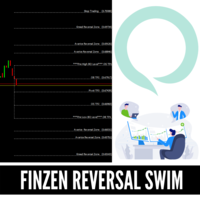
FINZEN SWIM REVERSALSYSTEM NEW VERSION is an advanced multi-timeframe indicator designed for swing traders and scalpers. It identifies key support and resistance levels based on custom time periods (e.g., 333 minutes, 31 minutes) and provides real-time visual feedback with countdown timers, historical levels, and automatic arrow signals.
Key Features:
✅ Custom Timeframes - Any minute-based period (333, 31, 60, 240, etc.)
✅ No Repaint - All calculations use closed bars [1]
✅ Real-Time Countdown - Visual timer showing when levels update
✅ Historical Levels - Display 2-5 previous period levels
✅ Auto Arrows - Automatic signals on level crossovers
✅ Vertical Period Lines - Mark period changes on chart
✅ Full Customization - Colors, styles, sizes all configurable
✅ Smart Alerts - Optional sound and push notifications
🎯 WHO IS THIS FOR?
Swing Traders - Identify major support/resistance zones
Day Traders - Multi-timeframe analysis in one indicator
Scalpers - Quick visual signals with countdown timer
Price Action Traders - Clean levels without clutter
📈 WHAT IT DOES
Core Functionality:
Calculates Swing High/Low from custom minute periods
Main Period (default: 333 minutes = 5h 33m)
Secondary Period (default: 31 minutes)
Projects 6 Key Levels:
Swing High (purple)
Upper Level 2 @ 33% (green)
Upper Level 1 @ 166% (blue)
Lower Level 1 @ -166% (orange)
Lower Level 2 @ -33% (red)
Swing Low (aqua)
Visual Countdown Timer
Shows time remaining until next period
Updates every tick
Positioned in top-right corner
Historical Level Display
Shows previous 2-5 periods
Dotted lines with progressive transparency
Helps identify trend and confluence zones
Automatic Arrow Signals
▲ Up arrow when price crosses level upward
▼ Down arrow when price crosses level downward
Color-coded to match level color
Optional text labels
Vertical Period Lines
Main period line (every 333 min) - gray dashed
Secondary period line (every 31 min) - blue dotted
Shows exact measurement reference points
🚀 QUICK START
Installation:
Copy FINZEN_REVERSAL_V3_ENGLISH.mq4 to: MT4/MQL4/Indicators/
Restart MT4 or press F4 → Refresh
Drag indicator to any chart
Configure settings (see below)
Quick Configuration:
Main Period Minutes = 333 // Your primary timeframe
Detail Period Minutes = 31 // Your secondary timeframe
Level Upper 2 = 33 // Adjust based on strategy
Level Upper 1 = 166
Level Lower 1 = -166
Level Lower 2 = -33
Show Countdown = true // Enable countdown timer
Show History = true // Show previous levels
Show Arrows = true // Show crossover arrows
⚙️ SETTINGS EXPLAINED
Timeframe Settings
Main Period Minutes: Primary period for swing calculation (333 = 5h 33m)
Detail Period Minutes: Secondary period for finer detail (31 minutes)
Level Settings
Show Levels: Master switch for all horizontal levels
Level Upper/Lower: Percentage-based projection levels
Example: 166% = 1.66 × range above swing low
Color Settings
Configure colors for each level independently
Default colors optimized for dark chart themes
Vertical Lines
Show Main Line: Toggle main period vertical lines
Show Detail Line: Toggle secondary period lines
Styles: Solid, Dashed, Dotted, DashDot, DashDotDot
Countdown Timer
Show Countdown: Display real-time countdown
Shows: Hours:Minutes:Seconds until next period
Updates every tick
Historical Levels
Show History: Display previous period levels
History Periods: How many previous periods (2-5)
History Transparency: Fade level (0-90%)
Arrows
Show Arrows: Auto arrows on level crossovers
Arrow Size: 1-5 (1=tiny, 5=huge)
Show Arrow Labels: Display level name with arrow
Alerts
Enable Alerts: Sound alert on crossovers
Enable Push Notifications: Send to mobile app
📊 HOW TO USE
Trading Setup Examples:
1. Breakout Trading
Setup:
- Price approaching Swing High
- Countdown shows 3+ hours remaining
- Historical levels confirm zone
Entry:
- Wait for ▲ arrow on Swing High break
- Enter on retest of broken level
- Stop below Swing High
Target:
- Upper Level 1 (166%)
2. Reversal Trading
Setup:
- Price at Upper Level 2 (33%)
- Multiple arrows rejecting same level
- Historical confluence
Entry:
- Wait for ▼ arrow showing rejection
- Enter on confirmation candle
- Stop above Upper Level 2
Target:
- Swing Low or opposite level
3. Range Trading
Setup:
- Price between Swing High/Low
- Countdown shows 1+ hour remaining
Strategy:
- Buy at Lower Level 2 (▲ arrow)
- Sell at Upper Level 2 (▼ arrow)
- Stop outside range
🎯 UNDERSTANDING THE COUNTDOWN
Time Remaining Interpretation:
Time LeftAction> 3 hoursLevels very stable, safe to trade1-3 hoursLevels valid but will change soon< 1 hourCaution, avoid new positions< 15 minDO NOT enter, wait for new period
📚 UNDERSTANDING HISTORICAL LEVELS
Why Historical Levels Matter:
Trend Identification
Previous Periods:
High: 1.0850 → 1.0900 → 1.0950 (current)
Low: 1.0750 → 1.0800 → 1.0850 (current)
= Clear uptrend
Confluence Zones
If current level = previous level
→ STRONGER support/resistance
→ Higher probability of reaction
Breakout Confirmation
If price > all previous Swing Highs
→ Strong bullish breakout
→ New relative highs
🎯 ARROW INTERPRETATION
⚠️ CRITICAL: Arrows ≠ Entry Signals
What Arrows Show:
Price crossed a level
Direction of the cross
Which level was crossed
What You Should Do:
✅ Confirm with price action
✅ Check market context
✅ Apply risk management
✅ Use your strategy
Arrow Strategies:
A) Bounce Trading:
1. Price touches level
2. Arrow shows rejection
3. Enter on pullback with confirmation
B) Breakout Trading:
1. Arrow crosses major level
2. Wait for retest
3. Enter in breakout direction
C) Level Validation:
1. Multiple arrows at same level
2. Level becomes more significant
3. Trade future bounces
🔧 TECHNICAL DETAILS
How It Works:
Synthetic Period Calculation
mql4 // Calculates custom timeframes from M1 data
for(int i = 1; i <= minutes; i++)
{
high = iHigh(Symbol(), PERIOD_M1, i);
low = iLow(Symbol(), PERIOD_M1, i);
}
No Repaint Guarantee
mql4 // Uses closed bars [1], not current bar [0]
iHigh(Symbol(), PERIOD_M1, i); // i starts at 1
Level Calculation
mql4 range = swingHigh - swingLow
upperLevel1 = swingLow + (range × 166 / 100)
Requirements:
✅ MT4 build 600+
✅ M1 historical data (minimum 333 bars)
✅ Any currency pair or instrument
✅ Any chart timeframe (M1-MN)
Performance:
CPU Usage: Moderate (synthetic calculation)
Memory: Low (auto cleanup)
Objects: Limited to 100 arrows, 50 lines
Update Speed: Real-time on every tick
📋 CONFIGURATION PROFILES
Active Trading Profile
Show Countdown = true
Show History = true
History Periods = 2
Show Arrows = true
Show Arrow Labels = true
Enable Alerts = true
Show Main Line = true
Show Detail Line = false
Clean Analysis Profile
Show Countdown = false
Show History = false
Show Arrows = false
Show Labels = true
Show Main Line = false
Show Detail Line = false
Backtesting Profile
Show Countdown = false
Show History = true
History Periods = 5
Show Arrows = true
Show Arrow Labels = true
Show Main Line = true
Show Detail Line = true
FINZEN SWIM REVERSALSYSTEM NEW VERSION is an advanced multi-timeframe indicator designed for swing traders and scalpers. It identifies key support and resistance levels based on custom time periods (e.g., 333 minutes, 31 minutes) and provides real-time visual feedback with countdown timers, historical levels, and automatic arrow signals.
Key Features:
✅ Custom Timeframes - Any minute-based period (333, 31, 60, 240, etc.)
✅ No Repaint - All calculations use closed bars [1]
✅ Real-Time Countdown - Visual timer showing when levels update
✅ Historical Levels - Display 2-5 previous period levels
✅ Auto Arrows - Automatic signals on level crossovers
✅ Vertical Period Lines - Mark period changes on chart
✅ Full Customization - Colors, styles, sizes all configurable
✅ Smart Alerts - Optional sound and push notifications
🎯 WHO IS THIS FOR?
Swing Traders - Identify major support/resistance zones
Day Traders - Multi-timeframe analysis in one indicator
Scalpers - Quick visual signals with countdown timer
Price Action Traders - Clean levels without clutter
📈 WHAT IT DOES
Core Functionality:
Calculates Swing High/Low from custom minute periods
Main Period (default: 333 minutes = 5h 33m)
Secondary Period (default: 31 minutes)
Projects 6 Key Levels:
Swing High (purple)
Upper Level 2 @ 33% (green)
Upper Level 1 @ 166% (blue)
Lower Level 1 @ -166% (orange)
Lower Level 2 @ -33% (red)
Swing Low (aqua)
Visual Countdown Timer
Shows time remaining until next period
Updates every tick
Positioned in top-right corner
Historical Level Display
Shows previous 2-5 periods
Dotted lines with progressive transparency
Helps identify trend and confluence zones
Automatic Arrow Signals
▲ Up arrow when price crosses level upward
▼ Down arrow when price crosses level downward
Color-coded to match level color
Optional text labels
Vertical Period Lines
Main period line (every 333 min) - gray dashed
Secondary period line (every 31 min) - blue dotted
Shows exact measurement reference points
🚀 QUICK START
Installation:
Copy FINZEN_REVERSAL_V3_ENGLISH.mq4 to: MT4/MQL4/Indicators/
Restart MT4 or press F4 → Refresh
Drag indicator to any chart
Configure settings (see below)
Quick Configuration:
Main Period Minutes = 333 // Your primary timeframe
Detail Period Minutes = 31 // Your secondary timeframe
Level Upper 2 = 33 // Adjust based on strategy
Level Upper 1 = 166
Level Lower 1 = -166
Level Lower 2 = -33
Show Countdown = true // Enable countdown timer
Show History = true // Show previous levels
Show Arrows = true // Show crossover arrows
⚙️ SETTINGS EXPLAINED
Timeframe Settings
Main Period Minutes: Primary period for swing calculation (333 = 5h 33m)
Detail Period Minutes: Secondary period for finer detail (31 minutes)
Level Settings
Show Levels: Master switch for all horizontal levels
Level Upper/Lower: Percentage-based projection levels
Example: 166% = 1.66 × range above swing low
Color Settings
Configure colors for each level independently
Default colors optimized for dark chart themes
Vertical Lines
Show Main Line: Toggle main period vertical lines
Show Detail Line: Toggle secondary period lines
Styles: Solid, Dashed, Dotted, DashDot, DashDotDot
Countdown Timer
Show Countdown: Display real-time countdown
Shows: Hours:Minutes:Seconds until next period
Updates every tick
Historical Levels
Show History: Display previous period levels
History Periods: How many previous periods (2-5)
History Transparency: Fade level (0-90%)
Arrows
Show Arrows: Auto arrows on level crossovers
Arrow Size: 1-5 (1=tiny, 5=huge)
Show Arrow Labels: Display level name with arrow
Alerts
Enable Alerts: Sound alert on crossovers
Enable Push Notifications: Send to mobile app
📊 HOW TO USE
Trading Setup Examples:
1. Breakout Trading
Setup:
- Price approaching Swing High
- Countdown shows 3+ hours remaining
- Historical levels confirm zone
Entry:
- Wait for ▲ arrow on Swing High break
- Enter on retest of broken level
- Stop below Swing High
Target:
- Upper Level 1 (166%)
2. Reversal Trading
Setup:
- Price at Upper Level 2 (33%)
- Multiple arrows rejecting same level
- Historical confluence
Entry:
- Wait for ▼ arrow showing rejection
- Enter on confirmation candle
- Stop above Upper Level 2
Target:
- Swing Low or opposite level
3. Range Trading
Setup:
- Price between Swing High/Low
- Countdown shows 1+ hour remaining
Strategy:
- Buy at Lower Level 2 (▲ arrow)
- Sell at Upper Level 2 (▼ arrow)
- Stop outside range
🎯 UNDERSTANDING THE COUNTDOWN
Time Remaining Interpretation:
Time LeftAction> 3 hoursLevels very stable, safe to trade1-3 hoursLevels valid but will change soon< 1 hourCaution, avoid new positions< 15 minDO NOT enter, wait for new period
📚 UNDERSTANDING HISTORICAL LEVELS
Why Historical Levels Matter:
Trend Identification
Previous Periods:
High: 1.0850 → 1.0900 → 1.0950 (current)
Low: 1.0750 → 1.0800 → 1.0850 (current)
= Clear uptrend
Confluence Zones
If current level = previous level
→ STRONGER support/resistance
→ Higher probability of reaction
Breakout Confirmation
If price > all previous Swing Highs
→ Strong bullish breakout
→ New relative highs
🎯 ARROW INTERPRETATION
⚠️ CRITICAL: Arrows ≠ Entry Signals
What Arrows Show:
Price crossed a level
Direction of the cross
Which level was crossed
What You Should Do:
✅ Confirm with price action
✅ Check market context
✅ Apply risk management
✅ Use your strategy
Arrow Strategies:
A) Bounce Trading:
1. Price touches level
2. Arrow shows rejection
3. Enter on pullback with confirmation
B) Breakout Trading:
1. Arrow crosses major level
2. Wait for retest
3. Enter in breakout direction
C) Level Validation:
1. Multiple arrows at same level
2. Level becomes more significant
3. Trade future bounces
🔧 TECHNICAL DETAILS
How It Works:
Synthetic Period Calculation
mql4 // Calculates custom timeframes from M1 data
for(int i = 1; i <= minutes; i++)
{
high = iHigh(Symbol(), PERIOD_M1, i);
low = iLow(Symbol(), PERIOD_M1, i);
}
No Repaint Guarantee
mql4 // Uses closed bars [1], not current bar [0]
iHigh(Symbol(), PERIOD_M1, i); // i starts at 1
Level Calculation
mql4 range = swingHigh - swingLow
upperLevel1 = swingLow + (range × 166 / 100)
Requirements:
✅ MT4 build 600+
✅ M1 historical data (minimum 333 bars)
✅ Any currency pair or instrument
✅ Any chart timeframe (M1-MN)
Performance:
CPU Usage: Moderate (synthetic calculation)
Memory: Low (auto cleanup)
Objects: Limited to 100 arrows, 50 lines
Update Speed: Real-time on every tick
📋 CONFIGURATION PROFILES
Active Trading Profile
Show Countdown = true
Show History = true
History Periods = 2
Show Arrows = true
Show Arrow Labels = true
Enable Alerts = true
Show Main Line = true
Show Detail Line = false
Clean Analysis Profile
Show Countdown = false
Show History = false
Show Arrows = false
Show Labels = true
Show Main Line = false
Show Detail Line = false
Backtesting Profile
Show Countdown = false
Show History = true
History Periods = 5
Show Arrows = true
Show Arrow Labels = true
Show Main Line = true
Show Detail Line = true
Version 1.1
2021.03.05
This is the new updated version with Weekly and Monthly levels, each zone will be activated every Monday after the ASIA session:
* you could achive weekly trades and if follow trends
* much more precise and dynamic than older one version
* you could achive weekly trades and if follow trends
* much more precise and dynamic than older one version

You are missing trading opportunities:
- Free trading apps
- Over 8,000 signals for copying
- Economic news for exploring financial markets
Registration
Log in
You agree to website policy and terms of use
If you do not have an account, please register