Exp Assistant 5

FREE
Veröffentlicht:
26 Mai 2014
Aktuelle Version:
26.524
Keinen passenden Roboter gefunden?
Geben Sie Ihren Eigenen in Auftrag
auf Freelance!
Gehen Sie zu Freelance
Geben Sie Ihren Eigenen in Auftrag
auf Freelance!
Wie man einen Roboter oder Indikator kaufen kann
Starte Deinen EA im
Virtual Hosting
Virtual Hosting
Teste einen Indikator/Roboter vor dem Kauf
Möchtest Du Geld im Market verdienen?
Wie man Produkte richtig präsentiert

Sie verpassen Handelsmöglichkeiten:
- Freie Handelsapplikationen
- Über 8.000 Signale zum Kopieren
- Wirtschaftsnachrichten für die Lage an den Finanzmärkte
Registrierung
Einloggen
Sie stimmen der Website-Richtlinie und den Nutzungsbedingungen zu.
Wenn Sie kein Benutzerkonto haben, registrieren Sie sich
Although my MT5 terminal supports ALGOTRADING and other EAs are using it, Expert Assistant 5 reports that : "CHECK ALGO TRDADING .....AUTOMATED TRADING IS PROHIBITED". How can I resolve this?
Great app!
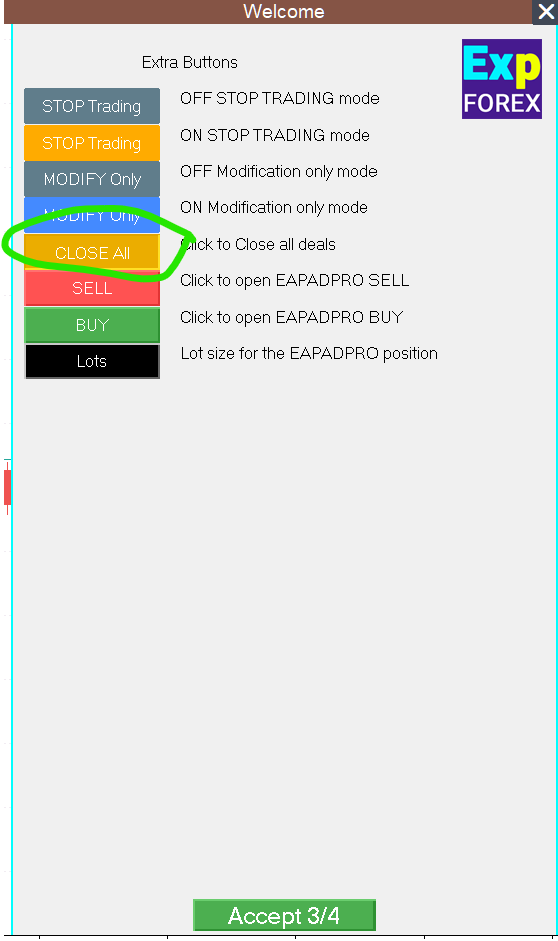
How can i use the extra buttons?
I would like to use the close all button
Thank you!
Hello
I have a new Question about the Exp-Asisstent 5.
I plan to migrate all my 6 accounts into a VPS.With all Robots on all Charts.
Tillt today i use a Home Account with MT5/ Exp-Assistant 5 and a Handy with MT5 at the same Account , it works well.
Also the Trades set from the Handy handled over the Homeaccount with the Exp-Assistant 5.
XAUCHF is for me only for Handtrading.
The cenario is follow:(for example)
VPS Server Account: 12345 with MT5/ XAUCHF + Exp-Assistent 5 on the Chart
Home Account: 12345 with MT5/ XAUCHF + Exp Assistent 5 on The Chart
Handy Account 12345 with MT5/ XAUCHF
If i set a Trade in my Homeaccount: 12345 than the VPS Server Account: 12345 with the Exp-Assistant 5 will Handle this , because it much faster than the Homeaccount: 12345 with the Exp-Assistant 5,well??
If i set Trades from my Handy at the same Account it will be Handle also from the VPS Server,Yes??
Thank you for Answer
Best Regards for the Support Team
Andreas Junius
Hello
I have a new Question about the Exp-Asisstent 5.
I plan to migrate all my 6 accounts into a VPS.With all Robots on all Charts.
Tillt today i use a Home Account with MT5/ Exp-Assistant 5 and a Handy with MT5 at the same Account , it works well.
Also the Trades set from the Handy handled over the Homeaccount with the Exp-Assistant 5.
XAUCHF is for me only for Handtrading.
The cenario is follow:(for example)
VPS Server Account: 12345 with MT5/ XAUCHF + Exp-Assistent 5 on the Chart
Home Account: 12345 with MT5/ XAUCHF + Exp Assistent 5 on The Chart
Handy Account 12345 with MT5/ XAUCHF
If i set a Trade in my Homeaccount: 12345 than the VPS Server Account: 12345 with the Exp-Assistant 5 will Handle this , because it much faster than the Homeaccount: 12345 with the Exp-Assistant 5,well??
If i set Trades from my Handy at the same Account it will be Handle also from the VPS Server,Yes??
Thank you for Answer
Best Regards for the Support Team
Andreas Junius
Hello Andreas,
Thank you for your detailed question!
You're absolutely right in thinking through the setup — and yes, your scenario will work as expected when you migrate everything to a VPS.
Let’s go over your plan step by step:
✅ Your Setup:
Same trading account (12345) is running on:
VPS with MT5 and Exp-Assistant 5
Home PC with MT5 and Exp-Assistant 5
Mobile (Handy) with MT5
You plan to migrate all logic to the VPS, where execution is faster and more stable.
✅ What will happen:
If you open a trade on your mobile (Handy) — the trade will instantly appear on the account.
The VPS terminal (also logged into the same account) will detect this trade in real time and Exp-Assistant 5 on the VPS will manage it (trailing, stop-loss, etc.).
Your home PC terminal can still be connected, but it will be slower. Since the VPS is always online and faster, Exp-Assistant 5 on the VPS will take over the logic first, as you assumed.
✅ Important notes:
Make sure only one instance of Exp-Assistant 5 is managing the same trade at the same time to avoid any conflicts (although the EA is designed to be smart about this).
You can safely remove the EA from the home PC once you're fully migrated to the VPS for cleaner operation.
🛠 Suggestion:
Once everything is moved to the VPS, it's best to only use the VPS terminal with Exp-Assistant 5 for managing trades — and use the mobile or home terminal only for monitoring or manual entry.
support me
support me
giúp tôi khắc phục tình trạng trên.
giúp tôi khắc phục tình trạng trên.
Vui lòng liên hệ với nhà môi giới của bạn để tìm hiểu lý do chặn này.
Здравствуйте!
Недавно убрали возможность переключаться между разными периодами в симуляторе.
В MQL5 есть возможность добавить кнопки какие то в интерфейс для переключения между таймфреймами?

У меня последняя версия МТ5. Они конечно неудобно сделали. Слишком много кликов. Я думаю это не удобно не только для тех, кто хочет "руками" торговать в тестере стратегий, но и тем, кто тестирует свои советники.
Здравствуйте!
Недавно убрали возможность переключаться между разными периодами в симуляторе.
В MQL5 есть возможность добавить кнопки какие то в интерфейс для переключения между таймфреймами?
У меня последняя версия МТ5. Они конечно неудобно сделали. Слишком много кликов. Я думаю это не удобно не только для тех, кто хочет "руками" торговать в тестере стратегий, но и тем, кто тестирует свои советники.
К сожаленнию, функция переключения na недоступна в тестере стратегий!
❌ ERR_FUNCTION_NOT_ALLOWED_IN_TESTING_MODE
Код ошибки: 4753
Описание: Функция запрещена в режиме тестирования (стратеги-тестер MetaTrader).
After the last update, the EA keeps popping up everytime an order is opened or closed. I have to go into ea settings and disable show ea but that means everytime I want to change a simple thing I have to right click n open ea settings. Before it was very easy. Even when closed there was a small box which allowed to open ea display front with a single click. Hope this gets corrected. FYI having even 3 charts open makes it very difficult to everytime have to close the ea front popping up as my charts don't have enough space to close without adjusting charts again.
Hello. You can disable any pop up windows. Please share your screen
Check the video. Here I attach the ea, don't change settings and close it and start a trade, ea front display pops up. I have to close it. Happens for any opened or closed order.
Then I change the settings from the front display. Still pops up. Before the update when I click cross on display it never pops up on it's own.
Then I right click on top right ea logo, go into ea properties and disable everything I think might be causing this and disable show ea too. Then it doesn't happen with orders. but now the small display box is also gone so there is no way to open the display front easily.
Hope I showed the issue correctly.
Check the video. Here I attach the ea, don't change settings and close it and start a trade, ea front display pops up. I have to close it. Happens for any opened or closed order.
Then I change the settings from the front display. Still pops up. Before the update when I click cross on display it never pops up on it's own.
Then I right click on top right ea logo, go into ea properties and disable everything I think might be causing this and disable show ea too. Then it doesn't happen with orders. but now the small display box is also gone so there is no way to open the display front easily.
Hope I showed the issue correctly.
Thank you. Interesting feature.
I will check this problem.
Thank you.
Thank you. Interesting feature.
I will check this problem.
Thank you.
I updated again and now the issue is gone. Thank you. :)
Hi there
i am wondering can i use the exp assistant to trailing stop multiple pairs from one charts as trades been open from other EA and how